1. Introducción
Thank you for choosing the TOTAL TMT460013 Digital Multimeter. This device is designed for safe and accurate measurement of various electrical parameters, including AC/DC voltage, DC current, resistance, and continuity. It is an essential tool for electricians, technicians, and hobbyists for electrical testing and troubleshooting. Please read this manual thoroughly before use to ensure proper operation and safety.
2. Información de seguridad
Always adhere to basic safety precautions when using this multimeter to reduce the risk of fire, electric shock, or personal injury. Failure to follow these instructions can result in severe injury or damage to the device.
- No exceed the maximum input values specified for each measurement range.
- No use the multimeter if it appears damaged or if the test leads are compromised.
- Siempre ensure the test leads are correctly connected to the appropriate input jacks for the desired measurement.
- Nunca attempt to measure voltage on a circuit with the function switch set to current, resistance, or continuity mode.
- Tenga cuidado cuando se trabaja con voltages superior a 30 V CA RMS, 42 V pico o 60 V CC, ya que representan un peligro de descarga eléctrica.
- Eliminar the test leads from the circuit before changing the function switch position.
- Reemplazar the battery immediately when the low battery indicator appears to ensure accurate readings.
- Adherirse to local and national safety codes.
3. Producto terminadoview
The TOTAL TMT460013 Digital Multimeter is a compact and robust device designed for various electrical measurements. Its intuitive interface and clear display make it easy to use for both professionals and DIY enthusiasts.
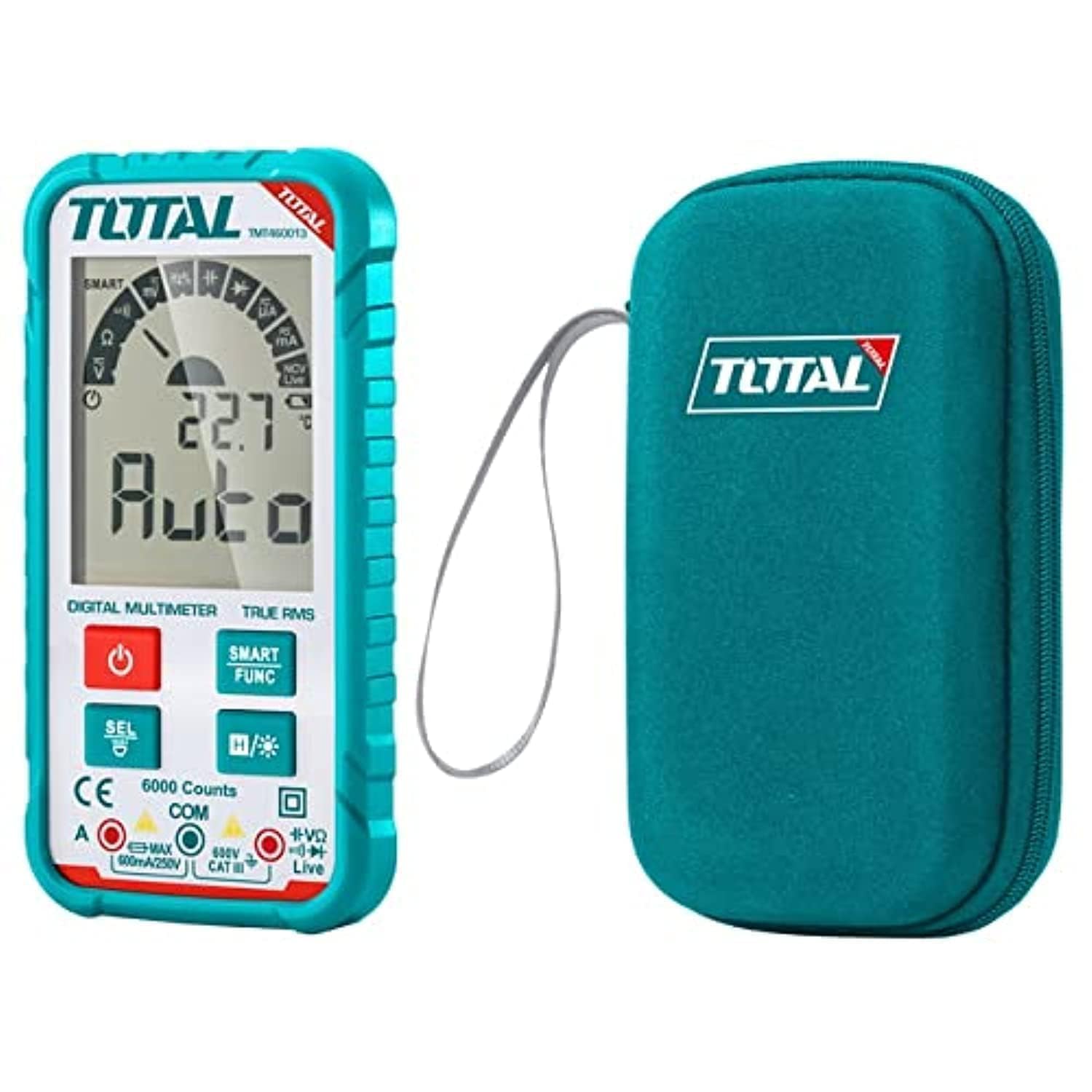
Figura 1: Frente view of the TOTAL TMT460013 Digital Multimeter, showing the LCD display, function buttons, and input terminals.
Controles y pantalla
- Pantalla LCD: Muestra lecturas de medición, unidades e indicadores de función.
- Botón de encendido (rojo): Press to turn the multimeter ON or OFF.
- SMART FUNC Button (Green): Cycles through different measurement functions within a mode (e.g., AC/DC voltage, resistencia/continuidad).
- HOLD Button (Blue): Congela la lectura actual en la pantalla. Presione de nuevo para liberarla.
- Tomas de entrada: Terminals for connecting test leads (COM, VΩmA).
4. Configuración
4.1 Instalación de la batería
The multimeter is powered by internal batteries. Ensure batteries are correctly installed before first use or when replacing them.
- Turn off the multimeter by pressing the Power button.
- Localice la tapa del compartimiento de la batería en la parte posterior de la unidad.
- Utilice un destornillador para aflojar los tornillos que sujetan la cubierta.
- Retire la tapa e inserte las pilas, observando la polaridad correcta (+ y -).
- Vuelva a colocar la tapa del compartimiento de la batería y ajuste el/los tornillo(s).
4.2 Conexión de cables de prueba
La conexión correcta de los cables de prueba es fundamental para realizar mediciones precisas y seguras.
- Inserte el cable de prueba negro en el COM Toma de entrada (común).
- Inserte el cable de prueba rojo en el VΩmA conector de entrada para volumentage, resistance, or current measurements.
- Asegúrese de que las conexiones estén firmes antes de continuar con cualquier medición.
5. Instrucciones de funcionamiento
5.1 Encendido / Apagado
Press the red Power button once to turn the multimeter ON. Press and hold the Power button for a few seconds to turn it OFF.
5.2 Selecting Measurement Functions
The TMT460013 features an auto-ranging function, simplifying measurement selection. The device will automatically detect the type of measurement (AC/DC voltage, resistance, continuity) when the leads are connected. Use the FUNCIÓN INTELIGENTE button to cycle between specific functions if needed (e.g., between AC and DC voltage, or resistance and continuity).
5.3 Toma de medidas
- VolumentagMedición electrónica (CA/CC):
Connect the test leads in parallel to the circuit or component you wish to measure. The multimeter will automatically detect AC or DC voltage. - Medida de resistencia:
Asegúrese de que el circuito esté desenergizado antes de medir la resistencia. Conecte los cables de prueba al componente. - Prueba de continuidad:
Ensure the circuit is de-energized. Connect the test leads across the component or wire. A low resistance (typically less than 50Ω) will indicate continuity, often accompanied by an audible beep. - Medición de corriente CC:
ADVERTENCIA: To measure current, the multimeter must be connected in series with the circuit. Ensure the circuit is de-energized before connecting the multimeter. Break the circuit, then connect the red lead to the higher potential side and the black lead to the lower potential side.
5.4 Función de retención de datos
Presiona el azul SOSTENER button to freeze the current reading on the display. This is useful for recording measurements in difficult-to-read locations. Press the button again to release the hold and resume live readings.
6. Mantenimiento
6.1 Limpieza
Limpiar la carcasa con publicidadamp Paño y detergente suave. No utilice abrasivos ni disolventes. Asegúrese de que el dispositivo esté completamente seco antes de usarlo.
6.2 Reemplazo de batería
When the low battery indicator appears on the display, replace the batteries as described in Section 4.1. Always use the specified battery type.
6.3 Almacenamiento
Si no se utiliza el multímetro durante un periodo prolongado, retire las pilas para evitar fugas y daños. Guarde el dispositivo en un lugar fresco y seco, alejado de la luz solar directa y de temperaturas extremas.
7. Solución de problemas
Consulte la siguiente tabla para conocer los problemas más comunes y sus soluciones.
| Problema | Posible causa | Solución |
|---|---|---|
| Sin pantalla o pantalla tenue | Baterías bajas o agotadas; Instalación incorrecta de la batería | Reemplace las baterías; Verifique la polaridad de las baterías |
| Lecturas incorrectas | Incorrect function selected; Poor test lead connection; Damaged test leads | Ensure correct function; Check lead connections; Replace damaged leads |
| No hay pitido de continuidad | Circuit not continuous; Multimeter not in continuity mode | Check circuit for breaks; Select continuity function using SMART FUNC button |
| Multimeter does not respond | Internal fault; Completely drained battery | Replace batteries; Contact customer support if issue persists |
8. Especificaciones
Key technical specifications for the TOTAL TMT460013 Digital Multimeter.
| Característica | Detalle |
|---|---|
| Fabricante | Total |
| Número de modelo | TMT460013 |
| Tipo de medida | Multímetro |
| Fuente de poder | Funciona con pilas |
| Peso del artículo | 209 g (0.21 kilogramos) |
| Dimensiones del producto | 10 x 20 x 37 cm |
| Color | Turquesa |
| Normas de seguridad | UL 61010-1, IEC 61010-2-030 |
| ASIN | B09QZWHFNR |
| GTIN | 06941639846475 |
9. Garantía y soporte
For warranty information and technical support, please refer to the documentation provided with your purchase or visit the official TOTAL Tools webSitio. Conserve su recibo de compra como comprobante de compra para cualquier reclamación de garantía.