Introducción
This manual provides essential information for the safe and efficient operation of your Crosley Montero Portable Rechargeable Bluetooth Speaker. Please read this manual thoroughly before using the device and retain it for future reference.
Información de seguridad
- No exponga el altavoz al agua ni a la humedad excesiva. Este producto no es impermeable.
- Evite colocar el altavoz cerca de fuentes de calor como radiadores, rejillas de calefacción, estufas u otros aparatos (incluidos ampificadores) que producen calor.
- Utilice únicamente accesorios especificados por el fabricante.
- Desenchufe este aparato durante tormentas eléctricas o cuando no lo utilice durante períodos prolongados.
- Refiera todo el servicio a personal de servicio calificado. Se requiere servicio cuando el aparato ha sido dañado de alguna manera.
¿Qué hay en la caja?
- Crosley Montero Portable Rechargeable Bluetooth Speaker
- Cable micro USB
- Cable de entrada auxiliar de 3.5 mm
Producto terminadoview
The Crosley Montero speaker features a classic design with modern connectivity options. It includes controls for mode selection, track navigation, and volume adjustment on the top panel. The rear panel houses the input/output ports.
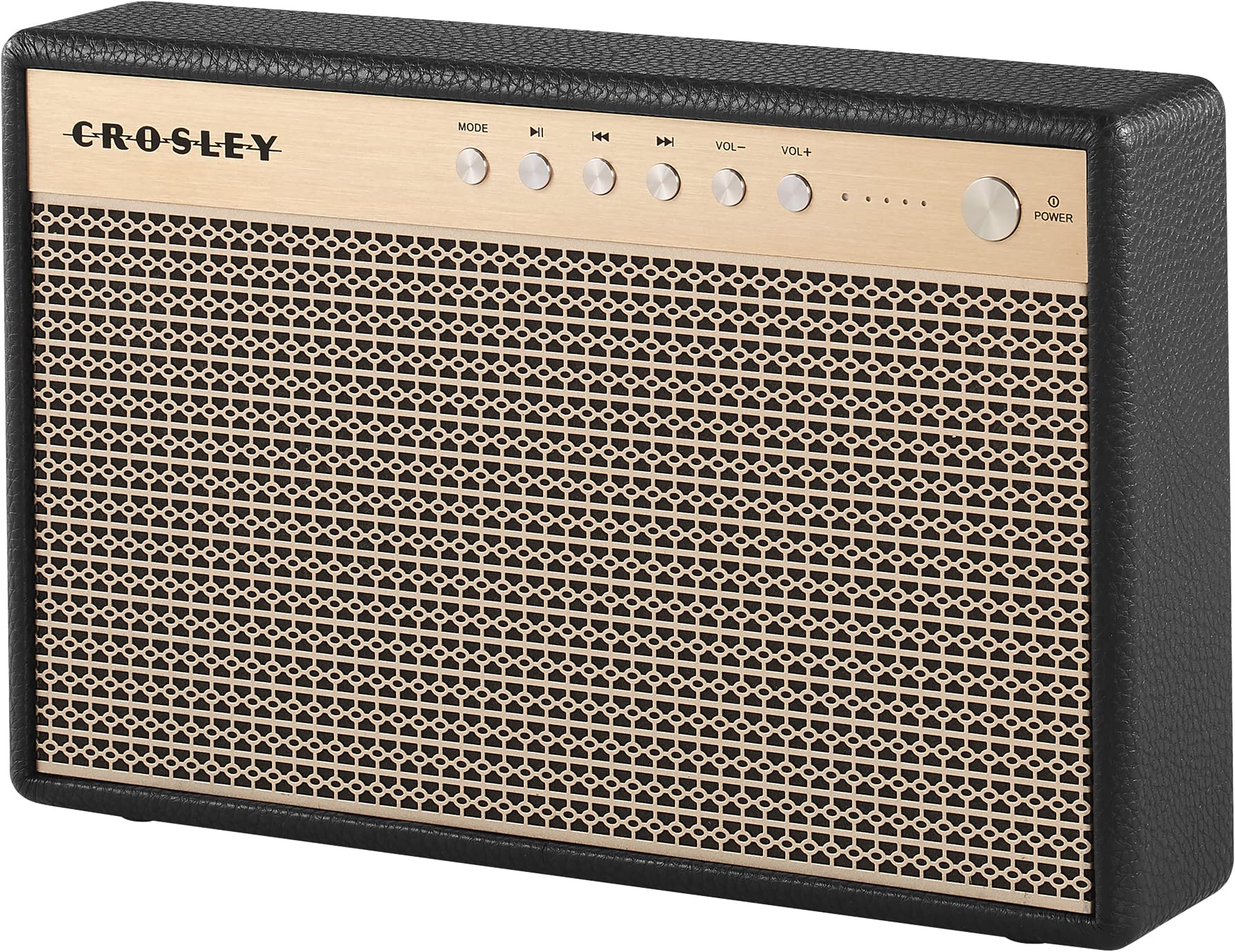
Figura 1: Frente view of the Crosley Montero speaker, showing the speaker grille and control panel.

Figura 2: Trasero view of the Crosley Montero speaker, highlighting the AUX input, USB OTG (input port), Phone Charging (output: 5V 1A), and DC 5V power input ports.
Configuración
Carga del altavoz
Before initial use, fully charge the speaker using the provided Micro-USB cable. Connect the Micro-USB cable to the DC 5V port on the rear of the speaker and the other end to a compatible USB power adapter (not included). The charging indicator lights will illuminate during charging and turn off when fully charged.
Encendido/apagado
- To power on: Press and hold the Power button on the control panel.
- To power off: Press and hold the Power button. The speaker must be disconnected from external power before shutting off.
Instrucciones de funcionamiento
Emparejamiento Bluetooth
- Power on the speaker. The Bluetooth indicator light will flash, indicating it is in pairing mode.
- En su dispositivo con Bluetooth (teléfono inteligente, tableta, etc.), habilite Bluetooth y busque los dispositivos disponibles.
- Seleccione "Crosley Montero" de la lista de dispositivos.
- Once paired, the Bluetooth indicator light on the speaker will remain solid. You can now stream audio from your device.
Entrada auxiliar
Para conectar un dispositivo a través de la entrada auxiliar:
- Connect one end of the 3.5mm Aux In cable to the AUX port on the rear of the speaker.
- Conecte el otro extremo del cable al conector de auriculares o a la salida de audio de su dispositivo externo.
- Press the "MODE" button on the speaker's control panel until the AUX mode is selected.
- Adjust the volume on both the speaker and your external device.
Carga de teléfono USB
The speaker features a USB port for charging external devices. Connect your phone's USB charging cable to the "Phone Charging (Output: 5V 1A)" port on the rear of the speaker. This feature allows you to charge your phone while the speaker is in use or on standby.
Controles básicos
- MODO: Presione para cambiar entre los modos de entrada Bluetooth y AUX.
- Reproducir/Pausa: Press to play or pause audio during Bluetooth playback.
- Pista anterior: Press to go to the beginning of the current track or the previous track during Bluetooth playback.
- Pista siguiente: Press to skip to the next track during Bluetooth playback.
- VOL-: Presione para disminuir el volumen.
- VOL+: Presione para aumentar el volumen.
Vídeo 1: An official video demonstrating the features and operation of the Crosley Montero Portable Rechargeable Bluetooth Speaker.
Vídeo 2: A concise official video showcasing the Crosley Montero Portable Rechargeable Bluetooth Speaker.
Mantenimiento
- Clean the speaker with a soft, dry cloth. Do not use liquid cleaners or aerosol sprays.
- Keep the speaker away from dust and direct sunlight.
- Guarde el altavoz en un lugar fresco y seco cuando no lo utilice durante períodos prolongados.
Solución de problemas
| Problema | Solución |
|---|---|
| El altavoz no se enciende. | Ensure the speaker is charged. Connect it to a power source using the Micro-USB cable. |
| No sale sonido del altavoz. | Check volume levels on both the speaker and the connected device. Ensure the correct mode (Bluetooth/AUX) is selected. |
| El dispositivo Bluetooth no se puede emparejar. | Ensure the speaker is in pairing mode (flashing Bluetooth indicator). Turn off and on Bluetooth on your device. Move the device closer to the speaker. |
| El teléfono no se carga mediante USB. | Verify the USB cable is securely connected to the "Phone Charging" port and your phone. Ensure the speaker has sufficient battery charge. |
Presupuesto

Figura 3: Overall dimensions of the Crosley Montero speaker: 10.25" W x 6.5" H x 2.25" D.
- Nombre del modelo: Montero
- Tipo de altavoz: Altavoz portátil
- Tecnología de conectividad: Bluetooth, USB
- Tecnología de comunicación inalámbrica: Bluetooth
- Potencia máxima de salida del altavoz: 30 vatios
- Respuesta de frecuencia: 18 kHz
- Fuente de energía: Funciona con pilas (1 batería de iones de litio incluida)
- Dimensiones del producto: 10.25" de profundidad x 6.5" de ancho x 2.25" de alto
- Peso del artículo: 2.8 Pounds (approximately 2.76 pounds)
- Material: Plástico
- Componentes incluidos: Speaker, Micro-USB Cable, 3.5mm Aux In Cable
Garantía y soporte
This Crosley product comes with a limited warranty. For specific warranty details, please refer to the warranty card included with your purchase or visit the official Crosley website. For technical support or customer service, please contact Crosley's USA-based customer support.


