1. Producto terminadoview
The ODK 55-inch Home Office Computer Desk is designed to provide a functional and organized workspace. It features a sturdy monitor stand, two-tier reversible storage shelves, and a side storage bag, offering ample space for your computer, peripherals, and office supplies.

Image 1.1: ODK 55-inch Home Office Computer Desk in a modern setting.
Características principales:
- Sturdy Monitor Stand: Elevates monitors to a comfortable eye level, reducing neck and eye strain.
- AmpEl espacio: 55-inch desktop provides generous work area.
- Reversible 2-Tier Storage Shelves: Can be installed on either the left or right side, with an adjustable middle board for larger items like a computer chassis.
- Bolsa de almacenamiento lateral: Offers convenient additional storage for documents or small items.
- Construcción duradera: Made with P2 grade wooden board and a powder-coated metal frame.
2. Información de seguridad
Warning: This desk requires assembly. Always follow the assembly instructions carefully to avoid injury. Do not attempt to assemble the desk without proper tools and knowledge. Additionally, always unplug electrical devices from the power source before moving or adjusting the desk to prevent electrical shock.
- Asegúrese de que todos los tornillos y sujetadores estén bien apretados antes de usar.
- No sobrecargue el escritorio ni los estantes más allá de su capacidad de peso recomendada.
- Mantenga las piezas pequeñas fuera del alcance de los niños durante el montaje.
- Coloque el escritorio sobre una superficie nivelada para evitar que se tambalee.
3. Configuración y montaje
Assembly of the ODK computer desk is required. Please refer to the detailed assembly instructions included in your product packaging for step-by-step guidance. The following points highlight key aspects of the setup:
3.1 Desembalaje e identificación de piezas
- Desempaquete con cuidado todos los componentes del embalaje.
- Verifique que todas las piezas enumeradas en el manual de instrucciones estén presentes y sin daños.
- Separate hardware components to ensure easy access during assembly.
3.2 Reversible Shelf Installation
The 2-tier storage shelves can be positioned on either the left or right side of the desk to suit your preference and room layout. When installing the shelves, ensure the desktop side with the five pre-drilled holes is positioned outwards if the shelves are on the left side.
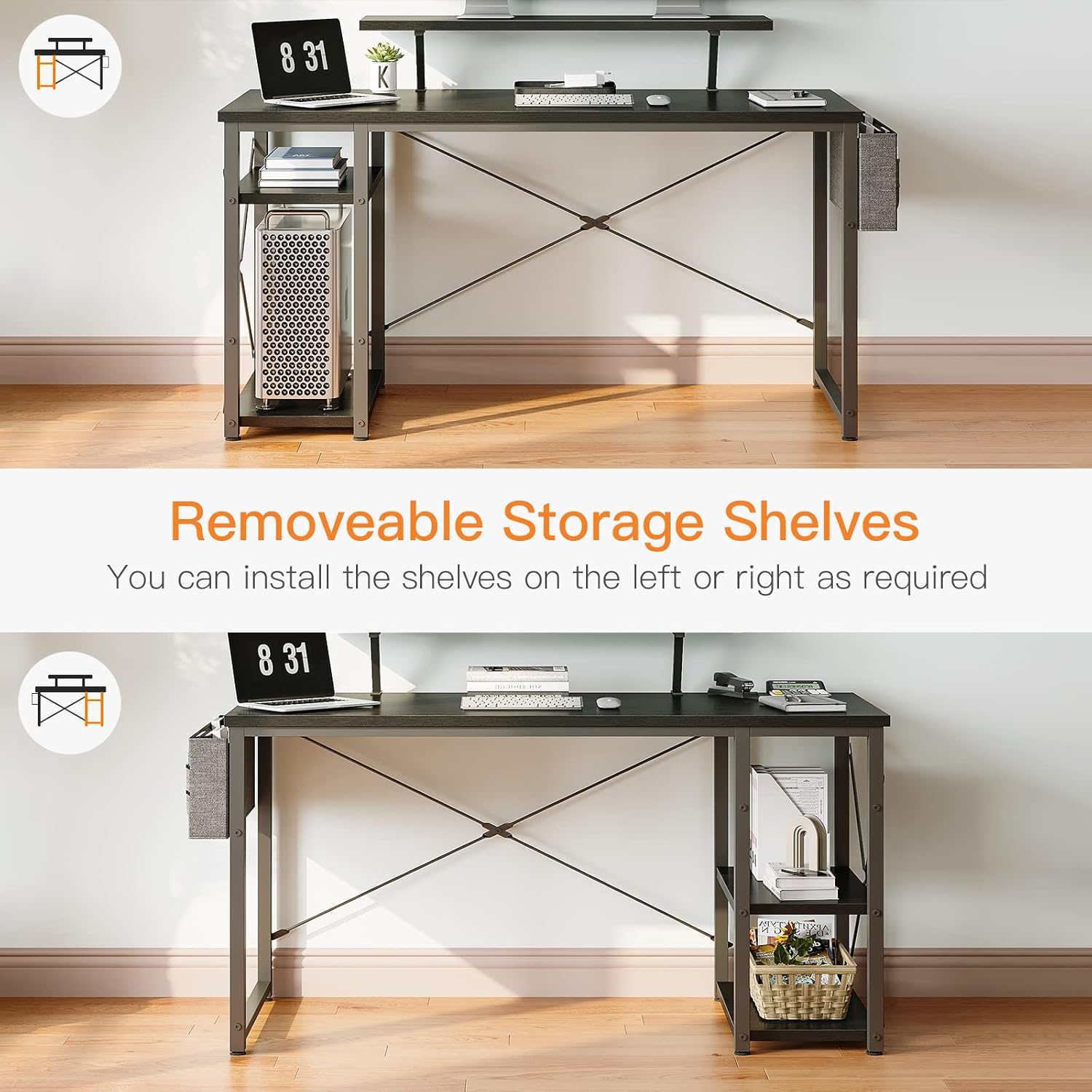
Image 3.1: Illustration of the reversible storage shelf design.
3.3 Adjustable Shelf for PC Tower
The middle board of the 2-tier storage shelves is adjustable. This feature allows you to create additional vertical space, accommodating larger computer chassis or other tall items.
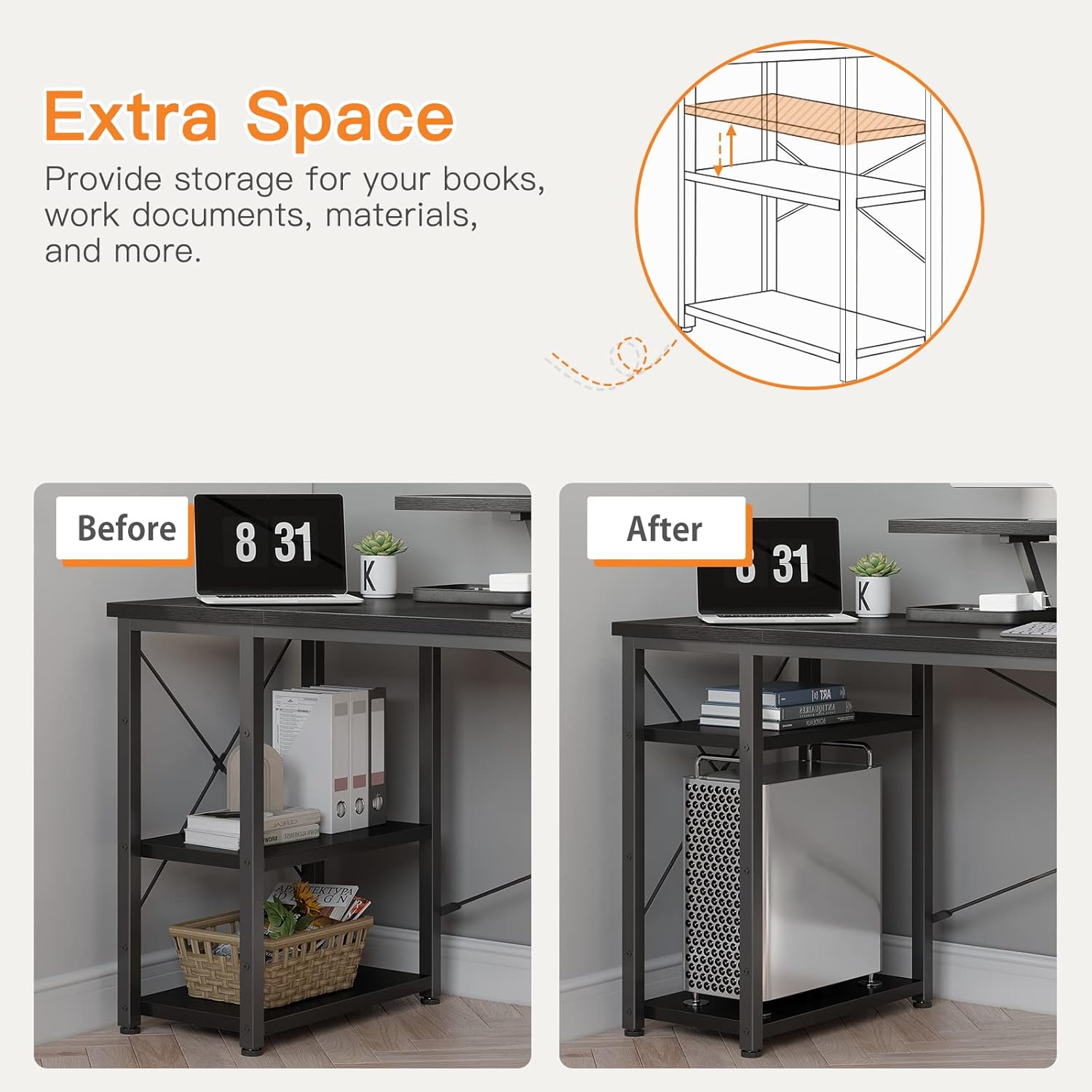
Image 3.2: The adjustable middle shelf for increased storage flexibility.
4. Instrucciones de funcionamiento
Once assembled, the ODK computer desk is ready for use. Its design focuses on ergonomic comfort and efficient organization.
4.1 Utilizing the Monitor Stand
The integrated monitor stand is designed to position your screens at an optimal height, promoting a healthy sitting posture and reducing strain on your neck and eyes. Place your monitor(s) directly on the stand. The 55-inch desk can comfortably accommodate two 27-inch monitors on the stand.

Image 4.1: Desk with monitors positioned on the elevated stand.
4.2 Gestión del almacenamiento
- 2-Tier Shelves: Use these shelves for books, binders, computer towers, or other office essentials. Adjust the middle shelf as needed for taller items.
- Bolsa de almacenamiento lateral: Attach the included storage bag to the side of the desk for quick access to documents, pens, or small accessories.

Imagen 4.2: Detallada view of the monitor stand, 2-layer shelves, and storage bag.
4.3 producto másview Video
For a visual demonstration of the ODK Home Office Computer Desk and its features, please watch the following video:
Video 4.3: ODK Home Office Computer Desk with Monitor Stand and Reversible 2-Tier Storage Shelves.
5. Mantenimiento
To ensure the longevity and appearance of your ODK computer desk, follow these simple maintenance guidelines:
- Limpieza: Limpie las superficies del escritorio con un paño suave y húmedo.amp paño. Evite productos químicos agresivos o limpiadores abrasivos que puedan dañar el acabado.
- Derrames: Limpie los derrames inmediatamente para evitar manchas o daños en la superficie de la madera.
- Sujetadores: Revise periódicamente todos los tornillos y fijaciones para asegurarse de que estén bien apretados. Vuelva a apretarlos si es necesario para mantener la estabilidad.
- Evite condiciones extremas: Do not expose the desk to excessive moisture, direct sunlight for prolonged periods, or extreme temperature changes, as this may cause warping or discoloration.
6. Solución de problemas
If you encounter any issues with your ODK computer desk, refer to the following common troubleshooting tips:
6.1 Desk Wobbles or Instability
- Comprobar el nivel de la superficie: Ensure the desk is placed on a completely flat and level floor.
- Apretar los sujetadores: Re-check and tighten all assembly screws, especially those connecting the legs and crossbars. Loose fasteners are a common cause of wobbling.
- Ajuste de las patas niveladoras: If your desk includes adjustable leveling feet, use them to compensate for uneven floors.
6.2 Dificultad durante el montaje
- Review Instrucciones: Double-check the assembly manual to ensure each step is followed correctly.
- Orientación de la pieza: Verify that all parts are oriented in the correct direction as shown in the diagrams. Some parts may appear similar but have subtle differences.
- Agujeros pre-perforados: If screws are not fitting into pre-drilled holes, ensure you are using the correct screw type and that the holes are clear of debris.
6.3 Piezas faltantes o dañadas
If you find any parts missing or damaged upon unboxing, do not proceed with assembly. Contact ODK customer service immediately for assistance. Provide your purchase details and a description of the issue.
7. Especificaciones
| Atributo | Detalle |
|---|---|
| Marca | ODK |
| Número de modelo | B0B2LSJ6FJ |
| Dimensiones del producto | 19.7" de profundidad x 55" de ancho x 33.6" de alto |
| Color | Negro |
| Estilo | Minimalist |
| Material base | Madera de ingeniería |
| Tipo de material superior | Madera de ingeniería |
| Tipo de acabado | Recubierto de polvo |
| Característica especial | Reversible |
| Tipo de habitación | Dormitorio, Residencia estudiantil, Sala de estar, Oficina, Estudio |
| Usos recomendados | Redacción, juegos, trabajo, escritura |
| Componentes incluidos | Organizador de escritorio |
| Montaje requerido | Sí |
| Forma | Rectangular |
| Diseño de escritorio | Escritorio de computadora |
| Número de estantes | 2 |
| Longitud diagonal de la superficie de trabajo | 55 pulgadas |
| Tipo de montaje | Montaje en el piso |
| Opciones de almacenamiento | 2 estantes |
8. Garantía y soporte
8.1 Información de garantía
ODK provides a garantía de un año Para este producto, cubre defectos de fabricación y defectos de material en condiciones normales de uso. Conserve su comprobante de compra para reclamaciones de garantía.
8.2 Servicio al cliente
For any questions, concerns, or assistance with your ODK computer desk, including assembly, missing parts, or warranty claims, please contact ODK customer service. We offer 24-hour online professional pre-sale and after-sale service Para garantizar su satisfacción.
Contact information can typically be found on the ODK official websitio o a través de su plataforma de compra.


