1. Introducción
Welcome to the user manual for your new Avtex W195TS Smart TV. This television is specifically designed for mobile living, offering versatile power options (12V, 24V, and 240V) and a range of smart features, including Wi-Fi, Bluetooth, and an integrated Freesat satellite decoder. This manual provides essential information for setting up, operating, maintaining, and troubleshooting your device to ensure optimal performance and enjoyment.
2. Información de seguridad
Lea atentamente todas las instrucciones de seguridad antes de usar el televisor. Conserve este manual para futuras consultas.
- Fuente de alimentación: Asegúrese de que el volumen correctotage is used (12V, 24V DC or 240V AC). Do not overload power outlets.
- Ventilación: No bloquee las aberturas de ventilación. Deje suficiente espacio alrededor del televisor para una ventilación adecuada.
- Agua y humedad: No exponga el televisor a la lluvia ni a la humedad. No coloque objetos con líquidos sobre él.
- Limpieza: Desenchufe el televisor antes de limpiarlo. Utilice un paño suave y seco. No utilice limpiadores líquidos ni en aerosol.
- Colocación: Place the TV on a stable, flat surface or mount securely to a wall/bracket. Avoid direct sunlight or heat sources.
- Servicio: No intente reparar este producto usted mismo. Refiera todo el servicio a personal de servicio calificado.
3. Contenido del paquete
Before setup, please check that all items are present in the box:
- Televisor inteligente Avtex W195TS
- Control remoto con pilas
- Cable de alimentación de 12 V/24 V CC
- Adaptador de corriente CA de 240 V
- Soporte de mesa (si corresponde)
- Manual de usuario (este documento)
4. Producto terminadoview
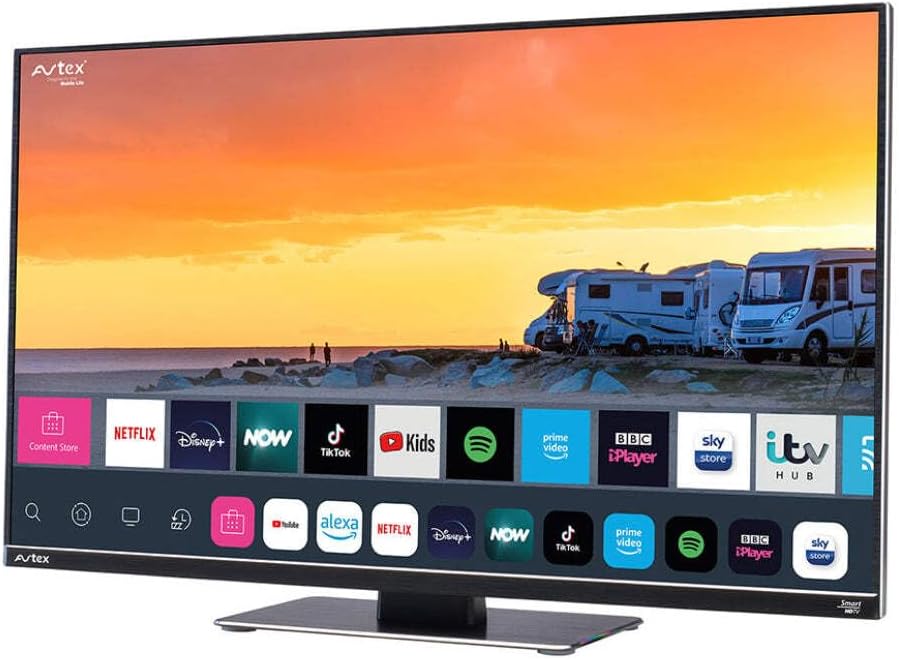
Figure 4.1: Avtex W195TS Smart TV Front View
This image shows the Avtex W195TS Smart TV from a slight angle, highlighting its slim design and the vibrant display. The screen shows a user interface with icons for popular streaming services like Netflix, Disney+, Now, TikTok, Kids, Spotify, Prime Video, BBC iPlayer, Sky Store, and ITV Hub. The background on the screen depicts a scenic view of motorhomes parked near a beach at sunset. The Avtex logo is visible on the top left and bottom left of the TV frame.
4.1. Puertos y conexiones
- Puertos HDMI: Para conectar dispositivos externos como reproductores de Blu-ray, consolas de juegos o decodificadores.
- Puertos USB (2): Para reproducción de medios desde unidades USB o conexión de accesorios USB.
- Entrada de antena: For connecting a terrestrial TV antenna.
- Entrada de satélite: For connecting a satellite dish for Freesat or other satellite services.
- Entrada de energía DC: For 12V/24V DC power connection.
- Entrada de alimentación de CA: For 240V AC power connection via adapter.
- Puerto Ethernet: Para conexión de red cableada.
- Salida de audio: Para conectar sistemas de audio externos o auriculares.
5. Configuración
5.1. Installing the Stand (Optional)
- Coloque con cuidado el televisor boca abajo sobre una superficie suave y limpia para evitar dañar la pantalla.
- Alinee el soporte con los orificios de montaje en la parte inferior del televisor.
- Asegure el soporte utilizando los tornillos provistos.
5.2. Conexión de alimentación
The Avtex W195TS supports multiple power inputs:
- 12 V/24 V CC: Connect the supplied 12V/24V DC power cable to the DC input on the TV and to your vehicle's 12V or 24V power outlet.
- 240 V CA: Connect the supplied 240V AC power adapter to the AC input on the TV, then plug the adapter into a standard 240V AC wall socket.
Nota: Do not connect both DC and AC power simultaneously.
5.3. Conexión de antena/satélite
- Terrestrial TV: Connect your aerial cable to the 'ANTENNA IN' port.
- Satellite TV (Freesat): Connect your satellite dish cable to the 'SATELLITE IN' port.
5.4. Encendido inicial y configuración inicial
- Connect the TV to power and press the power button on the remote control or TV.
- The First-Time Setup Wizard will appear. Follow the on-screen prompts to select your language, country, and time zone.
- Perform an automatic channel scan for both terrestrial and satellite channels.
- Conéctese a su red Wi-Fi seleccionando el nombre de su red e ingresando la contraseña.
6. Operando
6.1. Funciones de control remoto
Familiarize yourself with the remote control buttons for easy navigation and control of your TV's features.
- Botón de encendido: Enciende/apaga el televisor.
- Botón de fuente: Selects input sources (HDMI, USB, TV, Satellite).
- Volumen +/-: Ajusta el nivel de volumen.
- Canal +/-: Cambia los canales de televisión.
- Botones de navegación (Arriba/Abajo/Izquierda/Derecha/OK): Para navegar y seleccionar el menú.
- Botón Smart Hub/Inicio: Accede a la interfaz de Smart TV.
- Botones de la aplicación: Botones dedicados para aplicaciones de transmisión populares (si están disponibles).
6.2. Funciones de Smart TV
Your Avtex W195TS is equipped with smart TV capabilities:
- Tienda de aplicaciones: Download and install various applications for streaming, news, and entertainment.
- Servicios de transmisión: Access pre-installed or downloaded apps like Netflix, Disney+, Prime Video, BBC iPlayer, etc. (subscription may be required).
- Web Navegador: Navega por Internet directamente en tu televisor.
- Duplicar pantalla: Connect your smartphone or tablet to display content on the TV screen (compatibility may vary).
6.3. Conectividad Bluetooth
Pair Bluetooth devices such as headphones or external speakers for enhanced audio experience.
- Vaya al menú de configuración del televisor.
- Select 'Bluetooth' or 'Connected Devices'.
- Enable Bluetooth and put your device into pairing mode.
- Seleccione su dispositivo de la lista para emparejarlo.
6.4. Reproducción de medios a través de USB
Insert a USB drive into one of the USB ports to view fotos, reproducir vídeos o escuchar música.
- The TV will usually prompt you to open the media player.
- Navegar por tu files usando el control remoto.
7. Mantenimiento
7.1. Limpieza del televisor
- Pantalla: Limpie suavemente la pantalla con un paño suave que no deje pelusa. Para manchas difíciles, limpie ligeramenteampEnjuague el paño con agua o una solución de limpieza específica para pantallas (no rocíe directamente sobre la pantalla).
- Casing: Utilice un paño suave y seco para limpiar el televisor.asing. Evite el uso de limpiadores abrasivos o disolventes.
7.2. Actualizaciones de software
Periodically check for software updates to ensure your TV has the latest features and bug fixes. Updates can usually be found in the TV's settings menu under 'System' or 'Software Update'.
8. Solución de problemas
If you encounter issues with your Avtex W195TS, refer to the following common problems and solutions:
| Problema | Posible causa | Solución |
|---|---|---|
| Sin poder | El cable de alimentación no está conectado, no hay corriente en el tomacorriente. | Check power cable connection; test outlet with another device; ensure correct voltage (12 V / 24 V / 240 V). |
| No hay imagen, pero hay sonido | Fuente de entrada incorrecta seleccionada; cable defectuoso. | Press the 'Source' button on the remote to select the correct input; check HDMI/antenna cables. |
| No hay sonido, pero hay imagen | Volumen silenciado o demasiado bajo; problema con el sistema de audio externo. | Active el volumen o aumente el nivel; verifique las conexiones a los dispositivos de audio externos. |
| No se puede conectar al Wi-Fi | Contraseña incorrecta; problema con el enrutador; el televisor está demasiado lejos del enrutador. | Re-enter Wi-Fi password; restart router; move TV closer to router or use an extender. |
| El control remoto no funciona | Baterías agotadas; obstrucción; problema de emparejamiento. | Replace batteries; remove obstructions; re-pair remote if it's a Bluetooth remote. |
9. Especificaciones
| Característica | Especificación |
|---|---|
| Marca | avtex |
| Número de modelo | AVTEX W195TS |
| Tamaño de pantalla | 19.5 pulgadas |
| Resolución | 1080p (Full HD) |
| Relación de aspecto | 16:9 |
| Tecnología de conectividad | Bluetooth, HDMI, Wi-Fi |
| Puertos USB totales | 2 |
| Volumentage | 12 voltios, 24 voltios, 240 voltios |
| Peso del artículo | 2.5 kilogramos |
| Año del modelo | 2018 |
10. Garantía y soporte
Your Avtex W195TS Smart TV comes with a manufacturer's warranty. Please refer to the warranty card included in your product packaging for specific terms and conditions, including warranty period and coverage details. Keep your proof of purchase for warranty claims.
For technical support, troubleshooting assistance beyond this manual, or warranty inquiries, please contact Avtex customer service through their official website or the contact information provided with your product. When contacting support, please have your model number (AVTEX W195TS) and serial number ready.


