1. Introducción
The AeroCool Blade is an ATX semi-tower PC case designed for optimal airflow and aesthetic appeal. It features an RGB front panel with preset lighting modes, a full tempered glass side window, and ample space for component installation. This manual provides essential information for the proper setup, operation, and maintenance of your PC case.
Información de seguridad: Always disconnect power from your system before performing any installation or maintenance. Handle components with care to avoid damage. Refer to individual component manuals for specific installation instructions.
2. Contenido del paquete
- AeroCool Blade ATX Semi-Tower PC Case
- 1 x 120mm RGB Rear Fan (pre-installed)
- 3 x 120mm Front Fans (pre-installed)
- Kit de accesorios (tornillos, separadores, bridas)
3. Configuración e instalación
3.1 Preparación del caso
Carefully remove the case from its packaging. Place it on a stable, flat surface. Remove the tempered glass side panel by unscrewing the thumb screws at the rear of the case and gently pulling the panel away.

Figura 3.1: Interna view of the AeroCool Blade PC case, illustrating the layout for component installation.
3.2 Instalación de la placa base
- Install the necessary motherboard standoffs into the motherboard tray according to your motherboard's form factor (ATX, Micro-ATX, Mini-ITX).
- Instale el protector de E/S en la abertura trasera de la carcasa.
- Coloque con cuidado la placa base sobre los separadores, alineando los orificios de los tornillos.
- Asegure la placa base con los tornillos proporcionados.
3.3 Instalación de la unidad de fuente de alimentación (PSU)
The AeroCool Blade supports bottom-mounted PSUs. Slide your PSU into the dedicated compartment at the bottom rear of the case. Secure it with screws from the rear of the case.
3.4 Instalación de la unidad de almacenamiento
- Discos duros de 3.5": Install 3.5" hard drives into the drive cage located beneath the PSU shroud.
- Unidades SSD/HDD de 2.5": Install 2.5" drives onto the dedicated mounting points on the motherboard tray or behind it.

Figura 3.2: Parte interna trasera view, highlighting cable management routes and 2.5-inch drive mounting locations.
3.5 Expansion Card (GPU) Installation
Remove the necessary expansion slot covers from the rear of the case. Insert your graphics card or other expansion cards into the PCIe slots on your motherboard and secure them with screws.
3.6 Instalación de ventiladores y refrigeración
The case comes with one 120mm RGB fan pre-installed at the rear and three 120mm fans pre-installed at the front. Ensure all fan cables are connected to appropriate headers on your motherboard or fan controller.

Figure 3.3: A 120mm RGB fan, similar to those pre-installed in the AeroCool Blade case.
3.7 Conexiones de E/S del panel frontal
Connect the front panel cables (USB 3.0, USB 2.0, HD Audio, Power Switch, Reset Switch, LED Switch, Power LED, HDD LED) to the corresponding headers on your motherboard. Refer to your motherboard manual for exact pin configurations.
4. Instrucciones de funcionamiento
4.1 Encendido
Once all components are installed and connected, replace the side panel. Connect your monitor, keyboard, mouse, and power cable to the PSU. Press the Power button located on the top panel of the case to turn on your system.

Figura 4.1: Vista frontal superior view of the case, indicating the location of the power button and front I/O ports.
4.2 Control de iluminación RGB
The AeroCool Blade features an RGB front panel. Use the dedicated LED button on the top panel to cycle through various preset lighting modes and effects. Pressing the button will change the lighting pattern or color.

Figura 4.2: Frente view of the AeroCool Blade case with its distinctive RGB lighting.
4.3 Puertos del panel frontal
El panel superior proporciona un acceso cómodo a:
- 1 puerto USB 3.0
- 2 puertos USB 2.0
- HD Audio output
- Entrada de micrófono
Connect your USB devices, headphones, and microphone to these ports as needed.
5. Mantenimiento
5.1 Limpieza del filtro de polvo
Regularly check and clean the dust filters to maintain optimal airflow and prevent dust buildup inside the case. Dust filters are typically located at the top, front, and bottom (under the PSU). Gently remove them and clean with compressed air or rinse with water (ensure they are completely dry before re-installation).
5.2 Limpieza exterior
Limpie las superficies exteriores de la caja con un paño suave y húmedo.amp paño. Evite utilizar productos químicos agresivos o materiales abrasivos que puedan dañar el acabado o el vidrio templado.
6. Solución de problemas
- El sistema no se enciende:
Ensure the PSU is switched on and properly connected to the wall outlet. Verify all power cables from the PSU are correctly connected to the motherboard and components. Check the front panel power switch connection to the motherboard. - La iluminación RGB no funciona:
Ensure the RGB controller (if applicable) and fan RGB cables are securely connected. Press the LED button on the top panel to cycle through modes. If connected to a motherboard header, check motherboard software settings. - Los ventiladores no giran:
Verify that all fan power cables are securely connected to the motherboard fan headers or a fan controller. Check BIOS/UEFI settings for fan speed control. - El USB/audio del panel frontal no funciona:
Ensure the USB and HD Audio cables from the front panel are correctly connected to the corresponding headers on your motherboard.
7. Especificaciones
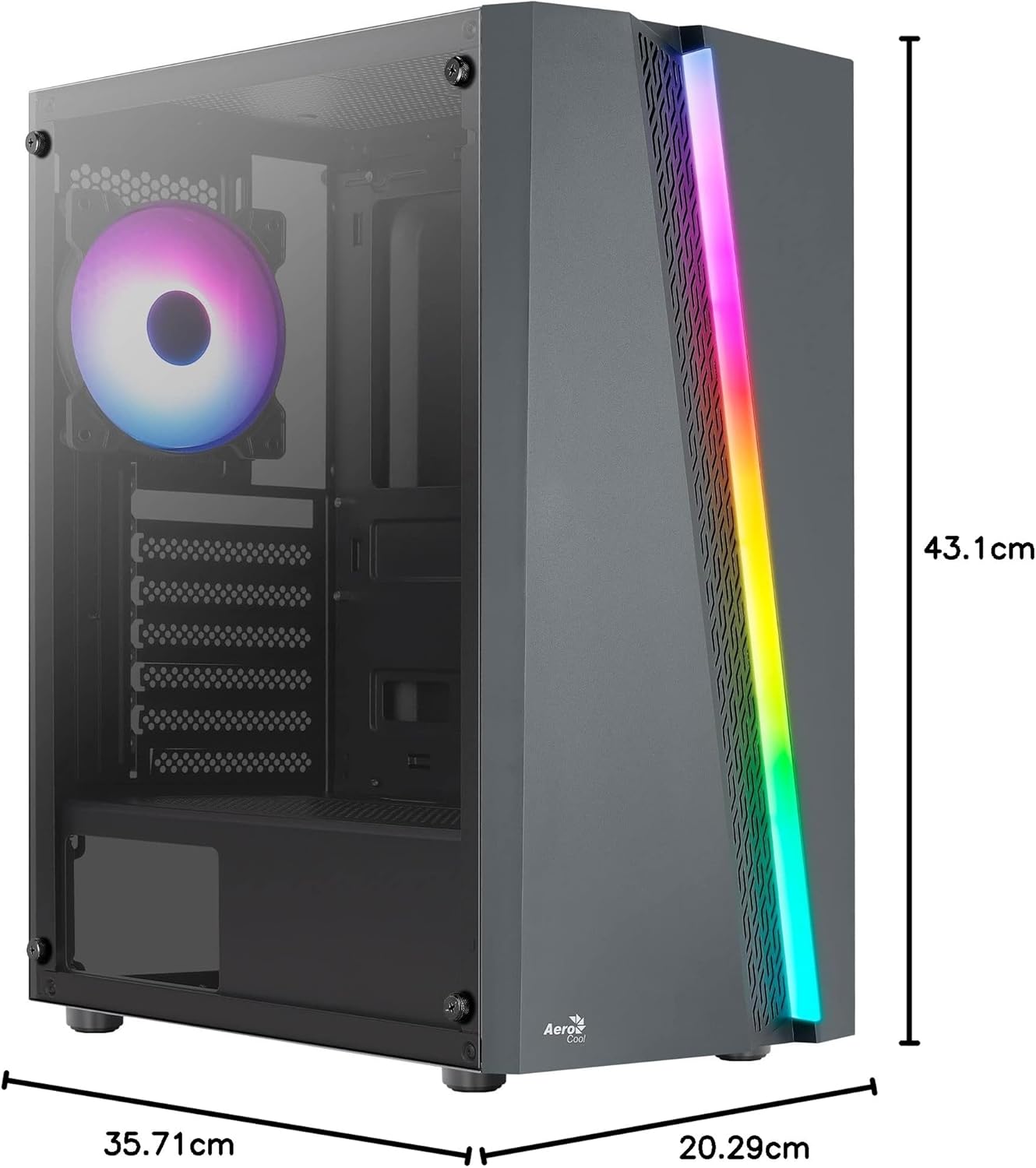
Figure 7.1: Dimensions of the AeroCool Blade PC Case.
| Característica | Especificación |
|---|---|
| Marca | Aerocooler |
| Nombre del modelo | BLADEBK |
| Tipo de caso | Semi-Tower |
| Compatibilidad de la placa base | ATX, Micro ATX, Mini ITX |
| Material | Vidrio templado (panel lateral) |
| Dimensiones del producto (L x An x Al) | 43.1 x 20.3 x 35.7 cm |
| Peso del artículo | 4 kilogramos |
| Bahías de unidad | 2 x 3.5", 2 x 2.5" |
| Liquidación de GPU | Hasta 307 mm |
| Altura del enfriador de la CPU | Hasta 155 mm |
| Puertos de E / S frontales | 1 x USB 3.0, 2 x USB 2.0, HD Audio, Mic, LED Control, Power |
| Ventiladores preinstalados | 1 x 120mm RGB Rear, 3 x 120mm Front |
| Método de enfriamiento | Aire |
8. Garantía y soporte
Para obtener información sobre la garantía y soporte técnico, consulte el sitio web oficial de AeroCool. webSitio web o contacte a su distribuidor local. Conserve su comprobante de compra para reclamaciones de garantía.
Información del contacto: Para obtener más ayuda, visite www.aerocool.io.


