1. Introducción
The uStream TT2 is a cutting-edge belt-drive turntable designed to deliver a premium vinyl listening experience. It combines classic analog sound reproduction with modern wireless convenience, featuring Bluetooth V5.1 connectivity for effortless pairing with compatible audio devices. This manual provides comprehensive instructions for setting up, operating, and maintaining your uStream TT2 turntable.
2. Contenido del paquete
Asegúrese de que todos los elementos estén presentes antes de continuar con la configuración:
- uStream TT2 Turntable Unit
- Guardapolvo
- Plato
- Correa de transmisión
- Contrapeso
- Peso antipatinaje
- Cable de alimentación
- USB Recording Software (Audacity, typically provided via download link or CD)
- Cable de audio RCA
- Manual de instrucciones (este documento)
3. Turntable Components
Familiarize yourself with the main components of your uStream TT2 turntable:

Figura 3.1: Arriba view of the uStream TT2 Turntable. This image shows the main unit with the dust cover open, revealing the platter, tonearm assembly, and speed/power knob.
- Plato: The circular platform on which records are placed. Made of aluminum for reduced resonance.
- Correa de transmisión: Located beneath the platter, it connects to the motor pulley to rotate the platter.
- brazo: The arm that holds the cartridge and stylus. Made of aluminum.
- Cartridge (Audio-Technica AT91): Houses the stylus and converts groove vibrations into electrical signals.
- Aguja: The needle that tracks the record grooves.
- Contrapeso: Balances the tonearm and allows for adjustment of tracking force.
- Anti-skate Adjustment: Compensates for the inward force on the tonearm, ensuring even tracking.
- Speed Selector/Power Knob: Controls power and selects playback speeds (33 1/3 and 45 RPM).
- Guardapolvo: Protege el plato giratorio del polvo cuando no está en uso.

Figura 3.2: Posterior view of the uStream TT2 Turntable. This image highlights the connectivity options including RCA Line Out, Pre-Amp switch, USB port, and AC power input.
- RCA Outputs (LINE OUT): Para conectar a un dispositivo externo amplificador o receptor.
- PRE-AMP Encender / apagar): Toggles the built-in RIAA equalizer. Set to ON for connecting to line-level inputs (e.g., AUX on a stereo system) or Bluetooth. Set to OFF for connecting to a dedicated PHONO input on an ampmás duradero.
- Puerto USB: For connecting to a computer to digitize vinyl records.
- Entrada de CA: Para conectar el cable de alimentación.
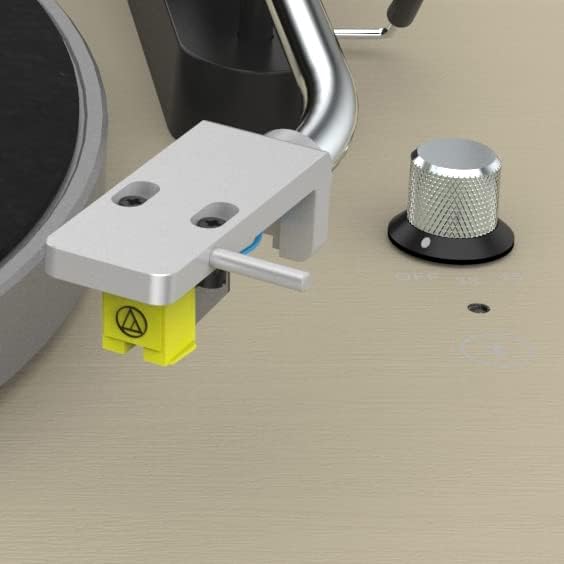
Figure 3.3: Close-up of the Audio-Technica AT91 moving magnet cartridge. This image provides a detailed view of the cartridge attached to the tonearm, responsible for sound reproduction.
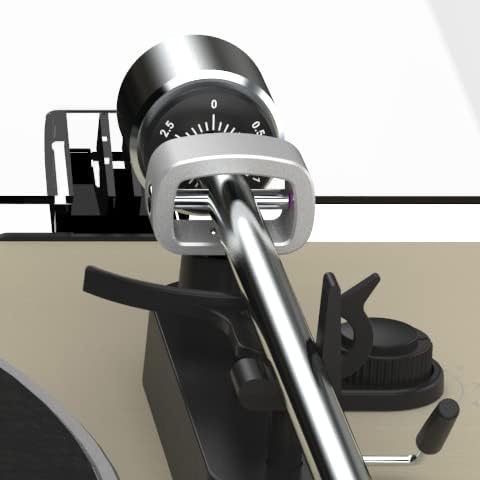
Figure 3.4: Close-up of the tonearm counterweight and anti-skate adjustment. This image shows the precision components used to balance the tonearm and ensure proper tracking force.
4. Guía de configuración
4.1 Desembalaje y colocación
- Retire con cuidado todos los componentes del embalaje.
- Coloque el plato giratorio sobre una superficie estable y nivelada, lejos de la luz solar directa, fuentes de calor y vibraciones excesivas.
4.2 Instalación del plato y la correa
- Coloque el plato sobre el eje central.
- Locate the drive belt. Gently stretch the belt around the inner rim of the platter and hook it onto the motor pulley (a small brass or plastic cylinder) located in the motor well. Ensure the belt is not twisted.
- Coloque el tapete de fieltro encima del plato.
4.3 Ajuste del equilibrio del brazo y de la fuerza de seguimiento
- Retire el protector del lápiz del cartucho.
- Place the counterweight onto the rear of the tonearm and twist it clockwise until it is approximately halfway on.
- Suelte el brazo clamp. Carefully move the tonearm away from its rest.
- Adjust the counterweight by rotating it until the tonearm is perfectly balanced, floating horizontally above the platter. Do not let the stylus touch the platter.
- Once balanced, hold the counterweight steady with one hand and rotate the numbered ring on the front of the counterweight until the "0" aligns with the line on the tonearm.
- Rotate the entire counterweight (both the numbered ring and the weight) clockwise until the desired tracking force is set. For the Audio-Technica AT91 cartridge, the recommended tracking force is typically 2.0 grams. Align the "2.0" mark with the line on the tonearm.
- Return the tonearm to its rest and secure it with the clamp.
4.4 Anti-skate Adjustment
- Attach the small loop of the anti-skate weight's thread to the anti-skate lever on the tonearm support.
- Pass the thread through the wire support loop.
- The anti-skate force should generally match the tracking force. If your tracking force is 2.0 grams, set the anti-skate to the corresponding notch or number (usually 2).
4.5 Instalación de la cubierta antipolvo
- Insert the hinges of the dust cover into the hinge slots on the rear of the turntable base.
4.6 Conexiones de audio
Your uStream TT2 offers both wired (RCA) and wireless (Bluetooth) audio output options.
4.6.1 RCA Wired Connection
- Connect the RCA audio cable (red and white plugs) from the "LINE OUT" ports on the rear of the turntable to the corresponding audio input (e.g., AUX, CD, LINE IN) on your ampificador, receptor o altavoces amplificados.
- PRE-AMP Cambiar:
- Empezar a ON if connecting to a standard line-level input (e.g., AUX, CD, LINE IN) on your amplifier/receiver, or if using Bluetooth. This activates the built-in phono preamp.
- Empezar a APAGADO if connecting to a dedicated "PHONO" input on your amplifier/receiver, as these inputs have their own built-in phono preamp.
4.6.2 Conexión de alimentación
- Connect the power cable to the AC input on the rear of the turntable.
- Conecte el otro extremo del cable de alimentación a una toma de pared adecuada.
5. Operación
5.1 Reproducción de un disco
- Coloque un disco en el plato.
- Select the correct speed (33 1/3 or 45 RPM) using the speed selector knob. For 45 RPM records, you may need to use a 45 RPM adapter (not included, but commonly available).
- Rotate the speed selector knob to turn the turntable ON. The platter will begin to spin.
- Levante suavemente el brazo utilizando la palanca de señalización.
- Coloque el brazo sobre el surco inicial deseado del disco.
- Baje lentamente la palanca de señalización para colocar con cuidado la aguja sobre el disco.
- At the end of the record, the auto-stop function will stop the platter rotation. Lift the tonearm using the cueing lever, return it to its rest, and secure it with the clamp. Rotate the speed selector knob to OFF to power down the unit.
5.2 Emparejamiento Bluetooth
Ensure the PRE-AMP switch on the rear is set to ON for Bluetooth functionality.
- Power on the uStream TT2 turntable.
- Activate Bluetooth pairing mode on your desired Bluetooth speaker or headphones. Refer to your audio device's manual for specific instructions.
- The uStream TT2 will automatically enter pairing mode when powered on with the PRE-AMP switch ON. The Bluetooth indicator light (if present, typically near the speed knob) will flash.
- Once successfully paired, the Bluetooth indicator light will become solid.
- You can now play records, and the audio will stream wirelessly to your paired Bluetooth device.
5.3 Digitizing Vinyl Records (USB)
The uStream TT2 allows you to convert your vinyl records into digital audio files using the USB port and included Audacity software.
- Connect the USB cable (not included, standard USB-A to USB-B printer cable) from the turntable's USB port to an available USB port on your computer.
- Install the Audacity software on your computer. (Download link or CD provided with purchase).
- Open Audacity and configure the input device to recognize the turntable (often listed as "USB Audio CODEC" or similar).
- Begin playing a record on the turntable.
- In Audacity, click the "Record" button to start recording the audio.
- When finished, click "Stop" in Audacity. You can then edit and export your digitized audio files.
6. Mantenimiento y cuidado
6.1 Limpieza del lápiz óptico
- A dirty stylus can cause poor sound quality and damage to your records.
- Use a soft brush specifically designed for stylus cleaning. Brush gently from back to front (away from the cantilever).
- Do not use solvents or excessive force.
6.2 Limpieza del plato giratorio
- Wipe the dust cover and plinth with a soft, dry, lint-free cloth.
- Para marcas difíciles, utilice un paño ligeramente húmedo.amp paño con jabón suave y luego séquelo bien.
- Evite utilizar limpiadores abrasivos o disolventes, ya que pueden dañar el acabado.
6.3 Reemplazo de la correa
The drive belt is a wear item and may need replacement over time if it stretches or degrades, leading to inconsistent speed. Replacement belts can be obtained from authorized Mitchell Acoustics dealers or reputable audio suppliers.
7. Solución de problemas
If you encounter issues with your uStream TT2, please consult the following table before contacting support.
| Problema | Posible causa | Solución |
|---|---|---|
| Sin poder | Power cable not connected; Outlet not active; Power knob OFF. | Ensure power cable is securely connected to turntable and outlet. Check outlet with another device. Rotate speed selector knob to ON. |
| Sin sonido o volumen bajo | PRE- incorrectoAMP switch setting; RCA cables not connected properly; Amplifier/receiver input not selected; Bluetooth not paired. | Check PRE-AMP switch (ON for line-level/Bluetooth, OFF for PHONO input). Ensure RCA cables are fully inserted. Select correct input on your amplifier/receiver. Re-pair Bluetooth device. |
| Sonido distorsionado o saltado | Stylus dirty or damaged; Incorrect tracking force/anti-skate; Record dirty or damaged; Turntable not level. | Clean stylus. Re-adjust tracking force and anti-skate. Clean record. Ensure turntable is on a level surface. Replace stylus if damaged. |
| El plato no gira o la velocidad es inconsistente | Drive belt dislodged or worn; Incorrect speed selected. | Check and re-seat the drive belt. Replace belt if worn or stretched. Ensure correct speed (33 1/3 or 45 RPM) is selected. |
| Problemas de emparejamiento de Bluetooth | PRE-AMP switch OFF; Device too far; Device already paired to another source. | Asegúrese de PRE-AMP switch is ON. Move Bluetooth device closer to turntable (within 10 meters). Disconnect Bluetooth device from other sources and try pairing again. |
8. Especificaciones
| Característica | Detalle |
|---|---|
| Nombre del modelo | uTransmitir TT2 |
| Marca | Acústica Mitchell |
| Tecnología de conectividad | Bluetooth V5.1, RCA (Line Out), USB |
| Velocidad máxima de rotación | 33 1/3 RPM, 45 RPM |
| Tipo de cartucho | Audio-Technica AT91 Moving Magnet |
| Material del brazo | Aluminio |
| Material del plato | Aluminio |
| Pre incorporadoamp | Yes (RIAA equalizer, switchable) |
| Características especiales | Anti-skate adjustment, Adjustable counterweight, Auto-stop function, USB digitization |
| Dimensiones del producto (L x An x Al) | 440 x 380 x 135 mm (17.32 x 14.96 x 5.31 pulgadas) |
| Peso del artículo | 6.68 kg (14.72 libras) |
| Material | Real wood veneer plinth (Black Ash), Plastic |
| Componentes incluidos | Power cable, USB recording software (Audacity) |
9. Garantía y soporte
9.1 Información de garantía
Mitchell Acoustics products are crafted to exacting standards for superior performance. For specific warranty terms and conditions, please refer to the warranty card included with your product or visit the official Mitchell Acoustics webSitio. Conserve su comprobante de compra para reclamaciones de garantía.
9.2 Atención al cliente
If you require further assistance or have questions not covered in this manual, please contact Mitchell Acoustics customer support. Contact details can typically be found on the official Mitchell Acoustics websitio o en el embalaje de su producto.
Designed by Paul Mitchell, renowned British audio specialist.


