1. Introducción
Gracias por la compraasing the iDance GO PARTY 4 Portable Bluetooth Speaker. This device is designed to provide high-quality audio streaming via Bluetooth, USB MP3 playback, and includes a wired microphone with voice changer effects and integrated disco LED lights. This manual provides essential information for safe and effective use of your speaker.
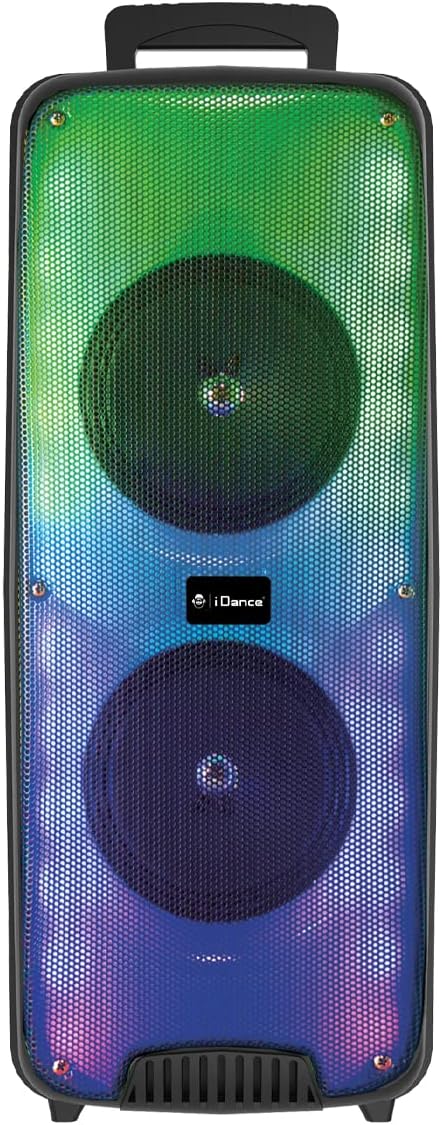
Imagen 1.1: Frente view of the iDance GO PARTY 4 Portable Bluetooth Speaker, showcasing its dual speakers and vibrant LED lighting.
2. Información de seguridad
- Lea todas las instrucciones antes de operar el dispositivo.
- Keep the speaker away from water, moisture, and extreme temperatures. This product is No impermeable.
- No bloquee las aberturas de ventilación.
- Utilice únicamente accesorios especificados por el fabricante.
- Desenchufe el dispositivo durante tormentas eléctricas o cuando no lo utilice durante períodos prolongados.
- No intente reparar la unidad usted mismo. Encargue cualquier servicio técnico a personal cualificado.
- Deseche las baterías y los componentes electrónicos de forma responsable de acuerdo con las regulaciones locales.
3. Contenido del paquete
Asegúrese de que todos los artículos estén presentes en el paquete:
- iDance GO PARTY 4 Portable Bluetooth Speaker
- Micrófono con cable
- Mando a distancia
- Cable de carga (Micro USB)

Image 3.1: Included wired microphone and remote control.
4. Producto terminadoview
Familiarize yourself with the control panel and ports of your iDance GO PARTY 4 speaker.

Image 4.1: Rear control panel of the iDance GO PARTY 4 speaker.
Características del panel de control:
- Interruptor encendido / apagado: Enciende o apaga el altavoz.
- Perilla de VOLUMEN: Ajusta el volumen del altavoz principal.
- ENTRADA DE AUDIO: Entrada auxiliar de 3.5 mm para dispositivos de audio externos.
- CHARGING DC 5V Port: Puerto micro USB para cargar el altavoz.
- Puerto USB: For USB MP3 playback.
- Ranura para tarjetas TF: For TF (MicroSD) card MP3 playback.
- Botones ANTERIOR / SIGUIENTE: Navegar por las pistas durante la reproducción de MP3.
- SOUND EFFECT Button: Activa varios efectos de sonido.
- VOICE CHANGER Button: Cycles through voice changer modes.
- MODE / LED ON/OFF Button: Switches between input modes (Bluetooth, USB, AUX) and controls LED lights.
- Perilla de eco: Ajusta el efecto de eco del micrófono.
- Perilla de volumen del micrófono: Ajusta el volumen del micrófono.
- INPUT (MIC) Port: Jack de 6.35 mm para conectar el micrófono con cable.
- Indicador de carga: Luz LED que indica el estado de carga.
5. Configuración
5.1. Carga del altavoz
- Connect the provided Micro USB charging cable to the CHARGING DC 5V Port en el altavoz.
- Conecte el otro extremo del cable a un adaptador de corriente USB estándar (no incluido) o al puerto USB de una computadora.
- La luz indicadora de carga se iluminará. Una vez cargada por completo, la luz puede cambiar de color o apagarse, según el modelo.
- A full charge provides approximately 4 to 8 hours of playback time.
5.2. Encendido y apagado
- Para encender el altavoz, deslice el Interruptor de encendido y apagado a la posición 'ON'.
- Para apagar el altavoz, deslice el Interruptor de encendido y apagado a la posición 'OFF'.
6. Instrucciones de funcionamiento
6.1. Emparejamiento Bluetooth
- Asegúrese de que el altavoz esté encendido.
- Presione el MODO button on the control panel or remote control until the speaker is in Bluetooth mode. A voice prompt or indicator light will confirm.
- En su dispositivo móvil (teléfono inteligente, tableta, etc.), habilite Bluetooth y busque los dispositivos disponibles.
- Select "iDance GO PARTY 4" or a similar name from the list of devices.
- Una vez emparejado, el altavoz indicará una conexión exitosa y podrá comenzar a transmitir audio.
6.2. Reproducción de MP3 USB
- Inserte una unidad flash USB que contenga audio MP3 files en el Puerto USB.
- The speaker should automatically switch to USB mode and begin playing the MP3 files. Si no, presione el MODO botón para seleccionar el modo USB.
- Utilice el ANTERIOR / SIGUIENTE Botones para saltar pistas.
6.3. Microphone Usage and Voice Changer
- Conecte el micrófono con cable al INPUT (MIC) Port.
- Ajuste el volumen del micrófono con el Perilla de volumen del micrófono.
- Girar el Perilla de eco to add or reduce the echo effect to your voice.
- Presione el VOICE CHANGER Button to cycle through the four available voice effects: Child, Woman, Man, and Robot.
6.4. luces LED
The iDance GO PARTY 4 features integrated disco LED lights. Press the MODE / LED ON/OFF Button (or the dedicated LED button on the remote) to turn the lights on or off.
6.5. Funciones de control remoto
The included remote control allows for convenient operation of the speaker from a distance. Functions include:
- Encendido/apagado
- Mode Selection (Bluetooth, USB, AUX)
- Subir/Bajar volumen
- Saltar pista (Anterior/Siguiente)
- Reproducir/Pausa
- Control de luz LED
- Voice Changer Activation
- Sound Effects (EFX1-EFX8)
7. Mantenimiento
- Limpieza: Utilice un paño suave y seco para limpiar el exterior del altavoz. No utilice limpiadores líquidos ni productos abrasivos.
- Almacenamiento: Guarde el altavoz en un lugar fresco y seco, alejado de la luz solar directa y de temperaturas extremas.
- Cuidado de la batería: Para prolongar la vida útil de la batería, evite descargarla por completo con frecuencia. Cargue el altavoz regularmente, incluso si no lo usa, para mantener la batería en buen estado.
8. Solución de problemas
| Problema | Posible causa | Solución |
|---|---|---|
| El altavoz no se enciende. | La batería está agotada. | Cargue el altavoz utilizando el cable Micro USB proporcionado. |
| No hay sonido desde el altavoz. | El volumen es demasiado bajo; modo de entrada incorrecto; dispositivo no emparejado (Bluetooth). | Increase volume; press MODE button to select correct input; re-pair Bluetooth device. |
| El dispositivo Bluetooth no se puede conectar. | El altavoz no está en modo de emparejamiento; el dispositivo está demasiado lejos; hay interferencias. | Asegúrese de que el altavoz esté en modo Bluetooth; acerque el dispositivo; apague otros dispositivos Bluetooth. |
| El micrófono no funciona. | El micrófono no está conectado correctamente; el volumen del micrófono es demasiado bajo. | Ensure microphone is fully plugged into the INPUT port; increase MIC VOL. |
| El control remoto no responde. | Battery depleted; obstruction between remote and speaker. | Replace remote control battery; ensure clear line of sight to the speaker's IR receiver. |
9. Especificaciones
| Número de modelo | GOPTY4 |
| Marca | iDance |
| Tecnología de conectividad | Bluetooth |
| Potencia de salida | 200 vatios (pico) |
| Speaker Output (Max) | 10 vatios |
| Fuente de poder | Alimentado por batería (iones de litio) |
| Duración de la batería | 4-8 horas (aprox.) |
| Dimensiones (L x An x Al) | 25.5 x 20 x 58 cm |
| Peso | 3.99 kilogramos |
| Material | Plástico |
| Método de control | Control remoto, botones en el dispositivo |
| Características especiales | Portable, Disco LED Lights, USB MP3 Player, Wired Microphone, Voice Changer (Child, Woman, Man, Robot), Echo Effect |
| Dispositivos compatibles | Smartphones, Tablets, MP3 Players, Home Cinema Systems, Televisions |
| Impermeable | No |
10. Garantía y soporte
The iDance GO PARTY 4 Portable Bluetooth Speaker comes with a limited warranty. Please refer to the warranty card included in your package for specific terms and conditions. For technical support, service inquiries, or further assistance, please contact your retailer or visit the official iDance websitio.


