1. Introducción
Thank you for choosing the Beafon SL605 Silverline Flip Phone. This manual provides essential information for setting up, operating, and maintaining your device. The SL605 is designed with ease of use in mind, featuring large buttons, a clear display, and an SOS emergency call function, making it ideal for seniors.

Figure 1.1: Beafon SL605 Silverline Flip Phone (Closed)
This image shows the Beafon SL605 flip phone in its closed state, displaying the external screen with the current time and date. The phone has a sleek black and silver design.
2. Contenido del paquete
Por favor, revise el contenido del paquete al abrirlo. Si falta algún artículo o está dañado, contacte con su vendedor.
- Beafon SL605 Flip Phone
- Batería recargable de iones de litio
- Cable de carga
- Charging Cradle (if included with your model)
- Manual de usuario (este documento)
3. Dispositivo terminadoview
Familiarize yourself with the key components of your Beafon SL605.

Figure 3.1: Beafon SL605 Silverline Flip Phone (Open)
This image displays the Beafon SL605 flip phone in its open position, revealing the internal color display and the large, illuminated keypad. The keypad features clearly marked buttons for easy dialing and navigation.
Frente 3.1 View (Cerrado)
- Pantalla externa: Shows time, date, battery status, and incoming call information.
- LED de notificación: Indicates new messages or missed calls.
Frente 3.2 View (Abierto)
- Pantalla interna: 2.4-inch color screen for menus, contacts, and messages.
- Teclado: Large, illuminated buttons for dialing and navigation. Includes dedicated call, end call, and SOS buttons.
- Teclas de navegación: Up, Down, Left, Right, and OK/Confirm buttons.
- Photo Contact Indicator: Feature to display contact photos.
3.3 Trasero View

Figura 3.2: Posterior View of Beafon SL605
This image shows the back of the Beafon SL605 flip phone, highlighting the prominent SOS emergency call button and the speaker grille at the bottom.
- Botón de emergencia SOS: Press and hold to activate the emergency call sequence.
- Vocero: For loud ringtones and hands-free calls.
3.4 lados View
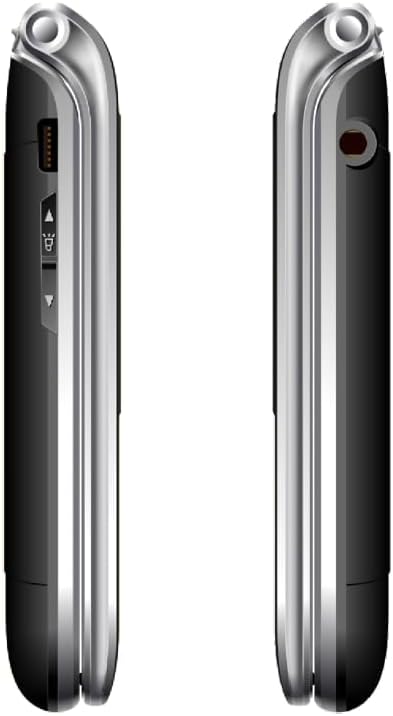
Figura 3.3: Lado View of Beafon SL605
Esta imagen presenta un lado view of the Beafon SL605 flip phone, illustrating the charging port and volume control buttons located on the side of the device.
- Puerto de carga: For connecting the charging cable or placing in the charging cradle.
- Botones de volumen: Adjust call volume and ringtone volume.
- Toma de auriculares: 3.5 mm port for headphones.
4. Configuración
4.1 Instalación de la batería y la tarjeta SIM
- Retire la cubierta posterior del teléfono haciendo palanca con cuidado desde la muesca.
- Insert your SIM card into the designated slot. Ensure the gold contacts face downwards and the cut corner aligns with the slot.
- Insert the Lithium-ion battery, aligning the contacts with those in the phone.
- Vuelva a colocar la cubierta posterior, presionándola firmemente hasta que encaje en su lugar.
4.2 Carga de la batería
Antes del primer uso, cargue completamente la batería del teléfono.
- Connect the charging cable to the phone's charging port or place the phone in its charging cradle.
- Conecte el otro extremo del cable a una toma de corriente.
- The battery icon on the display will indicate charging status. A full charge typically takes 2-3 hours.
4.3 Encendido / Apagado
- Para encender: Mantenga pulsado el Finalizar llamada/Encendido botón hasta que se encienda la pantalla.
- Para apagar: Mantenga pulsado el Finalizar llamada/Encendido botón hasta que aparezca un mensaje de apagado y luego confirme.
5. Instrucciones de funcionamiento
5.1 Realizar y recibir llamadas
- Para marcar: Open the phone, enter the phone number using the keypad, and press the Llamar botón.
- De Contactos: Navigate to the "Contacts" menu, select a contact, and press the Llamar botón.
- Contestar: Cuando suene el teléfono, abra la tapa o presione el Llamar botón.
- Para finalizar la llamada: Presione el Finalizar llamada botón o cerrar la tapa.
5.2 Función de llamada de emergencia SOS
El botón SOS se encuentra en la parte trasera del teléfono. Permite contactar rápidamente con los números de emergencia predefinidos.
- Configuración de números SOS: Ir a Menú > Configuración SOS para agregar hasta 5 contactos de emergencia.
- Activando SOS: Mantenga pulsado el Botón SOS en la parte posterior del teléfono durante 3 segundos.
- The phone will automatically call the first number in the SOS list. If unanswered, it will call the next number, and so on, cycling through the list up to 3 times.
- An emergency SMS message will also be sent to all SOS contacts.
5.3 Mensajería (SMS)
- To Send: Ir a Menu > Messages > Write Message. Enter your message and select a recipient from contacts or enter a number.
- To Read: New messages will be indicated by a notification. Go to Menú > Mensajes > Bandeja de entrada Para leer.
5.4 Configuración del teléfono
Access various settings via the Menú botón.
- Volumen del tono de llamada: Adjust using the side volume buttons or in Menú> Configuración> Profiles.
- Number Announcement: Enable or disable the feature that announces dialed numbers by button press in Menu > Settings > Call Settings.
- Idioma: The device supports multiple languages. Change the interface language in Menu > Settings > Phone Settings > Language. (Note: Some models may have limited language options, such as German as a primary language.)

Figure 5.1: Beafon SL605 Photo Contact Feature
This image shows two open Beafon SL605 phones side-by-side. The phone on the right demonstrates the photo contact feature, where a contact's picture is displayed on the screen, making it easier to identify callers.
6. Mantenimiento y cuidado
- Mantenga el teléfono seco. Los líquidos pueden corroer los circuitos electrónicos.
- No utilice productos químicos agresivos, disolventes de limpieza ni detergentes fuertes para limpiar el teléfono. Límpielo con un paño suave y seco.amp paño.
- Do not store the phone in high temperatures, as this can shorten the life of electronic devices, damage batteries, and warp or melt certain plastics.
- Do not store the phone in cold temperatures, as moisture can form inside the phone when it returns to normal temperature, which could damage the electronic circuit boards.
- No deje caer, golpee ni agite el teléfono. Un manejo brusco puede dañar las placas de circuitos internos y los componentes mecánicos.
- The phone has IP54 protection against dust and splashes. While it offers some protection, it is not waterproof and should not be submerged in water.
7. Solución de problemas
| Problema | Posible causa | Solución |
|---|---|---|
| El teléfono no se enciende. | La batería está agotada o no está instalada correctamente. | Cargue la batería. Asegúrese de que esté correctamente insertada. |
| No puedo realizar ni recibir llamadas. | No hay tarjeta SIM, la tarjeta SIM no está insertada correctamente o no hay señal de red. | Ensure SIM card is properly inserted. Check network signal strength. Contact your service provider if issues persist. |
| Sound is too low/high. | Volume settings are incorrect. | Adjust volume using the side buttons during a call or in the phone's settings. |
| El botón SOS no funciona. | Números SOS no configurados o incorrectos. | Verify that SOS emergency numbers are correctly configured in the settings. |
| External display is blank or white. | Possible software glitch or hardware issue. | Try restarting the phone. If the problem persists, contact customer support. |
8. Especificaciones
- Modelo: Beafon SL605
- Tipo de producto: Teléfono móvil plegable
- Color: Negro
- Sistema operativo: Beafon OS
- Pantalla interna: 2.4 inches (6.09 cm) Color LCD
- Pantalla externa: 1.44 inches (3.65 cm) Color LCD
- Tecnología Celular: 2G
- Conectividad: Bluetooth, conector de 3.5 mm
- Características especiales: IP54 Dust and Splash Protection, Rubberized Surface, Ergonomic Design, Extra Large Illuminated Buttons, Extra Loud Ringtone, Photo Contact Indicator, Number Announcement (optional)
- Batería: Iones de litio (incluido)
- Capacidad de almacenamiento de memoria: 32 GB
- Fabricante: Beafon
- País natal: Porcelana
9. Garantía y soporte
For warranty information, please refer to the warranty card included in your product packaging or contact your point of purchase. Beafon provides customer support for product inquiries and technical assistance.
Soporte en línea: Visit the official Beafon webSitio para preguntas frecuentes, actualizaciones de software e información de contacto.
Servicio al cliente: Contact details for customer service can typically be found on the manufacturer's websitio o en su documentación de compra.
10. Información importante de seguridad
- Do not attempt to disassemble or modify the phone. This can void the warranty and cause damage.
- Utilice únicamente baterías, cargadores y accesorios aprobados.
- Dispose of the phone and battery responsibly according to local regulations. Do not dispose of them in household waste.
- Avoid using the phone in extreme temperatures or highly humid environments.
- Mantenga el teléfono alejado de marcapasos y otros dispositivos médicos.
- Do not use the phone while driving or operating heavy machinery.
11. Vídeos oficiales del producto
No se encontraron vídeos oficiales del producto del vendedor para este modelo en los datos proporcionados.


