Introducción
This manual provides comprehensive instructions for the MAUL M112 calculator. It covers setup, basic operations, advanced functions, maintenance, and troubleshooting to ensure optimal performance and longevity of your device. Please read this manual thoroughly before using the calculator.
Producto terminadoview

Imagen 1: Frente view of the MAUL M112 calculator, showcasing its 12-digit display and key layout. The calculator features a silver front panel and black keys with colored function buttons.
The MAUL M112 is a compact, 12-digit display calculator designed for office, home, and school use. It features both solar and battery power for reliable operation in various lighting conditions. Key functions include percentage and tax calculations, memory functions, and an automatic shutdown feature to conserve energy.

Imagen 2: The MAUL M112 calculator held in a hand, illustrating its compact size (approximately 11.9 cm x 7.0 cm x 1.0 cm). This image highlights its portability and ergonomic design.
Configuración
Fuente de poder
The MAUL M112 calculator operates on a dual power system: solar and battery. This ensures continuous functionality even in low-light environments.
- Energía solar: The calculator primarily uses solar energy when sufficient light is available. Ensure the solar panel, located above the display, is exposed to light for optimal performance.
- Energía de la batería: For use in dark conditions or when solar power is insufficient, the calculator automatically switches to battery power. One LR1130 battery is included with the device.
Uso inicial
Upon first use, the calculator should be ready for operation. If the display does not activate, ensure it is exposed to light or check the battery compartment.

Imagen 3: Trasero view of the MAUL M112 calculator, displaying the battery compartment cover. This is where the LR1130 battery is housed and can be accessed for replacement.
Instrucciones de funcionamiento
Operaciones básicas
- Encender/Borrar: Prensa ON C·CE para encender la calculadora o borrar la entrada actual.
- All Clear: Prensa AC to clear all calculations and memory.
- Entrada de número: Use the number keys (0-9) and the decimal point (.) to enter values.
- Operaciones aritmeticas: Usar + (suma), - (sustracción), x (multiplicación), y ÷ (division) for calculations.
- Es igual a: Prensa = para mostrar el resultado de un cálculo.
- Double Zero: El 00 button allows for quick entry of two zeros.
- Delete Last Digit: Presione el → (backspace) button to delete the last entered digit.
Funciones de la memoria
The calculator includes a 3-button memory function:
- M+:Agrega el valor mostrado a la memoria.
- M-: Subtracts the displayed value from the memory.
- CMR: Recalls the memory content (first press) or clears the memory (second press).
Funciones especiales
- % (porcentajetagmi): Calcula el porcentajetages.
- Example (Add Percentagmi): Enter value, press +, enter percentage, prensa %.
- Example (Discount): Enter value, press -, enter percentage, prensa %.
- IMPUESTO+ / IMPUESTO- (Cálculo de impuestos): These buttons are used for calculations involving tax rates.
- Establecimiento de la tasa impositiva: Prensa COLOCAR, then enter the tax rate (e.g., 5 for 5%), then press IMPUESTO+. La tasa impositiva ahora está almacenada.
- Add Tax: Enter original price, press IMPUESTO+.
- Subtract Tax: Enter price including tax, press IMPUESTO-.
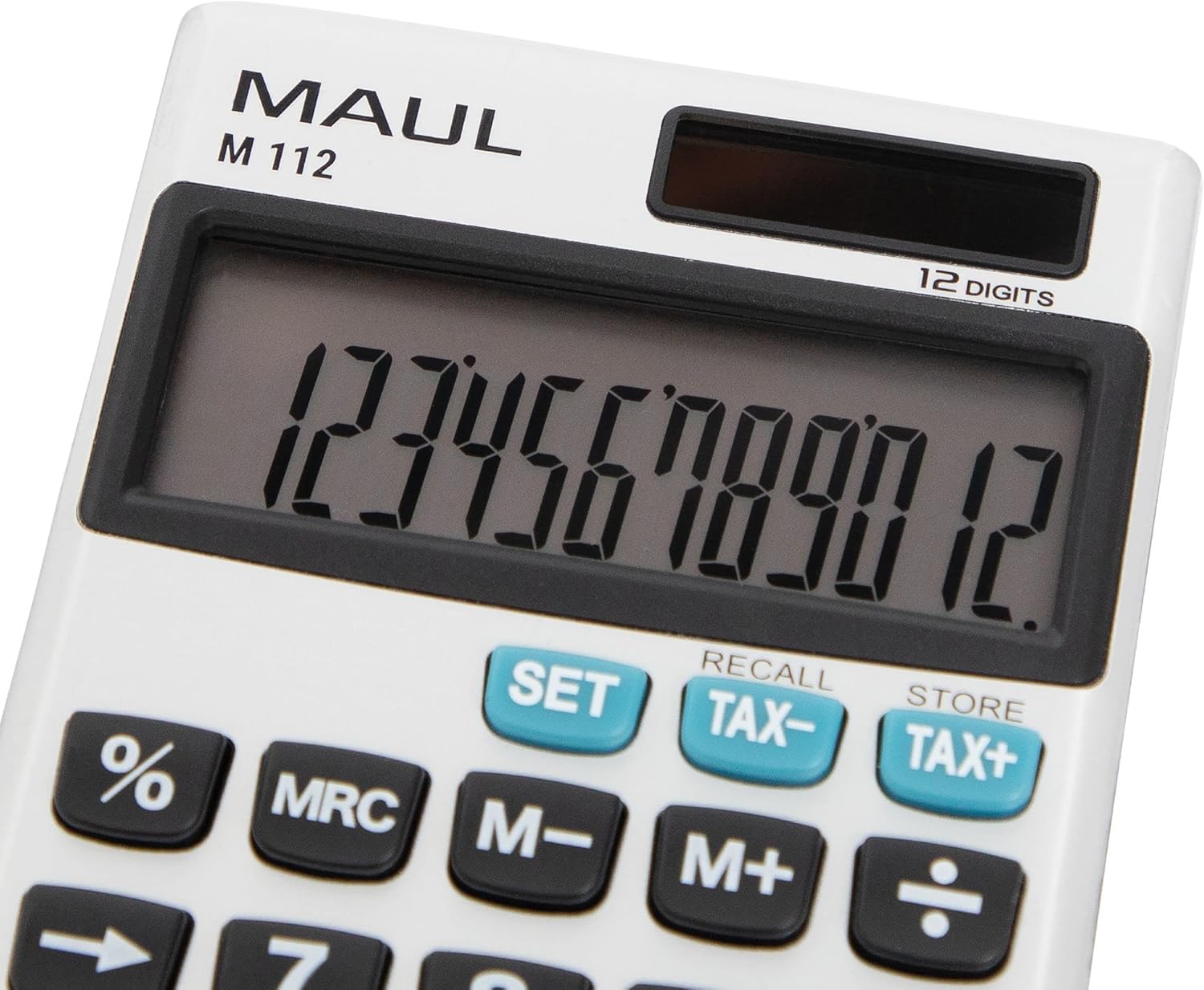
Imagen 4: Un detallado view of the MAUL M112 calculator's 12-digit LCD display and the function keys, including SET, TAX-, TAX+, %, MRC, M-, M+, and the arithmetic operators. This image highlights the clear labeling and distinct coloring of important keys.
Mantenimiento
Limpieza
Para mantener la apariencia y la funcionalidad de la calculadora:
- Wipe the calculator with a soft, dry cloth.
- Para suciedad difícil, ligeramente dampEnjuague el paño con agua. Evite usar productos químicos agresivos o limpiadores abrasivos.
- Ensure no liquid enters the calculator's internal components.
Reemplazo de batería
When the display becomes dim or unresponsive in low light, the LR1130 battery may need replacement.
- Turn the calculator over.
- Locate the battery compartment cover (refer to Image 3).
- Carefully open the cover using a small screwdriver or coin.
- Retire la batería LR1130 vieja.
- Insert a new LR1130 battery, ensuring correct polarity (+/-).
- Vuelva a colocar la tapa del compartimiento de la batería de forma segura.
Nota: Deseche las baterías usadas de acuerdo con las normas locales.
Solución de problemas
- La pantalla está en blanco:
- Asegúrese de que la calculadora esté expuesta a suficiente luz para recibir energía solar.
- Check if the battery needs replacement (refer to Battery Replacement section).
- Prensa ON C·CE para encender el dispositivo.
- Cálculos incorrectos:
- Prensa AC to clear all previous entries and memory.
- Verifique nuevamente sus valores de entrada y la secuencia de operaciones.
- Las teclas no responden:
- Ensure the keys are clean and free from debris.
- If the issue persists, try replacing the battery.
Presupuesto
| Nombre del modelo | M112 |
| Mostrar | 12-digit LCD, 1-line display |
| Fuente de poder | Solar powered and battery operated (LR1130) |
| Dimensiones (L x An x Al) | 11.9 x 7.0 x 1.0 cm |
| Material | Plastic (front made of aluminium) |
| Funciones de la memoria | 3-button memory (M+, M-, MRC) |
| Funciones especiales | Porcentajetage (%), Tax Calculation (TAX+, TAX-), Double Zero (00), Delete Last Digit (→) |
| Apagado automático | Sí |
| Fabricante | Jakob Maul GmbH |
Garantía
The MAUL M112 calculator comes with a 5 año de garantía from the date of purchase. This warranty covers manufacturing defects under normal use. Please retain your proof of purchase for warranty claims. For detailed warranty terms and conditions, please refer to the official MAUL websitio o póngase en contacto con el servicio de atención al cliente.
Apoyo
For further assistance, technical support, or inquiries regarding your MAUL M112 calculator, please visit the official MAUL webSitio web o contacte con su departamento de atención al cliente. La información de contacto suele encontrarse en el empaque del producto o en la información del fabricante. websitio.
Fabricante: Jakob Maul GmbH


