Miofive Dash Cam Dual

Manual de usuario de la cámara de tablero delantera y trasera Miofive

Model: Dash Cam Dual

Introducción

The Miofive Dash Cam Front and Rear system provides comprehensive video recording for your vehicle, featuring 4K resolution for the front camera and 2K for the rear. Designed for reliability and ease of use, this dual dash camera system incorporates advanced features such as 5G WiFi connectivity, built-in GPS, motion detection, and G-sensor technology, all powered by a durable super capacitor. This manual provides detailed instructions for setup, operation, maintenance, and troubleshooting to ensure optimal performance of your device.
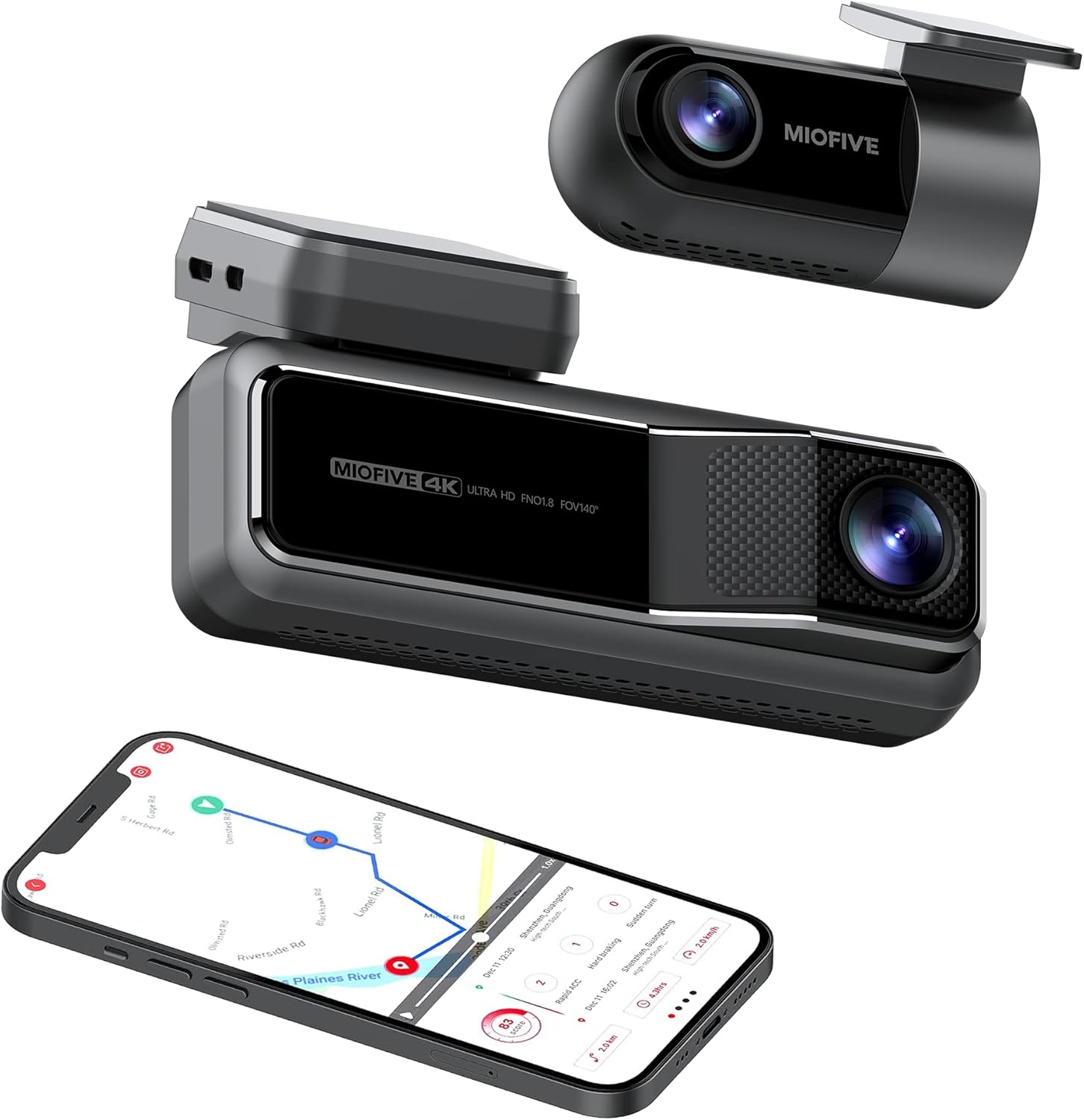
Miofive Dash Cam Front and Rear with smartphone showing map

The Miofive Dash Cam system, featuring both front and rear cameras, along with its companion mobile application.

¿Qué hay en la caja?

Verifique que todos los artículos enumerados a continuación estén incluidos en su paquete:

Contents of the Miofive Dash Cam package laid out

All components included in the Miofive Dash Cam Front and Rear package.

Configuración e instalación

Montaje de la cámara del tablero

  1. Limpie la zona del parabrisas donde se instalará la cámara del tablero. Asegúrese de que esté libre de polvo y grasa.
  2. Apply one of the static stickers to the cleaned area on the windshield. This helps protect your windshield and makes removal easier.
  3. Attach the main dash cam unit to the static sticker using the provided adhesive tape. Press firmly for 30 seconds to ensure a secure bond.
  4. Adjust the camera lens angle to ensure it captures the road ahead clearly, typically centered with the horizon.

Conexión de energía

  1. Conecte el cargador de automóvil provisto al puerto de entrada de energía de la cámara del tablero.
  2. Conecte el cargador de automóvil a la toma de corriente de 12 V de su vehículo (toma del encendedor de cigarrillos).
  3. Route the power cable neatly along the edge of the windshield and dashboard using the crow bar to tuck it into crevices, ensuring it does not obstruct your view o controles del vehículo.
  4. For continuous parking monitoring, an optional hardwire kit (sold separately) is required to provide constant power to the dash cam. Refer to the hardwire kit's instructions for installation.

Conexión de la cámara trasera

  1. Monte la cámara trasera en el parabrisas trasero, generalmente en la parte superior central, para garantizar una visión clara. view of the road behind. Use a static sticker and adhesive tape as with the front camera.
  2. Connect the rear camera cable to the rear camera and route it to the main dash cam unit.
  3. Plug the rear camera cable into the designated rear camera input port on the main dash cam.
Diagram showing front and rear dash cam installation in a car

Illustration of the Miofive Dash Cam Front and Rear installation process.

Instrucciones de funcionamiento

Encendido/apagado

The dash cam will automatically power on and begin recording when connected to your vehicle's power supply and the ignition is turned on. It will power off automatically when the vehicle's power is cut.

Grabación básica

Once powered on, the dash cam will automatically start loop recording. This means it continuously records video in segments, overwriting the oldest footage when the storage is full. Important footagSe puede bloquear para evitar sobrescribir.

5G WiFi and App Control

The Miofive Dash Cam features built-in 5G WiFi for seamless connection to the Miofive mobile application. Download the Miofive app from your smartphone's app store. Once connected, you can:

Miofive App Support iconMiofive App interface on a smartphone

The Miofive App provides comprehensive control and access to your dash cam's features and recordings.

G-Sensor and Motion Detection

The built-in G-sensor automatically detects sudden impacts or collisions. When an event is detected, the dash cam will automatically lock the current video segment, preventing it from being overwritten by loop recording. This ensures critical evidence is preserved.

G-shock Sensor icon

The G-sensor ensures automatic recording and locking of footage durante los impactos.

Monitor de estacionamiento

With the optional hardwire kit, the dash cam can monitor your vehicle even when parked. The 24-hour parking monitor and time-lapse recording features capture disturbances or continuous footage, providing security when you're away from your car.

Image showing a smartphone with a car icon and text 'Always On Guard' related to parking monitoring

The parking monitor feature provides continuous surveillance for your vehicle when parked.

Visión nocturna

Equipped with the Sony Starvis IMX415 sensor and High Dynamic Range (HDR) technology, the Miofive Dash Cam delivers clear and bright video quality in low-light conditions, enhancing visibility during nighttime driving or in dimly lit environments.

Comparison of Sony Starvis Night Vision versus Normal Dashcam Sensor

Enhanced night vision capabilities for clear recordings in low light.

AI Algorithm and Go Assist

The intelligent AI algorithm monitors road conditions and provides helpful alerts. The Go Assist feature can notify you of sudden turns, braking, and accelerations, and prompt you to proceed when the vehicle ahead moves, improving driving awareness.

AI Algorithm icon

AI algorithm for smart driving assistance and alerts.

Seguimiento GPS

Built-in GPS technology records your driving route, speed, and coordinates, providing detailed information for each journey. This data can be accessed and reviewed through the Miofive app.

Built-in GPS technology and AI algorithm features

Integrated GPS technology records essential driving data.

Mantenimiento

Regular maintenance helps ensure the longevity and optimal performance of your Miofive Dash Cam:

Solución de problemas

Problemas comunes y soluciones

Presupuesto

CaracterísticaDetalle
MarcaMiocinco
Nombre del modeloDash Cam Dual
Dimensiones del producto2.87 x 5.98 x 6.94 pulgadas
Peso del artículo1.81 libras
FabricanteMIOFIVE Technology Limited Co., Ltd.
UPCNovatek Processor
Sensor de imagensony starvis
PantallaPantalla IPS de 2.2 pulgadas
campo de visión de la cámara140° horizontales y verticales Viewángulos de ing
AberturaF1.8
Image Resolution (Front)4K UHD (3840x2160) @30fps
Image Resolution (Rear)2K QHD (2560x1440) @30fps
AlmacenamientoMemoria eMMC integrada de 128 GB
Sensor GBuilt-in 6 Gyro sensor
Wifi2.4 / 5 GHz
Fuente de alimentaciónSupercondensador
Entrada de potencia5 V/2.4 A
Temperatura de funcionamiento-10 °C a 45 °C (14 °F a 113 °F)
Tecnología de conectividadWifi
Tipo de servicio del vehículoMinivan, Autobús, Coche, Camión
Tipo de montajeMontaje de parabrisas
ColorNegro
Miofive Dash Cam Dual specifications diagram

Detailed specifications for the Miofive Dash Cam Dual.

Garantía y soporte

Miofive is committed to providing excellent customer service and support for its products:

For support inquiries, please contact:

Correo electrónico: soporte@miofive.com

Warranty and Service information with icons for money back, customer support, and warranty coverage

Miofive's commitment to customer satisfaction and product support.

Documentos relacionados - Dash Cam Dual

Preview Manual del usuario de la cámara de salpicadero Miofive: instalación, funciones y solución de problemas
Un manual de usuario completo para la Miofive DASH CAM, que detalla los pasos de instalación, el uso de la aplicación, las características del dispositivo, la solución de problemas comunes, las especificaciones técnicas y las precauciones de seguridad importantes.
Preview Manual de usuario de la cámara para salpicadero MIOFIVE S1
Manual de usuario completo para la Dash Cam MIOFIVE S1, que cubre la instalación, configuración, conexión de aplicaciones, funciones, resolución de problemas y especificaciones.
Preview MIOFIVE MINI 2 User Manual: Installation, Operation, and Specifications
Comprehensive user manual for the MIOFIVE MINI 2 dashcam, covering installation, app connection, features, specifications, safety precautions, and support.
Preview Manual del usuario de la cámara de tablero MIOFIVE S1 E: guía de instalación, funcionamiento y solución de problemas
Manual de usuario completo de la cámara de salpicadero MIOFIVE S1 E. Abarca la instalación, la conexión de la app, las funciones, la resolución de problemas y las especificaciones para una conducción segura y una grabación óptimas.
Preview Guía de uso rápido de la cámara de tablero LAMTTO: configuración y solución de problemas
Esta guía proporciona instrucciones esenciales de configuración y responde a preguntas frecuentes sobre las cámaras de tablero LAMTTO, incluyendo errores de memoria, problemas de alimentación, acceso a la interfaz de configuración, problemas de grabación y conectividad wifi. Aprenda a poner en funcionamiento su cámara de tablero LAMTTO.
Preview Manual del usuario de la cámara de tablero QOZ 4K: instalación, configuración y solución de problemas
Manual de usuario completo de la cámara de tablero QOZ 4K. Aprenda a instalarla, conectarla, configurarla y solucionar problemas comunes de la cámara de tablero de su auto.