1. Introducción
The Café Couture Countertop Oven is designed to flawlessly prepare a wide range of recipes, from snacks to elaborate meals. It features 14 essential cooking modes, including Air Fry, CrispFinish, Bake, Broil, Roast, Toast, Bagel, Pizza, Cookies, Proof, Dehydrate, Slow Cook, Reheat, and Keep Warm. This manual provides detailed instructions for safe and efficient operation of your new appliance.

Frente view of the Café Couture Countertop Oven in Matte White, showcasing a roasted chicken on a baking tray inside the illuminated oven cavity.
2. Información importante de seguridad
Always read all instructions before using this appliance. Basic safety precautions should be followed, including:
- No toque superficies calientes. Utilice asas o perillas.
- Para protegerse contra descargas eléctricas, no sumerja el cable, los enchufes ni el aparato en agua ni en ningún otro líquido.
- Es necesaria una estrecha supervisión cuando cualquier aparato sea utilizado por niños o cerca de ellos.
- Desenchufe el aparato del tomacorriente cuando no lo utilice y antes de limpiarlo. Deje que se enfríe antes de colocar o quitar piezas.
- No opere ningún aparato con un cable o enchufe dañado o después de que el aparato funcione mal o haya sufrido algún daño.
- El uso de accesorios no recomendados por el fabricante del aparato puede provocar lesiones.
- No utilizar en exteriores.
- No deje que el cable cuelgue del borde de la mesa o mostrador, ni que toque superficies calientes.
- No lo coloque sobre o cerca de un quemador de gas o eléctrico caliente, ni dentro de un horno caliente.
- Se debe tener mucho cuidado al mover un aparato que contenga aceite caliente u otros líquidos calientes.
- Siempre conecte primero el enchufe al aparato y luego el cable a la toma de corriente. Para desconectarlo, apague cualquier control y desenchúfelo de la toma de corriente.
- No utilice el aparato para ningún fin distinto del previsto.
3. ¿Qué hay en la caja?
Your Café Couture Countertop Oven comes with the following accessories:
- Heavy-Duty Wire Rack
- Bandeja de hornear
- 12" Pizza Pan
- Cesta para freír/deshidratar al aire
- Bandeja para migas
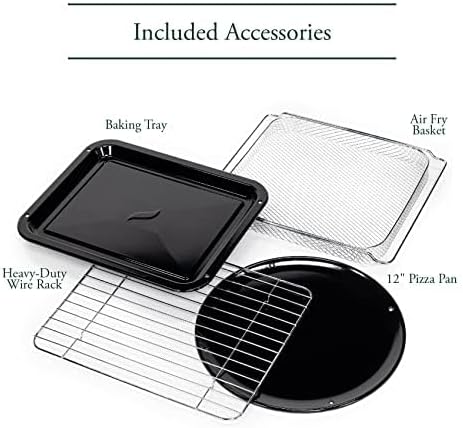
A collection of accessories included with the oven: a heavy-duty wire rack, a baking tray, a 12-inch pizza pan, and an air fry/dehydrate basket.
This video showcases the various accessories included with the Café Couture Oven, such as the heavy-duty wire rack, pizza pan, baking pan, and air fry basket, demonstrating their use with different foods like bagels, pizza, and avocado fries.
4. Configuración
4.1 Preparación inicial
- Before first use, wipe the interior walls of the oven with a damp esponja.
- Accessories may be cleaned in the dishwasher, but hand washing with warm, soapy water is recommended for longevity.
4.2 Colocación
- Place the oven on a level, heat-resistant surface.
- Ensure at least 4 inches of clearance on all sides for proper ventilation.
- No coloque ni almacene ningún artículo encima del horno, excepto los accesorios incluidos.
4.3 First Use Operation
- Plug in the oven. The appliance alarm will sound, and the control display will illuminate.
- It is recommended to operate the oven empty on Air Fry mode for 20 minutes at 400°F (205°C) before cooking for the first time. This helps to eliminate any manufacturing odors.
- During this initial operation, the unit may emit visible vapors and a slight odor. This is normal, safe, and not detrimental to the oven.
This video provides initial setup instructions for the Café Couture Oven, including wiping the interior, cleaning accessories, proper placement on a heat-resistant surface, and the recommended first-time operation on Air Fry mode to eliminate manufacturing odors.
5. Instrucciones de funcionamiento
5.1 Selección de un modo de cocción
- Rotate the 'Cook Mode' knob until your desired cooking mode is shown on the control display.
- When using the oven for the first time, default cooking settings will be displayed. Otherwise, the oven will always store the last used settings for any given cooking mode.
5.2 Adjusting Cooking Mode Settings
- The settings for each cooking mode can be adjusted using the 'Temp/Time/Slices/Shade' knob.
- Rotate the knob clockwise to increase the temperature or time.
- Rotate the knob counter-clockwise to decrease the temperature or time.
- The 'Temp/Time/Slices/Shade' knob also functions as a button. Pushing the button toggles the setting being adjusted (e.g., between temperature and time).
5.3 Starting the Oven
- After selecting your desired cooking mode and adjusting the settings, place the food in the oven.
- Presione el botón “Inicio” para comenzar a cocinar.
- For Bake, Roast, and Cookies modes, the 'Preheating' indicator will illuminate on the control display, and the oven will begin heating to the set temperature.
- When the oven has reached the set temperature, the oven alarm will sound, and the 'Preheating' indicator will disappear. The 'Press Start' reminder will illuminate. If the 'Start' button is not pressed within 10 minutes, the oven will automatically turn off.
- The preheat mode may be skipped manually by pressing the 'Start' button a second time. The cooking timer will begin counting down immediately.
- All other cooking modes do not require preheating. When starting one of these modes, the cooking timer will begin counting down immediately.
5.4 Cancelling a Cooking Mode
- When the oven has finished cooking, it will shut off automatically, and the oven alarm will sound to indicate that the cooking cycle is complete.
- The cooking cycle can also be ended manually by pressing the 'Cancel' button.
5.5 Turning on the Oven Light
- To turn on the oven light, press the 'Light' button to the left of the control display.
- To turn off the light, press the 'Light' button again.
- The oven light will also automatically turn on whenever the oven door is opened.
5.6 Activating the Convection Fan
- Some cooking modes offer an optional convection feature.
- To manually activate the convection fan for these cooking modes, press the 'Conv.' button to the right of the control display.

The Café Couture Countertop Oven's control panel showing 'ROAST' mode, alongside a comprehensive list of its 14 cooking modes: Air Fry, Crisp Finish, Bake, Broil, Roast, Toast, Bagel, Pizza, Cookies, Proof, Dehydrate, Slow Cook, Reheat, and Keep Warm.
This video demonstrates the CrispFinish feature of the Café Couture Oven, showing how it can be used to brown, caramelize, melt, or crisp dishes like crème brûlée.
This video provides a guide on how to use the Café Couture Oven, covering selection of cooking modes, adjusting settings, starting the oven, and cancelling a cooking cycle. It also shows how to turn the oven light on/off and activate the convection fan.
This video highlights the large capacity of the Café Couture Oven, demonstrating how it can accommodate various dishes like a whole roasted chicken, lasagna, and pizza.
6. Limpieza y mantenimiento
6.1 Limpieza del interior
- Desenchufe siempre el horno y déjelo enfriar completamente antes de limpiarlo.
- Limpia las paredes interiores con un anuncio.amp sponge and mild detergent. Avoid abrasive cleaners or scouring pads.
- Para las manchas difíciles, se puede aplicar una pasta de bicarbonato de sodio y agua, dejar actuar durante unos minutos y luego limpiar.
6.2 Accesorios de limpieza
- All included accessories (wire rack, baking tray, pizza pan, air fry/dehydrate basket, crumb tray) can be washed by hand with warm, soapy water.
- Most accessories are dishwasher safe, but hand washing is recommended to preserve their finish and extend their lifespan.
- No coloque la bandeja para migas en el lavavajillas.
6.3 Limpieza del exterior
- Limpie las superficies exteriores con un paño suave, damp paño.
- Evite utilizar productos químicos agresivos o materiales abrasivos que puedan dañar el acabado.
7. Solución de problemas
| Problema | Posible causa | Solución |
|---|---|---|
| El horno no enciende. | No enchufado; sin energíatage; se disparó el disyuntor. | Asegúrese de que el horno esté bien enchufado a una toma de corriente que funcione. Revise el disyuntor de la casa. |
| Los alimentos no se cocinan de manera uniforme. | Incorrect rack position; overcrowding; uneven food distribution. | Refer to recipe for recommended rack position. Avoid overcrowding the oven. Arrange food in a single layer for best results. |
| Oven emits smoke or strong odor during first use. | Aceites residuales de fabricación. | This is normal. Operate empty on Air Fry mode at 400°F for 20 minutes to burn off residues. Ensure adequate ventilation. |
| Display shows "Press Start" but oven doesn't start. | Preheating cycle complete, awaiting confirmation. | Press the 'Start' button again to begin the cooking timer. |
8. Especificaciones
- Marca: Cafetería
- Nombre del modelo: Horno Café™ Couture™ con freidora de aire
- Número de modelo: C9OAAAS4RW3
- Color: Blanco mate
- Dimensiones del producto: 17" de profundidad x 18.6" de ancho x 14" de alto
- Peso del artículo: 28 libras
- Capacidad: 0.8 pies cúbicos
- Tipo de control: Perilla
- Estilo de puerta: Puerta desplegable
- Tipo de material de la puerta: Vidrio templado
- Fuente de energía: AC
- Rango de temperatura: 80 - 450 grados Fahrenheit
- Número de estantes: 1
- Característica especial: CrispFinish™ - Use CrispFinish at the end of any standard cooking mode to melt, caramelize, brown or crisp, and put the perfect finishing touch on any of your signature dishes.
- Conectividad: WiFi & Smart Connected, Voice Control (via SmartHQ app, Echo, or Google Home devices)
- Código postal: 084691857563

Lado view of the Café Couture Countertop Oven in Matte White, illustrating its dimensions: 18.6 inches width, 14 inches height, and 17 inches depth. An air fry basket is visible inside.

A hand interacting with the SmartHQ app on a smartphone, demonstrating remote control capabilities for the Café Couture Countertop Oven. The oven's display shows 'AIR FRY' mode.
9. Garantía y soporte
For detailed warranty information, please refer to the warranty card included with your product packaging or visit the official Café Appliances website. For customer support, technical assistance, or to register your product, please visit the Café Appliances support page or contact their customer service line.
You can also connect your Café Smart Appliance by downloading the free SmartHQ app from your Apple or Android smartphone. Open the app, sign in or create an account, and follow the instructions to connect your appliance.
- Soporte en línea: Visita el Tienda de café en Amazon Para obtener información sobre productos y recursos.
- SmartHQ App: Disponible en Apple App Store y Google Play Store.