Introducción
This manual provides detailed instructions for the setup, operation, and maintenance of your LFF Atomic Clock Model LWC204. This digital clock features a large, easy-to-read display, atomic time synchronization, and a wireless sensor for indoor and outdoor temperature readings. Please read this manual thoroughly before use to ensure proper functionality and longevity of your device.
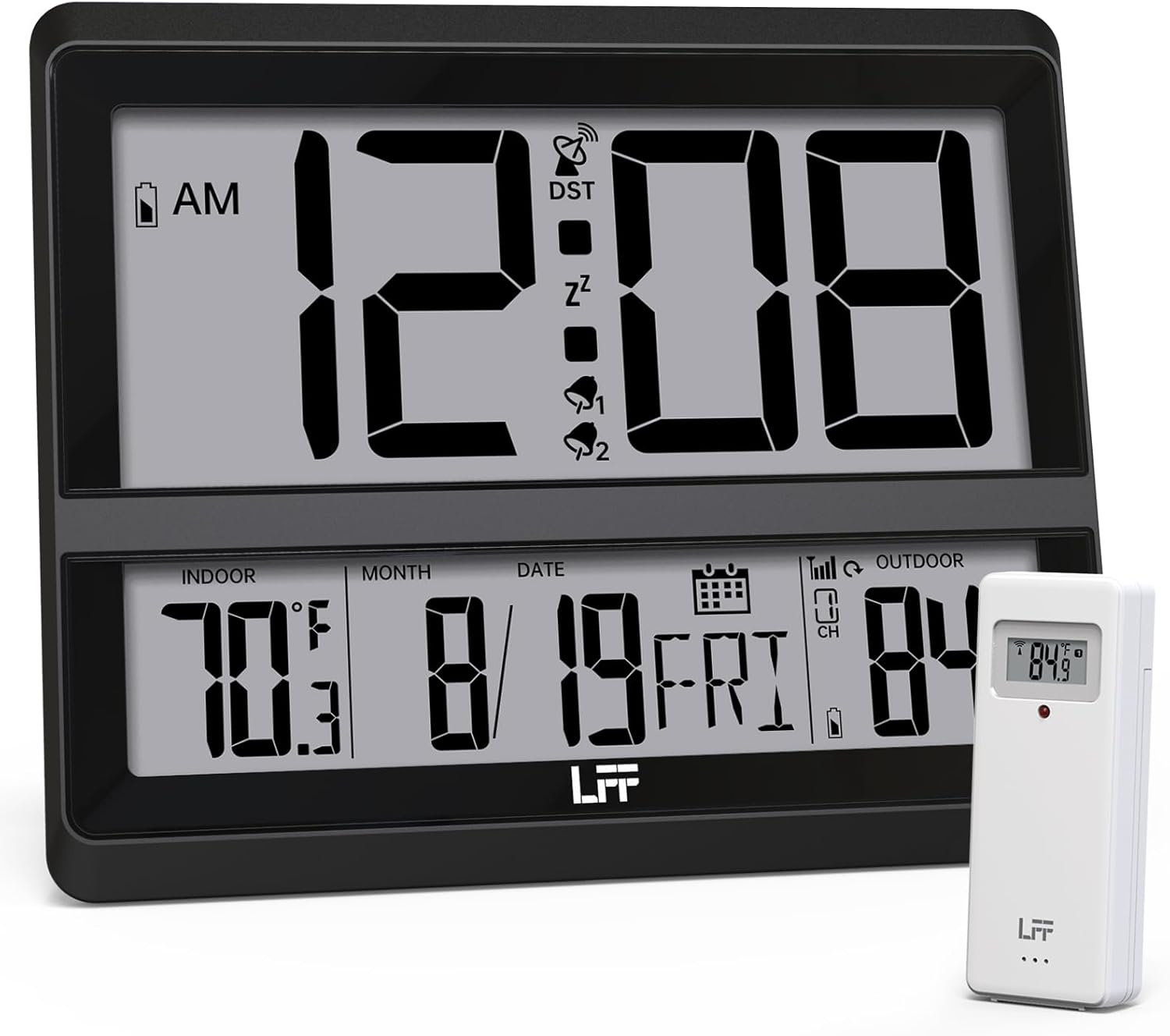
Image: The LFF Atomic Clock main unit with its wireless outdoor temperature sensor.
Contenido del paquete
- LFF Atomic Clock Main Unit
- Sensor de temperatura exterior inalámbrico
- Manual de instrucciones (este documento)
- Bracket for table standing
Note: Batteries are not included. The main clock unit requires 3x AA batteries, and the outdoor sensor requires 2x AAA batteries.
Producto terminadoview
Familiarize yourself with the main components and controls of your LFF Atomic Clock.

Image: Front display and rear button layout of the LFF Atomic Clock.
Características de la pantalla:
- Visualización de la hora: Large digits for current time (12/24 Hour format).
- Indicador AM/PM: Para formato de 12 horas.
- DST Symbol: Indicates Daylight Saving Time is active.
- RCC Reception Icon: Shows status of atomic time signal reception.
- Alarm Icons (Zz, 1, 2): Indicate active alarms and snooze function.
- Temperatura interior: Current temperature inside (°C/°F).
- Temperatura exterior: Current temperature from wireless sensor (°C/°F).
- Date & Weekday: Month, Day, and Day of the Week.
- Indicador de batería baja: For both main unit and outdoor sensor.
Botones traseros:
- Botón de ajuste: Entra en el modo de configuración.
- Botón de alarma: Accede a la configuración de la alarma.
- Botón CANAL: Cycles through outdoor sensor channels (if multiple sensors are used).
- DOWN/WAVE/°C/°F Button: Decreases values in setting mode, manually initiates atomic signal search (WAVE), or switches temperature units.
- UP/ALARM Button: Increases values in setting mode, or activates/deactivates alarm.
Configuración
1. Instalación de la batería
- Sensor exterior:
- Abra el compartimento de la batería en la parte posterior del sensor exterior inalámbrico.
- Inserte 2 pilas AAA, respetando la polaridad correcta (+/-).
- Cierre bien el compartimento de la batería.
- Note: For temperatures below -4°F (-20°C), Lithium batteries are recommended for the outdoor sensor.
- Unidad de reloj principal:
- Abra el compartimiento de la batería en la parte posterior de la unidad del reloj principal.
- Inserte 3 pilas AA, respetando la polaridad correcta (+/-).
- Cierre bien el compartimento de la batería.

Image: Battery compartments for the main clock and outdoor sensor.
2. Sincronización inicial y configuración
Upon battery installation, the clock will automatically begin searching for the WWVB atomic time signal and attempt to connect with the outdoor sensor.
- The RCC Reception Icon will flash during the atomic signal search. This process may take several minutes or up to 24 hours depending on signal strength.
- The outdoor temperature should appear on the display within a few minutes after the sensor batteries are installed. If not, press the CANAL button on the main unit to cycle through channels or press the reset button on the outdoor sensor.
3. Manual Settings (if needed)
If the atomic signal is not received or you wish to adjust settings manually:
- Configuración de zona horaria:
- Mantenga pulsado el COLOCAR button for 3 seconds to enter time zone setting.
- Utilice el UP/ALARM or DOWN/WAVE/°C/°F buttons to select your time zone (e.g., PST, MST, CST, EST).
- Prensa COLOCAR para confirmar y pasar al siguiente ajuste.
- Formato de 12/24 horas:
- After time zone, the hour format will flash. Use UP/ALARM or DOWN/WAVE/°C/°F to select 12-hour or 24-hour format.
- Prensa COLOCAR Para confirmar.
- Configuración manual de hora y fecha:
- Continuar presionando COLOCAR to cycle through Year, Month, Day, Hour, Minute settings.
- Usar UP/ALARM or DOWN/WAVE/°C/°F para ajustar cada valor.
- Prensa COLOCAR para confirmar cada ajuste.
- Horario de verano (DST):
- After setting the time, the DST setting will flash. Use UP/ALARM or DOWN/WAVE/°C/°F to enable or disable DST.
- Prensa COLOCAR para salir del modo de configuración.

Image: The clock automatically corrects time daily via WWVB signal.
4. Ubicación del sensor exterior
- Place the wireless outdoor sensor within 330 feet (100 meters) of the main unit.
- Choose a shaded location to avoid direct sunlight, which can affect temperature accuracy.
- Asegúrese de que el sensor esté protegido de la lluvia y la nieve directas.
- Evite colocar el sensor cerca de objetos metálicos grandes o aparatos eléctricos que puedan interferir con la señal inalámbrica.

Image: Wireless range of 330 feet for the outdoor sensor.
Instrucciones de funcionamiento
1. Modos de visualización
- The clock continuously displays time, indoor temperature, outdoor temperature, date, and day of the week.
- Presione el DOWN/WAVE/°C/°F Botón para cambiar entre Celsius (°C) y Fahrenheit (°F) para la visualización de la temperatura.
2. Función de alarma
- Configuración de la alarma:
- Presione el ALARMA button once to display Alarm 1 time. Press again for Alarm 2.
- While an alarm time is displayed, press and hold the ALARMA button for 3 seconds to enter alarm setting mode. The hour will flash.
- Usar UP/ALARM or DOWN/WAVE/°C/°F para ajustar la hora. prensa ALARMA Para confirmar.
- El minuto parpadeará. Usar UP/ALARM or DOWN/WAVE/°C/°F para ajustar los minutos. prensa ALARMA para confirmar y salir de la configuración de alarma.
- Activación/desactivación de la alarma:
- Presione el ALARMA button to display Alarm 1 or Alarm 2.
- Presione el UP/ALARM button to toggle the alarm ON or OFF. The corresponding alarm icon (1 or 2) will appear/disappear on the display.
- Función de repetición:
- Cuando suene la alarma, presione el DORMITAR button (usually located on top or a dedicated button) to activate snooze. The alarm will sound again after approximately 5-10 minutes.
- Para detener la alarma por completo, presione cualquier otro botón (por ejemplo, ALARMA, COLOCAR).
3. Búsqueda manual de señales atómicas
If you wish to manually initiate a search for the WWVB atomic time signal, press and hold the DOWN/WAVE/°C/°F button for 3 seconds. The RCC Reception Icon will flash, indicating the search is in progress.
Mantenimiento
- Limpieza: Limpie el reloj y el sensor con un paño suave y seco. No utilice limpiadores abrasivos ni disolventes.
- Reemplazo de batería: When the low battery indicator appears on the display for either the main unit or the outdoor sensor, replace the batteries promptly to ensure continuous operation and accurate readings. Refer to the "Battery Installation" section for details.
- Almacenamiento: Si va a almacenar el dispositivo durante un período prolongado, retire todas las baterías para evitar fugas.
Solución de problemas
| Problema | Posible causa | Solución |
|---|---|---|
| No hay pantalla en la unidad principal. | Las baterías están agotadas o instaladas incorrectamente. | Compruebe la polaridad de las pilas y sustitúyalas por pilas AA nuevas. |
| Temperatura exterior no se muestra o es incorrecta. |
|
|
| Atomic time signal not received (RCC icon flashing or not displayed). |
|
|
| Time is incorrect after atomic synchronization. | Configuración de zona horaria incorrecta. | Adjust the time zone setting as described in the "Manual Settings" section. |
Presupuesto
| Característica | Detalle |
|---|---|
| Número de modelo | LWC204 |
| Tipo de pantalla | LCD digital |
| Fuente de alimentación (unidad principal) | 3 pilas AA (no incluidas) |
| Fuente de alimentación (sensor exterior) | 2 pilas AAA (no incluidas) |
| Rango de temperatura interior | 32 °F a 122 °F (0 °C a 50 °C) |
| Rango de temperatura exterior | -58 °F a 158 °F (-50 °C a 70 °C) |
| alcance inalámbrico | Hasta 330 pies (100 metros) al aire libre |
| Formato de hora | 12/24 horas seleccionables |
| Dimensiones (Unidad principal) | 7.48" W x 8.66" H (approx.) |
| Opciones de montaje | Wall Mount or Tabletop (bracket included) |
Garantía y soporte
LFF products are designed for reliability and performance. For specific warranty information, please refer to the warranty card included with your purchase or contact LFF customer support.
For technical assistance or further inquiries, please visit the official LFF webSitio web o contacte con su departamento de atención al cliente. Los datos de contacto suelen estar disponibles en el empaque del producto o en la página web oficial de la marca.


