Introducción
This manual provides comprehensive instructions for the assembly, operation, and maintenance of your ODK 66-inch L-Shaped Computer Desk. Please read this manual thoroughly before beginning assembly or use to ensure proper setup and long-term durability of your product. Keep this manual for future reference.
Información de seguridad
- Asegúrese de que todos los componentes estén presentes y sin daños antes del montaje. No lo utilice si alguna pieza falta o está dañada.
- Monte el escritorio sobre una superficie suave y limpia para evitar rayones.
- Do not overtighten screws during assembly to avoid stripping threads. Tighten to approximately 70% initially, then a final 1/4 turn after all components are aligned.
- Mantenga las piezas pequeñas fuera del alcance de los niños durante el montaje.
- No se pare ni se siente sobre el escritorio.
- Distribuya el peso uniformemente sobre la superficie del escritorio.
- Regularly check and tighten all fasteners to ensure stability.
Contenido del paquete
Your ODK L-Shaped Computer Desk package includes all necessary components for assembly, such as P2 MDF boards, metal frame parts, a PC stand, storage shelves, a monitor stand, and iron hooks. All required hardware (screws, adjustable leg pads) is also included.
Note: A detailed parts list with labels is typically provided within the product packaging. Please refer to that list to verify all components.
Instrucciones de instalación y montaje
Follow these general steps for assembling your ODK L-Shaped Computer Desk. For detailed, step-by-step diagrams, please refer to the assembly guide included in your product packaging.
- Desembalaje e identificación de las piezas: Desempaque con cuidado todos los componentes y colóquelos sobre una superficie limpia y suave. Identifique cada pieza utilizando las etiquetas proporcionadas y la lista de piezas.
- Montar el marco: Begin by connecting the metal frame components. Ensure all connections are secure but do not fully tighten screws yet.
- Adjuntar paneles de escritorio: Secure the P2 MDF desktop panels to the assembled frame. The desk features finished sides on all planks, ensuring a consistent aesthetic.
- Instalar elementos de almacenamiento: Attach the PC stand, two-tier storage shelves, and monitor stand as indicated in your specific assembly guide.
- Attach Iron Hooks: Secure the two iron hooks to the designated locations on the desk frame.
- Ajuste final: Once all components are in place and aligned, gradually tighten all screws to approximately 70% tightness. After confirming alignment, give each screw an additional 1/4 turn to secure the desk firmly. Avoid overtightening.
- Ajuste de las almohadillas de las piernas: Adjust the leg pads on the bottom of the desk to compensate for uneven floors.
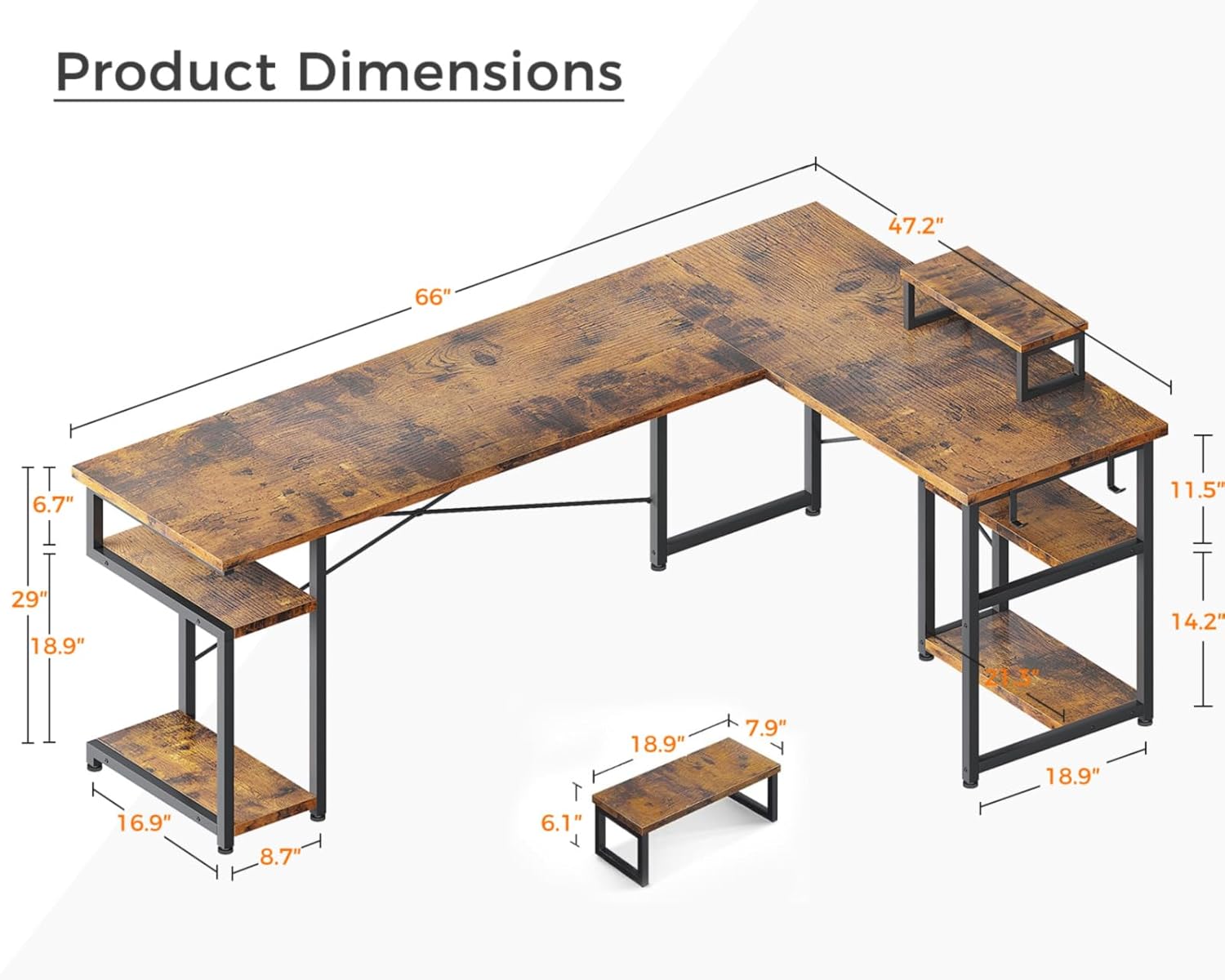
Imagen: Detailed product dimensions for the ODK 66-inch L-Shaped Computer Desk, showing overall length, width, height, and dimensions of the integrated shelves and monitor stand.

Imagen: De cerca view highlighting the movable monitor stand, two integrated iron hooks for accessories, and the high-quality, scratch-resistant desktop surface of the ODK L-Shaped Desk.

Imagen: Ilustración de la ample storage shelves on both the left and right sections of the ODK L-Shaped Desk, designed to accommodate a PC tower and various office supplies or gaming accessories.
Directrices de funcionamiento
The ODK L-Shaped Computer Desk is designed for versatile use in home offices, gaming setups, and writing environments. Its L-shaped design maximizes corner space, providing ample room for multiple monitors and accessories.
- Soporte de monitor: Utilize the movable monitor stand to elevate your screen to an ergonomic viewing height, reducing neck and eye strain.
- Estantes de almacenamiento: The two-tier storage shelves and PC stand provide dedicated space for your computer tower, books, documents, and other office or gaming essentials.
- Iron Hooks: Use the integrated iron hooks to hang headphones, cables, or other accessories, keeping your workspace tidy.
- Distribución del peso: While the desk is sturdy, avoid placing excessively heavy items on one section. Distribute the weight of your equipment and belongings evenly across the desktop and shelves.
- Espacio para las piernas: The 29.1-inch height from the floor to the desktop provides comfortable legroom for most users.
Mantenimiento
Proper maintenance will extend the life and appearance of your ODK L-Shaped Computer Desk.
- Limpieza: The desk surface is easily cleanable. Wipe regularly with a soft, damp paño. Evite productos químicos agresivos o limpiadores abrasivos que puedan dañar el acabado.
- Derrames: The textured surface is designed to be anti-skidding and anti-scratching. In case of spills, wipe them immediately to prevent staining or damage.
- Sujetadores: Periodically check all screws and bolts to ensure they remain tight. Retighten as necessary to maintain the desk's stability.
- Protección: While the desk is scratch-resistant, using coasters for drinks and pads under heavy or sharp objects is recommended to preserve the surface.
Solución de problemas
If you encounter any issues with your ODK L-Shaped Computer Desk, refer to the following common solutions:
- El escritorio se tambalea:
- Asegúrese de que todos los tornillos estén bien apretados.
- Adjust the leg pads on the bottom of the desk to compensate for uneven flooring.
- Piezas que no encajan:
- Vuelva a revisar las instrucciones de montaje para asegurarse de que las piezas estén orientadas correctamente.
- Do not force parts together. If a part does not fit, re-examine the steps and part identification.
- Piezas faltantes o dañadas:
- If any parts are missing or damaged upon arrival, contact ODK customer service immediately for assistance.
For further assistance, please contact ODK customer service.
Presupuesto
| Marca | ODK |
| Número de modelo | B01XS011256SA |
| Forma | Forma de L |
| Diseño de escritorio | Escritorio de computadora |
| Dimensiones del producto (Pr. x An. x Al.) | 47.24" de profundidad x 66.14" de ancho x 29.53" de alto |
| Color | Vinotage |
| Estilo | Vinotage |
| Material base | Acero aleado |
| Tipo de material superior | Madera de ingeniería, metal |
| Tipo de acabado | De madera |
| Características especiales | Monitor Stand, Scratch Resistant |
| Usos recomendados | Juegos, Trabajo, Escritura |
| Peso del artículo | 59 libras |
| Montaje requerido | Sí |
Garantía y soporte
ODK is committed to customer satisfaction. If you encounter any issues regarding product quality or experience problems during use, please contact ODK customer service. Easy and fast replacement is guaranteed for eligible issues.
For more information or to contact support, please visit the official ODK store or contact your retailer.


