1. Producto terminadoview
The AUKEY LS02 Smart Watch is designed to help you monitor your daily activities and stay connected. It features a large 1.4-inch TFT screen with a 320 x 320 pixel resolution, providing clear display of information.
Las funcionalidades clave incluyen:
- Display of daily activity information and phone notifications.
- Synchronization with the AUKEY Fit App for call, text, and chat message alerts.
- Control of your phone's music playlist directly from your wrist.
- Accurate fitness tracking for various activities like running, cycling, and walking.
- Monitoring of performance data such as steps, activity minutes, distance, and calories burned.
- Compatibility with both iPhone and Android smartphones.

Figura 1.1: Frente view of the AUKEY LS02 Smart Watch, showing the display with time, date, and various health metrics.
2. Guía de configuración
2.1. ¿Qué hay en la caja?
Al desembalar, verifique que todos los componentes estén presentes:
- AUKEY LS02 Smart Watch (with strap attached)
- Cable de carga
- Manual de instrucciones (este documento)
2.2. Carga inicial
Before first use, fully charge your AUKEY LS02 Smart Watch.
- Conecte el cable de carga magnético a los contactos de carga en la parte posterior del reloj.
- Conecte el extremo USB del cable de carga a un adaptador de corriente USB estándar (se recomienda 5 V/1 A) o al puerto USB de una computadora.
- La pantalla del reloj indicará el estado de carga. La carga completa demora aproximadamente 2 horas.
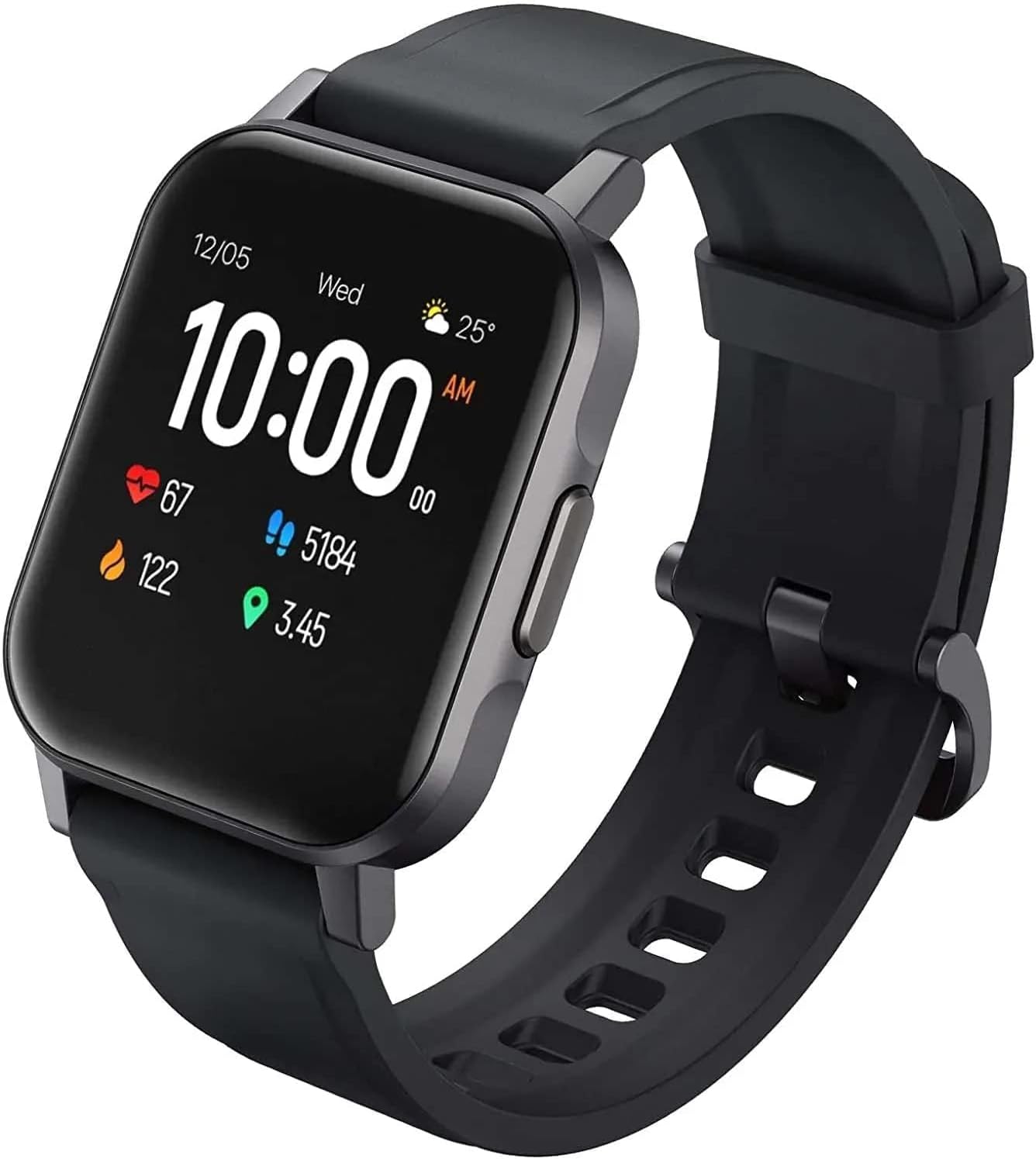
Figura 2.1: Angulado view of the AUKEY LS02 Smart Watch, highlighting the watch body and strap connection.
2.3. Emparejamiento con su teléfono inteligente
To unlock the full features of your smartwatch, pair it with the AUKEY Fit App.
- Download the AUKEY Fit App: Buscar "AUKEY Fit" in your smartphone's app store (Google Play Store for Android or Apple App Store for iOS) and install it.
- Habilitar Bluetooth: Asegúrese de que Bluetooth esté habilitado en su teléfono inteligente.
- Abra la aplicación: Launch the AUKEY Fit App and follow the on-screen instructions to create an account or log in.
- Agregar dispositivo: In the app, navigate to the "Device" or "Add Device" section. The app will search for nearby AUKEY smartwatches.
- Seleccione su reloj: From the list of found devices, select "AUKEY LS02" or a similar identifier.
- Confirmar emparejamiento: Es posible que aparezca una solicitud de emparejamiento tanto en el teléfono como en el reloj. Confirma el emparejamiento en ambos dispositivos.
- Sincronización: Once paired, the watch will synchronize data with the app, including time, date, and personal settings.
Nota: Keep your watch close to your smartphone during the pairing process to ensure a stable connection.
3. Funcionamiento de su reloj inteligente
3.1. Navegación básica
- Pantalla táctil: Desliza el dedo hacia la izquierda/derecha, arriba/abajo para navegar por los menús y las pantallas. Toca para seleccionar una opción.
- Botón lateral: Press the side button to wake the screen, return to the home screen, or access the main menu (functionality may vary based on context).
3.2. Mostrar información
The main watch face typically displays:
- Hora y fecha
- Nivel de batería
- Estado de la conexión Bluetooth
- Daily Steps Count
- Frecuencia cardíaca
- Calorias quemadas
- Distancia recorrida
Swipe through different screens to access more detailed information or specific functions.
3.3. Notificaciones
Once paired with the AUKEY Fit App, your watch can receive notifications from your smartphone.
- Ensure notification permissions are enabled for the AUKEY Fit App in your phone's settings.
- Within the AUKEY Fit App, select which applications you wish to receive notifications from (e.g., calls, SMS, WhatsApp, Facebook).
- Cuando llega una notificación, el reloj vibrará y mostrará el contenido del mensaje.
- Swipe up or down on the watch face to view notificaciones recientes
3.4. Seguimiento de la actividad física
The watch automatically tracks your daily activity and offers modes for specific exercises.
- Actividad diaria: Monitors steps, distance, calories, and active minutes throughout the day.
- Modos de entrenamiento: Select from various activities such as running, cycling, mountain climbing, and walking. The watch will record specific metrics for the chosen activity.
- Monitoreo del ritmo cardíaco: El reloj monitorea continuamente tu frecuencia cardíaca. View your current heart rate on the watch or detailed historical data in the AUKEY Fit App.
3.5. Control de música
Controla la reproducción de música de tu teléfono inteligente directamente desde tu reloj.
- Asegúrese de que su reloj esté conectado a su teléfono inteligente a través de Bluetooth.
- Navigate to the music control interface on your watch (usually by swiping or through the main menu).
- You can play/pause, skip tracks (next/previous), and adjust volume (if supported by the watch model).
4. Cuidado y mantenimiento
4.1. Limpieza del reloj inteligente
La limpieza regular ayuda a mantener la apariencia y la funcionalidad del reloj.
- Limpie la pantalla y el cuerpo del reloj con un paño suave que no deje pelusa. Si es necesario, limpie ligeramenteampen el paño con agua.
- For the strap, use a mild soap solution and rinse thoroughly. Ensure the strap is completely dry before reattaching to the watch or wearing.
- Evite utilizar productos químicos agresivos, limpiadores abrasivos o disolventes, ya que pueden dañar el acabado del reloj o los componentes internos.
4.2. Resistencia al agua
The AUKEY LS02 Smart Watch is designed to be splash-proof and resistant to sweat and light rain. It is no suitable for swimming, showering, or diving. Avoid prolonged exposure to water.
Importante: Water damage is not covered under warranty if the watch is used beyond its specified water resistance capabilities.
4.3. Almacenamiento
When not in use for extended periods, store your watch in a cool, dry place away from direct sunlight and extreme temperatures. Ensure the watch is partially charged (around 50%) before long-term storage to preserve battery health.
7. Garantía y soporte
AUKEY products are designed with quality and reliability in mind. For specific warranty terms and conditions applicable to your AUKEY LS02 Smart Watch, please refer to the warranty card included with your purchase or visit the official AUKEY websitio.
If you require technical assistance, have questions about product functionality, or need to report a defect, please contact AUKEY customer support through their official channels. Details for contacting support can typically be found on the AUKEY website or within the AUKEY Fit App.
Please have your product model number (AUKEY-LS02BLK) and purchase details ready when contacting support.


