Introducción
Thank you for choosing the ErGear L-Shaped Computer Desk. This manual provides detailed instructions for the safe and efficient assembly, operation, and maintenance of your new desk. Please read this manual thoroughly before beginning assembly or use, and retain it for future reference.
This L-shaped computer desk is designed to enhance your workspace with integrated features such as an electrical outlet, monitor stand, storage shelves, CPU holder, storage pocket, and storage hook.
Información importante de seguridad
- Asamblea de dos personas: For safety and ease of assembly, it is highly recommended that two people assemble this desk.
- Límite de peso: Do not exceed the maximum weight limit of 176 pounds (80 kg) on the desktop. Distribute weight evenly.
- Estabilidad: Ensure the desk is stable on an even surface. Use the adjustable foot pads to level the desk if the floor is uneven.
- Seguridad eléctrica: The integrated power outlet features 3 AC outlets and 2 USB-A ports. While convenient, these are not surge protected. Consider using an external surge protector for sensitive electronics. Ensure the power cable is not pinched or damaged during assembly or use.
- Niños y mascotas: Mantenga las piezas pequeñas y los materiales de embalaje fuera del alcance de los niños y las mascotas durante el montaje para evitar riesgos de asfixia.
- Uso de la herramienta: Use appropriate tools as specified in the assembly instructions. Do not overtighten screws, especially when attaching wooden components, to avoid stripping.
Contenido del paquete
Before beginning assembly, verify that all parts listed in the included assembly guide are present and undamaged. If any parts are missing or damaged, please contact ErGear customer support.

Imagen: Más alláview of the ErGear L-Shaped Computer Desk, showcasing its various components including the L-shaped desktop, monitor stand, shelves, and power outlet.
Configuración y montaje
This desk offers flexible configuration, allowing the side-section to be assembled on either the left or right side to suit your space and preference. Refer to the detailed assembly instructions provided in the product packaging for step-by-step guidance.
Consideraciones clave sobre el ensamblaje:
- Dos opciones de montaje: The manual will illustrate both left and right-hand configurations. Choose your preferred layout before starting.
- Etiquetado: All pieces are clearly labeled. Ensure you match the labels to the corresponding steps in the instruction manual.
- Hardware: Hardware is also clearly labeled. Use the provided Allen key for assembly. An electric screwdriver with an appropriate Allen key bit can speed up the process, but avoid overtightening, especially on wooden parts.
- Almohadillas para pies ajustables: Install the rubber foot pads on the bottom of the desk legs. These can be adjusted to level the desk on uneven floors.

Image: Illustration showing the two possible assembly configurations for the L-shaped desk, allowing for a left or right-hand setup.
Instrucciones de funcionamiento
Toma de corriente integrada:
The desk is equipped with a built-in power strip featuring 3 standard AC outlets and 2 USB-A charging ports. This allows for convenient power access for your devices directly on your desk.
- Conexión: Plug the desk's 6.7ft power cable into a wall outlet.
- Uso: Connect laptops, monitors, phone chargers, and other compatible devices to the AC outlets or USB ports.
- Nota: These outlets are for power distribution and charging. They do not provide surge protection.

Image: Detail of the integrated power outlet, showing 3 AC sockets and 2 USB ports in use, charging various electronic devices.
Elevador de monitor:
The elevated monitor stand helps improve your workplace posture by raising your monitors to eye level. This can reduce neck and eye strain during long periods of use.
- Colocación: Position your monitors on the riser.
- Ergonomía: Adjust your chair height and monitor angle for optimal viewing comodidad.

Image: A user working at the ErGear desk, demonstrating how the monitor riser elevates screens to eye level for better posture.
Características de almacenamiento:
The desk includes multiple storage solutions to keep your workspace organized:
- Estante de CPU: The dedicated CPU shelf is height-adjustable, allowing you to customize its position to accommodate different CPU sizes or other storage needs. Adjust by repositioning the shelf supports during assembly or by carefully loosening and re-securing the shelf.
- Book Shelf: Provides space for books, binders, or decorative items.
- Fabric Storage Pocket: Ideal for documents, magazines, or small accessories.
- Posavasos: Keeps your beverage secure and prevents spills on the desktop.
- Gancho de almacenamiento: Convenient for hanging headphones, cables, or bags.
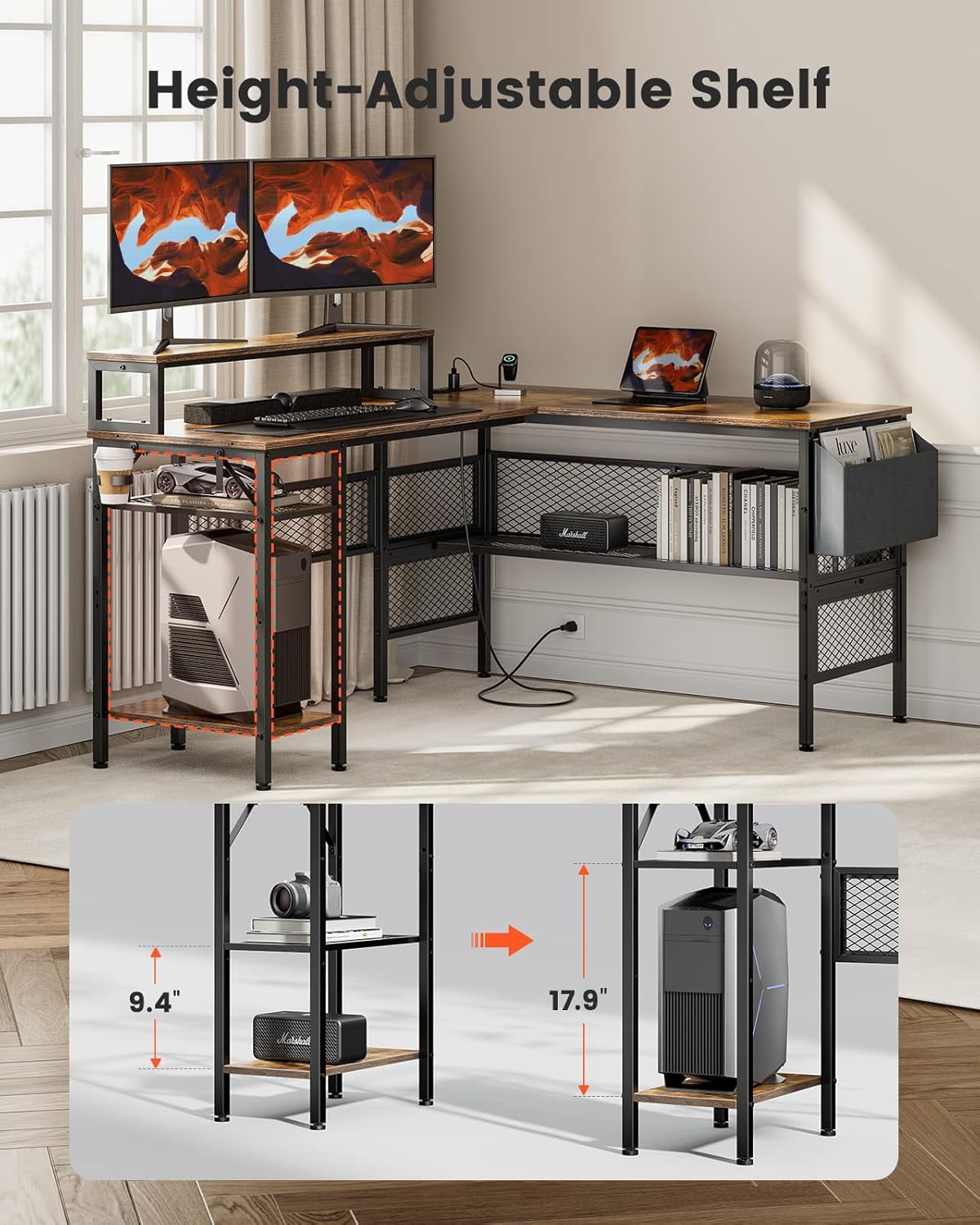
Image: The ErGear desk highlighting the height-adjustable CPU shelf, demonstrating its flexibility to accommodate different item heights.
Mantenimiento y cuidado
- Limpieza: Limpie las superficies del escritorio con un paño suave y húmedo.amp Paño. Evite productos químicos fuertes o limpiadores abrasivos, que pueden dañar el acabado.
- Derrames: Limpie los derrames inmediatamente para evitar manchas o daños en la superficie de la madera.
- Sujetadores: Revise periódicamente todos los tornillos y pernos para asegurarse de que estén bien apretados. Vuelva a apretarlos si es necesario para mantener la estabilidad.
- Calor y humedad: Evite colocar objetos calientes directamente sobre la superficie del escritorio. Use posavasos para bebidas para evitar la formación de anillos de humedad.
Solución de problemas
- Issue: Desk wobbles or is unstable.
- Solución: Check that all assembly screws are securely tightened. Adjust the height-adjustable foot pads on the bottom of the legs to level the desk on uneven flooring.
- Problema: Las tomas de corriente no funcionan.
- Solución: Ensure the desk's main power cable is securely plugged into a functional wall outlet. Check if the wall outlet itself is receiving power (e.g., by plugging in another device). If the issue persists, contact customer support.
- Problema: Dificultad durante el montaje.
- Solución: Review the assembly instructions carefully, paying close attention to diagrams and part labels. Ensure you are using the correct screws for each step. If a part seems difficult to fit, double-check its orientation. Remember that two-person assembly is recommended.
Presupuesto
| Característica | Detalle |
|---|---|
| Marca | Equipo ErGear |
| Número de modelo | EGCD3V |
| Tipo | Escritorio para computadora en forma de L |
| Color | Marrón rústico |
| Dimensiones del producto | 49.78 x 139.7 x 73.91 cm (profundidad x anchura x altura) |
| Peso del artículo | 24.5 kilogramos |
| Material | Engineered Wood (Top), Steel (Base) |
| Capacidad de carga máxima | 176 libras (80 kg) |
| Toma de corriente | 3 tomas de CA, 2 puertos USB-A |
| Longitud del cable de alimentación | 6.7 pies |
| Características especiales | Monitor Riser, Height-Adjustable CPU Shelf, Storage Pocket, Cup Holder, Storage Hook, Adjustable Foot Pads |

Image: Detailed diagram illustrating the product dimensions of the ErGear L-Shaped Computer Desk, including length, width, and height measurements for various sections.
Garantía y atención al cliente
For warranty information, missing parts, or any questions regarding your ErGear L-Shaped Computer Desk, please refer to the warranty card included in your product packaging or contact ErGear customer support directly. Contact details are typically available on the manufacturer's official websitio o a través de su plataforma de compra.
When contacting support, please have your model number (EGCD3V) and purchase information readily available.


