Introducción
The Edifier CX7 is an active 2.1 home entertainment system designed to deliver high-quality audio for various devices, including televisions, personal computers, and notebooks. This system features Bluetooth V5.0 connectivity, an 8-inch subwoofer, and an infrared remote control for convenient operation. This manual provides essential information for setting up, operating, and maintaining your CX7 system.
Contenido del paquete
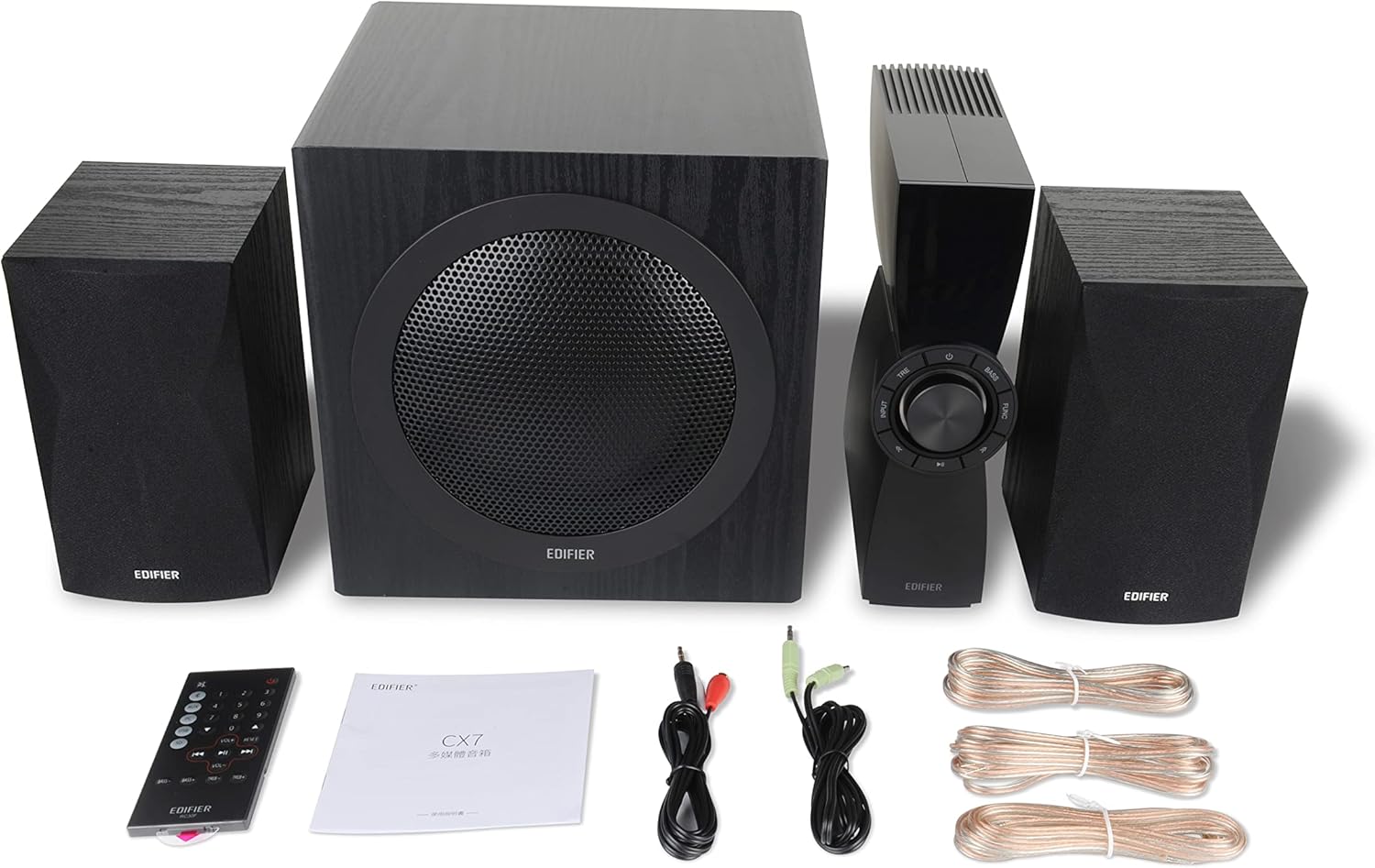
Figure 1: Edifier CX7 System Components
Verifique que todos los artículos enumerados a continuación estén incluidos en su paquete:
- Subwoofer (1)
- Altavoces satélite (2)
- Control Unit (1)
- Infrared Remote Control (1)
- Cable de audio de 3.5 mm a RCA (1)
- Cable de audio RCA a RCA (1)
- Speaker Connection Cables (2)
- Manual de usuario (1)
Guía de configuración
1 Colocación
Position the subwoofer on the floor, preferably in a corner or near a wall for optimal bass response. Place the satellite speakers on either side of your listening area, equidistant from the listener, and at ear level if possible. Ensure the control unit is easily accessible.

Figure 2: Recommended System Placement
2. Conexión de altavoces
Connect the satellite speakers to the speaker output terminals on the rear of the control unit using the provided speaker cables. Ensure correct polarity (red to red, black to black) for each speaker.
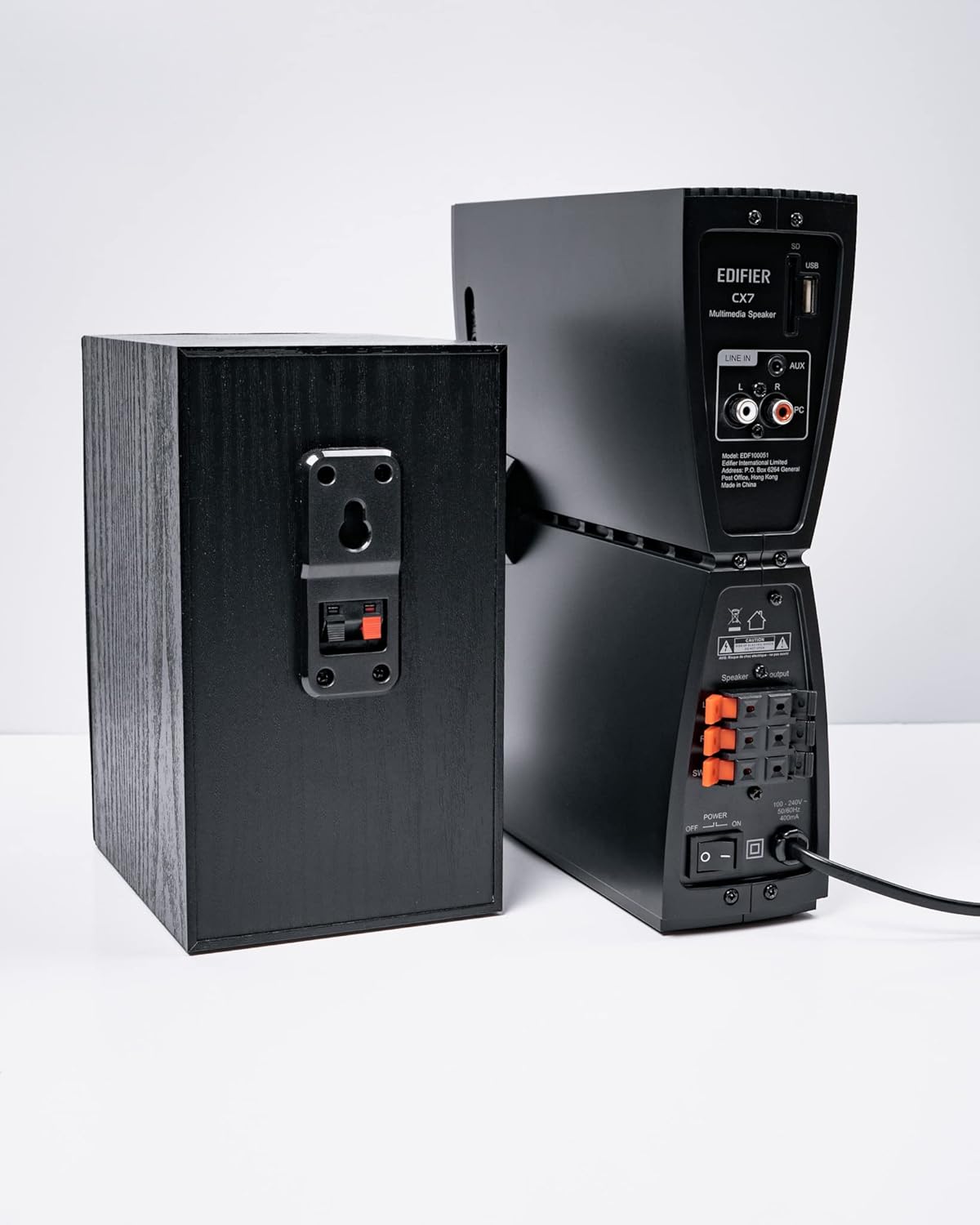
Figura 3: Conexiones de los altavoces
3. Conexión de fuentes de audio
The CX7 system supports multiple audio input options:
- Entrada auxiliar: Use the 3.5mm to RCA audio cable to connect devices like smartphones, tablets, or computers to the AUX input on the control unit.
- Entrada de PC: Use the RCA to RCA audio cable to connect your PC's audio output to the PC input on the control unit.
- Bluetooth: Para la conexión inalámbrica, consulte la sección "Emparejamiento Bluetooth" en las Instrucciones de funcionamiento.
4. Conexión de alimentación
Connect the power cable to the control unit and then plug it into a standard wall outlet. Turn on the power switch located on the rear of the control unit.
Instrucciones de funcionamiento
1. Encendido y apagado
After connecting the power, press the power button on the control unit or the remote control to turn the system on or off. The display on the control unit will illuminate when powered on.

Figure 4: Control Unit Display
2. Selección de entrada
Press the "INPUT" button on the control unit or the remote control to cycle through available audio sources: AUX, PC, and Bluetooth. The selected input will be displayed on the control unit's screen.

Figure 5: Control Knob and Input Buttons
3. Control de volumen
Rotate the large knob on the control unit clockwise to increase volume and counter-clockwise to decrease it. Alternatively, use the "VOL+" and "VOL-" buttons on the remote control.
4. Ajuste de graves y agudos
Press the "BASS" or "TRE" (Treble) buttons on the control unit or remote control, then rotate the main knob to adjust the respective levels. The display will show the current bass/treble setting.
5. Emparejamiento Bluetooth
- Select the Bluetooth input on the CX7 system. The display will show "BT" and flash, indicating it's in pairing mode.
- En tu dispositivo (teléfono inteligente, tableta, etc.), activa el Bluetooth y busca dispositivos disponibles.
- Select "EDIFIER CX7" from the list of found devices.
- Once paired, the "BT" indicator on the CX7 display will stop flashing and remain solid.
To disconnect a Bluetooth device, press and hold the "FUNC" button on the control unit or the Bluetooth button on the remote control for a few seconds.
6. Funciones de control remoto

Figura 6: Control remoto por infrarrojos
The remote control provides convenient access to all major functions:
- Fuerza: Enciende/apaga el sistema.
- Selección de entrada: Cycles through AUX, PC, Bluetooth.
- Volumen: Ajusta el volumen maestro.
- Graves agudos: Ajusta los niveles de graves y agudos.
- Silenciar: Silencia/activa el audio.
- Controles de reproducción: Play/Pause, Previous/Next track (for Bluetooth mode).
Mantenimiento
- Limpieza: Use a soft, dry cloth to clean the surfaces of the speakers and control unit. Do not use liquid cleaners or abrasive materials.
- Ventilación: Ensure adequate ventilation around the control unit and subwoofer to prevent overheating. Do not block ventilation openings.
- Ambiente: Evite exponer el sistema a temperaturas extremas, humedad, polvo o luz solar directa.
- Apagado: If the system will not be used for an extended period, disconnect it from the power outlet.
Solución de problemas
| Problema | Posible causa | Solución |
|---|---|---|
| Sin sonido |
|
|
| La conexión Bluetooth falla |
|
|
| Sonido distorsionado |
|
|
Presupuesto
| Característica | Detalle |
|---|---|
| Nombre del modelo | CX7 |
| Tipo de altavoz | Sistema de altavoces 2.1 |
| Tecnología de conectividad | Bluetooth |
| Tecnología de comunicación inalámbrica | Bluetooth V5.0 |
| Alcance de Bluetooth | 10 metros |
| Modo de salida de audio | Rodear |
| Potencia máxima de salida del altavoz | 69 vatios |
| Tecnología de conectividad de subwoofer | Inalámbrico |
| Diámetro del woofer | 8 pulgadas |
| Material | Polipropileno |
| Color | Negro |
| Dimensiones del producto | 16.93" de profundidad x 17.72" de ancho x 13.39" de alto |
| Peso del artículo | 29 libras (13.2 kilogramos) |
| Fuente de poder | Eléctrico con cable |
| Tipo de controlador | Mando a distancia |
| Usos recomendados | Para Televisores, Para Ordenadores, Para Smartphones o Tablets |
Garantía y soporte
For warranty information and technical support, please refer to the warranty card included with your product or visit the official Edifier webSitio. Conserve su recibo de compra como comprobante para reclamaciones de garantía.
Edifier Oficial Websitio: www.edificador.com


