1. Introducción
This manual provides detailed instructions for the amazon basics Wired Gaming Mouse, Model ABIM03. This mouse is designed to enhance your gaming and computing experience with its adjustable DPI, customizable RGB lighting, and programmable buttons. Please read this manual thoroughly before use to ensure proper operation and longevity of your device.
2. Características del producto
- DPI ajustable: Up to 6400 DPI for precise cursor control and quick movements.
- Iluminación RGB personalizable: Personalize your mouse with various RGB lighting modes and driver customization options for PC.
- Botones programables: Equipped with multiple programmable buttons for assigning custom functions or macros.
- Gaming-Grade Sensor: Ensures accurate tracking and rapid response for gaming.
- Diseño duradero: Features extra durable switches and enhanced build quality for extended use.
- Honeycomb Grip: Ergonomic honeycomb design provides a comfortable and secure grip.

Image: The amazon basics Wired Gaming Mouse highlighting its adjustable DPI settings, ranging from 1200 to 7200 (though product states up to 6400).
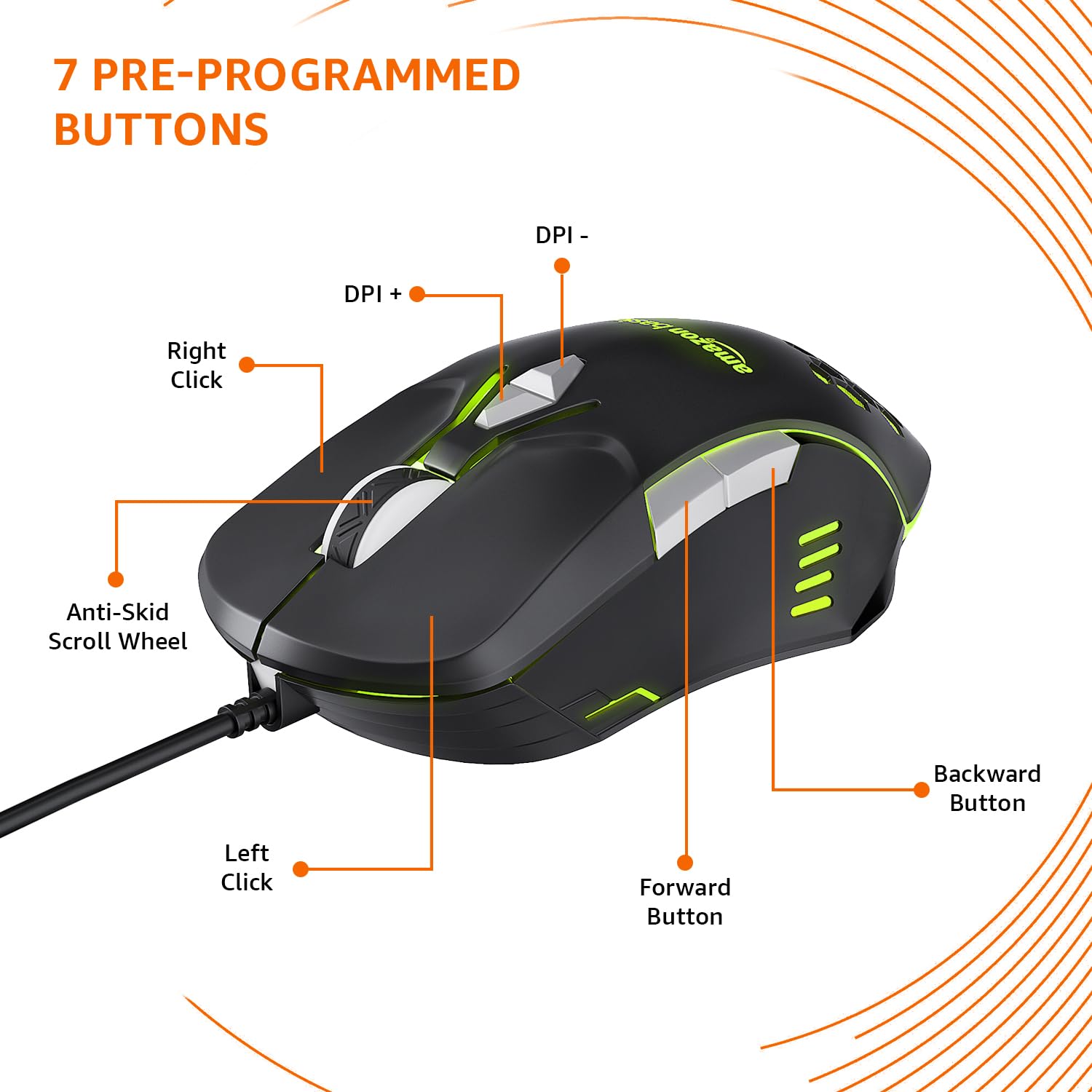
Image: The amazon basics Wired Gaming Mouse showing its 7 pre-programmed buttons, including Left Click, Right Click, Anti-Skid Scroll Wheel, DPI+, DPI-, Forward Button, and Backward Button.

Imagen: Una vista de arriba hacia abajo view of the amazon basics Wired Gaming Mouse, emphasizing its honeycomb-designed surface for improved grip and airflow.

Image: The amazon basics Wired Gaming Mouse illuminated with red RGB lighting, showcasing its light and comfortable design.
3. Instrucciones de configuración
- Desempaquetar el ratón: Retire con cuidado el ratón para juegos de su embalaje.
- Conectarse a la PC: Conecte el conector USB del mouse a un puerto USB disponible en su computadora.
- Instalación del controlador: Your operating system (Windows, Linux) should automatically detect and install the necessary drivers. If prompted, follow the on-screen instructions. For advanced customization of RGB and programmable keys, refer to the manufacturer's website for specific driver software.
- Colocación: Coloque el mouse sobre una superficie plana y limpia o sobre una alfombrilla para obtener un rendimiento óptimo.
4. Instrucciones de funcionamiento
4.1 Funcionalidad básica
- Click izquierdo: Acción primaria, selección.
- Botón derecho del ratón: Acción secundaria, menús contextuales.
- Rueda de desplazamiento: Scroll up/down pages. Pressing the scroll wheel often acts as a middle click.
- Botones de avance/retroceso: Generalmente se utiliza para la navegación en web navegadores o file exploradores.
4.2 Ajuste de DPI (puntos por pulgada)
The mouse features dedicated DPI adjustment buttons (DPI+ and DPI-) to change cursor sensitivity on the fly. Press these buttons to cycle through different DPI levels up to 6400. A higher DPI setting results in faster cursor movement across the screen with less physical mouse movement.
4.3 Customizing RGB Lighting
The mouse includes customizable RGB lighting. Specific lighting modes can often be cycled through using a dedicated button (if present) or through the optional driver software. Refer to the driver software for advanced customization options, including color selection, effects, and brightness.
4.4 Botones de programación
The mouse is equipped with programmable buttons. To assign custom functions, macros, or key combinations to these buttons, you will need to install and use the specific driver software provided by the manufacturer. This software typically allows you to create profiles para diferentes aplicaciones o juegos.
Video: A short product highlight video demonstrating the key features of the amazon basics Wired Gaming Mouse, including adjustable DPI, RGB lighting, programmable buttons, and durable design.
5. Mantenimiento
- Limpieza: Utilice un paño suave y seco para limpiar el exterior del ratón. Para la suciedad difícil, utilice un paño ligeramente seco.amp Se puede utilizar un paño, asegurándose de que no entre líquido en el ratón.
- Limpieza del sensor: De vez en cuando, utilice un hisopo de algodón ligeramenteampened with isopropyl alcohol to gently clean the optical sensor on the underside of the mouse. Ensure the mouse is disconnected before cleaning.
- Evite los líquidos: Do not immerse the mouse in water or any cleaning solutions.
- Almacenamiento: Guarde el ratón en un lugar fresco y seco, alejado de la luz solar directa y de temperaturas extremas.
6. Solución de problemas
| Problema | Solución |
|---|---|
| El ratón no responde. |
|
| El movimiento del cursor es errático o irregular. |
|
| Programmable buttons are not working. |
|
| La iluminación RGB no funciona o está bloqueada. |
|
7. Especificaciones
| Característica | Detalle |
|---|---|
| Marca | Conceptos básicos de Amazon |
| Número de modelo | ABIM03 |
| Tecnología de conectividad | Cableado (USB) |
| Tecnología de detección de movimiento | Óptico |
| Rango de DPI | Hasta 6400 DPI |
| Teclas programables | 4 (in addition to standard left/right click and scroll) |
| Iluminación | RGB |
| Color | Negro |
| Peso del artículo | 145 gramos |
| Dimensiones del producto (LxAnxAl) | 15.8 x 10.4 x 5.4 cm |
| Plataforma de hardware | PC |
| Compatibilidad del sistema operativo | Linux, Windows 7 and above |
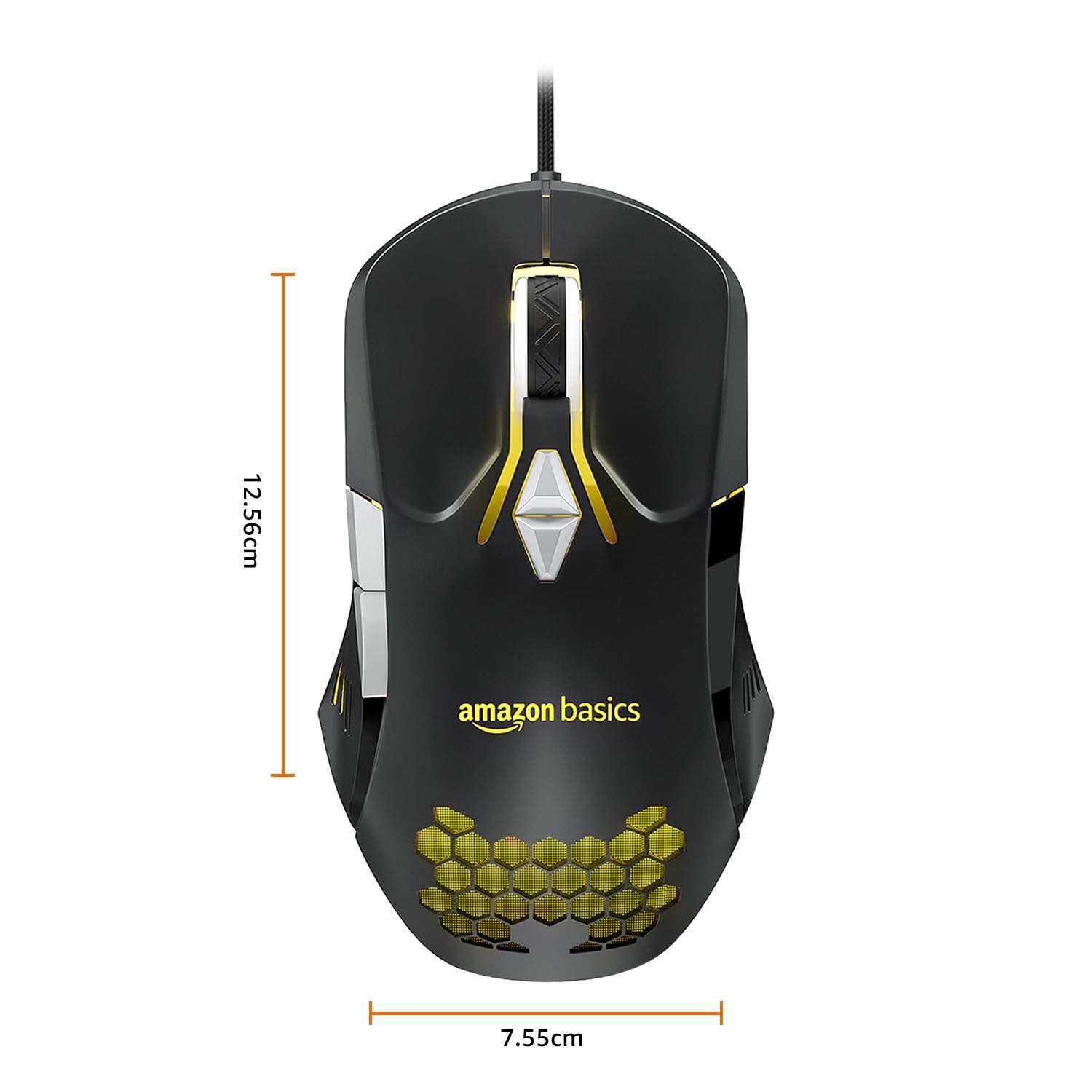
Image: The amazon basics Wired Gaming Mouse with its length (12.56cm) and width (7.55cm) dimensions indicated.
8. Información de garantía
This amazon basics Wired Gaming Mouse comes with a Garantía de 1 años from the date of purchase. This warranty covers manufacturing defects and issues arising from normal use. It does not cover damage caused by misuse, accidents, unauthorized modifications, or normal wear and tear. Please retain your proof of purchase for warranty claims.
9. Soporte
For further assistance, technical support, or warranty claims, please visit the official amazon basics support page or contact customer service through your purchase platform. Ensure you have your product model number (ABIM03) and proof of purchase ready when contacting support.
Recursos en línea:
- Página del producto: amazon.in/dp/B0BTD2YN6Y
- amazon basics Store: Tienda de Amazon Basics


