1. Producto terminadoview
The Keychron Q3 Pro SE is a state-of-the-art full metal QMK/VIA wireless custom mechanical keyboard designed to provide an exceptional typing experience. It features a tenkeyless (TKL) layout, an aluminum knob, and additional special size keys for enhanced efficiency. This keyboard supports both wireless (Bluetooth 5.1) and wired (USB Type-C) connections, offering seamless multitasking across various devices.

Una sobrecarga view of the Keychron Q3 Pro SE keyboard, showcasing its TKL layout, dedicated macro keys, and rotary knob.
Características principales:
- Wireless and Full Metal Design: Constructed with a full aluminum body, the Q3 Pro SE offers a premium feel and robust durability, supporting both wireless Bluetooth 5.1 and wired USB Type-C connections.
- Custom Macro Keys and Knob: Features four customizable macro keys and an aluminum rotary encoder on the left side, programmable via VIA software for enhanced workflow efficiency.
- Multitasking Connectivity: Connects wirelessly to up to 3 devices via Broadcom Bluetooth 5.1, compatible with Mac, Windows, and Linux. Also supports wired mode with a 1000 Hz polling rate.
- Programabilidad QMK/VIA: Easily remap keys and create macros using the Keychron Launcher web app or open-source QMK firmware for a fluid workflow across different operating systems.
- Conmutadores intercambiables en caliente: Equipped with pre-lubed K Pro mechanical linear red switches, the keyboard allows for easy hot-swapping of most 3-pin and 5-pin MX mechanical switches without soldering.
- Durable PBT Keycaps & South-facing Backlight: Features unique Keychron spherical-angle (KSA profile) double-shot PBT keycaps that are oil-resistant and durable. South-facing RGB lighting ensures better illumination from the typist's perspective.
- Double-Gasket Design: Incorporates silicone pads between the top and bottom cases, in addition to plate gaskets, to significantly reduce sound resonance and improve typing acoustics.
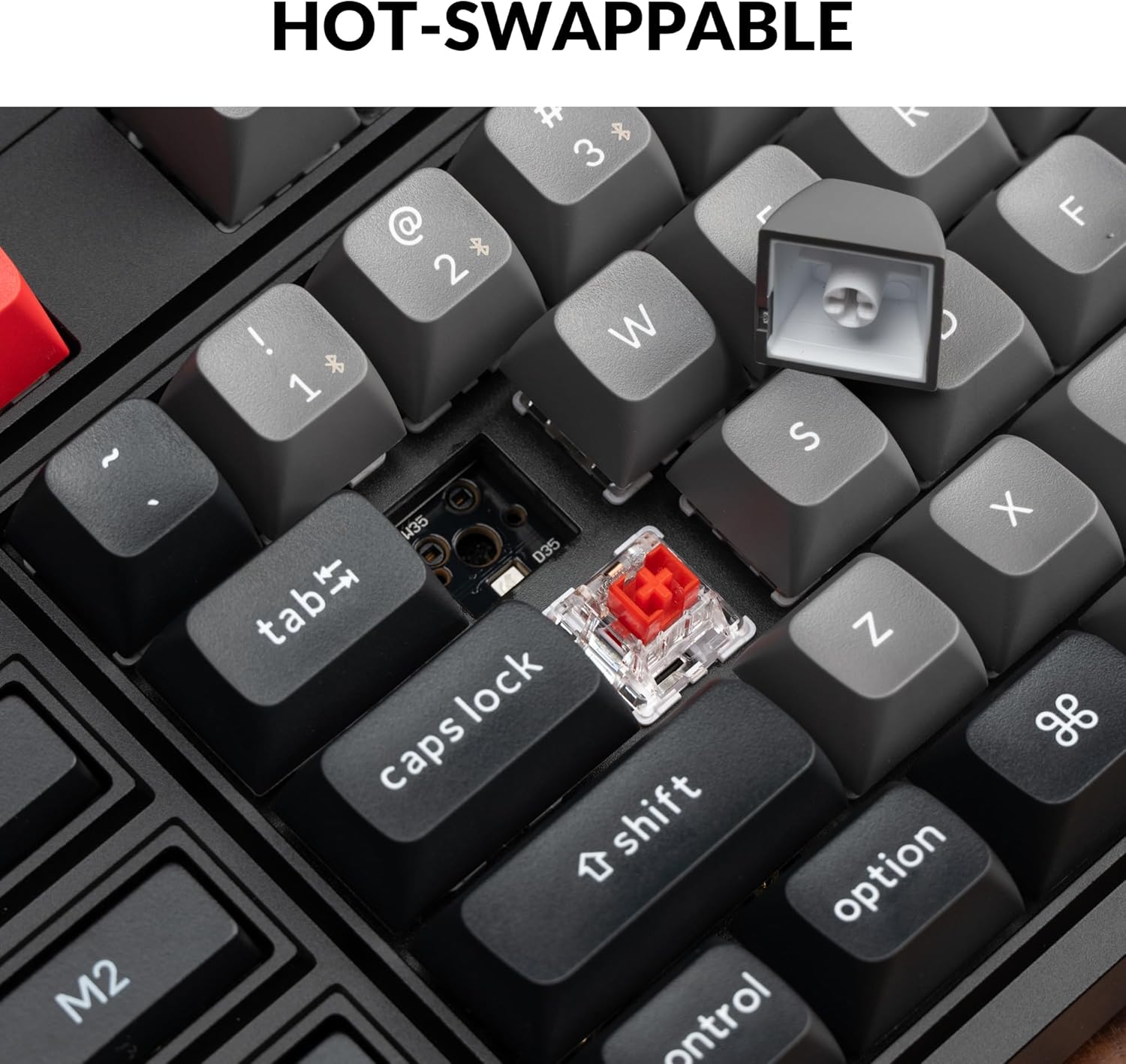
Un primer plano view demonstrating the hot-swappable feature, with a keycap removed and a switch visible, ready for replacement.

An illustration of the QMK/VIA software interface, showing how users can customize key assignments and macros for the keyboard.

The Keychron Q3 Pro SE keyboard shown in use with a laptop and smartphone, highlighting its wireless Bluetooth and wired Type-C connectivity options.
2. Guía de configuración
2.1 Conexión inicial
The Keychron Q3 Pro SE supports both wired and wireless (Bluetooth) connections. Choose the method that best suits your needs.
Conexión por cable:
- Localice el puerto USB tipo C en la parte posterior del teclado.
- Conecte un extremo del cable USB tipo C proporcionado al teclado.
- Conecte el otro extremo del cable a un puerto USB disponible en su computadora.
- El teclado será reconocido automáticamente por su sistema operativo.
Conexión inalámbrica Bluetooth:
- Ensure the keyboard's mode switch (located on the back) is set to 'BT' (Bluetooth).
- En su computadora o dispositivo, habilite Bluetooth y busque nuevos dispositivos.
- The keyboard should appear as 'Keychron Q3 Pro SE'. Select it to pair.
- If prompted, enter the pairing code displayed on your screen using the keyboard, then press Enter.
- The keyboard can store up to 3 Bluetooth devices. Switch between them using the Fn + 1/2/3 key combinations.
2.2 Cambio de diseño del sistema operativo
The Keychron Q3 Pro SE features a physical switch on the back to toggle between Windows and macOS layouts, ensuring proper key mapping for your operating system.

A close-up of the physical switch on the side of the keyboard, allowing users to easily toggle between Windows and macOS layouts for optimal compatibility.
- Set the switch to 'Win' for Windows and Linux systems.
- Set the switch to 'Mac' for macOS systems.
3. Instrucciones de funcionamiento
3.1 Customizing Macro Keys and Knob
The Q3 Pro SE's four macro keys (M1-M4) and the rotary knob are fully programmable using the VIA software. This allows for extensive customization to streamline your workflow.
- A través de software: Download and install the VIA software from the official Keychron websitio.
- Reasignación de teclas: Use VIA to remap any key on the keyboard to a different function, including standard keys, multimedia controls, or special characters.
- Creación de macros: Create complex macros (sequences of key presses) and assign them to the M1-M4 keys for quick execution of repetitive tasks.
- Personalización de la perilla: The rotary knob can be assigned various functions such as volume control, zoom in/out, brush size adjustment, or backlight hue control.

A close-up of the programmable rotary knob and macro keys (M1-M4) on the left side of the keyboard, highlighting their accessibility for custom functions.
3.2 Conmutadores intercambiables en caliente
The hot-swappable design allows you to easily change the mechanical switches without soldering. This provides flexibility to customize your typing feel.
- Use the provided switch puller tool to gently remove the keycap.
- Position the switch puller around the switch and apply gentle pressure to pull it straight up.
- Alinee los pines del nuevo interruptor con los orificios de la PCB.
- Gently push the new switch down until it clicks into place. Ensure it is fully seated.

Un detallado view of the hot-swappable sockets on the keyboard's PCB, with some switches removed and others in place, illustrating the ease of switch replacement.
3.3 PBT Keycaps and RGB Backlight
The keyboard comes with durable KSA profile double-shot PBT keycaps. The south-facing RGB backlight is designed to provide optimal illumination from the typist's angle.
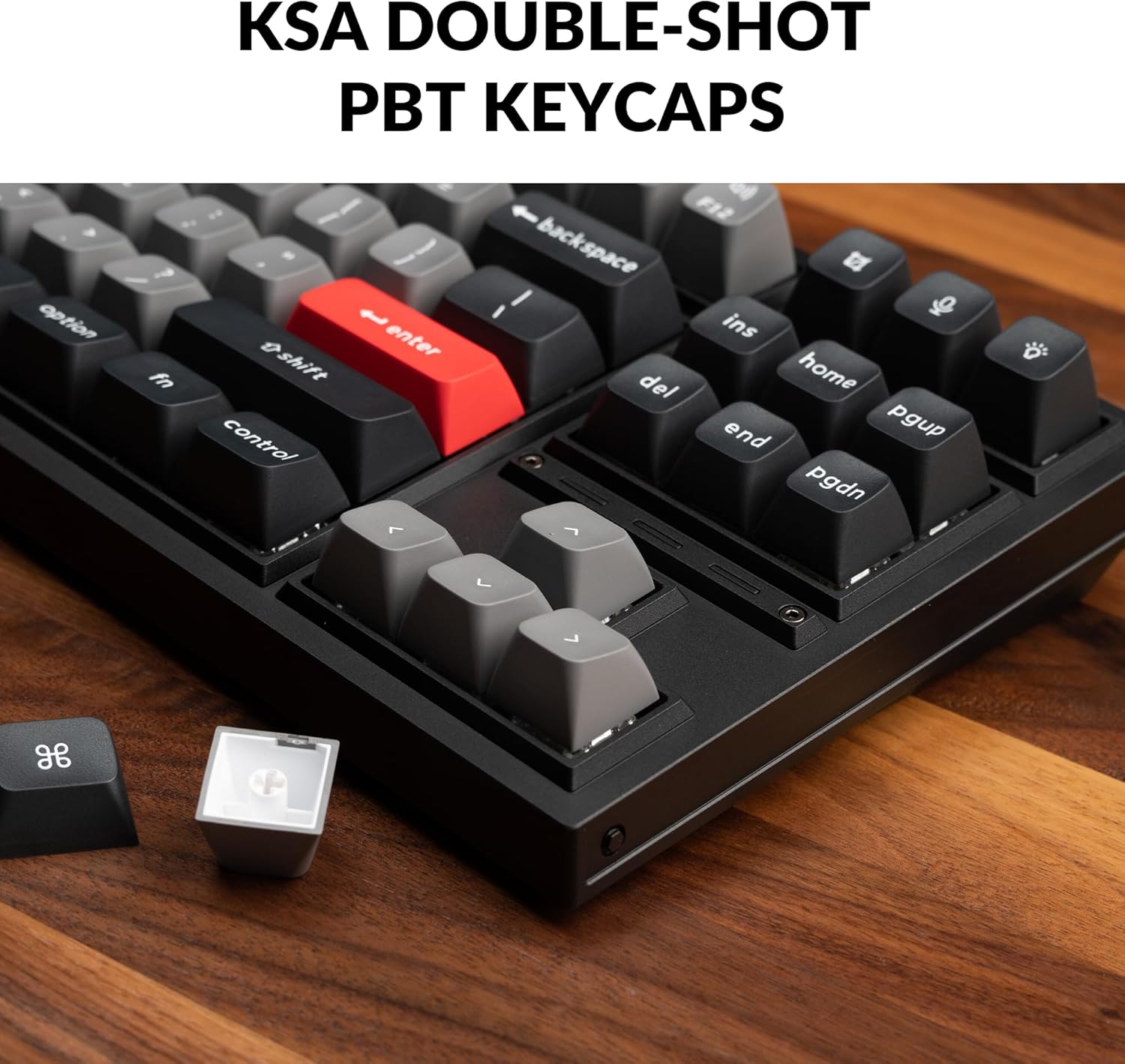
A close-up of the KSA double-shot PBT keycaps on the Keychron Q3 Pro SE, highlighting their texture and profile, with a detached keycap showing its internal structure.

A view of the keyboard's RGB backlighting, with light emanating from beneath the keycaps and through the transparent switch housings, showcasing el diseño LED orientado al sur.
4. Mantenimiento
4.1 Limpieza del teclado
La limpieza regular ayuda a mantener la apariencia y la funcionalidad del teclado.
- Eliminación de polvo: Utilice una lata de aire comprimido para soplar el polvo y los residuos de entre las teclas.
- Limpieza de superficies: Wipe the keycaps and keyboard frame with a soft, lint-free cloth slightly dampLimpie con agua o una solución limpiadora suave y no abrasiva. Evite la humedad excesiva.
- Limpieza profunda (teclas): Para una limpieza a fondo, las teclas se pueden extraer con el extractor incluido y lavar con agua y jabón suave. Asegúrese de que estén completamente secas antes de volver a colocarlas.
4.2 Mantenimiento del interruptor y del estabilizador
The hot-swappable design simplifies switch maintenance and replacement.
- Reemplazo del interruptor: If a switch becomes faulty or you wish to change the typing feel, refer to section 3.2 for instructions on hot-swapping switches.
- Lubricación del estabilizador: The PCB-mounted screw-in stabilizers are pre-lubed. Over time, if you notice rattling or stickiness on larger keys (Spacebar, Shift, Enter), you may consider re-lubricating the stabilizers with a suitable lubricant (e.g., Krytox 205g0). This typically requires removing the keycap and applying lubricant to the stabilizer wires and housings.

An exploded diagram illustrating the various components of the Keychron Q3 Pro SE, including the knob, keycaps, switches, top case, gaskets, sound absorbing foam, plate, PCB, case foam, battery, silicone gaskets, and bottom case, useful for understanding assembly and disassembly.
5. Solución de problemas
5.1 Problemas comunes y soluciones
- El teclado no responde (con cable):
- Asegúrese de que el cable USB-C esté conectado de forma segura tanto al teclado como a la computadora.
- Pruebe con un puerto USB diferente en su computadora.
- Pruebe con un cable USB-C diferente si está disponible.
- El teclado no se conecta (Bluetooth):
- Asegúrese de que el interruptor de modo del teclado esté configurado en 'BT'.
- Verify Bluetooth is enabled on your device and the keyboard is in pairing mode (Fn + 1/2/3 for 4 seconds).
- Elimina el teclado de la lista de Bluetooth de tu dispositivo e intenta volver a emparejarlo.
- Asegúrese de que la batería del teclado tenga suficiente carga.
- Teclas que no se registran o se escriben dos veces:
- This could indicate a faulty switch. Use the hot-swappable feature to replace the affected switch (refer to section 3.2).
- Asegúrese de que el interruptor esté completamente asentado en su zócalo.
- Incorrect Key Output (OS Layout):
- Check the OS layout switch on the back of the keyboard and ensure it matches your operating system (Windows/macOS).
- Customization Issues (VIA):
- Ensure the keyboard is connected via USB-C when using the VIA software.
- Verify you are using the correct VIA firmware for your specific Q3 Pro SE model.
- Visita el Keychron website for the latest VIA software and firmware updates.
6. Especificaciones
| Característica | Detalle |
|---|---|
| Dimensiones del producto | 16.34 x 5.68 x 1.24 pulgadas (414.98 x 144.16 x 31.5 mm) |
| Peso del artículo | 6.93 libras (3.14 kg) |
| Fabricante | Clavechrono |
| Número de modelo | Keychron Q3 Pro SE |
| Batería | Se requiere 1 batería de iones de litio (incluida), 4000 mAh |
| Tecnología de conectividad | Bluetooth 5.1 / USB Type-C Wired |
| Tasa de sondeo | 1000 Hz (Wired) / 90 Hz (Wireless) |
| Número de llaves | 82 |
| Teclas | KSA Double-shot PBT (Non-shine through) |
| Interruptores | Keychron K Pro Red Switch (Linear) |
| Intercambiable en caliente | Yes, with 3-pin & 5-pin MX Mechanical Switches |
| Iluminar desde el fondo | South-facing RGB Backlight |
| Dispositivos compatibles | Portátil, PC, teléfono inteligente, tableta |
| Sistema operativo compatible | mac OS/Windows/Linux |

A visual representation of the Keychron Q3 Pro SE keyboard alongside a detailed list of its technical specifications.
6.1 ¿Qué hay en la caja?
- 1x Teclado completamente ensamblado (incluye carcasa de aluminio, PCB, placa de PC, espuma insonorizante, espuma para carcasa, 16x juntas (12 instaladas y 4 en la caja), 5 juegos de estabilizadores, 1 juego de teclas (PBT KSA de doble inyección), 1 juego de interruptores)
- 1x cable tipo C a tipo C
- 1 adaptador de tipo A a tipo C.
- 1 extractor de interruptor.
- 1x extractor de teclas
- 1x destornillador
- 1x llave hexagonal

An image displaying the Keychron Q3 Pro SE keyboard and all its included accessories, such as cables, tools, and extra components, as listed in the package contents.
7. Garantía y soporte
7.1 Información de garantía
Keychron products typically come with a limited warranty covering manufacturing defects. For specific warranty terms and conditions, please refer to the warranty card included with your product or visit the official Keychron websitio.
7.2 Atención al cliente
For technical assistance, troubleshooting, or inquiries regarding your Keychron Q3 Pro SE keyboard, please contact Keychron customer support through their official website. You can also find additional resources, FAQs, and community forums on their support pages.
Visit the official Keychron Store for more information and support: Tienda Keychron en Amazon


