1. Introducción
This manual provides detailed instructions for the safe and effective use of your Technaxx TX-219 4-in-1 Multifunction Device. This versatile unit combines a jump starter, an air compressor, a power bank, and an LED light, designed for automotive and portable power needs. Please read this manual thoroughly before operation and retain it for future reference.
2. Instrucciones de seguridad
Observe siempre las siguientes precauciones de seguridad para evitar lesiones o daños al dispositivo o al vehículo:
- Lea todas las instrucciones antes de usar.
- Mantener fuera del alcance de los niños.
- Wear eye protection when operating the jump starter.
- No exponga el dispositivo a la lluvia ni a la humedad.
- Do not operate if the device or cables are damaged.
- Asegure una ventilación adecuada durante el uso.
- Conecte el arrancador clamps correctly: positive to positive, negative to negative. Avoid short-circuiting.
- No intente arrancar con puente una batería congelada.
- Disconnect the jump starter from the vehicle battery within 30 seconds after the engine starts.
- Do not use the air compressor continuously for more than 10 minutes to prevent overheating. Allow it to cool down.
- Guarde el dispositivo en un lugar fresco y seco cuando no esté en uso.
3. Contenido del paquete
Verifique que todos los artículos estén presentes en el paquete:
- Technaxx Jump Starter TX-219 Unit
- Adapter Cable with Battery Clamps
- Adaptador de CA
- Compressed Air Hose
- Cable USB
- Cable adaptador de coche
- Manual de usuario

Figura 3.1: Encimaview of the Technaxx TX-219 package contents, showing the main unit, battery clamps, various charging cables, and the air hose.
4. Producto terminadoview
Familiarize yourself with the components of your Technaxx TX-219 device.

Figura 4.1: Angular view of the Technaxx TX-219 unit, showing the digital display, control buttons, USB ports, and LED light.
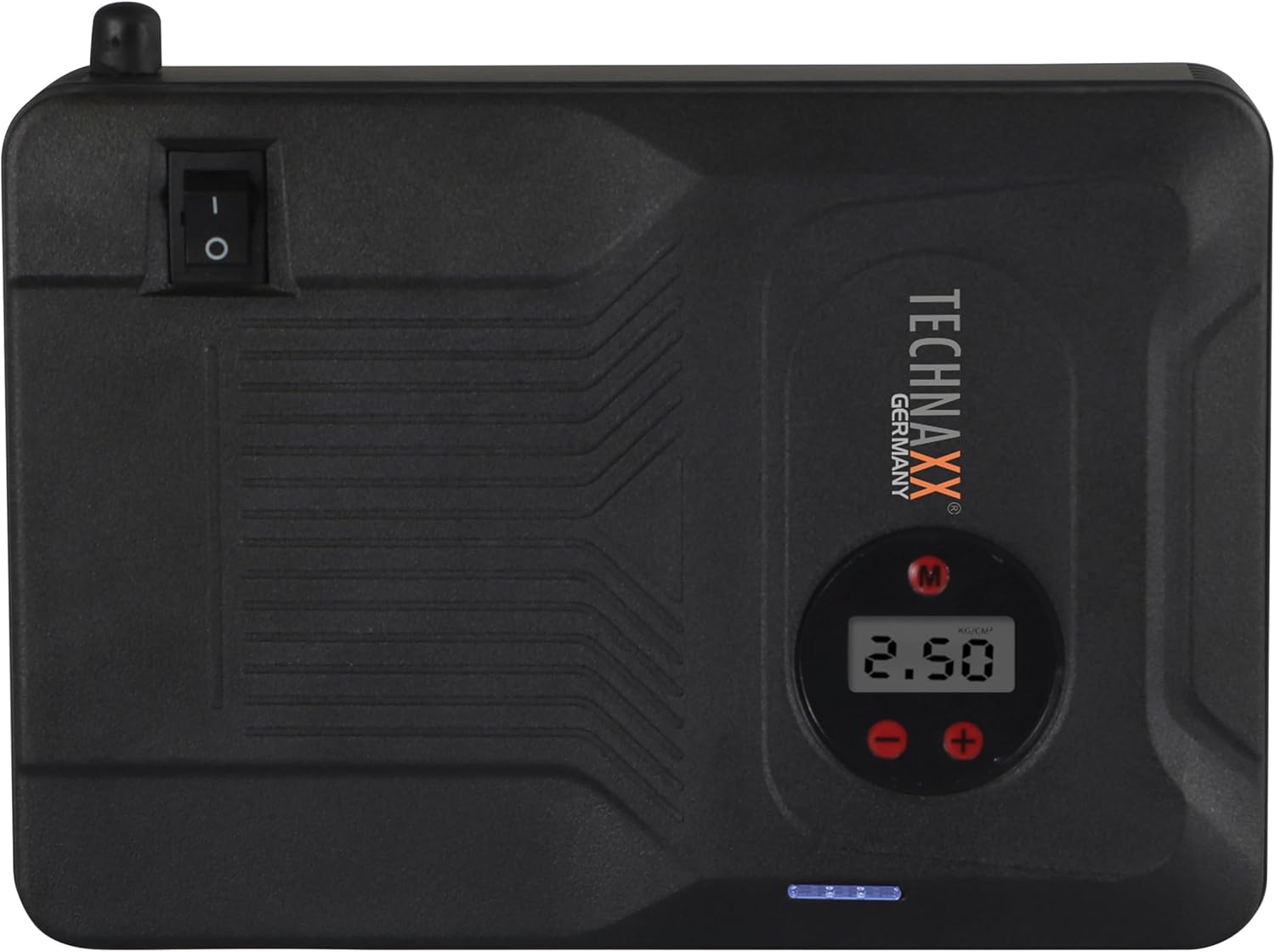
Figura 4.2: Arriba view of the device, highlighting the power switch and the digital display for pressure readings.

Figura 4.3: Frente view of the device, showing the digital display, pressure adjustment buttons, and the power indicator lights.
Componentes clave:
- Pantalla digital: Shows air pressure for the compressor and battery status.
- Botones de control: For adjusting pressure settings and operating the device.
- USB-A Output Ports (5V/1A, 5V/2A): Para cargar dispositivos electrónicos externos.
- 15V/0.4A Input Port: For charging the internal battery of the TX-219.
- Jump Start Output Port: Connects to the battery clamp cable.
- Luz LED: Proporciona iluminación.
- Interruptor de alimentación: On/Off control for the device.
- Conexión de la manguera de aire: For the air compressor function.
5. Setup and Charging the Device
Before first use, fully charge the Technaxx TX-219 unit. It is recommended to recharge the device every 3 months to maintain battery health.
- Connect the AC adapter to the 15V/0.4A input port on the TX-219.
- Conecte el adaptador de CA a una toma de pared estándar.
- The battery indicator lights on the device will illuminate to show charging progress. All lights will be solid when fully charged.
- Alternatively, use the car adapter cable to charge the device from a vehicle's 12V accessory socket.

Figura 5.1: The Technaxx TX-219 unit being charged or used as a power bank to charge a smartphone.
6. Instrucciones de funcionamiento
6.1. Arrancar un vehículo
The TX-219 can jump start gasoline engines up to 4.0L and diesel engines up to 3.0L.
- Ensure the TX-219 is sufficiently charged (at least 75% battery indicated).
- Apague el encendido del vehículo y todos los accesorios.
- Conecte el rojo (+) clamp al terminal positivo (+) de la batería del vehículo.
- Conecte el negro (-) clamp a una parte metálica limpia y sin pintar del bloque del motor o del chasis del vehículo, lejos de la batería. Do not connect to the negative (-) battery terminal directly unless specified by vehicle manufacturer.
- Connect the adapter cable to the jump start output port on the TX-219.
- Arranque el motor del vehículo. Si no arranca inmediatamente, espere 30 segundos antes de volver a intentarlo. No lo arranque durante más de 3 segundos por intento.
- Once the engine starts, immediately disconnect the adapter cable from the TX-219.
- Luego, desconecte el cable negro (-).amp, seguido del signo rojo (+) clamp de la batería del vehículo.

Figura 6.1: The Technaxx TX-219 connected to a vehicle battery using the provided clamps para arrancar el vehículo.

Figura 6.2: A close-up of the jump starter connected to a car battery, illustrating the process of jump starting.
6.2. Uso del compresor de aire
The integrated air compressor can inflate tires up to 3.5 Bar (approximately 50 PSI) and features an automatic shut-off.
- Connect the compressed air hose to the air hose connection port on the TX-219.
- Conecte el otro extremo de la manguera a la válvula del neumático.
- Turn on the TX-219. The digital display will show the current tire pressure.
- Use the '+' and '-' buttons to set the desired pressure. The display supports Bar, KPA, kg/cm², and PSI units.
- Press the compressor start button to begin inflation.
- El compresor se detendrá automáticamente una vez que se alcance la presión preestablecida.
- Disconnect the air hose from the tire valve and the TX-219.

Figura 6.3: The Technaxx TX-219 being used to inflate a car tire, demonstrating the air compressor function.

Figura 6.4: A user inflating a tire with the TX-219, showing the digital display and the air hose connection.
6.3. Usar como banco de energía
The 14000 mAh battery can charge various USB-powered devices.
- Connect your device's USB charging cable to one of the USB-A output ports (5V/1A or 5V/2A) on the TX-219.
- The TX-219 will automatically begin charging your device.
- Monitor your device's charging status. Disconnect once fully charged.

Figura 6.5: The Technaxx TX-219 connected to a smartphone via USB, illustrating its power bank functionality.

Figura 6.6: The TX-219 acting as a portable power bank, charging a mobile device.
6.4. Uso de la luz LED
The integrated LED light can be used for illumination in dark environments.
- Locate the LED light button on the device.
- Presione el botón una vez para encender la luz LED.
- Press again to cycle through different light modes (e.g., steady, strobe, SOS, if available).
- Press and hold the button to turn off the LED light.

Figura 6.7: The TX-219's LED light providing illumination in a vehicle's engine compartment.
7. Especificaciones
| Característica | Especificación |
|---|---|
| Modelo | TX-219 |
| Tipo de batería | Fosfato de litio y hierro |
| Capacidad de la batería | 14000 mAh |
| Corriente de arranque | 350 A (Máx. 600 A) |
| Vol. de inicio rápidotage | 12 voltios |
| Compatibilidad del motor (gasolina) | Hasta 4.0L |
| Compatibilidad del motor (diésel) | Hasta 3.0L |
| Salida USB-A 1 | 5 V, 2 A |
| Salida USB-A 2 | 5 V, 1 A |
| Compresor de aire | 12 V / 100 W, Max 3.5 Bar (approx. 50 PSI) |
| Entrada de carga | 15 V, 0.4 A (máx.) |
| Luz LED | Funciones múltiples |
| Dimensiones (L x An x Al) | 19 x 13 x 5.5 cm |
| Peso | 1.16 kilogramos |
| Certificaciones | CE |
8. Mantenimiento
- Limpieza: Limpie el dispositivo con un paño suave y seco. No utilice productos químicos agresivos ni limpiadores abrasivos.
- Almacenamiento: Store the TX-219 in a cool, dry place, away from direct sunlight and extreme temperatures.
- Recarga: Recharge the unit every three months, even if not in use, to prolong battery life.
- Inspección de cables: Regularly inspect all cables and clampVerifique si hay signos de daño, desgaste o corrosión. Reemplácelo si es necesario.
9. Solución de problemas
| Problema | Posible causa | Solución |
|---|---|---|
| El dispositivo no se enciende. | La batería está agotada. | Charge the TX-219 fully. |
| El vehículo no arranca. | Clase incorrectaamp connection; TX-219 battery too low; vehicle battery severely damaged. | Asegúrese de clamps are connected correctly (+ to +, - to chassis). Recharge TX-219. Consult a mechanic if vehicle battery is faulty. |
| El compresor de aire no infla. | Hose not securely connected; desired pressure already reached; device battery low. | Check hose connections. Verify desired pressure setting. Recharge TX-219. |
| La carga USB no funciona. | USB cable faulty; device not compatible; TX-219 battery low. | Try a different USB cable. Ensure your device is compatible. Recharge TX-219. |
| La luz LED no funciona. | Battery depleted; light button not pressed correctly. | Recharge TX-219. Press the LED button firmly. |
10. Garantía y soporte
For warranty information and technical support, please refer to the warranty card included with your product or visit the official Technaxx webSitio. Conserve su recibo de compra como comprobante de compra.
Fabricante: Tecnología naxx
Número de modelo: 5031


