1. Instrucciones de seguridad importantes
Please read all instructions carefully before using the GEARSTONE GT-JT2 Under Desk Elliptical Stepper. Retain this manual for future reference.
- Consulte a su médico antes de comenzar cualquier programa de ejercicios.
- This equipment is intended for home or office use only.
- Asegúrese de que el step esté colocado sobre una superficie plana y estable.
- Mantenga a los niños y mascotas alejados del equipo durante su uso.
- No exceda el peso máximo del usuario de 110 kg (242 lbs).
- Utilice calzado apropiado durante el ejercicio.
- Deje de hacer ejercicio inmediatamente si siente dolor, mareos o dificultad para respirar.
- The LCD display requires batteries (not included). Ensure correct battery installation.
2. Producto terminadoview
The GEARSTONE GT-JT2 is a compact under-desk elliptical stepper designed for low-impact exercise. It features 'wing-style' steps for a smooth motion and an LCD display to track your workout progress. Its low-profile design allows for convenient use in various settings, including under a desk.
Características principales:
- Diseño compacto: Ideal for use at home or in the office.
- Low-Impact Exercise: Engages lower body muscles with minimal joint strain.
- Pantalla LCD Digital: Tracks time, distance, speed, step count, and calories burned.
- Construcción duradera: Made from iron, ABS, and rubber for stability and longevity.
- Large Foot Pedals: Provides a secure and comfortable platform for various foot sizes.
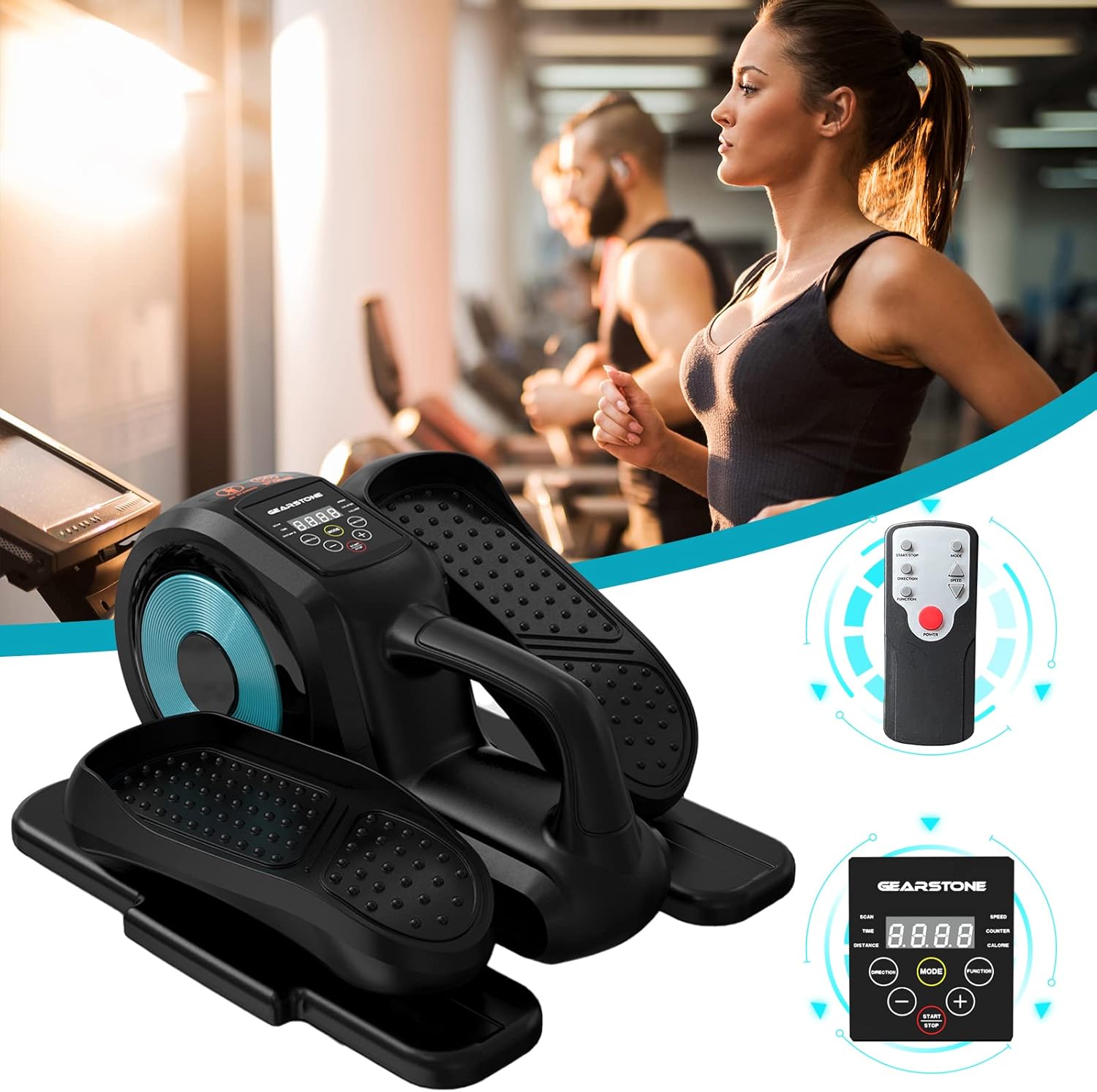
Image: The GEARSTONE GT-JT2 Under Desk Elliptical Stepper, shown with its remote control, ready for use in a home or office environment.
3. Contenido del paquete
Revise el paquete para asegurarse de que todos los artículos estén presentes y sin daños:
- GEARSTONE GT-JT2 Under Desk Elliptical Stepper Unit
- Control remoto (si está incluido con su modelo)
- Manual de usuario (este documento)
Nota: Batteries for the LCD display are not included and must be provided separately.
4. Configuración y montaje
The GEARSTONE GT-JT2 Stepper comes largely pre-assembled. Minimal setup is required.
- Deshacer: Retire con cuidado el stepper de su embalaje.
- Colocación: Place the stepper on a flat, stable surface. Ensure there is enough clear space around the unit for safe operation.
- Battery Installation (for LCD Display):
- Locate the battery compartment on the back or underside of the LCD display unit.
- Abra la tapa del compartimento.
- Insert the required batteries (typically AA or AAA, refer to the compartment label) ensuring correct polarity (+/-).
- Cierre bien la tapa del compartimento de la batería.
5. Instrucciones de funcionamiento
Using your GEARSTONE GT-JT2 Stepper is straightforward. Follow these steps for an effective workout:
- Posicionamiento: Sit comfortably in a chair with the stepper placed directly in front of you on the floor. Ensure your knees are at a comfortable angle and your feet can reach the pedals easily.
- Colocación del pie: Place your feet firmly on the large, non-slip pedals. Ensure your entire foot is supported.
- Comience a hacer ejercicio: Begin pedaling in a smooth, continuous motion. The 'wing-style' steps are designed to provide a natural elliptical movement.
- Adjust Resistance (if applicable): This model typically offers fixed resistance. Focus on maintaining a consistent pace.
- Monitorear el progreso: Observe the LCD display to track your workout data (see Section 6 for details).
- Control remoto (si está incluido): If your model includes a remote, you can use it to control the display functions (e.g., changing modes, starting/stopping the timer) without bending down.
- Ending Workout: Gradually slow down your pedaling until you come to a complete stop. Remove your feet from the pedals.

Image: A user demonstrating the GEARSTONE GT-JT2 Under Desk Elliptical Stepper in use, positioned beneath a desk for convenient exercise during work.
6. Funciones de la pantalla LCD
The integrated LCD display provides real-time feedback on your workout. It is powered by user-provided batteries.

Imagen: Un detalle view of the GEARSTONE GT-JT2's LCD display, illustrating the various metrics it tracks, such as time, distance, speed, step count, and calories.
Modos de visualización:
- ESCANEAR: Automatically cycles through all data metrics every few seconds.
- TIEMPO: Muestra la duración de su sesión de entrenamiento actual.
- DISTANCIA: Muestra la distancia estimada recorrida durante tu entrenamiento.
- VELOCIDAD: Indica tu velocidad de pedaleo actual.
- ENCIMERA: Displays the total number of steps or rotations.
- CALORÍA: Calcula las calorías quemadas durante tu entrenamiento.
Funciones de los botones:
- MODO: Press to cycle through the different display modes (TIME, DISTANCE, SPEED, COUNTER, CALORIE, SCAN).
- INICIO / PARO: Initiates or pauses the tracking of your workout data.
- 🇧🇷 Used for adjusting settings or values if applicable (e.g., setting target goals, though this model typically has simpler functionality).
The display will automatically turn off after a period of inactivity to conserve battery life. It will resume tracking when movement is detected or a button is pressed.
7. Mantenimiento y cuidado
El mantenimiento regular garantiza la longevidad y el rendimiento óptimo de su stepper.
- Limpieza: Limpie la unidad con publicidadamp Limpie el sudor y el polvo con un paño después de cada uso. No utilice limpiadores abrasivos ni disolventes.
- Almacenamiento: Guarde el stepper en un lugar fresco y seco, alejado de la luz solar directa y de temperaturas extremas. Su tamaño compacto permite guardarlo fácilmente debajo de la cama o en un armario.
- Inspección: Periodically check all bolts and moving parts to ensure they are secure and functioning correctly. Tighten any loose components.
- Reemplazo de batería: Replace the LCD display batteries when the screen becomes dim or stops functioning.
8. Solución de problemas
If you encounter any issues with your GEARSTONE GT-JT2 Stepper, refer to the following common problems and solutions:
| Problema | Posible causa | Solución |
|---|---|---|
| La pantalla LCD está en blanco o tenue. | Baterías muertas o instaladas incorrectamente. | Reemplace las baterías por otras nuevas, asegurándose de la polaridad correcta. |
| No data displayed during exercise. | Sensor not detecting movement; display in 'STOP' mode. | Ensure the stepper is in motion. Press the START/STOP button if applicable. Check battery status. |
| Stepper makes unusual noises. | Componentes sueltos; falta de lubricación. | Check and tighten all bolts and screws. Apply a small amount of silicone-based lubricant to moving joints if necessary. |
| Pedals feel stiff or uneven. | Problema con el mecanismo interno; residuos. | Inspect for any obstructions. If the problem persists, contact customer support. |
9. Especificaciones
| Característica | Detalle |
|---|---|
| Modelo | GT-JT2 |
| Marca | PIEDRA DE ENGRANAJES |
| Dimensiones (L x An x Al) | Aprox. 446 x 392 x 247 mm (17.5 x 15.4 x 9.7 pulgadas) |
| Peso del producto | Aprox. 8 kg (17.6 libras) |
| Peso máximo del usuario | 110 kg (242 libras) |
| Material | Iron, ABS, Rubber |
| Mostrar | LCD (Time, Distance, Speed, Counter, Calorie) |
| Fuente de alimentación (pantalla) | Batteries (Self-provided, not included) |
| Color | Amoratado |
10. Garantía y soporte
For warranty information or technical support, please refer to the documentation provided at the time of purchase or contact GEARSTONE customer service through the retailer where the product was purchased.
Please have your model number (GT-JT2) and purchase details ready when contacting support.