1. Introducción
Thank you for choosing the wonlex CF12 Smartwatch. This device is designed to enhance your daily life with smart features, health monitoring, and communication capabilities. This manual provides essential instructions for setup, operation, and maintenance to ensure optimal performance and longevity of your smartwatch.

Image 1.1: The wonlex CF12 Smartwatch, showcasing both the elegant mesh band and the comfortable pink silicone strap.
2. Guía de configuración
2.1 Contenido del paquete
- wonlex CF12 Smartwatch (with 1 stainless steel band)
- 1 correas de silicona
- Cable de carga
- Manual de usuario
2.2 Carga inicial
Antes del primer uso, cargue completamente su reloj inteligente. Conecte el cable de carga magnético a los puntos de carga de la parte trasera del reloj y conecte el extremo USB a un adaptador de corriente (no incluido) o al puerto USB de un ordenador. La carga completa suele tardar entre 2 y 3 horas.
2.3 Instalación de la aplicación y emparejamiento de dispositivos
To unlock the full functionality of your wonlex CF12 Smartwatch, you need to install the companion application on your smartphone.
- Descargar la aplicación: Scan the QR code in the manual or search for the designated app (e.g., 'FitCloudPro' or similar, check packaging for exact name) in your smartphone's app store (Apple App Store for iOS, Google Play Store for Android).
- Instalar y abrir: Install the app and grant necessary permissions (Bluetooth, notifications, location, etc.).
- Habilitar Bluetooth: Asegúrese de que Bluetooth esté habilitado en su teléfono inteligente.
- Emparejar dispositivo: Open the app, navigate to the 'Device' or 'Add Device' section. The app will search for available devices. Select 'CF12' or the corresponding device name to pair.
- Confirmar emparejamiento: Siga las instrucciones en pantalla tanto en el teléfono como en el reloj para confirmar el emparejamiento.
The smartwatch is compatible with Android 4.4+ and iOS 9.0+ devices, utilizing Bluetooth 5.2 for stable connectivity.
3. Instrucciones de funcionamiento
3.1 Navegación básica
- Pantalla táctil: Desliza el dedo hacia la izquierda/derecha, arriba/abajo para navegar por los menús y las funciones. Toca para seleccionar.
- Botón lateral: Presione para activar la pantalla, regresar a la pantalla de inicio o acceder al menú principal.
3.2 Customize Watch Faces
Personalize your smartwatch display with various watch faces.
- Diales incorporados: On the watch, long-press the home screen to cycle through pre-installed watch faces.
- Caras personalizadas: Use the companion app to upload your favorite photos as watch backgrounds or choose from an expanded library of designs.

Image 3.1: The smartwatch displaying various customizable watch faces, including options to use personal photos.
3.3 Call Management and Notifications
With Bluetooth connectivity, your smartwatch allows for convenient call handling and message alerts.
- Responder/Marcar llamadas: The built-in high-quality speakers enable you to answer incoming calls directly from your wrist or dial numbers via the watch interface.
- Recordatorios de mensajes: Receive intelligent notifications for incoming calls, text messages, and alerts from social media applications such as Facebook, Twitter, WhatsApp, WeChat, and Instagram. Ensure notification permissions are enabled in the companion app.

Image 3.2: The smartwatch displaying an incoming call and various social media notification icons, illustrating its Bluetooth call and message reminder capabilities.
3.4 Seguimiento de la salud
The wonlex CF12 Smartwatch provides comprehensive health monitoring features:
- Monitor de frecuencia cardíaca: Realiza un seguimiento continuo de tu frecuencia cardíaca.
- Monitor de presión arterial: Provides estimates of blood pressure levels.
- Monitor de oxígeno en sangre (SpO2): Mide la saturación de oxígeno en sangre.
- Rastreador de sueño: Monitorea los patrones de sueño, incluido el sueño profundo, el sueño ligero y los tiempos de vigilia.
- Manejo menstrual: Helps track menstrual cycles.
- Pregnancy Tracking: Supports tracking for pregnancy-related data.
Note: Health data provided by this device is for reference only and should not be used for medical diagnosis or treatment. Consult a medical professional for health concerns.

Image 3.3: Visual representation of the smartwatch's health monitoring capabilities, including 24-hour heart rate, blood pressure, SpO2, steps, and sleep tracking data.
3.5 modos deportivos
The smartwatch supports 122 sports modes to track your physical activity:
- Seguimiento de actividad: Automatically records daily steps, distance covered, calories burned, and active minutes.
- Modos específicos: Includes modes for walking, running, cycling, yoga, and many others. Select the appropriate mode before starting your workout for accurate tracking.
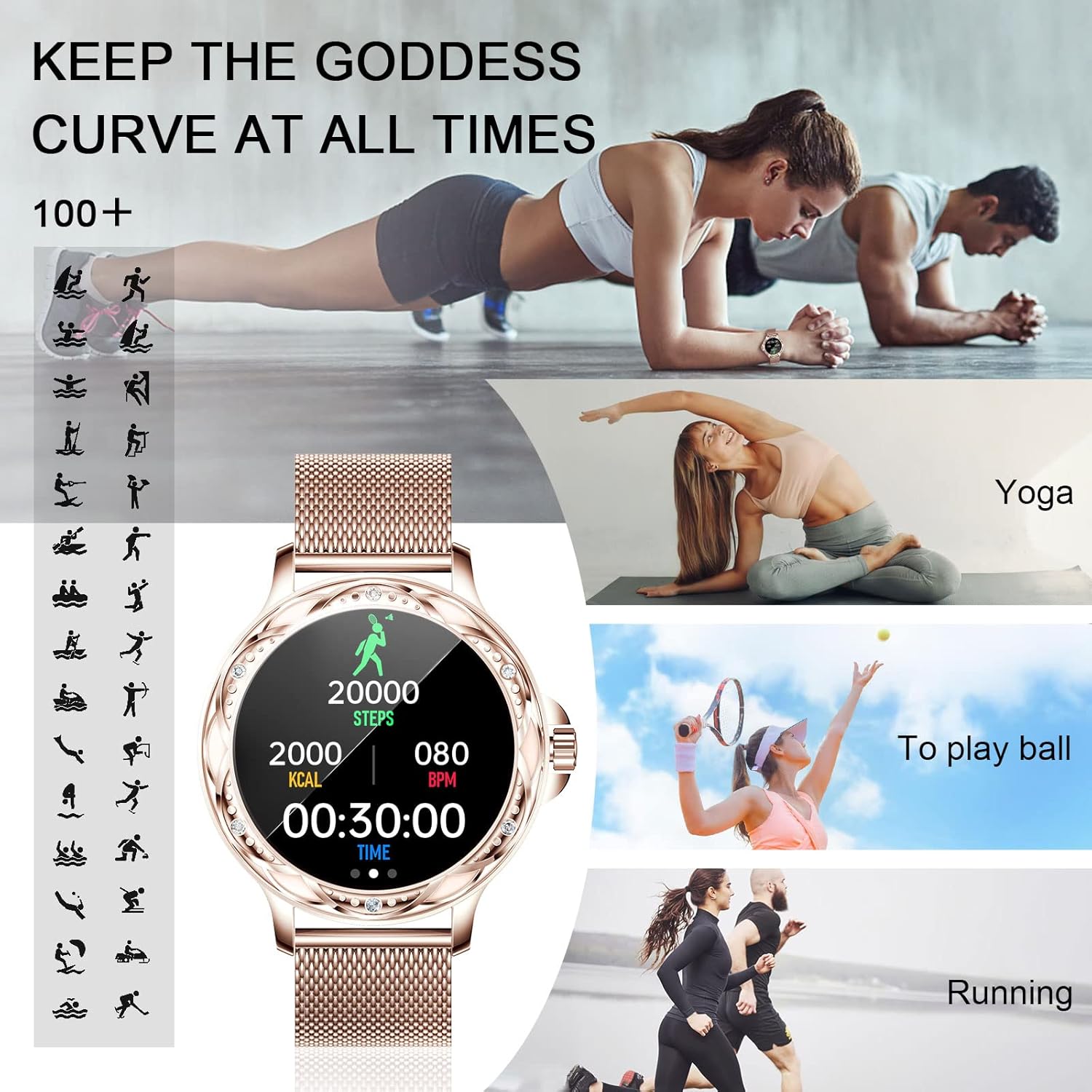
Image 3.4: The smartwatch interface showing steps, calories, and heart rate during a workout, alongside various sports activity icons.
3.6 Funciones adicionales
Your wonlex CF12 Smartwatch includes several other useful functions:
- Minutero: Para diversas necesidades de sincronización.
- Despertador: Configure alarmas directamente desde el reloj o la aplicación.
- Control remoto de la cámara: Use the 'Shake to take photos' feature to remotely trigger your phone's camera.
- Recordatorio de sedentarismo: Le avisa que debe moverse después de períodos de inactividad.
- Recordatorio de beber agua: Te incita a mantenerte hidratado.
- Buscar reloj: Localice su reloj si lo pierde (dentro del alcance de Bluetooth).
- Pronóstico del tiempo: Proporciona información meteorológica actual.
- Control de música: Play, pause, skip tracks on your paired smartphone.
- Asistente de voz con IA: Accede al asistente de voz de tu teléfono directamente desde el reloj.

Imagen 3.5: Una sobreview of the smartwatch's 'Personal Assistant' features, including icons for life helper, personality dial, music mode, making calls, timer, SMS reminder, alarm clock, photograph (remote camera), sedentary reminder, remind to drink water, find a watch, weather, steps, and sleep mode.
4. Mantenimiento y cuidado
4.1 Resistencia al agua
The wonlex CF12 Smartwatch features an IP67 waterproof rating. This means it can withstand daily life scenarios such as hand washing, rain, and splashes. However, it is No recomendado to soak the smartwatch in water, wear it while swimming or showering, or expose it to hot water or steam environments, as this may compromise its water resistance.
4.2 Limpieza
Regularly clean your smartwatch and bands with a soft, dry cloth. If necessary, use a slightly damp Paño y séquelo bien. Evite usar productos químicos agresivos o materiales abrasivos.
4.3 Duración de la batería
The smartwatch is equipped with a 200 mAh battery. A full charge provides approximately 3-5 days of typical usage and up to 20 days of standby time. Actual battery life may vary based on usage patterns and enabled features.
5. Solución de problemas
- El dispositivo no enciende: Asegúrese de que el reloj esté completamente cargado. Conéctelo al cargador durante al menos 30 minutos.
- No se puede emparejar con el teléfono inteligente:
- Asegúrese de que Bluetooth esté habilitado en su teléfono y en el reloj.
- Asegúrese de que el reloj esté dentro del alcance Bluetooth de su teléfono.
- Reinicie tanto el teléfono como el reloj inteligente.
- Try uninstalling and reinstalling the companion app.
- Notificaciones no recibidas:
- Verifique los permisos de la aplicación en su teléfono para asegurarse de que la aplicación complementaria tenga acceso a las notificaciones.
- Verifique que las configuraciones de notificaciones estén habilitadas dentro de la aplicación complementaria para aplicaciones específicas.
- Asegúrese de que el reloj esté conectado mediante Bluetooth.
- Inaccurate weather data: If weather data is incorrect, try closing and reopening the companion app. Ensure location services are enabled for the app and that you have entered your correct location or zip code in the app settings.
- Health data appears inconsistent: Asegúrese de que el reloj esté bien ajustado a su muñeca, ni demasiado apretado ni demasiado suelto. Limpie el sensor de la parte trasera del reloj.
6. Especificaciones
| Característica | Detalle |
|---|---|
| Número de modelo | CF12 |
| Marca | Ganólex |
| Conectividad | Bluetooth 5.2 |
| Compatibilidad | Android 4.4 o superior, iOS 9.0 o superior |
| Resistencia al agua | IP67 |
| Capacidad de la batería | 200 mAh |
| Duración típica de la batería | 3-5 días |
| Duración de la batería en modo de espera | Aprox. Días 20 |
| Vigilancia de la salud | Heart Rate, Blood Pressure, Blood Oxygen, Sleep, Menstrual Management, Pregnancy Tracking |
| Modos deportivos | 122+ modes (e.g., walking, running, cycling, yoga) |

Image 6.1: Diagram illustrating the physical dimensions of the wonlex CF12 Smartwatch and its bands.
7. Garantía y soporte
7.1 Información de garantía
Your wonlex CF12 Smartwatch is covered by a one-year after-sales service when purchased from an official authorized store. Please retain your proof of purchase for warranty claims.
7.2 Atención al cliente
For any questions, technical assistance, or warranty inquiries, please contact wonlex customer support through the contact information provided on your product packaging or the official wonlex websitio.


