Introducción
The BuzzTV E5 is a 4K UHD Streaming Media Player designed to deliver an immersive viewing experience with its Android 11 operating system. This manual provides essential information to help you set up, operate, and maintain your device.
Contenido del paquete
Verifique que todos los elementos estén presentes en la caja:
- BuzzTV E5 Set Top Box
- Fuente de alimentación USB tipo C
- 2 pilas AA
- Control remoto IR-200
- Setup/Help Card
- Cable HDMI

The package includes the BuzzTV E5 Set Top Box, a USB Type-C power supply, two AA batteries for the remote, an IR-200 remote control, a setup/help card, and an HDMI cable.
Producto terminadoview
The BuzzTV E5 is a compact and powerful streaming device.

The device features multiple ports for connectivity, including USB 3.0, LAN, TF card slot, AV, Ethernet, HDMI, Optical, and USB-C power input.
Características principales
- 4K UHD Streaming: Supports ultra-high-definition 4K resolution for crisp visuals.
- Rendimiento suave: Equipped with 2GB RAM and 32GB storage for responsive operation.
- Sistema operativo Android 11: Access to a wide range of apps and streaming services with an intuitive interface.
- Easy Setup and Connectivity: HDMI output for TV connection and reliable Wi-Fi.
- Diseño compacto: Sleek, space-saving form factor.
Guía de configuración
Configuración inicial
Follow these steps for the initial setup of your BuzzTV E5:
- Conectar al televisor: Connect the BuzzTV E5 to your television using the provided HDMI cable. Insert one end into the HDMI port on the E5 and the other into an available HDMI input on your TV.
- Conexión de energía: Connect the USB Type-C power supply to the E5 and plug the adapter into a power outlet.
- Inserte las baterías: Open the battery compartment on the IR-200 remote control and insert the two AA batteries, ensuring correct polarity.
- Encendido: Press the power button on the E5 device or the remote control to turn on the device.
- Configuracion inicial: Follow the on-screen instructions to select your language, connect to your Wi-Fi network, and log in with your Google account.

Asegúrese de que todos los cables estén conectados de forma segura antes de encender el dispositivo.
Instrucciones de funcionamiento
Operación básica
Navigate the Android 11 interface using the IR-200 remote control.
- Navegación: Use the directional pad and 'OK' button to select items.
- Botón de inicio: Press the home button to return to the main screen.
- Botón Atrás: Use the back button to go to the previous screen.
- Control de volumen: Ajuste el volumen utilizando los botones de volumen dedicados.
- Acceso a la aplicación: Access installed applications from the home screen or the Apps menu.
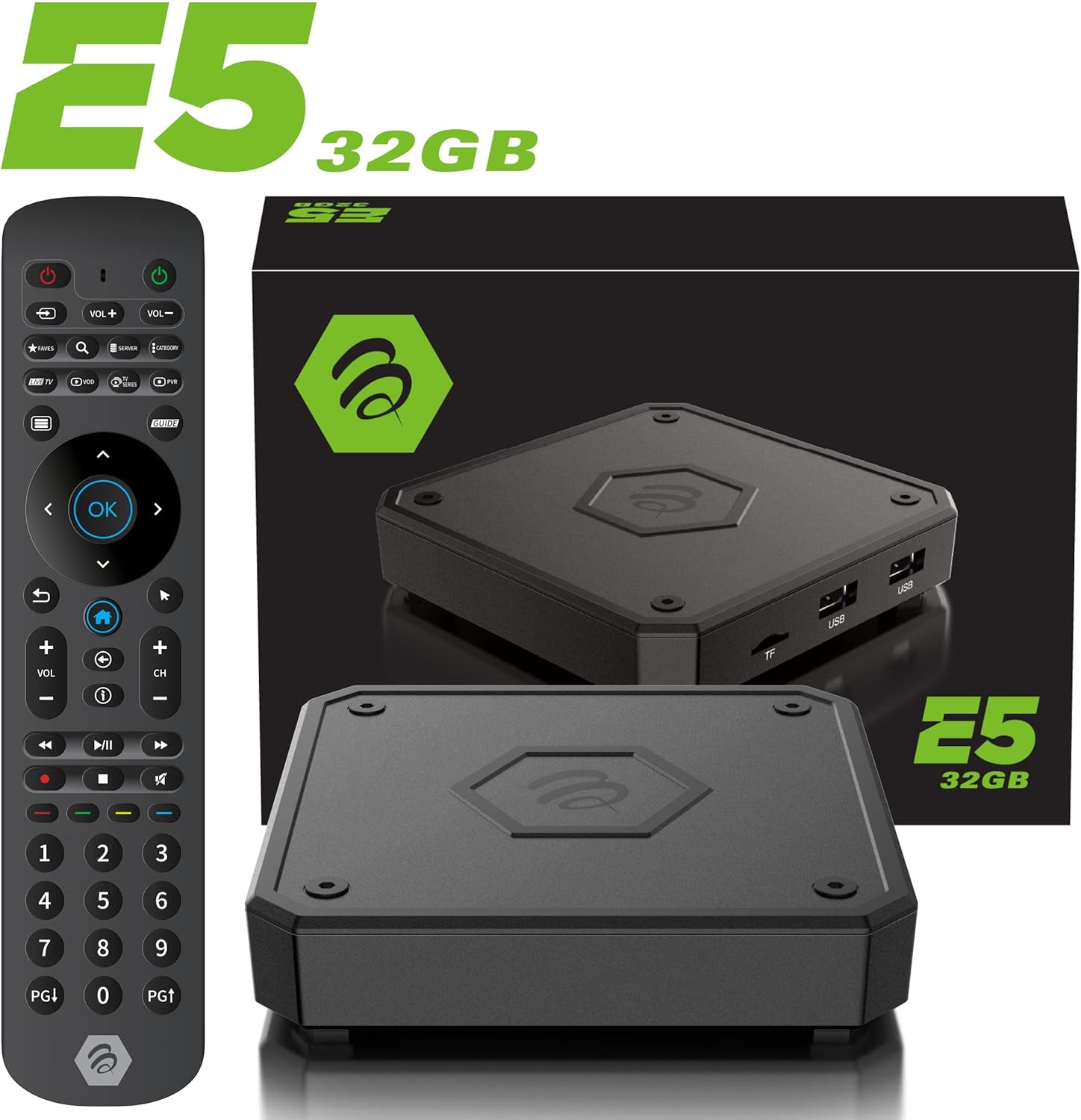
The IR-200 remote provides intuitive control over the BuzzTV E5's functions.
Conectividad
Opciones de conectividad
- Wifi: Supports dual-band Wi-Fi (2.4 GHz and 5 GHz) for wireless internet connection.
- Ethernet: A Gigabit LAN port is available for wired internet connection.
- HDMI: HDMI 2.1 output for high-quality video and audio to your TV.
- USB 3.0: Para conectar dispositivos de almacenamiento externos o periféricos.
- Salida óptica: Para salida de audio digital a sistemas de sonido compatibles.
Media Playback & Streaming
Reproducción y transmisión de medios
The BuzzTV E5 supports various media formats and provides access to numerous streaming services via the Google Play Store.
- Servicios admitidos: Access Netflix, Disney+, YouTube, Prime Video, Hulu, and many more.
- Medios locales: Reproducir medios files desde unidades USB o tarjetas TF conectadas.
Official Product Video: Introducing the BuzzTV 5th Generation Lineup
Este video proporciona un resumenview of the BuzzTV 5th Generation lineup, highlighting key features and models.
Presupuesto
Especificaciones técnicas
| Característica | Detalle |
|---|---|
| Nombre del modelo | E5 |
| Sistema operativo | Androide 11 |
| RAM | 2GB DDR |
| Almacenamiento | Memoria eMMC de 32 GB |
| Resolución | 4K UHD |
| Conectividad | Wi-Fi (2T2R Dual Band), Ethernet (10/100 Mbps) |
| Puertos | HDMI 2.1, USB 3.0, USB 2.0, Optical Audio, Power Input, MicroSD |
| UPC | Amlogic S905X4 Quad-core 64bit Cortex-A55 |
| GPU | Mali-G31 MP2 |
| Bluetooth | 5.0 |
| Dimensiones | 3 x 12 x 12 pulgadas |
| Peso | 1.83 libras |

Detailed technical specifications for the BuzzTV E5 model.
Solución de problemas
Problemas comunes y soluciones
- Sin energía: Ensure the power adapter is securely connected to both the device and the power outlet. Check if the power button on the device is pressed.
- No hay señal en la TV: Verify the HDMI cable is correctly connected to both the E5 and the TV. Ensure your TV input is set to the correct HDMI port.
- Problemas de conexión Wi-Fi: Check your Wi-Fi router and ensure it's working. Re-enter your Wi-Fi password in the E5 settings.
- El control remoto no responde: Check if the batteries are correctly inserted and have sufficient charge. Re-pair the remote if necessary (refer to the setup card).
- La aplicación se bloquea o se congela: Try restarting the application. If the issue persists, restart the BuzzTV E5 device.
Garantía y soporte
For warranty information and technical support, please refer to the official BuzzTV website or the contact information provided on your setup/help card. Keep your purchase receipt for warranty claims.
Online resources and FAQs may also be available on the BuzzTV support page.
Official Product Video: MAG555 Google TV 4K UHD Media Player With Voice Control And HDR From Infomir
This video provides an unboxing and setup guide for a similar Google TV media player, demonstrating general functionality and connectivity.
Official Product Video: MAG555 - revolutionize entertainment with the Google TV
This video showcases the features and user experience of the MAG555 Google TV, highlighting its entertainment capabilities.


