Introducción
The bopmen Star10 Wireless Bluetooth Karaoke Microphone is a versatile 4-in-1 device designed for singing, acting as a portable handheld microphone, speaker, and featuring an integrated disco light. It offers high-resolution audio quality and extensive compatibility, making it suitable for various entertainment settings including car travel, home parties, and general use for adults and children.

Image: The Star10 Wireless Bluetooth Karaoke Microphone in Rose Gold, showcasing its sleek design and integrated disco ball.
Información de seguridad
- No exponga el dispositivo a temperaturas o humedad extremas.
- Evite dejar caer o someter el dispositivo a impactos fuertes.
- Mantener fuera del alcance de los niños pequeños para evitar peligro de asfixia por piezas pequeñas.
- Use only the provided USB C-A cable for charging.
- No intente desarmar o modificar el dispositivo.
- Limpie el dispositivo con un paño suave y seco. Evite el uso de productos químicos agresivos o limpiadores abrasivos.
Contenido del paquete
Por favor, marque la casilla correspondiente a los siguientes artículos:
- 1 x Karaoke microphone (Star10)
- 1 x USB C-A charging cable
- 1 x Manual de usuario
Producto terminadoview
Familiarize yourself with the main controls and ports of your Star10 microphone.

Image: Detailed diagram illustrating the main control panel and bottom ports of the Star10 microphone, including Microphone Volume, On/Off/Play/Pause, Reverb On/Off, Volume Up/Down, Next/Previous Song, Tone Mode, Disco Light Control, USB Port, 3.5mm Earphone Jack, and TF Card slot.
Controles principales:
- Microphone Volume / Accompaniment Mode On/Off: Adjusts microphone volume or toggles accompaniment.
- On/Off, Play/Pause: Enciende/apaga el dispositivo y controla la reproducción de música.
- Reverb On/Off / Bluetooth & TF Card Mode: Toggles reverb effect and switches between input modes.
- Subir/Bajar volumen: Ajusta el volumen general del altavoz.
- Canción anterior/siguiente: Navega a través de las pistas.
- Modo de tono: Recorre diferentes efectos de voz.
- Disco Light Control / Twins Pairing: Controls the disco light and initiates Twins Mode pairing.
Puertos inferiores:
- Luz indicadora: Shows device status (e.g., charging, connected).
- 3.5 mm Earphone Jack / Re-Set button inside: For private listening or resetting the device.
- Puerto USB: Para cargar el micrófono.
- Ranura para tarjetas TF: For playing music directly from a micro TF card (up to 32GB, not included).
Configuración
Carga del micrófono:
- Connect the provided USB C-A cable to the USB port on the bottom of the microphone.
- Conecte el otro extremo del cable a un adaptador de corriente USB compatible (no incluido) o a un puerto USB de una computadora.
- The indicator light will show charging status. A full charge provides up to 10 hours of use (minimum 5 hours).
Encendido/apagado:
- Mantenga pulsado el Encendido/Apagado/Reproducir/Pausar button for a few seconds to power on the microphone. You will hear an audible prompt.
- To power off, press and hold the same button until you hear the power-off prompt.
Instrucciones de funcionamiento
Conexión Bluetooth:
The Star10 microphone uses Bluetooth 5.2 for seamless connection to your devices.
- Encienda el micrófono. Entrará automáticamente en modo de emparejamiento Bluetooth.
- En su teléfono inteligente, tableta u otro dispositivo con Bluetooth habilitado, abra la configuración de Bluetooth.
- Buscar "STAR 10" in the list of available devices and select it to pair.
- Once connected, you will hear a confirmation prompt. You can now play music from your device through the microphone's speaker and sing along.

Image: The Star10 microphone demonstrating its wide compatibility, connecting wirelessly to smartphones, tablets, and laptops via Bluetooth.
Modo de tarjeta TF:
Play music directly from a micro TF card.
- Insert a micro TF card (up to 32GB, not included) with your music files into the TF Card slot on the bottom of the microphone.
- The microphone will automatically switch to TF Card mode. If not, press the Reverb On/Off / Bluetooth & TF Card Mode button to cycle modes.
- Utilice el Canción anterior / siguiente botones para navegar por las pistas y Reproducir/Pausa para el control de reproducción.
Disco Light Control:
Enhance your karaoke experience with the built-in disco light.
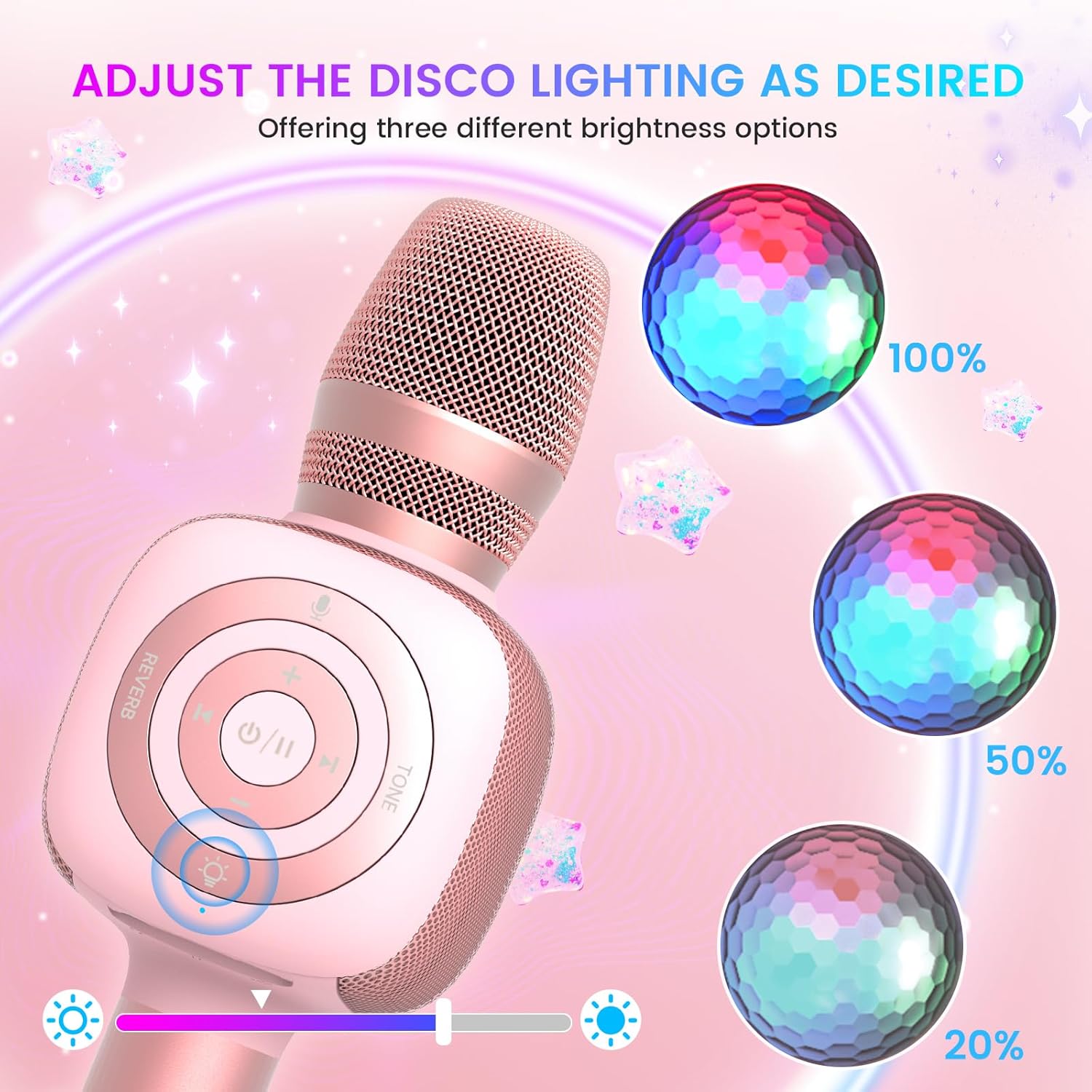
Image: The Star10 microphone's disco light feature, illustrating three adjustable brightness levels (100%, 50%, 20%) to suit different ambiance needs.
- Presione el Disco Light Control button (light bulb icon) to cycle through three RGB color modes and brightness levels.
- Press again to turn the disco light off.
Tone Modes (Magic Mode):
Experiment with different voice effects for added fun.

Image: The Star10 microphone's "Magic Mode" feature, depicting icons for Male Voice, Female Voice, Cartoon Voice, and Monster Sound effects.
- Presione el Modo de tono button to cycle through various voice effects such as Male Voice, Female Voice, Cartoon Voice, and Monster Sound.
- Continue pressing to return to the original tone.
Twins Mode (Duet Mode):
Pair two Star10 microphones for a duet experience.

Image: Two individuals enjoying a duet, each holding a Star10 microphone, illustrating the "Twins Mode" functionality for shared singing experiences.
- Ensure both Star10 microphones are powered on.
- On one microphone, press and hold the Disco Light Control button for 2 seconds until a prompt tone "LINK CONNECTED" is heard. This microphone is now in Twins Mode pairing.
- On your cellphone/device, perform Bluetooth pairing selection and choose either of the two microphones. Both microphones will now be connected and output audio.
- To exit Twins Mode, press and hold the Disco Light Control button on the paired microphone for 2 seconds.
Mantenimiento
- Limpieza: Wipe the microphone with a soft, dry cloth. Do not use liquid cleaners or aerosols.
- Almacenamiento: Guarde el micrófono en un lugar fresco y seco, alejado de la luz solar directa y de temperaturas extremas.
- Cuidado de la batería: For optimal battery life, charge the microphone regularly, even if not in frequent use. Avoid fully discharging the battery for extended periods.
Solución de problemas
| Problema | Posible causa | Solución |
|---|---|---|
| El micrófono no se enciende. | Batería baja; el botón de encendido no se mantiene presionado el tiempo suficiente. | Charge the microphone fully; Press and hold the power button for 3-5 seconds. |
| No se puede conectar a través de Bluetooth. | Microphone not in pairing mode; Device Bluetooth off; Interference. | Ensure microphone is on and in pairing mode; Enable Bluetooth on your device; Move closer to the microphone; Restart both devices. |
| No hay sonido desde el altavoz. | Volume too low; Device volume too low; Incorrect mode. | Increase microphone volume; Increase device volume; Ensure correct mode (Bluetooth/TF Card). |
| Los efectos de voz no funcionan. | Pulsación de botón incorrecta. | Press the 'Tone Mode' button repeatedly to cycle through effects. |
| Disco light not working. | Luz apagada. | Press the 'Disco Light Control' button to turn on/cycle modes. |
Presupuesto
- Modelo: ESTRELLA 10
- Marca: bopmen
- Factor de forma del micrófono: Portátil
- Tecnología de conectividad: Bluetooth 5.2
- Fuente de energía: Funciona con pilas (2 pilas de iones de litio incluidas)
- Duración de la batería: Up to 10 hours (minimum 5 hours)
- Dimensiones del producto: 18.7 x 16.54 x 12.2 pulgadas
- Peso del artículo: 1.19 libras (540 gramos)
- Relación señal / ruido: 52 dB
- Respuesta de frecuencia: 10 kHz
- Dispositivos compatibles: Personal Computer, Smartphone, Karaoke Machine
- Característica especial: Mute Function, Disco Light, Voice Changer, Twins Mode
- Color: Oro rosa
- Usos recomendados: Interior/exterior
Garantía y soporte
Your bopmen Star10 Karaoke Microphone comes with a standard manufacturer's warranty. For detailed warranty information, please refer to the warranty card included in your package or visit the official bopmen websitio.
If you encounter any issues or have questions regarding your product, please do not hesitate to contact our professional customer service team. We are committed to providing support and assistance within 24 hours to ensure your satisfaction.
Información del contacto: Please refer to the contact details provided in your product packaging or on the official bopmen support page for the most up-to-date information.


