1. Introducción
This manual provides comprehensive instructions for the safe and effective use of your NICRON B75 High Power UV Flashlight. Please read this manual thoroughly before operating the device and retain it for future reference. The NICRON B75 is a versatile, rechargeable LED flashlight featuring a 90-degree rotatable head, a magnetic base, and both white light (up to 1000 lumens) and 395nm ultraviolet (UV) light modes.
2. Producto terminadoview
2.1 Características principales
- Versatile Rotation: 90-degree rotatable head for adjustable light angle.
- Alta iluminación: Up to 1000 lumens of white light with a beam distance exceeding 100 meters.
- Detección UV: Integrated 395nm UV light for various detection purposes.
- Base magnética: Allows attachment to metal surfaces for hands-free operation.
- Construcción duradera: IP65 waterproof rating and 1-meter drop resistance.
- Recargable: Convenient USB charging.
2.2 Contenido del paquete
- Linterna NICRON B75
- Rechargeable Battery (pre-installed or included separately)
- Cable de carga

Figure 1: NICRON B75 Flashlight with its components, including the UV light function, magnetic base, and charging cable.
3. Configuración
3.1 Carga inicial
Before first use, fully charge the flashlight. Connect the provided charging cable to the flashlight's charging port and to a USB power source (e.g., computer, wall adapter). The power indicator light will show charging status.
4. Instrucciones de funcionamiento
4.1 Encendido/apagado y selección de modo
The flashlight features four modes: High, Medium, Low (white light), and UV light.
- Encender: Press the power button once. The flashlight will turn on in the last used white light mode.
- Para alternar entre los modos de luz blanca: While the white light is on, press the power button repeatedly to cycle through High → Medium → Low.
- To Activate UV Mode: From any state (on or off), press and hold the power button for approximately 1 second. The flashlight will switch to UV mode.
- Apagar: Press the power button once when the flashlight is in any mode for more than 3 seconds. If cycling modes, press the button after the desired mode is active for 3 seconds.

Figure 2: Illustration of the four available light modes: High, Medium, Low white light, and UV light.
4.2 Using the 90-Degree Rotatable Head
The flashlight head can be rotated 90 degrees to adjust the beam direction. This feature is useful for hands-free operation when combined with the magnetic base or pocket clip.
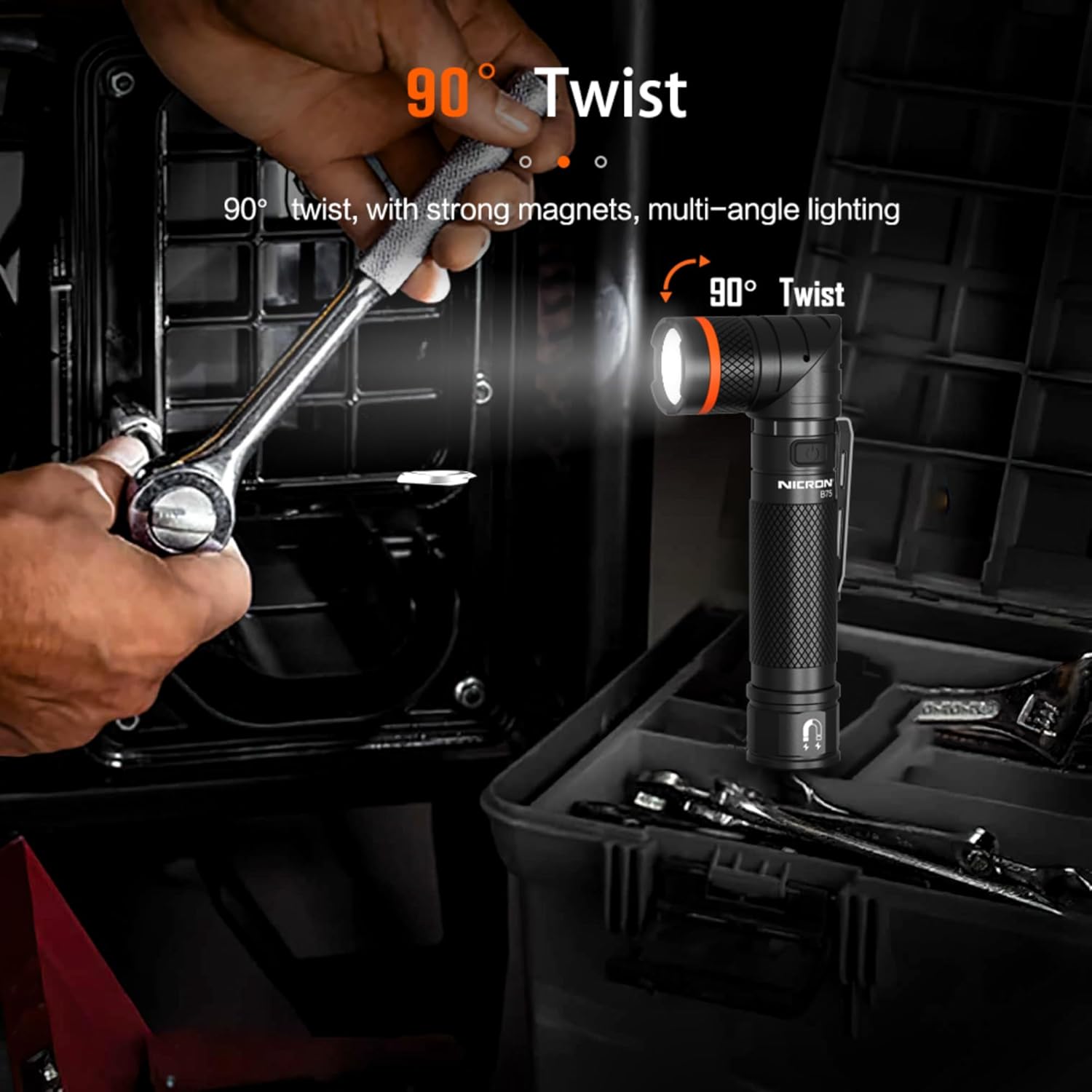
Figure 3: The flashlight head can be twisted 90 degrees for multi-angle lighting, ideal for hands-free use.
4.3 Utilizing the Magnetic Base
The integrated magnetic base allows the flashlight to be securely attached to ferrous metal surfaces. This provides convenient hands-free lighting for tasks such as automotive repairs or working in confined spaces.
4.4 UV Light Applications
The 395nm UV light can be used for various detection purposes, including:
- Counterfeit currency detection.
- Identifying pet urine stains.
- Detecting optical brighteners in fabrics.
- Gemological appraisal.
- Locating scorpions and other insects.
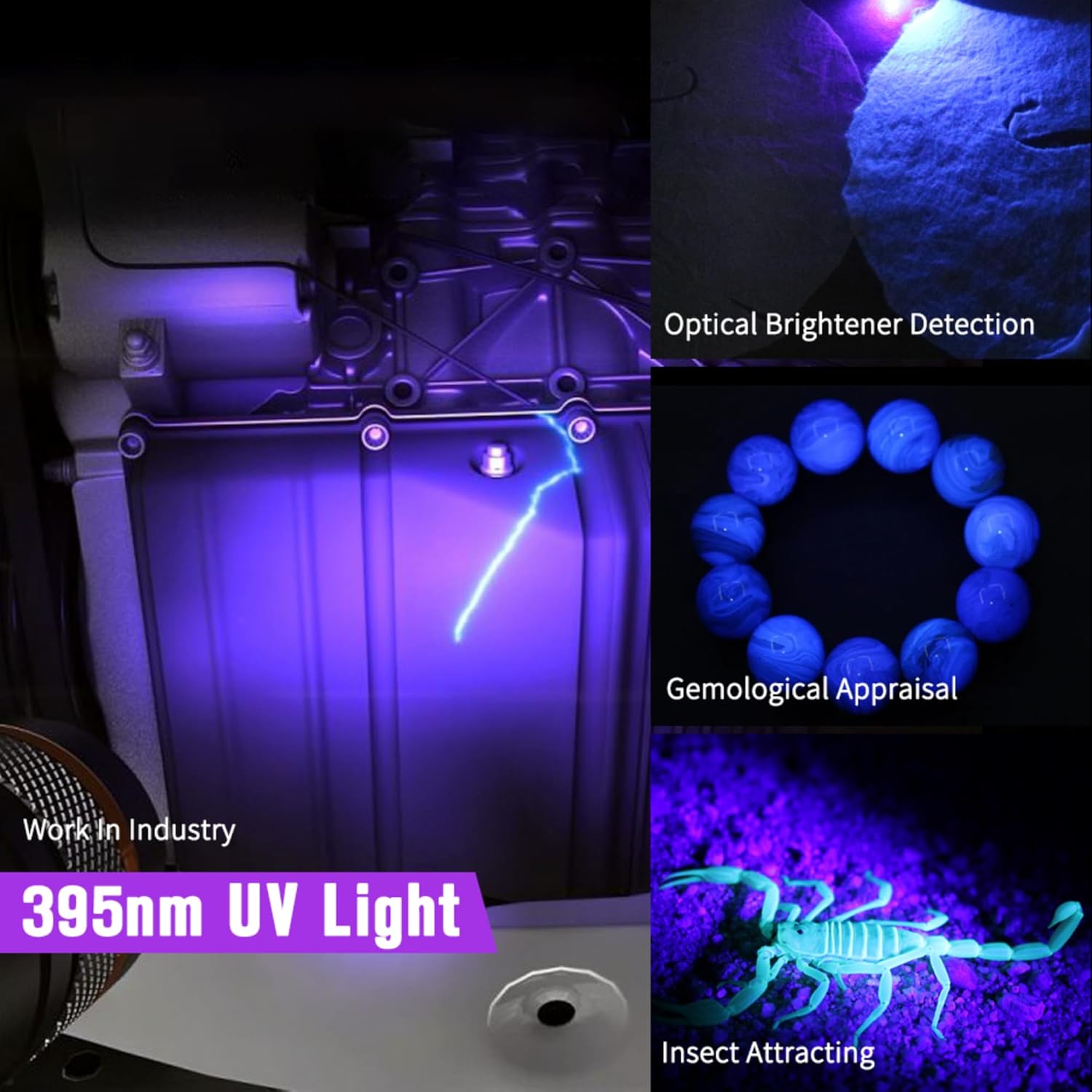
Figura 4: Examples of how the 395nm UV light can be used for detection in various scenarios.
5. Carga y batería
5.1 Proceso de carga
To charge the flashlight, connect the USB charging cable to the flashlight's port and a suitable USB power source. The charging indicator light will provide feedback on the battery status.
5.2 Indicador de batería
The power button features an integrated LED indicator to display battery charge level:
- Luz verde: Battery level is approximately >40%.
- Luz amarilla: Battery level is approximately 40%-20%.
- Luz roja: Battery level is approximately <20%, requiring charging.
- During charging, the indicator light will be RED. It will turn GREEN when the battery is fully charged.

Figure 5: The power indicator light displays battery status and charging progress.
6. Mantenimiento
6.1 Limpieza
Limpie el cuerpo de la linterna con un paño suave.amp Paño. No utilice limpiadores abrasivos ni disolventes. Mantenga la lente limpia para una óptima salida de luz.
6.2 Almacenamiento
Store the flashlight in a cool, dry place away from direct sunlight and extreme temperatures. If storing for extended periods, ensure the battery is partially charged (around 50%) and recharge every 3-6 months to maintain battery health.
6.3 Resistencia al agua
The NICRON B75 has an IP65 waterproof rating, meaning it is protected against dust ingress and low-pressure water jets from any direction. It is resistant to rain and splashes but should not be submerged in water for prolonged periods.
7. Solución de problemas
- La linterna no enciende: Asegúrese de que la batería esté cargada. Si la batería es extraíble, compruebe que esté correctamente insertada.
- La salida de luz es tenue: Charge the battery. Clean the lens if it is dirty.
- La linterna no carga: Ensure the charging cable is securely connected to both the flashlight and the power source. Try a different USB port or charging adapter.
8. Especificaciones

Figure 6: Detailed technical specifications for the NICRON B75 Flashlight.
| Parámetro | Valor |
|---|---|
| Modelo | B75 |
| Brillo (Luz Blanca) | High: 1000 Lumens, Med: 500 Lumens, Low: 100 Lumens |
| Longitud de onda UV | 395 nm |
| Tiempo de ejecución | High: 3h, Med: 4h, Low: 20h, UV: 7h |
| Tipo de fuente de luz | LED de alta potencia |
| Distancia del haz | 109 m/357.61 pies |
| Intensidad | 3000 cd |
| Nivel de resistencia al agua | IP65 |
| Resistencia a caídas | 1 metros |
| Peso | 160 g (5.64 onzas) |
| Dimensiones (L x P) | 160 x 28mm (6.3 x 1.1in) |
| Fuente de poder | Funciona con pilas (iones de litio) |
| Componentes incluidos | Batería, cable de carga |
9. Información de seguridad
- Do not shine the flashlight directly into eyes, as the intense light can cause temporary vision impairment or permanent damage.
- Mantener fuera del alcance de los niños.
- No desmonte la linterna; esto puede anular la garantía y causar daños.
- Use only the recommended battery type and charging cable.
- Evite exponer la linterna a calor extremo o llamas abiertas.
- Deshazte de las baterías de acuerdo a las regulaciones locales.
10. Garantía y soporte
For warranty information or technical support, please refer to the product packaging or contact NICRON customer service directly. Keep your purchase receipt as proof of purchase.


