1. Instrucciones de seguridad importantes
Lea y comprenda todas las instrucciones de seguridad antes de usar este producto. Si no las sigue, podría sufrir una descarga eléctrica, un incendio o lesiones graves.
- No exponga el dispositivo a temperaturas extremas, luz solar directa o humedad alta.
- Keep the device away from water and other liquids. If it gets wet, turn it off immediately and allow it to dry completely before reuse.
- No intente desmontar, reparar ni modificar el dispositivo. Encargue cualquier servicio técnico a personal cualificado.
- Use only specified charging methods (USB-C, solar, hand crank).
- Mantener fuera del alcance de los niños.
- Deshazte de las baterías de acuerdo a las regulaciones locales.
2. Producto terminadoview
The FosPower Emergency Weather Radio Model A6 is a versatile device designed for emergency preparedness and outdoor activities. It features multiple power sources, radio reception, lighting, and a power bank function.
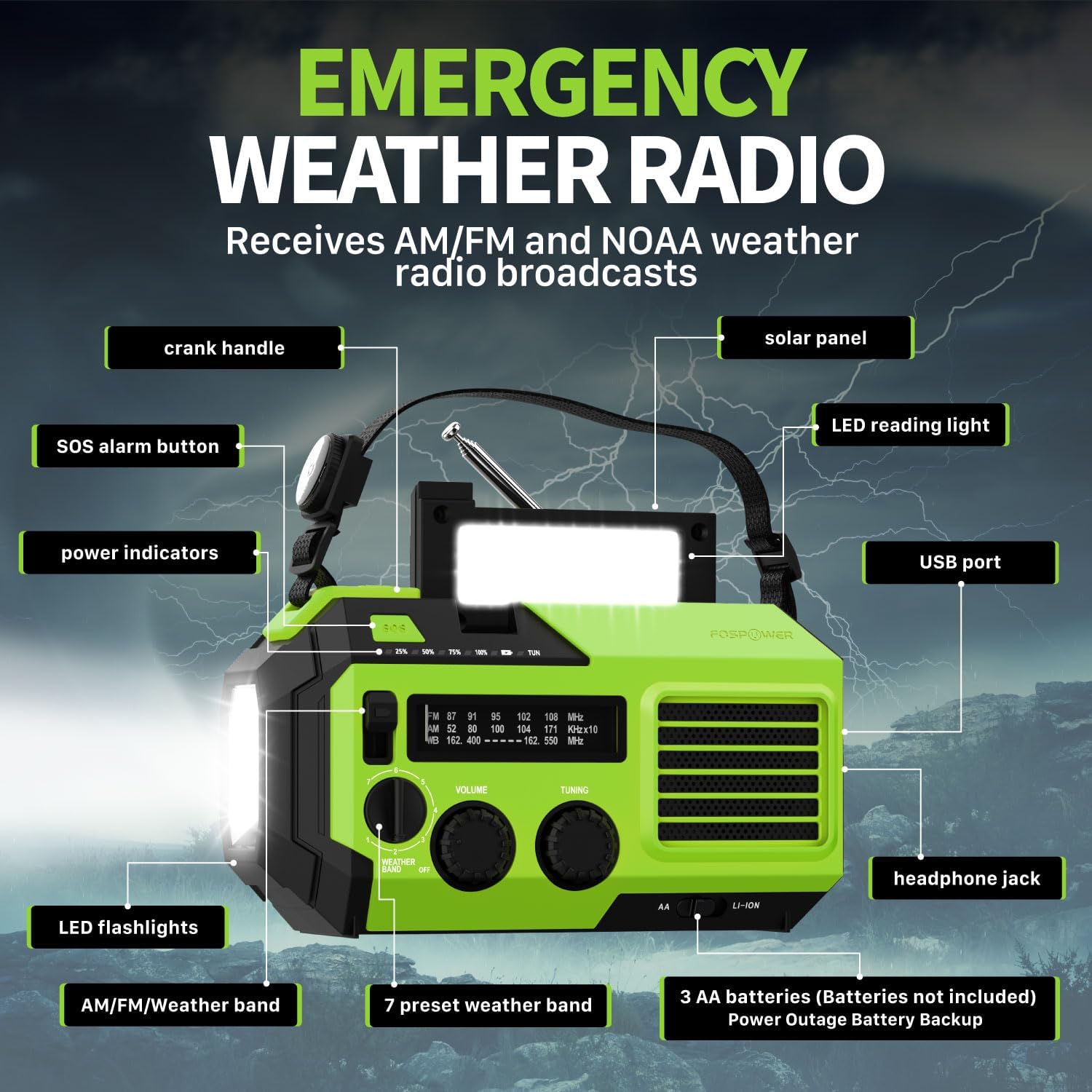
Imagen 2.1: Frente view of the FosPower Emergency Weather Radio with key components labeled, including the crank handle, solar panel, SOS alarm button, power indicators, LED reading light, USB port, LED flashlights, AM/FM/Weather band selector, volume and tuning knobs, and headphone jack.
Características principales:
- NOAA/AM/FM Radio: Access local weather information and emergency hazard alerts, as well as standard AM/FM broadcasts.
- 19240mWh (5200mAh) Power Bank: Charge USB devices during power outages or in outdoor settings.
- Múltiples fuentes de energía: Recharge via USB-C cable, solar panel, or hand crank. Can also be powered by AA batteries (not included).
- Alarma SOS: Activa una sirena fuerte y una luz intermitente para señalización de emergencia.
- Iluminación integrada: Features a powerful flashlight and a reading light.
- Resistencia al agua IPX3: Proporciona protección contra salpicaduras de agua.
3. Configuración
3.1 Carga inicial
Before first use, fully charge the internal battery using the provided USB-C cable. Connect the USB-C cable to the radio's USB-C port and the other end to a USB power adapter (not included) or a computer USB port. The power indicators will illuminate to show charging progress.
3.2 AA Battery Installation (Optional)
The radio can also operate on 3 AA batteries (not included) as a backup power source. Open the battery compartment cover on the back of the radio and insert 3 AA batteries, ensuring correct polarity. Close the cover securely.

Imagen 3.1: Trasera view of the radio highlighting the solar panel, hand-crank, AA battery compartment, and USB charging port, illustrating the multiple power sources.
4. Instrucciones de funcionamiento
4.1 Funcionamiento de la radio
- Encendido/apagado: Rotate the 'VOLUME' knob clockwise to turn the radio on and adjust the volume. Rotate counter-clockwise until it clicks to turn off.
- Selección de banda: Use the 'WEATHER BAND' switch to select between AM, FM, or WB (Weather Band).
- Sintonización: Rotate the 'TUNING' knob to scan for radio stations. Extend the telescopic antenna for improved reception, especially for FM and WB.
- Banda meteorológica de la NOAA: When WB is selected, the radio will receive NOAA weather alerts. The radio supports 7 preset weather bands.
- Toma de auriculares: For private listening, connect 3.5mm headphones to the headphone jack.
4.2 Flashlight and Reading Light

Image 4.1: The radio demonstrating its high-power flashlight and cool-tone reading lamp características.
- Flash: Press the flashlight button located on the front of the radio to turn the flashlight on or off.
- Luz para leer: Lift the solar panel to reveal the LED reading light. Press the reading light button to turn it on or off.
4.3 alarma SOS
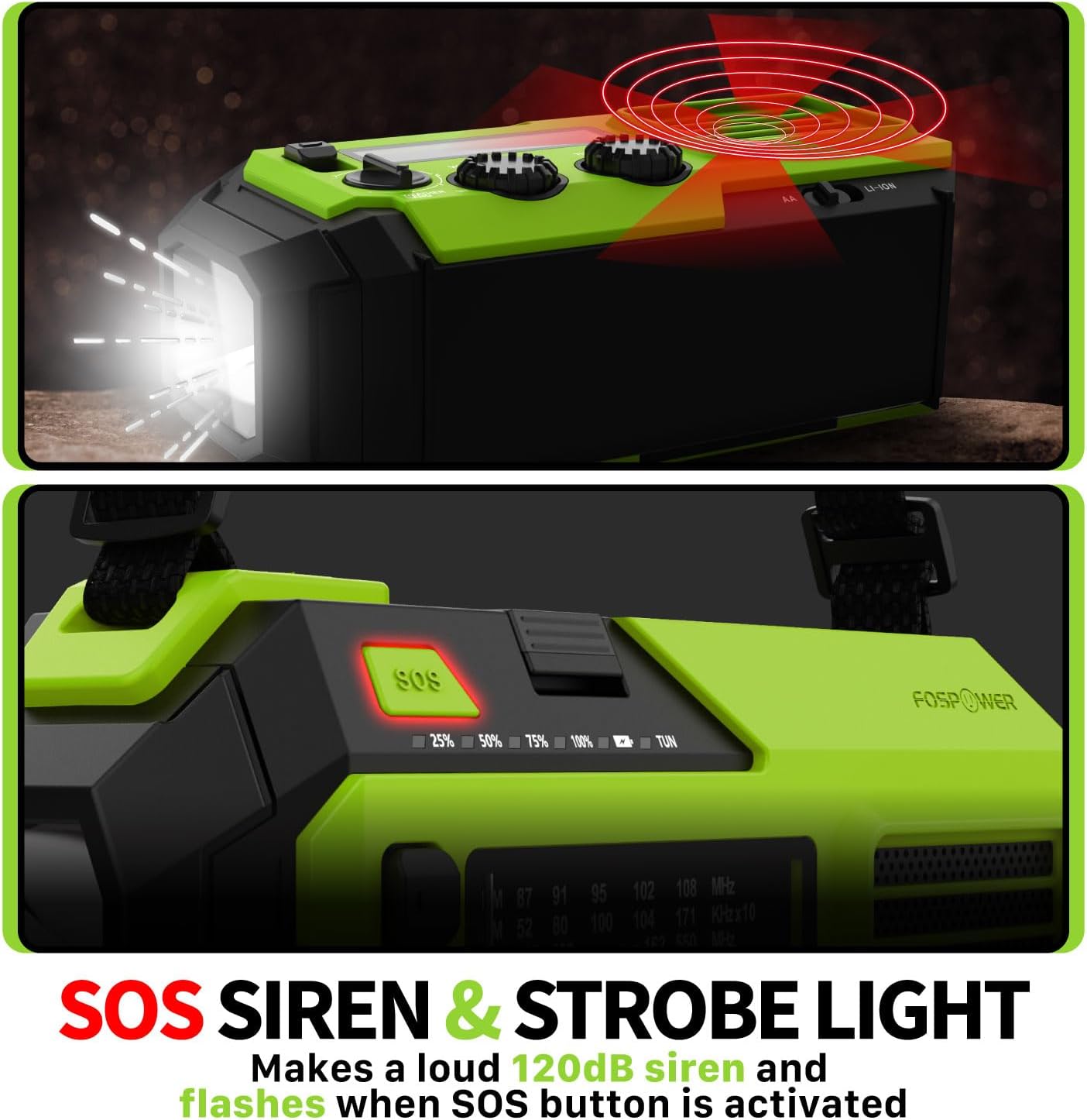
Image 4.2: Close-up of the radio's SOS button and an illustration of the siren and strobe light being activated.
In an emergency, press and hold the 'SOS' button to activate a loud 120dB siren and a flashing strobe light. Press the 'SOS' button again to deactivate.
4.4 Carga de dispositivos externos (batería externa)

Image 4.3: The radio connected via USB to a smartphone, demonstrating its power bank capability for charging small electronics.
Connect your USB-powered device (e.g., smartphone, tablet) to the radio's USB-A output port using your device's charging cable. The radio's internal battery will begin charging your device.
4.5 Carga de la radio
- Carga USB-C: Connect the provided USB-C cable to the radio's USB-C input port and a USB power source. This is the most efficient charging method.
- Carga solar: Place the radio with the solar panel facing direct sunlight. The solar panel charges the internal battery, primarily for maintaining charge or slow charging in emergencies.
- Carga de manivela: Gire la manivela en sentido horario o antihorario a un ritmo constante (aproximadamente 130-150 RPM) durante 3 a 5 minutos para generar energía para uso a corto plazo o para iniciar la carga.
5. Mantenimiento
- Limpieza: Limpie la radio con un paño suave y seco. No utilice limpiadores abrasivos ni disolventes.
- Almacenamiento: Store the radio in a cool, dry place away from direct sunlight when not in use for extended periods. For optimal battery health, fully charge the internal battery every 3-6 months.
- Cuidado de la batería: Si utiliza pilas AA, retírelas si no utilizará la radio durante un tiempo prolongado para evitar fugas.
6. Solución de problemas
| Problema | Posible causa | Solución |
|---|---|---|
| La radio no se enciende. | Internal battery is depleted; AA batteries are depleted or incorrectly installed. | Charge the internal battery via USB-C or hand crank. Check and replace AA batteries if used. |
| Mala recepción de radio. | Antena no extendida; área de señal débil; interferencia. | Fully extend the telescopic antenna. Adjust radio position. Try tuning to a stronger station. |
| El dispositivo externo no se carga. | Radio's internal battery is low; incorrect cable; device not compatible. | Ensure the radio's internal battery is sufficiently charged. Use a functional USB charging cable. Verify device compatibility. |
| La manivela está rígida o no genera energía. | Mechanism obstruction; improper cranking speed. | Ensure no obstructions. Crank at a steady, moderate pace (130-150 RPM). |
7. Especificaciones
| Característica | Detalle |
|---|---|
| Número de modelo | FOSPWB-2419 |
| Dimensiones del producto | 6.76 x 3.52 x 2.59 pulgadas |
| Peso del artículo | 1.08 libras |
| Batería interna | 19240mWh (5200mAh) |
| External Battery Support | 3 pilas AA (no incluidas) |
| Bandas de radio | Banda meteorológica AM, FM y NOAA (WB) |
| Métodos de carga | USB-C, Solar, Hand Crank |
| Características especiales | Built-In Flashlight, Reading Light, SOS Alarm, Power Bank |
| Resistencia al agua | IPX3 |
8. Garantía y soporte
FosPower provides a limited lifetime warranty for this product. For warranty claims, technical assistance, or customer service inquiries, please contact FosPower's USA-based customer support team. Refer to the official FosPower websitio o su documentación de compra para obtener detalles de contacto.


