Introducción
This manual provides comprehensive instructions for the Silvergear XL Smartwatch. It covers setup, operation, maintenance, and troubleshooting to ensure you get the most out of your device. The Silvergear XL Smartwatch features a large 2.41-inch IPS display, integrated cameras, 4G connectivity, and extensive fitness tracking capabilities.
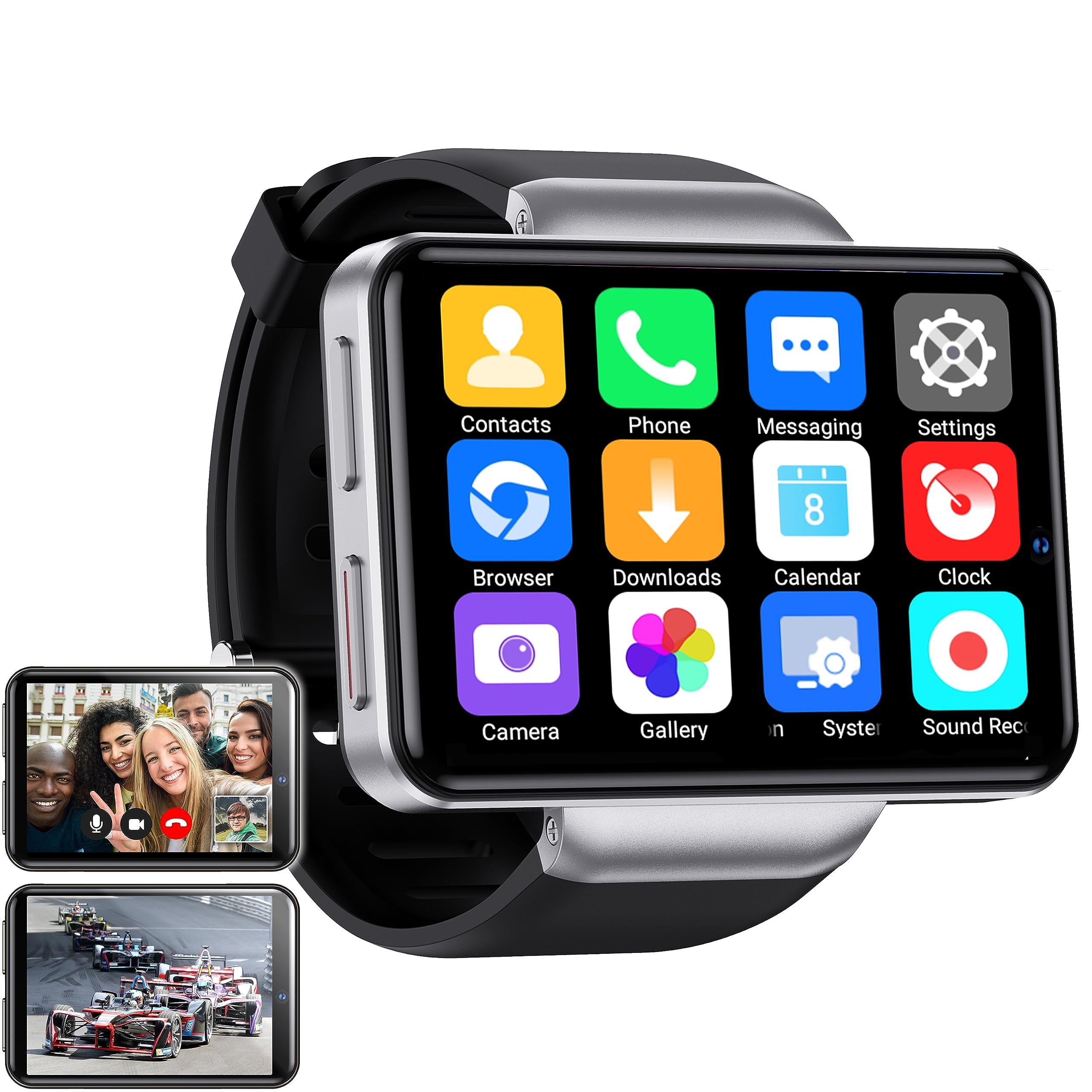
Figure 1: Silvergear XL Smartwatch overview.

Figure 2: The Silvergear XL Smartwatch offers a perfect balance of style, functionality, and advanced technology, including a 2.41-inch IPS display, live video streaming, app downloads, fitness tracking, and communication features.
1. Configuración
1.1 Desempaquetado y contenido del paquete
Carefully unpack your Silvergear XL Smartwatch and verify all contents.

Figure 3: Package contents including the Smartwatch XL, charging base, screen protector, and two screwdrivers. Dimensions are also shown: 4.5 cm height, 6.5 cm width, 1.5 cm thickness for the watch body, and strap lengths of 8.5 cm and 12 cm. The watch weighs 120 grams.
- Silvergear XL Smartwatch
- Base de carga
- Protector de pantalla
- 2x Screwdrivers (for SIM card tray)
- Manual de usuario (este documento)
1.2 Carga del reloj inteligente
Antes del primer uso, cargue completamente el reloj inteligente.
- Connect the charging base to a USB power adapter (not included) or a computer's USB port.
- Place the smartwatch onto the charging base, ensuring the charging pins align.
- La pantalla del reloj indicará el estado de carga. La carga completa demora aproximadamente de 2 a 3 horas.
1.3 Instalación de la tarjeta SIM
To enable 4G connectivity, calls, and internet access, install a Nano SIM card.

Figure 4: Illustration of how to insert a Nano SIM card into the smartwatch. The image also shows the watch's ability to download apps from the Play Store.
- Localice la bandeja de la tarjeta SIM en el costado del reloj inteligente.
- Utilice el destornillador proporcionado para abrir la bandeja de la tarjeta SIM.
- Carefully insert a Nano SIM card into the tray, ensuring correct orientation.
- Close the SIM card tray securely with the screwdriver.
1.4 Encendido inicial y configuración
Press and hold the power button until the Silvergear logo appears. Follow the on-screen prompts to complete the initial setup, including language selection, time zone, and network connection.
2. Funcionamiento del reloj inteligente
2.1 Navegación básica
- Pantalla táctil: Desliza el dedo hacia la izquierda, derecha, arriba o abajo para navegar por los menús y las pantallas. Toca para seleccionar elementos.
- Botón de encendido: Pulsa para activar/desactivar la pantalla. Mantén pulsado para encender/apagar o reiniciar.
- Back Button (if applicable): Some watches have a dedicated back button or gesture. Refer to on-screen prompts.
2.2 Características de comunicación
With a Nano SIM card installed, you can make and receive calls and messages directly from your smartwatch.
- Llamadas: Tap the "Phone" icon to access the dialer or contacts.
- Mensajería: Tap the "Messaging" icon to send and receive text messages.
- Aplicaciones: Download communication apps from the Play Store for additional functionality.
Funcionalidad de cámara 2.3
The smartwatch is equipped with both front and side cameras for capturing photos and videos.

Figure 5: The smartwatch features a 5MP front camera and a 2MP side camera, allowing you to capture photos and videos directly from your wrist.
- Cámara de acceso: Tap the "Camera" icon on the home screen or app drawer.
- Cambiar cámaras: Use the on-screen icon to switch between the 5MP front camera and the 2MP side camera.
- Captura: Toque el botón del obturador para tomar una fotografía o iniciar/detener la grabación de un video.
2.4 Entretenimiento multimedia
Enjoy videos, TV programs, series, and music directly on your smartwatch's extra-large screen.

Figure 6: The extra-large screen allows you to enjoy multimedia content such as sport competitions, TV programmes, series, videos, and music.
- Video/TV: Use pre-installed apps or download streaming services from the Play Store.
- Música: Play music stored on the device or stream from compatible apps.
2.5 Seguimiento de la actividad física y la salud
Monitor your physical activity and health metrics with the integrated sensors.

Figure 7: The smartwatch offers pedometer and fitness tracking for various activities including running, hiking, cycling, basketball, football, jumping rope, and badminton.
- Podómetro: Realiza un seguimiento de tus pasos diarios, la distancia y las calorías quemadas.
- Monitor de frecuencia cardíaca: Provides accurate heart rate readings.
- Modos de entrenamiento: Select from 9 pre-defined exercise types (e.g., running, walking, cycling, swimming) to track your performance.
- Seguimiento del sueño: Monitors your sleep patterns (if supported by the device's software).
2.6 App Downloads
Expand your smartwatch's functionality by downloading applications from the Play Store.
- Ensure your smartwatch is connected to Wi-Fi or has an active 4G data connection.
- Tap the "Play Store" icon and browse or search for desired applications.
- Follow on-screen instructions to download and install apps.
3. Mantenimiento
3.1 Limpieza
Para mantener la apariencia y funcionalidad de su reloj inteligente:
- Limpie la pantalla y el cuerpo con un paño suave que no suelte pelusa.
- Para marcas difíciles, ligeramente dampEnjuague el paño con agua. Evite productos químicos agresivos o materiales abrasivos.
- Asegúrese de que los contactos de carga estén limpios y secos antes de cargar.
3.2 Resistencia al agua y al polvo
The Silvergear XL Smartwatch is rated IP67 for water and dust resistance.

Figure 8: The smartwatch is IP67 water- and dustproof, designed to withstand various weather conditions. This includes IP67 splashproof and IP67 dustproof ratings.
- Clasificación IP67: This means the device is protected from dust ingress and can withstand immersion in water up to 1 meter for up to 30 minutes.
- It is suitable for splashes, rain, and incidental exposure to water.
- Avoid prolonged immersion, hot water, or high-pressure water jets.
- Ensure the SIM card tray is properly sealed to maintain water resistance.
3.3 Actualizaciones de software
Compruebe periódicamente si hay actualizaciones de software para garantizar un rendimiento óptimo y acceso a nuevas funciones.
- Connect your smartwatch to Wi-Fi.
- Navigate to "Settings" > "About Watch" > "Software Update" (or similar path).
- Follow on-screen instructions to download and install any available updates.
4. Solución de problemas
| Problema | Posible causa | Solución |
|---|---|---|
| El reloj inteligente no se enciende. | Batería baja; dispositivo congelado. | Cargue el dispositivo durante al menos 30 minutos. Mantenga presionado el botón de encendido durante 10 a 15 segundos para forzar el reinicio. |
| No puedo realizar ni recibir llamadas. | No SIM card; SIM card not properly inserted; no network signal; incorrect network settings. | Ensure SIM card is correctly installed and activated. Check network signal strength. Verify network settings in the smartwatch. |
| La pantalla no responde. | Fallo de software; interferencia del protector de pantalla. | Restart the smartwatch. Remove and reapply the screen protector if it's causing issues. |
| Fitness tracking data is inaccurate. | Improper fit; sensor obstruction; software calibration needed. | Ensure the watch is worn snugly on your wrist. Clean the sensor area. Check for software updates. |
| No se puede conectar al wifi. | Contraseña incorrecta; fuera de rango; problema con el enrutador. | Verifique la contraseña del Wi-Fi. Acérquese al router Wi-Fi. Reinícielo. |
Si encuentra problemas que no aparecen aquí, o si las soluciones sugeridas no resuelven el problema, consulte la sección de soporte.
5. Especificaciones
Below are the technical specifications for the Silvergear XL Smartwatch (Model: 8711568088660).

Figure 9: Key technical specifications of the Silvergear XL Smartwatch, including Android 7.1.1 OS, MT6739 Quad-Core CPU (1.5 GHz), 2.41-inch full screen, 640x480 resolution, and 4G & WiFi connectivity.
| Característica | Detalle |
|---|---|
| Marca | Engranaje plateado |
| Número de modelo | 8711568088660 |
| Sistema operativo | Android (version 7.1.1 from image) |
| Tamaño de pantalla | 2.41 pulgadas |
| Tipo de pantalla | LCD (IPS from description) |
| Resolución | 640x480 (from image) |
| Procesador | MT6739 Quad-Core CPU, 1.5 GHz (from image) |
| Conectividad | 4G, Wi-Fi |
| Cámara frontal | 5 megapíxeles |
| Cámara lateral | 2 megapíxeles |
| Capacidad de almacenamiento de memoria | 500 MB |
| Resistencia al agua y al polvo | IP67 |
| GPS | Sin GPS |
| Dispositivos compatibles | Teléfono inteligente |
6. Información de garantía
The Silvergear XL Smartwatch comes with a manufacturer's warranty.
- Garantía del fabricante: 2 años.
- Esta garantía cubre defectos de materiales y mano de obra en condiciones de uso normal.
- It does not cover damage caused by misuse, accidents, unauthorized modifications, or normal wear and tear.
- Conserve su comprobante de compra para reclamos de garantía.
7. Soporte
For further assistance, technical support, or warranty claims, please contact Silvergear customer service.
- Refer to the Silvergear official websitio para detalles de contacto.
- Have your product model number (8711568088660) and proof of purchase ready when contacting support.


