Introducción
Thank you for choosing the AVMTON Wireless Gaming Mouse. This manual provides detailed instructions on how to set up, operate, and maintain your new mouse, ensuring optimal performance and an enhanced gaming and work experience. Designed for comfort and precision, this ergonomic wireless mouse features adjustable DPI, customizable buttons, and vibrant RGB lighting.
Producto terminadoview
The AVMTON Wireless Gaming Mouse is engineered for both gaming and office use, offering a comfortable ergonomic design and responsive control. It features a honeycomb hollow design with RGB backlighting, providing both aesthetic appeal and lightweight performance.
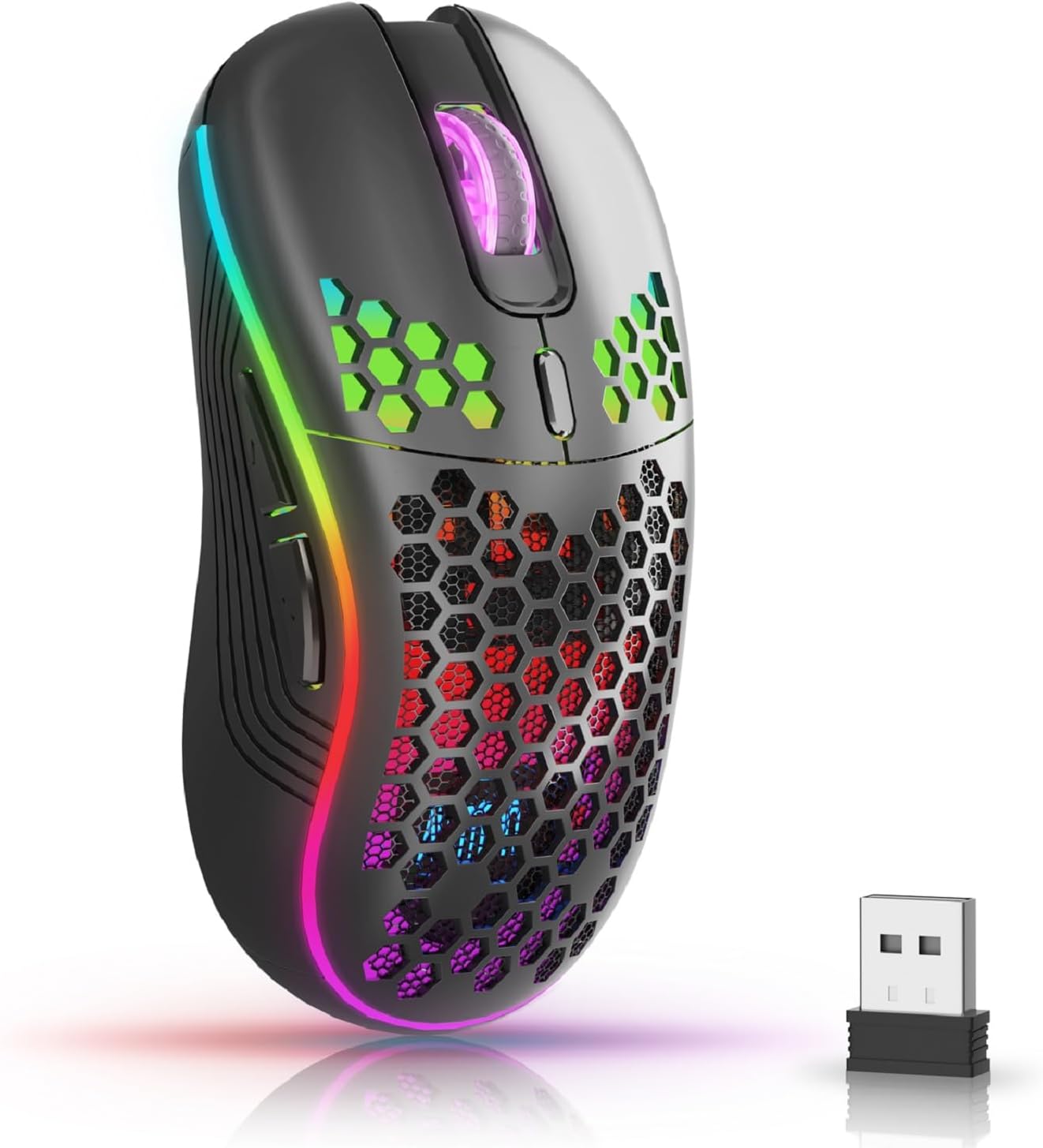
The AVMTON Wireless Gaming Mouse in black, featuring RGB lighting and a honeycomb design, shown alongside its compact USB receiver.

Illustration of the mouse's connectivity modes, including Type-C charging, 2.4G wireless receiver, and a 10m sensing range, suitable for home, gaming, and office environments.
Características principales:
- Diseño ergonómico: Shaped to fit the hand comfortably, reducing strain during extended use.
- DPI ajustable: Easily switch between 800/1200/1600/2400/4800 DPI settings for precise control.
- 6 botones programables: Includes forward/backward, left/right click, scroll wheel, and DPI adjustment button.
- Batería recargable: Built-in lithium battery with USB-C charging, offering 15-20 days of use on a single charge.
- Diseño de clic silencioso: Ideal for quiet environments like libraries or offices.
- Amplia compatibilidad: Supports Windows 2000/ME/XP/7/8/10/Vista/98, Mac OS, Linux, and compatible with laptops, PCs, desktops, and Macbooks.
- Construcción duradera: Tested for over 5 million clicks, ensuring long-lasting performance.
Guía de configuración
Follow these steps to set up your AVMTON Wireless Gaming Mouse:
- Cargue el ratón: Before first use, fully charge the mouse using the provided USB-C charging cable. Connect the cable to the mouse's Type-C port and a USB power source (e.g., computer USB port, USB wall adapter). The charging indicator will show the charging status.
- Localice el receptor USB: The compact USB 2.4G wireless receiver is typically stored in a compartment on the underside of the mouse for safe keeping during transport.
- Conecte el receptor: Insert the USB receiver into an available USB port on your computer (laptop, PC, desktop, Macbook).
- Encendido: Encienda el mouse utilizando el interruptor de encendido ubicado en la parte inferior del mouse.
- Conexión automática: El ratón debería conectarse automáticamente a tu ordenador. Normalmente no se requieren controladores adicionales para su funcionamiento básico.
Instrucciones de funcionamiento
Understanding the functions of your mouse buttons and settings will enhance your experience.
Funciones de los botones:
- Botón de clic izquierdo: Función de clic principal estándar.
- Botón derecho del ratón: Función de clic secundario estándar.
- Rueda de desplazamiento: Desplácese hacia arriba o hacia abajo a través de los documentos y web páginas. También se puede presionar para la funcionalidad de clic central.
- Botón de ajuste de DPI: Located near the scroll wheel. Press this button to cycle through available DPI settings (800/1200/1600/2400/4800). Each press changes the cursor speed and sensitivity.
- Botón de avance: Typically located on the side of the mouse. Used for navigating forward in web navegadores o file exploradores.
- Botón de retroceso: Typically located on the side of the mouse. Used for navigating backward in web navegadores o file exploradores.
Control de retroiluminación RGB:
The mouse features dynamic RGB backlighting. If you prefer to turn off the backlight, refer to the specific instructions provided with your mouse or check the manufacturer's website for software utilities, if available. Some models allow toggling RGB with a combination of buttons (e.g., DPI button + another button).
Mantenimiento
Un mantenimiento adecuado garantiza la longevidad y el rendimiento de su mouse.
- Cargando: Recharge the mouse when the battery indicator shows low power. A full charge provides approximately 15-20 days of use. It is recommended to fully charge the mouse before extensive use.
- Limpieza: Utilice un paño suave y seco para limpiar la superficie del ratón. Para la suciedad difícil, utilice un paño ligeramente seco.amp Se puede usar un paño, pero asegúrese de que no entre humedad en los componentes internos. Evite productos químicos agresivos o materiales abrasivos.
- Almacenamiento: Cuando no lo use durante un tiempo prolongado, apáguelo para conservar la batería. Guárdelo en un lugar fresco y seco.
Solución de problemas
If you encounter issues with your AVMTON Wireless Gaming Mouse, try the following solutions:
- El ratón no responde:
- Asegúrese de que el mouse esté encendido.
- Compruebe si el receptor USB está conectado de forma segura a un puerto USB que funcione en su computadora.
- Recharge the mouse. A low battery can cause unresponsiveness.
- Intente conectar el receptor USB a un puerto USB diferente.
- Reinicie su computadora.
- Conexión intermitente o con retraso:
- Ensure the mouse is within the 10-meter sensing range of the USB receiver.
- Retire cualquier objeto metálico grande u otros dispositivos inalámbricos que puedan estar causando interferencias entre el mouse y el receptor.
- Try moving the USB receiver to a port closer to the mouse.
- El ajuste de DPI no funciona:
- Asegúrese de estar presionando el botón de ajuste de DPI dedicado.
- Si el problema persiste, intente reiniciar el mouse y la computadora.
- Las luces RGB no funcionan:
- Check if the RGB backlight has been intentionally turned off (refer to "RGB Backlight Control" in Operating Instructions).
- Asegúrese de que el ratón tenga suficiente carga de batería.
If these steps do not resolve the issue, please contact AVMTON customer support for further assistance.
Presupuesto
| Característica | Detalle |
|---|---|
| Marca | AVMTON |
| Número de modelo | AV-DDMB-1 |
| Color | Negro |
| Tecnología de conectividad | 2.4G inalámbrico (receptor USB) |
| Configuración de DPI | 800 / 1200 / 1600 / 2400 / 4800 |
| Número de botones | 6 |
| Orientación de la mano | Bien |
| Duración de la batería | Approx. 15-20 days (on a single charge) |
| Puerto de carga | USB tipo C |
| Sistemas operativos compatibles | Windows 2000/ME/XP/7/8/10/Vista/98, Mac OS, Linux |
| Dispositivos compatibles | Computadora personal, computadora portátil |
| Características especiales | Portable, Ergonomic, Rechargeable, RGB Backlight, Silent Click |
Garantía y soporte
AVMTON offers a 12-month worry-free after-sales service for this product. If you encounter any problems with your wireless mouse, please do not hesitate to contact us. Our customer support team is ready to assist you.
For support, please visit the official AVMTON websitio o póngase en contacto con su distribuidor.


