1. Introducción
The IKIER K1 Pro Max is an advanced laser engraving and cutting machine designed for precision and efficiency. Featuring a powerful 48W laser module, it offers high-speed operation up to 900 mm/s and includes innovative functionalities such as automatic focus, continuous engraving, and a robust cooling system. This manual provides essential information for the safe and effective use of your device.
2. Información de seguridad
WARNING: Laser radiation can be dangerous. Always wear appropriate laser safety glasses when operating the machine. Never look directly into the laser beam. Ensure proper ventilation during operation.
- Protección ocular: Always wear certified laser safety glasses to protect your eyes from direct or reflected laser light.
- Ventilación: Opere la máquina en un área bien ventilada para disipar los humos y vapores producidos durante el grabado o corte.
- Supervisión: Nunca deje la máquina desatendida durante el funcionamiento.
- Materiales inflamables: Avoid placing flammable materials near the laser path.
- Parada de emergencia: Familiarize yourself with the emergency stop button location.
Funciones de seguridad integradas:
- Detección de inclinación: The machine automatically stops if tilted more than 15 degrees, preventing unintended laser operation.
- Detección de llama: An integrated sensor detects open flames directly below the laser module, triggering an alarm and returning the module to its origin.
- Candado de seguridad: A physical key lock prevents unauthorized use.
- Omnidirectional Limit Switch: Ensures the laser module operates within safe boundaries.

Figura 1: Sobreview of IKIER K1 Pro Max Safety Protections and Working Modes.

Figure 2: Flame Detection in action, showing the laser module detecting an open flame.
3. Configuración
The IKIER K1 Pro Max is designed for easy setup, with most components pre-assembled. Follow these general steps for initial setup:
- Desempaquetado: Retire con cuidado todos los componentes del embalaje. Compruebe que estén presentes todas las piezas indicadas en la lista de embalaje.
- Asamblea: Attach the X-axis to the main frame. Ensure all connections are secure.
- Conexión de energía: Conecte el adaptador de corriente a la máquina y a una toma de corriente adecuada.
- Conección de datos: Connect the machine to your computer via USB or prepare for offline operation using a USB drive.

Figure 3: IKIER K1 Pro Max Laser Engraver with included accessories.
4. Instrucciones de funcionamiento
4.1 Power Modes (48W/24W)
The IKIER K1 Pro Max features a switchable laser power module, allowing you to optimize performance for different tasks:
- Modo 48W: Ideal for powerful cutting tasks, providing maximum laser intensity.
- Modo 24W: Suitable for fine engraving, offering a smaller laser spot for delicate work.
A dedicated button on the laser module allows for easy switching between these modes.

Figure 4: Switchable Power Mode illustration with varying laser spot sizes.

Figure 5: Comparison of Engraving Mode (24W) and Cutting Mode (48W).
4.2 Autofocus & Auto Air Assist
The K1 Pro Max is equipped with an electric lift for automatic focusing and integrated auto air assist:
- Autofoco: The electric lift automatically adjusts the laser module height to achieve optimal focus with a single touch, ensuring precision and efficiency.
- Auto Air Assist: Automatically controls airflow during cutting, improving cut quality and reducing charring.

Figure 6: Autofocus and Auto Air Assist features.
4.3 Continuous Engraving
This feature allows the machine to resume an engraving task after an unexpected interruption, such as a power outage. To use this function, save your project files to a USB drive and connect it to the machine's 4.3-inch touchscreen for offline operation. Ensure the 'Auto-home startup' setting is turned off in your software (e.g., LightBurn) to prevent interference with this function.
4.4 Auxiliary Positioning
The auxiliary positioning feature uses a red cross laser to indicate the precise focus position of the laser, aiding in accurate material placement and job setup. This is particularly useful for ensuring your design is placed exactly where intended on your material.
4.5 Sinking Cutting
Sinking cutting allows for deeper cuts by performing multiple passes, gradually lowering the laser module. This is effective for thicker materials. The fixed focus distance of the laser module is 8mm. When setting the 'Number of Passes' and 'Z step per pass' in your software, ensure that 'Number of Passes * Z step per pass' is less than 8mm to avoid triggering the limit switch.

Figure 7: Sinking Cutting capability on thick wood.
4.6 Sistema de enfriamiento
The K1 Pro Max incorporates a super cooling system to maintain optimal performance and extend the lifespan of the laser module. It features an innovative dual air duct design with four high-quality copper tubes for thermal conduction, two rows of large fins, and a high-power fan for maximum heat dissipation.
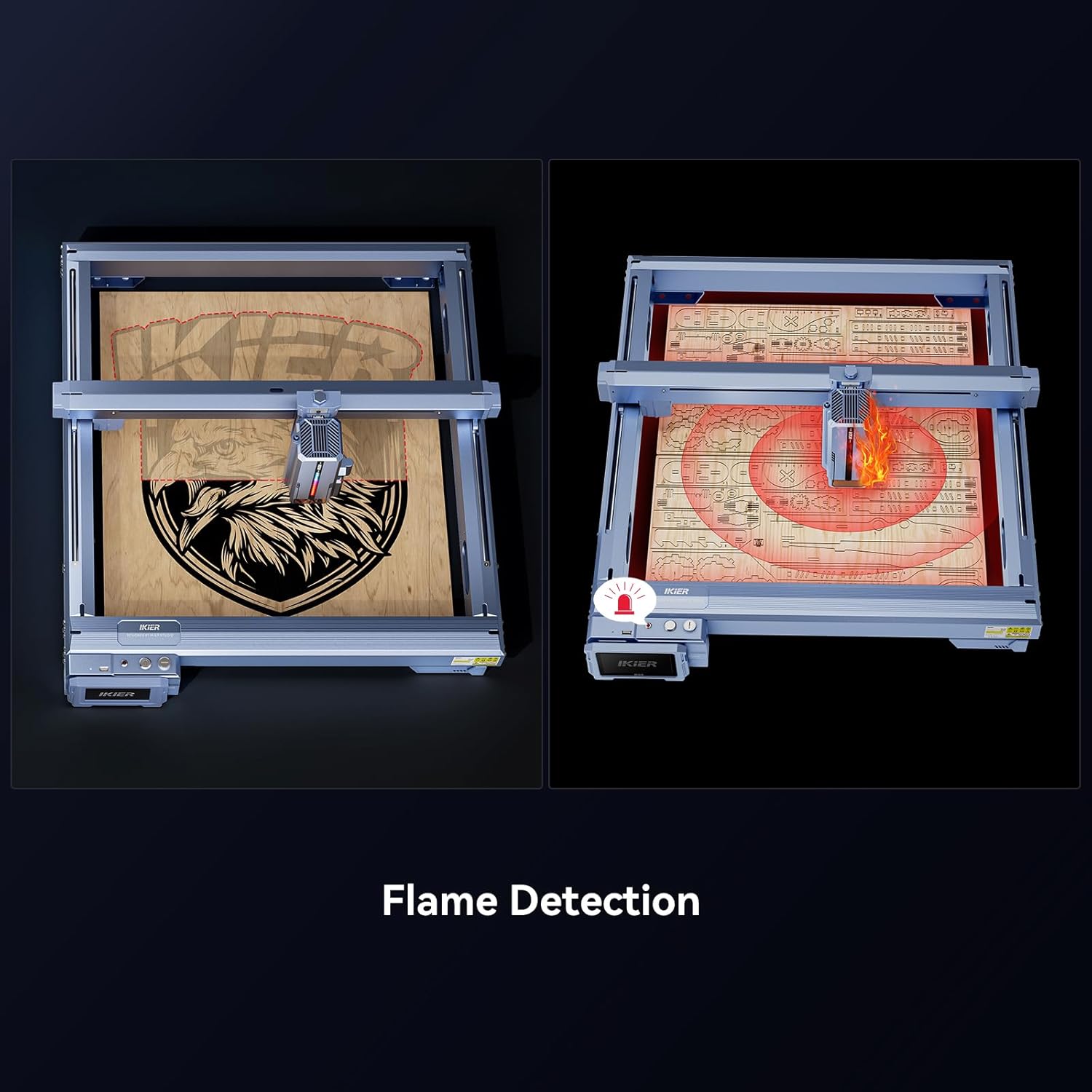
Figura 8: Interna view of the laser module's heat dissipation system.
4.7 modos de trabajo
The machine offers three distinct working modes to suit various project requirements:
- High-speed Mode: For rapid engraving and cutting, reaching speeds up to 900 mm/s.
- Modo equilibrado: The universal default mode, offering a good balance between speed and precision.
- High-precision Mode: For intricate details and superior accuracy in engraving.
4.8 Compatibilidad del software
The IKIER K1 Pro Max is compatible with popular laser control software such as LightBurn and LaserGRBL. Refer to the software's documentation for detailed instructions on creating and executing laser projects.
5. Mantenimiento
El mantenimiento regular garantiza la longevidad y el rendimiento óptimo de su grabador láser:
- Limpiar la lente láser: Periodically clean the laser lens with a soft, lint-free cloth and appropriate lens cleaning solution.
- Lubricar las piezas móviles: Apply a small amount of lubricant to the linear rails and lead screws to ensure smooth movement.
- Comprobar conexiones: Regularly inspect all electrical and data connections for tightness and wear.
- Mantenga el área limpia: Ensure the work area is free of dust and debris, which can affect machine performance.
6. Solución de problemas
If you encounter issues with your IKIER K1 Pro Max, consider the following common troubleshooting steps:
- La máquina no se enciende: Revise todas las conexiones eléctricas y asegúrese de que el interruptor de encendido esté en la posición de encendido. Verifique que la toma de corriente funcione.
- El láser no dispara: Ensure the security key is inserted and turned to the 'On' position. Check software settings for laser power and speed.
- Engraving Deviation: Ensure the material is securely fixed and the machine is stable. Check for any loose belts or mechanical components.
- Tilt Detection Alarm: If the machine prompts 'The machine is tilted', place it on a flat, stable surface and tap 'OK' on the screen to dismiss the alarm.
- Flame Detection Alarm: If 'Flame detected' appears, ensure there is no open flame near the laser module. Restart the machine if necessary after clearing the area.
- Problemas de enfoque automático: Ensure the laser module can physically touch the object within its effective stroke. Keep a distance of at least 5mm between the laser slider and the base.
For more detailed troubleshooting or persistent issues, please refer to the official IKIER support resources.
7. Especificaciones
| Característica | Detalle |
|---|---|
| Fabricante | IKIER |
| Dimensiones del paquete | 81.2 x 72.2 x 16.6 cm; 16.96 kilogramos |
| Referencia del modelo | IKIER K1 |
| Tamaño | Grabador láser de 48W |
| Estilo | Power Switching Laser Cutting and Engraving Machine |
| Material | 48W+R2 |
| Tipo de energía | AC |
| Componentes incluidos | IKIER Laser Engraver |
| ¿Baterias incluidas? | No |
| ¿Se requieren pilas? | No |
| Fecha de primera disponibilidad | 24 de julio de 2023 |
8. Garantía y soporte
IKIER is committed to providing quality products and customer satisfaction.
- Política de devoluciones: El producto es elegible para un reembolso o reemplazo dentro de los 31 días posteriores a la compra.
- Atención al cliente: For technical assistance, troubleshooting, or warranty inquiries, please visit the official IKIER website or utilize their online chat support for quick responses.


