1. Introducción
The NJOY Echo Pro 2000 is an advanced Uninterruptible Power Supply (UPS) designed to provide reliable power protection for critical equipment such as servers, workstations, and networking devices. Featuring double conversion online technology, it delivers a pure sine wave output, ensuring the highest degree of compatibility and protection for sensitive electronics. This manual provides essential information for the safe and efficient installation, operation, and maintenance of your Echo Pro 2000 UPS.

Figura 1.1: Frente view of the NJOY Echo Pro 2000 UPS. This image shows the main unit with its front panel display and control buttons.
2. Información de seguridad
Please read and follow all safety instructions carefully before installing, operating, or servicing the UPS. Failure to comply with these instructions may result in electric shock, fire, or serious injury.
- Seguridad eléctrica: El SAI contiene volúmenes peligrosos.tagNo intente desmontar la unidad. El mantenimiento solo debe ser realizado por personal cualificado.
- Seguridad de la batería: Batteries can present a risk of electrical shock and high short-circuit current. Observe proper polarity when connecting batteries. Do not dispose of batteries in a fire.
- Ambiente: Install the UPS in a well-ventilated area, free from excessive dust, humidity, and corrosive substances. Avoid direct sunlight and heat sources.
- Toma de tierra: Ensure the UPS is properly grounded to prevent electrical shock.
- Apagado de emergencia (EPO): Familiarize yourself with the EPO function for immediate shutdown in emergencies.
3. Producto terminadoview
3.1 Características principales
- Double Conversion Online Technology: Provides continuous, clean power by converting incoming AC to DC and then back to AC, isolating connected equipment from utility power fluctuations.
- Salida de onda sinusoidal pura: Ensures compatibility with all types of electronic loads, preventing distortion and electrical noise.
- Nivel de ruido bajo: Operates at less than 40 dB, suitable for office environments.
- Gestión de software: Includes specialized software for remote monitoring, scheduled power on/off, battery tests, and complete UPS configuration.
- Puertos de comunicación: Equipped with RS232, HID USB, and EPO ports. An optional SNMP card slot is available for advanced network monitoring.
- Baterías internas: Features 4 x 12V7Ah sealed lead-acid batteries for reliable backup power.
3.2 Conexiones del panel posterior
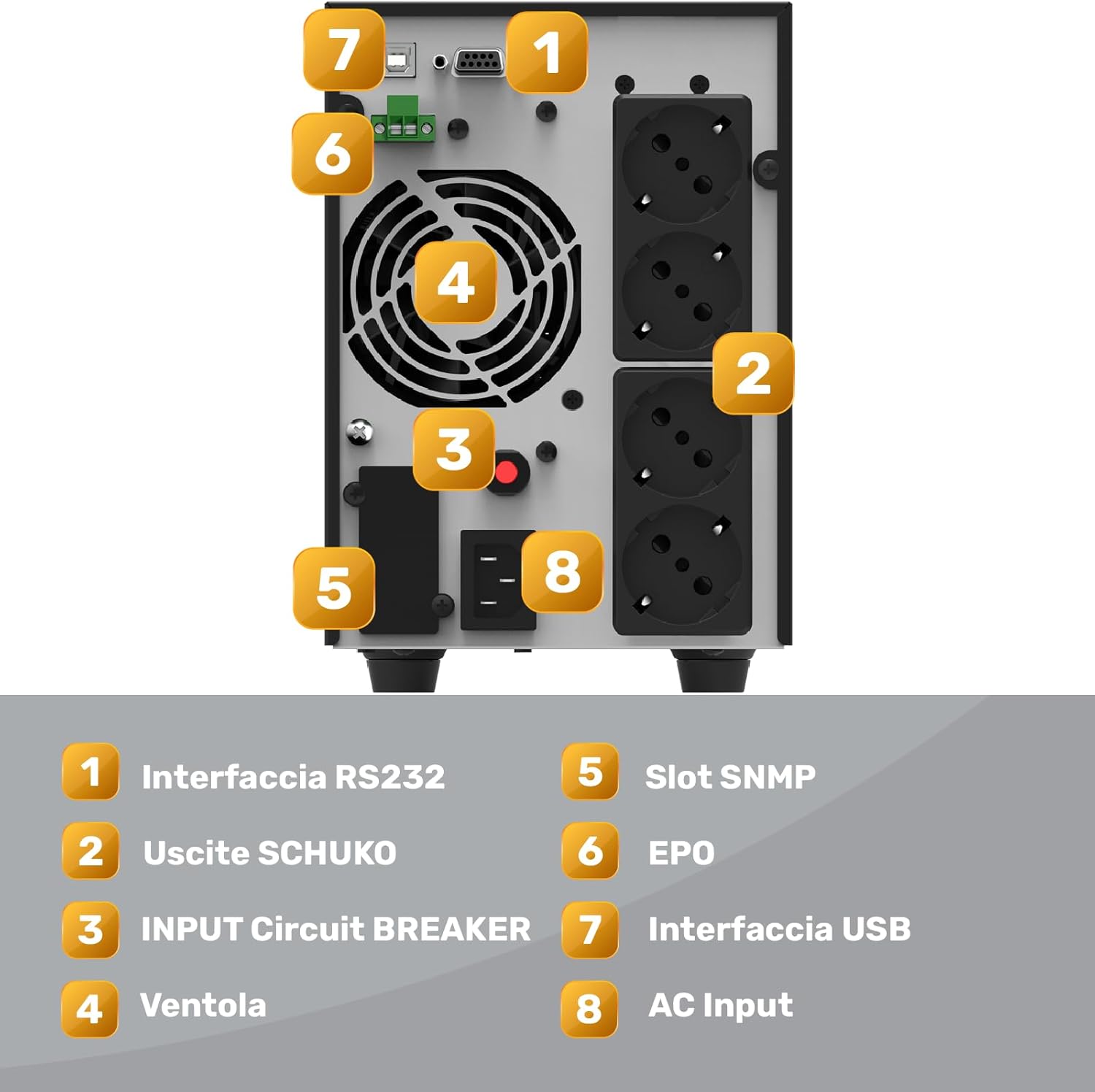
Figure 3.1: Rear panel of the NJOY Echo Pro 2000 UPS, showing various connection ports.
- Interfaz RS232: Para la comunicación en serie con una computadora o dispositivo de red.
- Tomas de corriente Schuko (x4): Output receptacles for connecting protected equipment.
- Disyuntor de entrada: Overcurrent protection for the UPS input.
- Fan: Ventilador de refrigeración para componentes internos.
- SNMP Slot: Expansion slot for an optional SNMP card (not included) for network management.
- EPO (Apagado de emergencia): Conector para apagado remoto de emergencia.
- Interfaz USB: Para comunicación USB con una computadora.
- Entrada de CA: Power input connector for the UPS.
4. Configuración
Follow these steps to properly set up your NJOY Echo Pro 2000 UPS:
- Desembalaje: Carefully unpack the UPS and inspect it for any shipping damage. Report any damage to your dealer.
- Colocación: Place the UPS in a clean, dry, and well-ventilated indoor environment. Ensure adequate clearance around the unit for proper airflow. Avoid placing it near heat sources or in direct sunlight.
- Carga inicial: Connect the UPS to a grounded AC power outlet using the provided power cord. Allow the UPS to charge for at least 8 hours before connecting any equipment to ensure optimal battery performance. The LCD display will indicate charging status.
- Equipo de conexión: Once the UPS is fully charged, connect your critical equipment (servers, computers, monitors, etc.) to the Schuko output receptacles on the rear panel. Do not connect surge suppressors or power strips to the UPS output.
- Configuración de comunicación: For monitoring and management, connect the UPS to your computer using the provided USB or RS232 cable. Install the specialized management software (refer to Section 5.2).
- EPO Connection (Optional): If using the Emergency Power Off function, connect the EPO cable to the designated port.
5. Instrucciones de funcionamiento
5.1 Encendido / Apagado
- Para encender: Press and hold the 'ON' button on the front panel for approximately 2 seconds until the UPS powers on and the LCD display illuminates.
- Para apagar: Press and hold the 'OFF' button for approximately 2 seconds. The UPS will shut down, and the display will turn off.
5.2 Pantalla LCD y botones de control
The front panel LCD provides real-time status information. Use the 'ENTER' and 'ESC' buttons to navigate through the display menus and view various parameters such as input/output voltage, battery level, load level, and operating mode.
5.3 Gestión de software
The included software allows for comprehensive monitoring and control of the UPS. Install the software on a connected computer to:
- Monitor real-time UPS status and parameters.
- Schedule automatic power on/off and battery tests.
- Configure UPS settings and alarm thresholds.
- Receive notifications for power events.
- Perform safe shutdown of connected computer systems during extended power outages.

Figura 5.1: Example of the UPS management software interface, showing status and configuration options.
6. Mantenimiento
El mantenimiento regular garantiza la longevidad y el rendimiento óptimo de su UPS.
- Cuidado de la batería: The UPS contains sealed lead-acid batteries. These batteries typically last 3-5 years under normal operating conditions. Replace batteries when their runtime significantly decreases. Only use replacement batteries of the same type and rating (4 x 12V7Ah). Battery replacement should be performed by qualified service personnel.
- Limpieza: Keep the UPS clean and free of dust. Use a dry cloth to wipe the exterior. Do not use liquid cleaners or solvents. Ensure ventilation openings are clear of obstructions.
- Condiciones ambientales: Maintain the UPS within the recommended operating temperature and humidity ranges to prolong its lifespan.
- Autotest: Periodically perform a battery self-test using the management software or front panel controls to assess battery health.
7. Solución de problemas
This section provides solutions to common issues you might encounter with your UPS. If the problem persists, contact technical support.
| Problema | Posible causa | Solución |
|---|---|---|
| El UPS no se enciende | Sin entrada de CA; Batería baja; Falla del SAI | Check AC power cord connection; Allow UPS to charge; Contact support if fault persists. |
| El UPS emite un pitido continuo | Overload; Low battery; UPS fault | Reduce connected load; Allow UPS to charge; Check LCD for error codes. |
| Tiempo de respaldo corto | Overload; Batteries need replacement | Reduce connected load; Perform battery test and replace if necessary. |
| Software not communicating with UPS | Cable incorrecto; Problema con el controlador; Configuración del software | Ensure correct USB/RS232 cable is used; Reinstall drivers; Check software communication settings. |
8. Especificaciones
| Característica | Especificación |
|---|---|
| Marca | NJOY |
| Número de modelo | UPOL-OL200EP-CG01B_SIL |
| Tipo de producto | Torre SAI |
| Tecnología | Online (VFI) Double Conversion |
| Capacidad de potencia | 2000 VA / 1600 W |
| Factor de potencia de salida | 0.8 |
| Volumen nominal de entradatage | 230 V CA |
| Vol de entradatage Rango | 80 - 300 V CA |
| Frecuencia de entrada | 50 Hz / 60 Hz (auto-sensing) |
| Volumen nominal de salidatage | 208/220/230/240 V AC |
| Forma de onda de salida | De onda sinusoidal pura |
| Puntos de venta | 4 x Schuko |
| Baterías | 4 x 12V7Ah Sealed Lead-Acid (internal) |
| Eficiencia | Hasta el 96% |
| Mostrar | Pantalla LCD |
| Puertos de comunicación | RS232, HID USB, EPO, SNMP Slot (optional card) |
| Nivel de ruido | <40dB |
| Dispositivos compatibles | Gaming Computers, DVRs, Video Surveillance Systems, WiFi/ADSL/Fiber Modems, Monitors, Printers, TVs, NAS, Servers |

Figure 8.1: Runtime autonomy chart for the NJOY Echo Pro 2000 UPS. This chart illustrates the approximate backup duration at different load levels. For example, at 1600W (100% load), the runtime is approximately 1 minute, while at 400W (25% load), it is approximately 17 minutes.
9. Información de garantía
For detailed warranty terms and conditions, please refer to the warranty card included with your product or visit the official NJOY webSitio. Conserve su comprobante de compra para reclamaciones de garantía.
10. Soporte
If you require technical assistance or have questions regarding your NJOY Echo Pro 2000 UPS, please contact NJOY customer support through their official websitio o la información de contacto proporcionada en la documentación de su producto.