1. Introducción
Thank you for choosing the De'Longhi Rivelia EXAM440.35.BG Automatic Coffee Machine. This appliance is designed to provide a premium coffee experience with ease of use and customizable options. Please read this manual carefully before using the appliance to ensure proper operation, maintenance, and safety.
2. Instrucciones de seguridad importantes
Siga siempre las precauciones básicas de seguridad al utilizar aparatos eléctricos para reducir el riesgo de incendio, descarga eléctrica y lesiones a las personas.
- Lea todas las instrucciones antes de usar.
- No toque superficies calientes. Utilice asas o perillas.
- Para protegerse contra incendios, descargas eléctricas y lesiones personales, no sumerja el cable, los enchufes o el aparato en agua u otro líquido.
- Es necesaria una estrecha supervisión cuando cualquier aparato sea utilizado por niños o cerca de ellos.
- Desenchufe el aparato del tomacorriente cuando no lo utilice y antes de limpiarlo. Deje que se enfríe antes de colocar o quitar piezas y antes de limpiarlo.
- No utilice ningún aparato que tenga un cable o enchufe dañados, que presente algún tipo de mal funcionamiento o que haya sufrido algún daño. Devuelva el aparato al centro de servicio autorizado más cercano para que lo examinen, lo reparen o lo ajusten.
- El uso de accesorios no recomendados por el fabricante del aparato puede provocar incendios, descargas eléctricas o lesiones personales.
- No utilizar en exteriores.
- No deje que el cable cuelgue del borde de la mesa o mostrador, ni que toque superficies calientes.
- No lo coloque sobre o cerca de un quemador de gas o eléctrico caliente, ni dentro de un horno caliente.
- Siempre conecte primero el enchufe al aparato y luego el cable a la toma de corriente. Para desconectarlo, apague cualquier control y desenchúfelo de la toma de corriente.
- No utilice el aparato para ningún fin distinto del previsto.
- Tenga mucho cuidado al desechar el vapor caliente.
3. Producto terminadoview
The De'Longhi Rivelia EXAM440.35.BG is a compact automatic coffee machine featuring a 3.5-inch color touchscreen, a manual milk frother, and the innovative Bean Switch System for easily changing coffee bean varieties.

Figura 3.1: Frente view of the De'Longhi Rivelia EXAM440.35.BG coffee machine in Sand Beige.
Componentes clave:
- 3.5" Full-Touch Color Display: For intuitive control and personalized coffee routines.
- Bean Switch System: Two interchangeable 250g bean containers for different coffee varieties.
- Espumador de leche manual: For preparing creamy milk foam for lattes and cappuccinos.
- Tanque de agua: Extraíble, capacidad 1.4 litros.
- Bandeja de goteo y recipiente para posos: For collecting excess water and used coffee grounds.
- Boquilla de café: Altura ajustable para varios tamaños de taza.

Figura 3.2: The De'Longhi Rivelia series, showcasing various color options including Sand Beige.
4. Configuración inicial
4.1 Desembalaje y colocación
- Retire con cuidado la máquina de su embalaje.
- Coloque la máquina sobre una superficie estable y nivelada, lejos de salpicaduras de agua y fuentes de calor.
- Asegúrese de que haya suficiente espacio alrededor de la máquina para ventilación y acceso a los componentes.
4.2 Llenado del depósito de agua
- Retire el tanque de agua del costado de la máquina.
- Llene el tanque con agua fresca y fría del grifo hasta el indicador de nivel MAX.
- Vuelva a colocar el tanque de agua de forma segura en la máquina.
4.3 Filling the Bean Container (Bean Switch System)
The Rivelia features two interchangeable bean containers. You can switch between them to enjoy different coffee varieties.
- Lift the lid of a bean container.
- Vierta granos de café frescos en el recipiente. No lo llene demasiado.
- Place the filled bean container onto the machine's bean hopper. Ensure it is seated correctly.
- To switch beans, simply lift the current container, replace it with another filled container, and the machine will detect the change.

Figura 4.1: The Bean Switch System with two interchangeable bean containers.

Figura 4.2: Illustration of filling the bean container with fresh coffee beans.
4.4 Primer uso y ciclo de enjuague
Before making your first coffee, perform a rinsing cycle to clean the internal circuits.
- Enchufe la máquina a una toma de corriente.
- Encienda la máquina con el botón de encendido.
- Follow the on-screen instructions for the initial setup, including language selection and water hardness.
- The machine will automatically perform a rinsing cycle. Place a container under the coffee spouts and hot water spout to collect the water.
- Una vez finalizado el ciclo de enjuague, la máquina está lista para su uso.
5. Operación
5.1 Using the 3.5" Full-Touch Color Display
The intuitive touchscreen allows you to select beverages, customize settings, and manage user profiles.

Figura 5.1: The 3.5-inch full-touch color display in use, showing beverage selection.
- Beverage Selection: Swipe through the menu to choose from 8 pre-programmed coffee recipes.
- Personalización: Adjust coffee strength, temperature, and volume for each drink.
- Usuario Profiles: Create up to 4 personalized user profiles to save your favorite settings. The machine adapts its menu based on your routine.
- Tecnología Bean Adapt: This technology automatically adjusts grinding parameters, dosage, and brewing temperature to optimize extraction for the selected coffee bean variety.
5.2 Preparación de bebidas de café
- Ensure the water tank is filled and a bean container is in place.
- Coloque una taza debajo de las salidas de café.
- Select your desired beverage from the touchscreen menu.
- Adjust settings (strength, volume) if desired.
- Press the "Start" icon to begin brewing.

Figura 5.2: A selection of coffee drinks, including espresso, americano, and milk-based beverages.
5.3 Using the Manual Milk Frother
The integrated steam wand allows you to manually froth milk for creamy cappuccinos and lattes.
- Llene una jarra de leche con leche fría (láctea o no láctea).
- Coloque la varilla de vapor en la leche, justo debajo de la superficie.
- Activate the steam function via the touchscreen.
- Move the jug up and down to create desired foam texture.
- Once frothed, turn off the steam function and clean the wand immediately.

Figura 5.3: Demonstrating the manual milk frother for creating creamy milk foam.
5.4 Dispensación de agua caliente
The machine can also dispense hot water for teas or other hot beverages.
- Place a cup under the hot water spout (usually the steam wand).
- Select the hot water function from the touchscreen.
- Press "Start" to dispense hot water.
6. Limpieza y mantenimiento
La limpieza regular garantiza un rendimiento óptimo y prolonga la vida útil de su cafetera.
6.1 Limpieza diaria
- Bandeja de goteo y recipiente para posos: Vacíe y enjuague a diario. La máquina le avisará cuando sea necesario vaciar el depósito de posos.
- Tanque de agua: Enjuague diariamente y rellene con agua fresca.
- Boquillas para café: Limpiar con publicidadamp paño.
- Vaporizador de leche: Después de cada uso, limpie la varilla de vapor con un paño húmedo.amp cloth and purge steam briefly to clear any milk residue.
6.2 Limpieza semanal
- Unidad de preparación: Remove the brew unit (refer to the machine's internal instructions for removal) and rinse it thoroughly under running water. Allow it to air dry before reinserting.
- Bean Containers: Empty and clean the bean containers, especially when switching bean types, to prevent oil buildup.
6.3 Descalcificar
The machine will indicate when descaling is required. Use only De'Longhi descaling solution and follow the on-screen instructions precisely. Descaling regularly prevents limescale buildup and maintains coffee quality.
7. Solución de problemas
This section addresses common issues you might encounter with your De'Longhi Rivelia EXAM440.35.BG.
| Problema | Posible causa | Solución |
|---|---|---|
| La máquina no se enciende. | No enchufado, toma de corriente defectuosa. | Verifique la conexión del cable de alimentación; pruebe con una toma de corriente diferente. |
| "Fill Water Tank" message appears, but tank is full. | Water tank not inserted correctly; sensor issue. | Remove and reinsert the water tank firmly. Ensure the float in the tank moves freely. |
| El café es demasiado débil o aguado. | Ajuste de molienda demasiado grueso; dosis de café insuficiente; granos viejos. | Adjust grind setting finer; increase coffee strength via menu; use fresh beans. |
| El espumador de leche no produce espuma. | Varilla de vapor bloqueada; la leche no está lo suficientemente fría; tipo de leche incorrecto. | Clean steam wand thoroughly; use cold milk; ensure milk is suitable for frothing. |
| Touchscreen unresponsive or scratched. | Fallo temporal del software; daño físico. | Restart the machine. If scratched, contact customer support for service options. Avoid abrasive cleaners. |
8. Especificaciones técnicas
| Característica | Detalle |
|---|---|
| Marca | De'Longhi |
| Número de modelo | EXAM440.35.BG |
| Color | Beige arena |
| Dimensiones (L x An x Al) | 43 x 24.5 x 38.5 cm |
| Peso | 9.8 kilogramos |
| Capacidad del tanque de agua | 1.4 litros |
| Fuerza | 1450 vatios |
| Volumentage | 240 voltios |
| Material | Metal |
| Características especiales | 4 usuarios profiles, 8 coffee beverages, Bean Switch System, Integrated steam wand, Coffee routines, Bean Adapt Technology |
| Apagado automático | Sí |
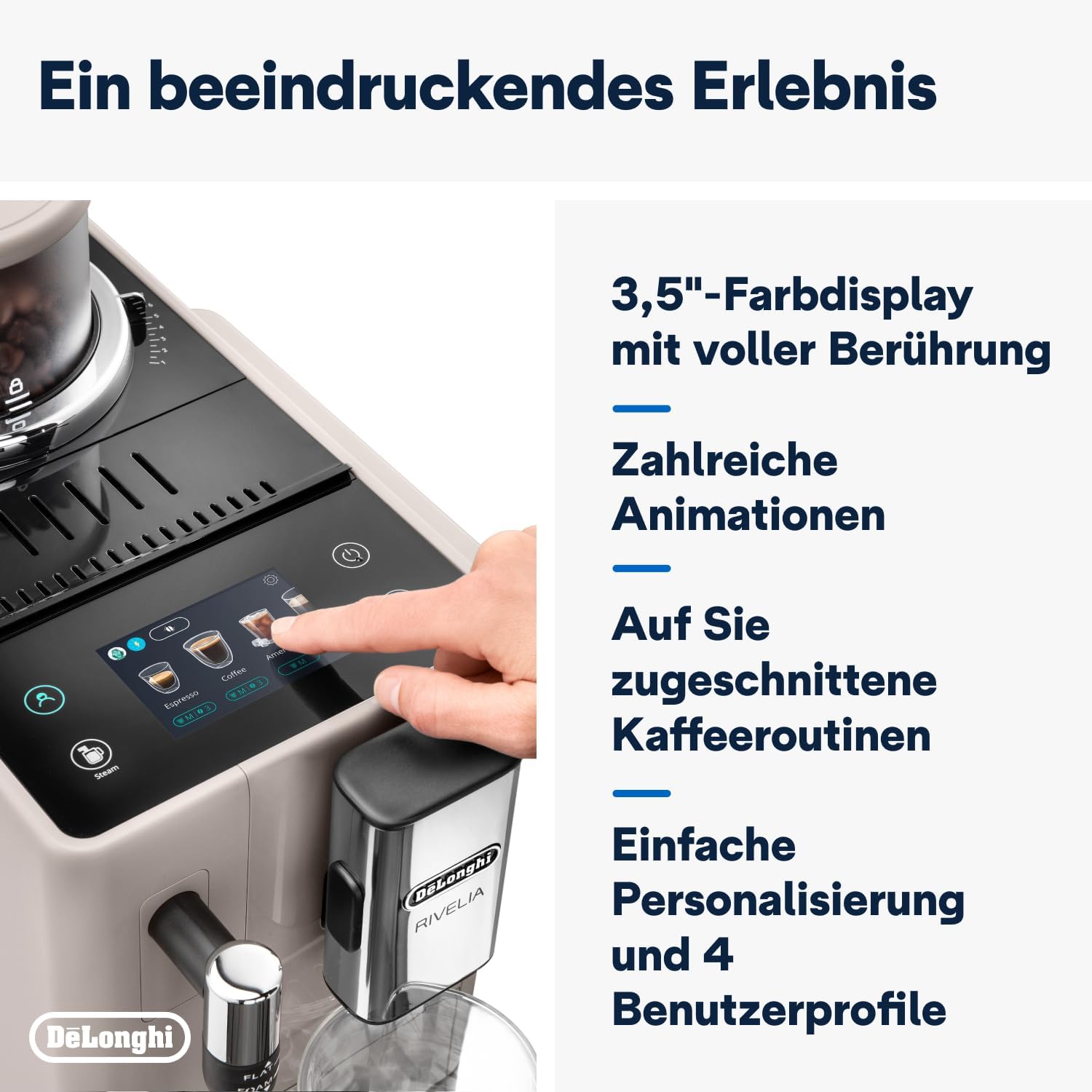
Figura 8.1: Dimensiones del producto: 245 mm (ancho) x 430 mm (profundidad) x 385 mm (alto).
9. Garantía y soporte
9.1 Información de garantía
Your De'Longhi Rivelia EXAM440.35.BG coffee machine comes with a standard manufacturer's warranty. Please refer to the warranty card included in your product packaging for specific terms and conditions, including the warranty period and coverage details. Keep your proof of purchase for warranty claims.
9.2 Atención al cliente
Para asistencia técnica, repuestos o servicio técnico, contacte con el servicio de atención al cliente de De'Longhi. Puede encontrar información de contacto en el sitio web oficial de De'Longhi. websitio o en la documentación proporcionada con su aparato.
- Soporte en línea: Visita la página oficial de De'Longhi webSitio para preguntas frecuentes, guías de solución de problemas y registro de productos.
- Soporte telefónico: Contact numbers are typically listed in your warranty booklet or on the brand's websitio.


