1. Introducción
This instruction manual provides comprehensive guidance for the safe and proper installation, operation, and maintenance of your Neomounts AFP-875BL Floor Plate. This floor plate is designed to provide a stable base for compatible Neomounts display stands, specifically models FL55-875BL1 and WL55-875BL1. Please read this manual thoroughly before beginning installation and retain it for future reference.
2. Información de seguridad
Adherence to the following safety guidelines is crucial for preventing injury and damage to the product or property.
- Asegúrese de que todos los componentes estén presentes y sin daños antes de la instalación. No lo utilice si alguna pieza falta o está defectuosa.
- Installation should be performed by at least two people due to the weight and size of the components.
- Verify that the floor surface is level and capable of supporting the combined weight of the floor plate, display stand, and display.
- Use only the hardware supplied by Neomounts or specified in this manual.
- Do not exceed the maximum weight capacity of the compatible display stand.
- Mantenga a los niños y las mascotas alejados del área de instalación.
3. Contenido del paquete
Desempaque la caja con cuidado y asegúrese de que todos los elementos enumerados a continuación estén presentes y en buenas condiciones.
- Neomounts AFP-875BL Floor Plate (1x)
- Mounting Hardware Kit (e.g., screws, washers, nuts for attaching the stand) (1x) - Specific contents may vary; refer to the diagram in your stand's manual.
4. Configuración e instalación
This section details the steps required to properly install the AFP-875BL Floor Plate with your compatible Neomounts display stand (FL55-875BL1 or WL55-875BL1).
4.1. Preparación
- Identify the desired location for the display stand. Ensure it is a stable, level surface.
- Unpack all components of the floor plate and the display stand.
- Gather necessary tools (e.g., wrenches, screwdrivers) as specified in your display stand's manual.
4.2. Pasos de montaje
- Position the Floor Plate: Carefully place the AFP-875BL floor plate on the chosen floor location. Ensure the orientation is correct for your display stand.
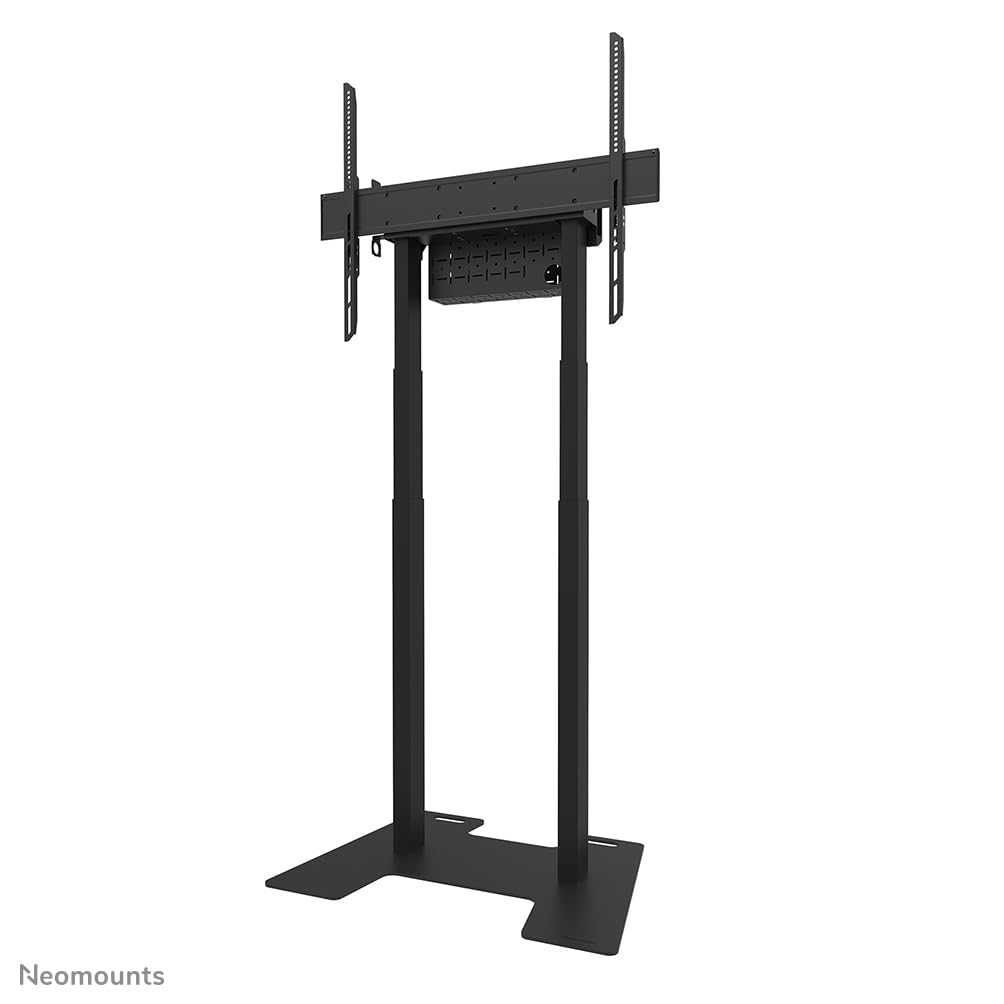
Image 1: The Neomounts AFP-875BL floor plate shown with a compatible display stand. This image illustrates the overall assembly.
- Attach the Display Stand Columns: Align the base columns of your FL55-875BL1 or WL55-875BL1 display stand with the designated mounting holes on the AFP-875BL floor plate.

Imagen 2: Un primer plano view of the floor plate's base, showing the cutouts and mounting points for the display stand columns.
- Secure the Columns: Using the provided mounting hardware (screws, washers, nuts), securely fasten the display stand columns to the floor plate. Ensure all connections are tight to prevent wobbling. Refer to your display stand's manual for specific torque requirements.

Image 3: Another perspective of the floor plate base, highlighting the robust design and attachment points.
- Comprobación final: After assembly, gently test the stability of the entire unit. Ensure there is no excessive movement or looseness.
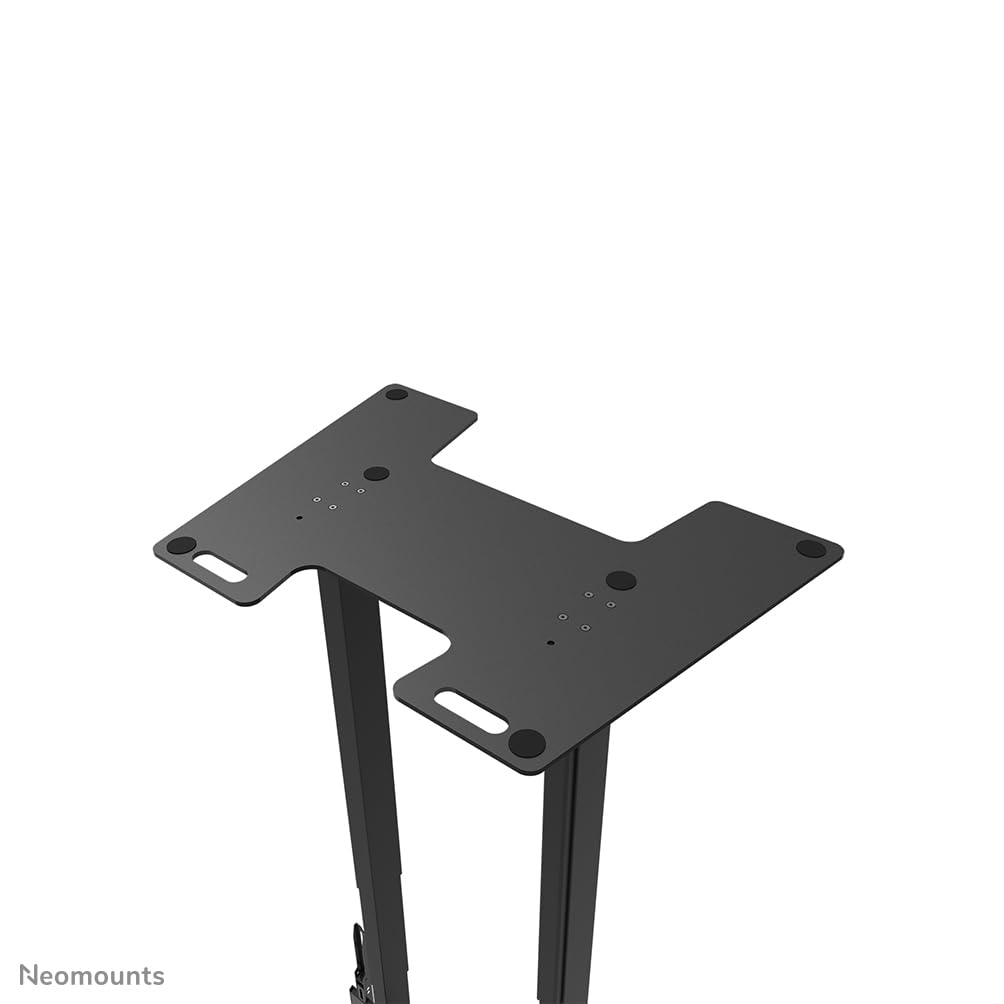
Imagen 4: Una vista de arriba hacia abajo view of the floor plate base, useful for verifying proper alignment and secure connections.
5. Instrucciones de funcionamiento
The Neomounts AFP-875BL Floor Plate serves as a static base for your display stand. Once installed, its primary function is to provide stability. No active "operation" is required from the floor plate itself.
- Comprobación de estabilidad: Periodically check the stability of the entire display stand assembly. Ensure all connections between the floor plate and the stand columns remain tight.
- Reubicación: If relocating the display stand, always lift the entire unit carefully. Avoid dragging the unit, as this can damage the floor plate, the floor, or compromise the integrity of the assembly.
6. Mantenimiento
Regular maintenance ensures the longevity and continued safe use of your floor plate.
- Limpieza: Clean the floor plate with a soft, damp paño. Evite limpiadores abrasivos o disolventes que puedan dañar el acabado.
- Inspección: Annually, or more frequently in high-traffic areas, inspect all mounting hardware for tightness. Retighten any loose screws or bolts. Check for any signs of wear, corrosion, or damage to the floor plate.
- Daño: If the floor plate shows signs of significant damage or deformation, discontinue use immediately and contact Neomounts support.
7. Solución de problemas
Esta sección aborda problemas comunes que podrías encontrar.
- Asunto: The display stand feels unstable or wobbly after installation.
Solución: Recheck all mounting hardware connecting the stand columns to the floor plate. Ensure they are fully tightened. Verify that the floor surface is level. - Asunto: Difficulty aligning the stand columns with the floor plate.
Solución: Ensure the floor plate is correctly oriented. If necessary, temporarily loosen the stand column connections to allow for minor adjustments, then retighten. - Asunto: Arañazos en el suelo.
Solución: Ensure the floor plate is not dragged across the floor. If the floor plate has protective feet, ensure they are intact. Consider placing a protective mat under the floor plate.
8. Especificaciones
Detailed technical specifications for the Neomounts AFP-875BL Floor Plate.
| Característica | Especificación |
|---|---|
| Número de modelo | AFP-875BL |
| Marca | Neomontajes |
| Dimensiones del producto (W x D x H) | 864 mm x 600 mm x 9.5 mm (34.02 x 23.62 x 0.37 pulgadas) |
| Peso del artículo | 24 kg (52.9 libras) |
| Monturas compatibles | FL55-875BL1, WL55-875BL1 |
| Material | Steel (inferred from product type and weight) |
| Color | Black (inferred from product title) |

Image 5: Technical drawing illustrating the dimensions of the AFP-875BL floor plate in millimeters.
9. Garantía y soporte
Neomounts products are designed for durability and reliability.
- Garantía: This product is covered by a 2-year warranty against defects in materials and workmanship. Please retain your proof of purchase for warranty claims.
- Atención al cliente: For technical assistance, missing parts, or warranty inquiries, please contact your local Neomounts dealer or visit the official Neomounts websitio para obtener información de contacto de soporte.


