Introducción
This manual provides essential instructions for the proper installation, operation, and maintenance of your JURA A1, A5, A7, A9, or ENA Micro series coffee machine water tank. This replacement water tank is designed to ensure optimal performance of your JURA espresso machine. Please read these instructions carefully before use.
Configuración
The water tank is a complete unit, including the valve on the water outlet, the float for the water level indicator, and the clamp designed for a JURA Claris Blue water filter cartridge (filter not included).
- Preparación: Ensure your JURA coffee machine is turned off and unplugged from the power source before proceeding. Remove the old water tank from the machine.
- Instalación del filtro (opcional): If you use a JURA Claris Blue water filter, insert it into the designated clamp within the new water tank. Ensure it is securely seated.
- Llenar el tanque: Fill the water tank with fresh, cold tap water up to the maximum fill line. Do not overfill.
- Inserting the Tank: Carefully slide the filled water tank into its designated slot on your JURA coffee machine. Ensure it is fully seated and clicks into place. A proper connection is crucial for water flow.
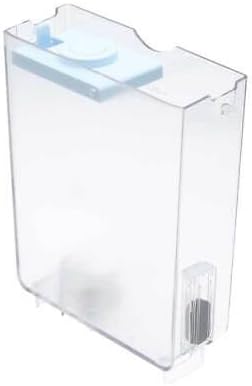
Figura 1: Angulado view of the water tank, highlighting the integrated valve and water level float.

Figura 2: Lado view illustrating the internal structure, including the area for the Claris Blue filter cartridge.
Operante
Once the water tank is correctly installed and filled, your JURA coffee machine is ready for operation. The water level indicator float will rise and fall with the water level, providing a visual cue for when refilling is necessary.
- Recarga: When the water level is low, carefully remove the tank, refill with fresh water, and reinsert it as described in the Setup section.
- Escucha: Regularly check the water level indicator to ensure sufficient water is available for brewing.
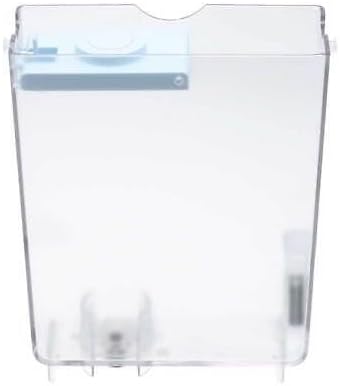
Figura 3: Frente view of the water tank, demonstrating its transparent design for easy water level monitoring.
Mantenimiento
Regular cleaning of the water tank is essential for hygiene and to prevent mineral buildup, ensuring the longevity of your coffee machine and the quality of your beverages.
- Limpieza diaria: Empty any remaining water from the tank daily. Rinse the tank thoroughly with fresh water.
- Limpieza semanal: Wash the water tank with a mild dish soap and warm water. Use a soft brush or sponge to clean all internal surfaces, paying attention to the valve and float mechanism. Rinse thoroughly to remove all soap residue.
- Descalcificar: If mineral deposits are visible, use a JURA-approved descaling solution according to its instructions. Ensure the tank is thoroughly rinsed after descaling.
- Reemplazo del filtro: If using a Claris Blue filter, replace it as recommended by JURA (typically every 2 months or after 50 liters of water, whichever comes first).

Figura 4: De arriba hacia abajo view of the water tank, illustrating the wide opening for easy filling and access during cleaning.
Solución de problemas
| Problema | Posible causa | Solución |
|---|---|---|
| Water not flowing from tank | Tank not seated correctly; valve obstructed; airlock. | Remove and reinsert tank firmly. Check valve for debris. Remove tank, shake gently, and reinsert. |
| Water level indicator not moving | Float stuck or damaged. | Remove tank and gently agitate the float. Clean the area around the float to remove any buildup. If damaged, replacement may be necessary. |
| Leaking from tank area | Tanque no colocado correctamente; grieta en el tanque; sello dañado. | Ensure tank is fully inserted. Inspect tank for visible cracks. If a crack or seal damage is found, the tank requires replacement. |
If problems persist after attempting these solutions, please consult your JURA coffee machine's main instruction manual or contact JURA customer support.
Presupuesto
- Tipo de producto: Replacement Water Tank
- Compatibilidad: JURA A1, A5, A7, A9, ENA Micro series coffee machines
- Manufacturer Article Numbers: 70618, 70122
- Componentes incluidos: Water tank, water outlet valve, water level indicator float, clamp for JURA Claris Blue water filter cartridge.
- Material: Plástico transparente
Garantía y soporte
For information regarding warranty coverage or technical support, please refer to the documentation provided with your original JURA coffee machine or visit the official JURA website. As this is a replacement part, its warranty may be subject to the terms of the seller or manufacturer of the part itself.


