Introducción
Thank you for choosing the Fenge Dual Monitor Stand with 2 Drawers. This manual provides essential information for the safe and efficient assembly, operation, and maintenance of your new computer riser. Please read these instructions thoroughly before use and retain them for future reference.
Información de seguridad
- Asegúrese de que todos los componentes estén presentes y sin daños antes del montaje. No lo utilice si alguna pieza falta o está defectuosa.
- Monte la unidad sobre una superficie suave y limpia para evitar rayones.
- No exceda la capacidad de carga máxima de 99 libras (45 kg).
- Place the monitor stand on a stable, level surface to prevent tipping.
- Mantenga las piezas pequeñas fuera del alcance de los niños.
Contenido del paquete
Verifique que todos los siguientes componentes estén incluidos en su paquete:
- Main MDF Board (Top Shelf)
- Lower MDF Board (Middle Shelf)
- Adjustable Height Legs (4 pieces)
- Fabric Drawers (2 pieces)
- Herrajes de montaje (tornillos, tacos, etc.)
- Assembly Tool (screwdriver/Allen wrench)
Instrucciones de montaje
Follow these steps to assemble your Fenge Dual Monitor Stand:
- Prepare the Boards: Lay the main MDF board (top shelf) and the lower MDF board (middle shelf) on a soft, flat surface.
- Attach Support Pieces: Secure the internal support pieces to the underside of the main MDF board and the top of the lower MDF board using the provided screws and dowels. Ensure they are aligned with the pre-drilled holes.
- Connect the Shelves: Carefully align the main MDF board with the lower MDF board, ensuring the support pieces fit correctly. Secure them together with the appropriate hardware.
- Instalar patas: Attach the four adjustable height legs to the underside of the lower MDF board. Tighten the screws securely.
- Insertar cajones: Slide the two fabric drawers into their designated compartments on the lower shelf.
Para obtener una guía visual sobre el montaje, consulte el vídeo de montaje oficial:
Video: Fenge Monitor Stand Assembly Guide (Excludes Drawer Section). This video demonstrates the step-by-step process of assembling the monitor stand components.
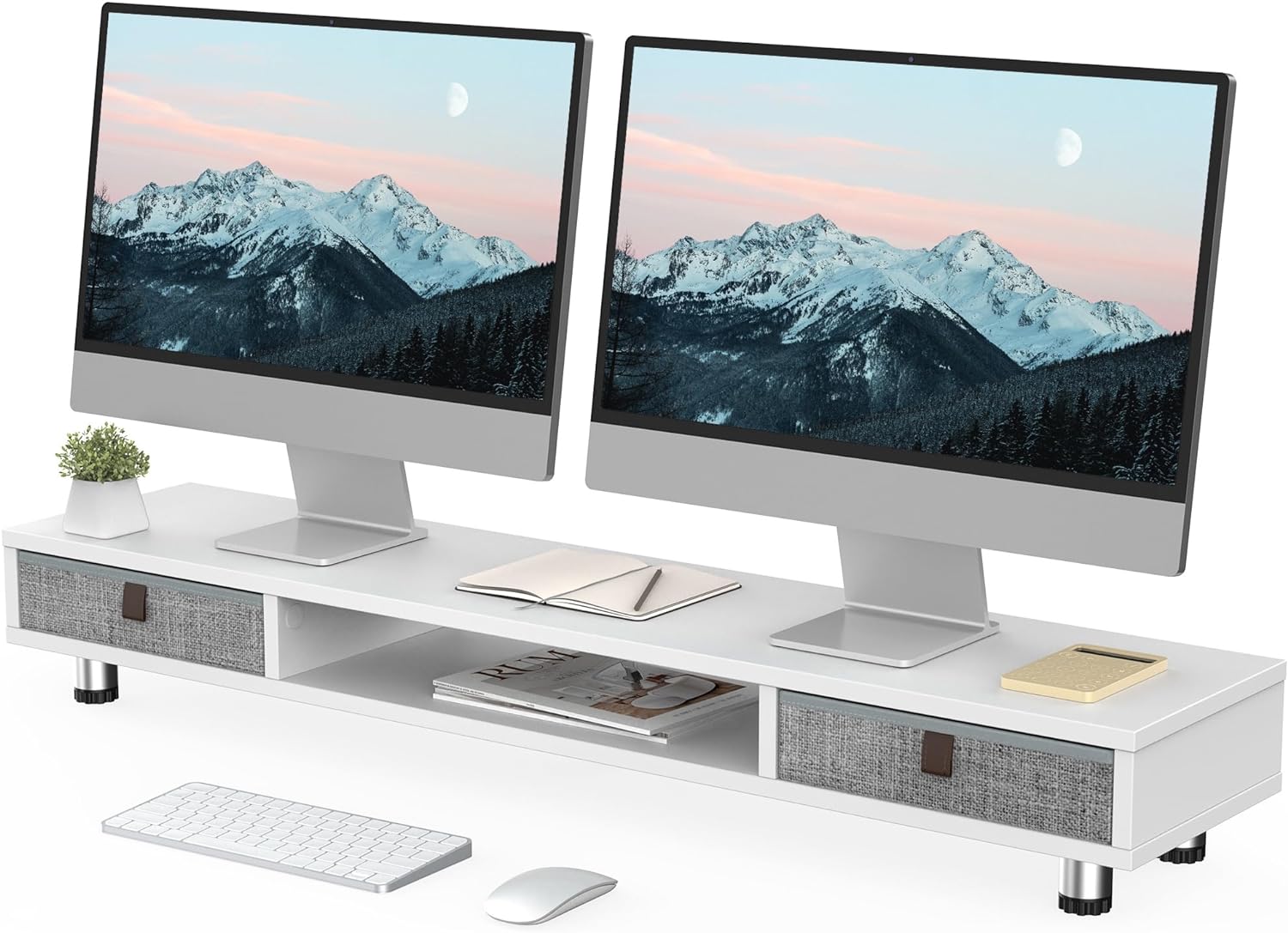
Image: The fully assembled Fenge Dual Monitor Stand in white, showcasing its design with two monitors and integrated storage drawers.
Instrucciones de funcionamiento
The Fenge Dual Monitor Stand is designed to enhance your workspace ergonomics and organization.
- Ubicación del monitor: Place up to two 32-inch monitors on the top surface of the stand. Ensure the weight is evenly distributed and does not exceed the 99 lbs (45 kg) capacity.
- Altura ajustable: The stand's height can be adjusted from 6.0 inches to 6.6 inches. Rotate the adjustable feet at the bottom of the legs to achieve your desired ergonomic viewing height. This helps alleviate neck strain during long work sessions.
- Almacenamiento integrado: Utilize the two large 10.9-inch slide-out fabric drawers for storing desktop items such as pens, notebooks, and small accessories, keeping your workspace tidy. The middle compartment also offers additional space for laptops, keyboards, or other devices.
- Uso versátil: This stand can also function as a printer stand, laptop riser, or TV stand, adapting to various needs in your home or office.

Image: A close-up illustrating the practical storage provided by the pull-out drawers, ideal for organizing small office supplies.

Imagen: Visual examples demonstrating the monitor stand's adaptability for use with printers, multiple monitors, or as a television stand.
Video: Fenge Dual Monitor Stand with 2 Drawers Product Overview. This video provides a brief demonstration of the monitor stand's features and functionality.
Mantenimiento
Para garantizar la longevidad y la apariencia de su soporte de monitor:
- Limpie las superficies con un paño suave yamp paño. Evite productos químicos agresivos o limpiadores abrasivos.
- Revise periódicamente todos los tornillos y conexiones para asegurarse de que permanezcan apretados.
- Keep the stand away from direct sunlight and extreme temperatures to prevent material damage.
Solución de problemas
Si encuentra algún problema con el soporte de su monitor, consulte las siguientes soluciones comunes:
- Inestabilidad/tambaleo: Ensure all screws are tightened. Check that the adjustable feet are evenly extended and making full contact with the desk surface.
- Los cajones no se deslizan suavemente: Verify that the drawers are inserted correctly and that there are no obstructions in the compartments.
- Dificultad con el ajuste de altura: Ensure the adjustable feet are not overtightened and can rotate freely.
Presupuesto
Detailed product specifications for the Fenge Dual Monitor Stand:
| Característica | Detalle |
|---|---|
| Modelo | B0CFF9BCKB |
| Dimensiones (L x An x Al) | 42.5 x 9.3 x 6.0~6.6 pulgadas |
| Peso del artículo | 18.56 libras (8.44 kg) |
| Capacidad de carga | 99 libras (44.91 kg) |
| Material | MDF (tablero de fibra de densidad media) |
| Color | Blanco |
| Calzoncillos | 2 fabric slide-out drawers (10.9 inches each) |
| Rango de altura ajustable | 6.0 pulgadas a 6.6 pulgadas |

Image: A detailed diagram illustrating the physical dimensions and weight capacity of the monitor stand.

Imagen: Primer plano view emphasizing the construction materials and adjustable features of the stand's legs.
Garantía y soporte
For warranty information or technical support, please refer to the product packaging or contact Fenge customer service directly. Keep your purchase receipt for any warranty claims.


