1. Información de seguridad
Lea este manual detenidamente antes de instalar y usar el producto. Consérvelo para futuras consultas.
- Ensure the wall structure can safely support the weight of the mount and the monitor.
- Use a stud finder to locate wood studs for secure mounting. Avoid drilling into electrical wires or pipes.
- No exceda la capacidad máxima de peso de 17.6 libras (8 kg).
- Asegúrese de que todos los tornillos estén bien apretados, pero no los apriete demasiado.
- Mantenga a los niños y a las mascotas alejados durante la instalación.
- Handle the gas spring arm with care as it is under tension. Follow instructions for tension adjustment.
2. Contenido del paquete
Verifique que todas las piezas estén presentes antes de comenzar la instalación. Si alguna pieza falta o está dañada, contacte con atención al cliente.
- Conjunto de brazo de montaje en pared para monitor
- Placa de montaje VESA
- Placa de pared
- Hardware Kit (various screws, washers, anchors for different wall types)
- Allen Key / Hex Wrench for adjustments
- Manual de instrucciones
3. Especificaciones
| Característica | Detalle |
|---|---|
| Marca | Suptek |
| Modelo | WM01A |
| Compatibilidad de tamaño de pantalla | 17 a 32 pulgadas |
| Compatibilidad VESA | 75 x 75 mm, 100 x 100 mm |
| Capacidad de peso | 4.4 - 17.6 libras (2 - 8 kg) |
| Ángulo de inclinación | ±80° |
| Ángulo de giro | ±90° |
| Rotación | 360° |
| Extensión máxima | 20.39 pulgadas |
| Ajuste de altura | 310 mm |
| Material | Acero aleado |
| Tipos de pared compatibles | Concrete Wall, Brick Wall, Wood Studs |
4. Instrucciones de configuración
4.1. Mounting the VESA Plate to Your Monitor
- Coloque con cuidado el monitor boca abajo sobre una superficie suave y limpia.
- Identify the VESA mounting holes on the back of your monitor. These are typically in a square pattern (75x75mm or 100x100mm).
- Select the appropriate screws (M4 or M5) and washers from the hardware kit that fit your monitor's VESA holes. Ensure screws are not too long to avoid damaging internal components.
- Attach the VESA mounting plate to the back of your monitor using the selected screws and washers. Tighten securely.

Image: VESA plate securely attached to the back of a monitor, showing the screw points.
Video: Demonstrates the installation process of the Suptek Gas Spring Single Monitor Wall Mount, including attaching the VESA plate to the monitor.
4.2. Montaje del brazo en la pared
- Determine the desired mounting location on your wall. Use a stud finder to locate a wood stud for optimal support. For concrete or brick walls, use appropriate anchors (provided in the hardware kit).
- Hold the wall plate against the wall at the desired height and mark the drill holes.
- Drill pilot holes according to the recommended drill bit size for your wall type.
- Fije la placa de pared a la pared con los tirafondos y las arandelas. Asegúrese de que esté bien fijada y nivelada.

Image: Illustration of compatible wall types for mounting: concrete, brick, and wood studs.
Video: Demonstrates the installation process of the Suptek Gas Spring Single Monitor Wall Mount, including securing the wall plate.
4.3. Fijación del monitor al brazo
- Carefully lift the monitor (with the VESA plate attached) and align it with the arm's mounting head.
- Slide the VESA plate onto the arm's mounting head until it clicks into place or is securely seated.
- Install any safety screws or locking mechanisms as indicated in the manual to prevent accidental detachment.
Video: Shows the process of attaching a monitor to the wall mount arm.
4.4. Ajuste de tensión
The gas spring tension needs to be adjusted according to your monitor's weight to ensure smooth and stable movement.
- Use the provided Allen key to adjust the tension screw located on the arm.
- Turn clockwise for lighter monitors (to increase tension).
- Turn counter-clockwise for heavier monitors (to decrease tension).
- Adjust until the monitor stays in position when moved and can be adjusted with minimal effort.

Image: Visual guide for adjusting the gas spring tension: clockwise for lighter monitors, counter-clockwise for heavier monitors.
5. Instrucciones de funcionamiento
The suptek WM01A monitor arm offers full motion adjustability for optimal viewing comodidad.
- Inclinación: Adjust the monitor screen up or down by ±80° to reduce glare and find your preferred viewángulo de ing.
- Girar: Rotate the monitor left or right by ±90° to share your screen with others or change your viewposición de ing.
- Rotación: Gire el monitor 360° para cambiar entre orientación horizontal y vertical.
- Extensión/Retracción: Extend the arm up to 20.39 inches or retract it to save space, folding to 3.15 inches from the wall.
- Ajuste de altura: The gas spring allows for smooth vertical height adjustments of up to 310mm.

Image: Visual representation of the monitor arm's full motion capabilities, including 360° rotation, tilt, and swivel.
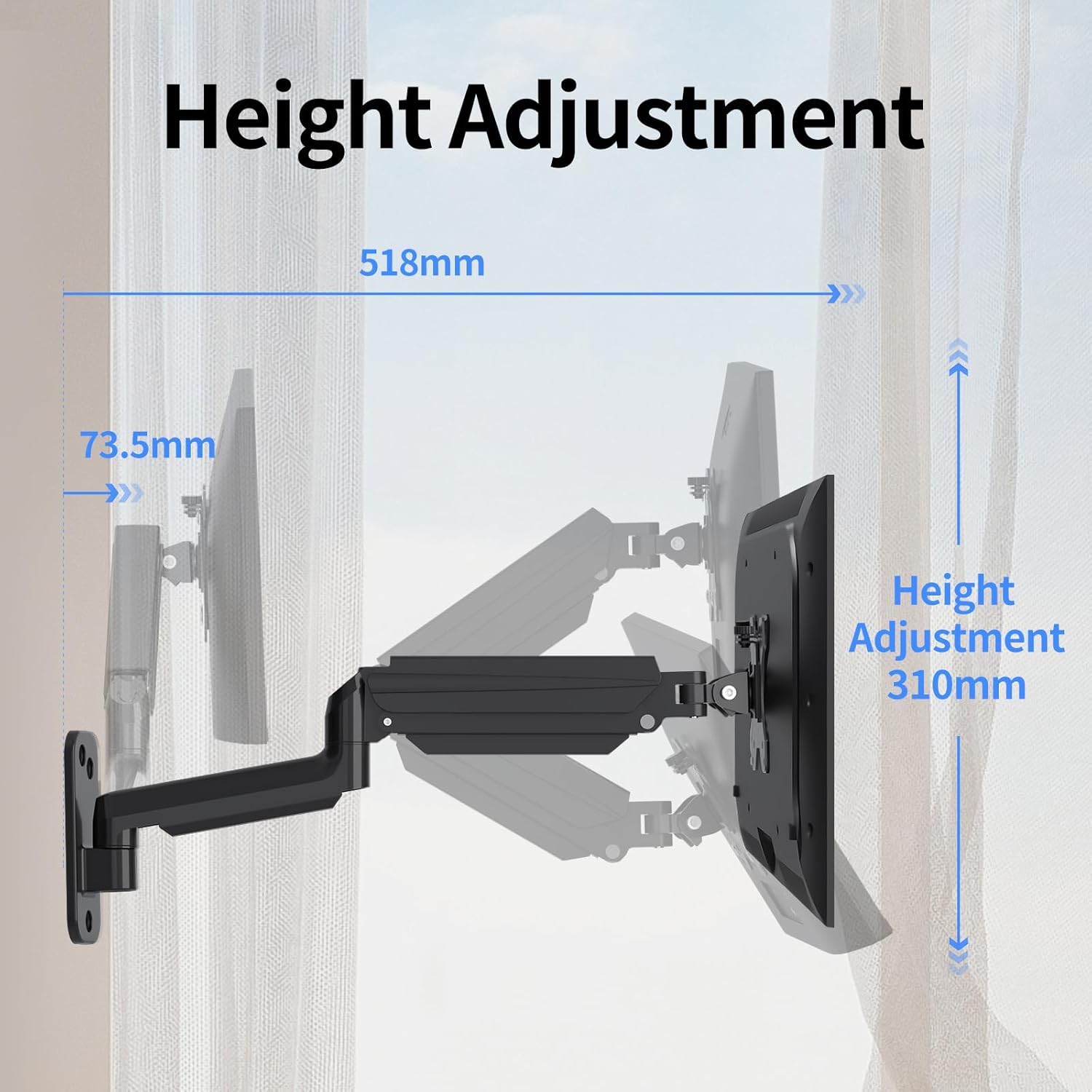
Image: Illustration detailing the height adjustment range of 310mm and the maximum extension of the arm.
Video: Demonstrates the various movements and adjustments possible with the Suptek Wall Monitor Mount (WM01A).
6. Gestión de cables
El sistema de gestión de cables integrado ayuda a mantener su espacio de trabajo ordenado y organizado.
- Route your monitor's power and video cables through the clips or channels provided along the arm.
- Asegúrese de que los cables tengan suficiente holgura para permitir un rango completo de movimiento sin tensión.
- Secure cables to prevent them from snagging or interfering with arm movement.

Image: Close-up of the monitor arm demonstrating how cables are neatly managed through the integrated system.
7. Mantenimiento
- Revise periódicamente todos los tornillos y conexiones para asegurarse de que permanezcan apretados.
- Limpie el soporte con un paño suave.amp paño. Evite los limpiadores abrasivos.
- No lubrique el mecanismo del resorte de gas a menos que lo indique específicamente el fabricante.
8. Solución de problemas
- El monitor se hunde o no mantiene la posición: The gas spring tension may be too low for your monitor's weight. Increase tension by turning the adjustment screw clockwise with the provided Allen key.
- El monitor es difícil de mover o está demasiado rígido: The gas spring tension may be too high. Decrease tension by turning the adjustment screw counter-clockwise.
- El monte se siente inestable: Recheck all wall mounting screws and VESA plate screws to ensure they are securely tightened. Confirm the wall type is appropriate for the installation method used.
9. Garantía y soporte
Para obtener información sobre la garantía o asistencia técnica, consulte el sitio web oficial del fabricante. webSitio web o contacte directamente con el servicio de atención al cliente. Conserve el recibo de compra para reclamaciones de garantía.
Manufacturer: suptek
Contacto: Visit the suptek Store on Amazon