1. Producto terminadoview
The Yamaha FGDP-30 Finger Drum Pad is a compact, standalone electronic percussion instrument designed for finger drumming. It integrates a professional-grade sound engine, built-in speaker, and a rechargeable battery, offering a portable solution for music creation across various genres. The device features 18 ultra-responsive, touch-sensitive pads with an optimized layout for dynamic play. It also functions as a high-speed USB audio/MIDI interface and supports the Rec'n'Share app for recording and sharing performances.

Figura 1: Frente view of the Yamaha FGDP-30 Finger Drum Pad, showing the layout of 18 pads, control buttons, and the display screen.
Características principales:
- Diseño todo en uno: Features 18 ultra-responsive, touch-sensitive pads, a professional-grade sound engine, built-in speaker, and a long-lasting rechargeable battery for portable use.
- Optimized Pad Layout: Ergonomically designed pad configuration for enhanced accuracy, comfort, and fluidity in finger drumming.
- Juego expresivo: Pads support advanced velocity sensitivity and after-touch detection for nuanced performance, with a high-fidelity internal tone generator.
- Advanced USB MIDI/Audio Interface: Connects to DAWs or external sound modules to trigger custom samples, record performances, or layer MIDI tracks. Plus, with the powerful Rec'n'Share app, drummers can quickly capture and share polished videos complete with backing tracks.
- Personalizable y ampliable: Allows for customizable pad assignments, adjustable sensitivity settings, and compatibility with external MIDI gear.
- Indicaciones de voz: Built-in voice prompts provide intuitive, hands-free operation for visually impaired musicians.
2. Configuración
2.1 Desembalaje e inspección inicial
Carefully remove the FGDP-30 from its packaging. Ensure all components, including the USB cable, are present. Inspect the device for any signs of damage during transit.
2.2 Encendido y carga
The FGDP-30 has a built-in rechargeable battery. To power on, press and hold the power button located on the top left of the device. If the battery is low, connect the device to a USB power source (5V) using the provided USB cable. The USB port is located on the back of the unit.

Figure 2: A hand connecting a USB cable to the FGDP-30 for charging or power supply. The USB port is labeled "USB TO HOST 5V".
2.3 Conexión de dispositivos externos
The FGDP-30 offers various connectivity options:
- USB to Host (5V): Connects to a computer for MIDI/Audio data transfer and power.
- ENTRADA AUX: Allows connection of an external audio player (e.g., smartphone, tablet) to play along with backing tracks.
- PHONES / OUTPUT: For connecting headphones or external speakers/ampsalvavidas.

Figura 3: Posterior view of the FGDP-30, highlighting the USB TO HOST, AUX IN, and PHONES/OUTPUT ports for various connections.

Figure 4: A smartphone connected to the FGDP-30's AUX IN port, demonstrating how to play along with external audio.
3. Instrucciones de funcionamiento
3.1 Funcionamiento básico del pad
The FGDP-30 features 18 pads designed for finger drumming. These pads are velocity-sensitive, meaning the sound's volume and character change based on how hard you strike them. Experiment with different striking techniques to explore the full expressive range.
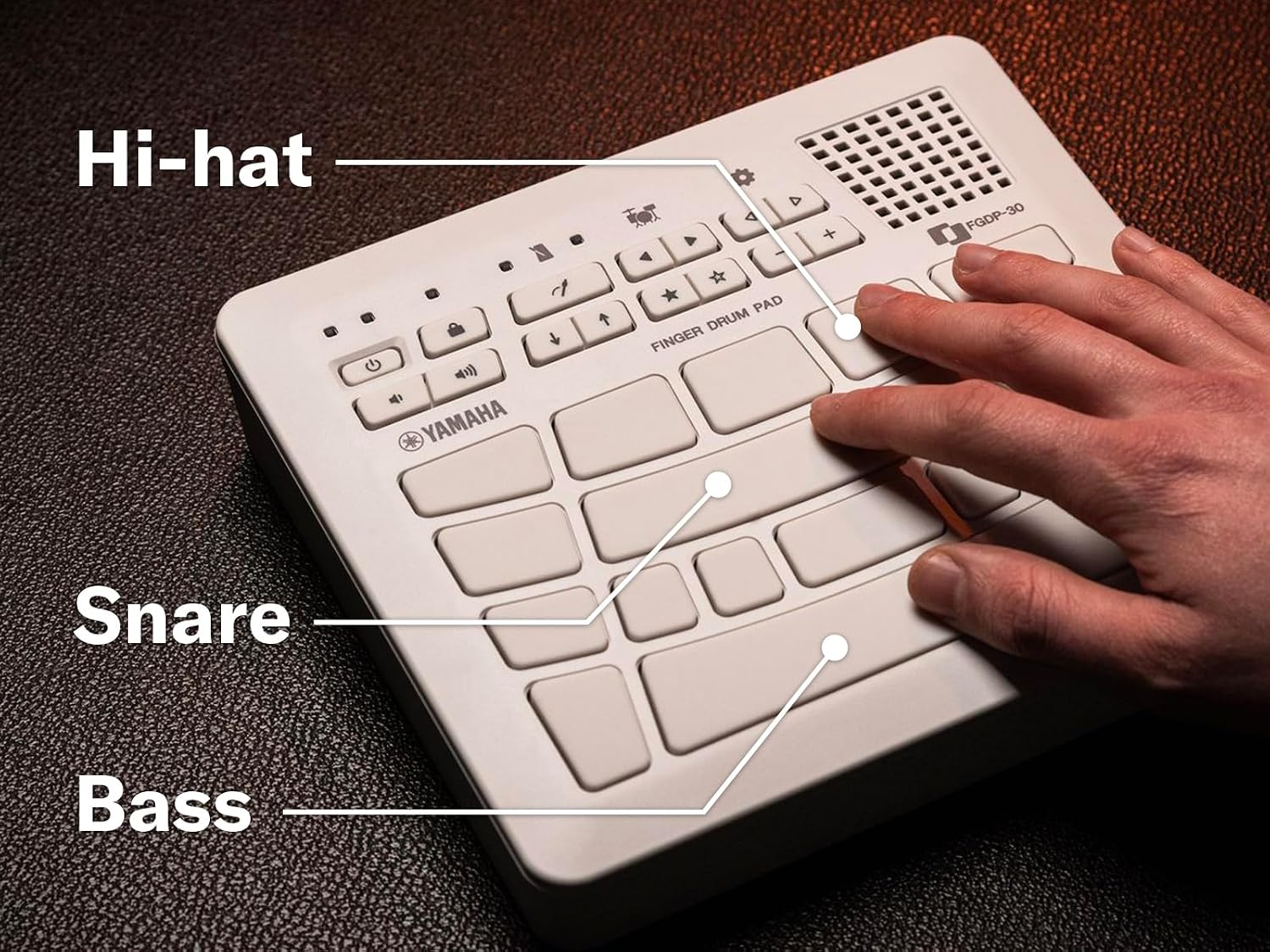
Figure 5: A user's hands positioned over the FGDP-30 pads, demonstrating the ergonomic layout for finger drumming.
3.2 Pad Layout and Functions
The FGDP-30's pads are strategically arranged to facilitate intuitive finger drumming. Key drum elements like hi-hat, snare, and bass drum are typically assigned to specific, easily accessible pads.
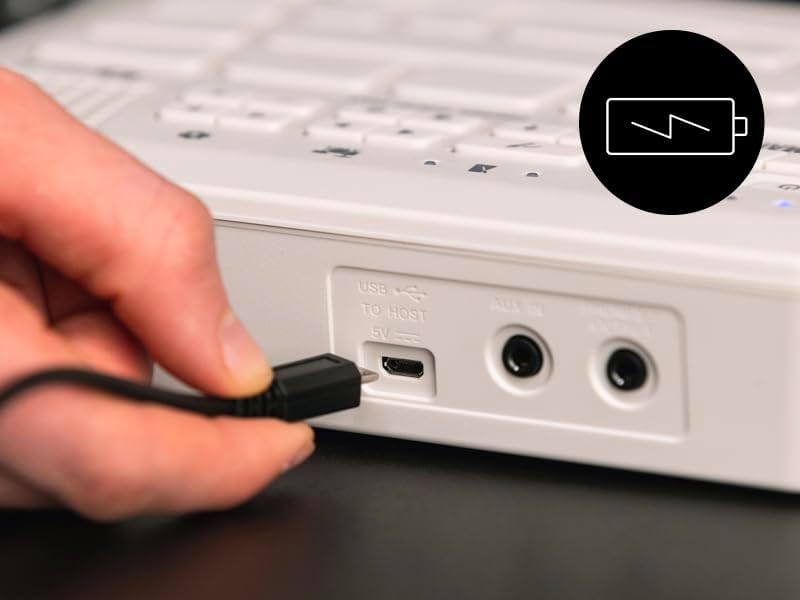
Figura 6: Un primer plano view of the FGDP-30 pads, with labels indicating typical assignments for Hi-hat, Snare, and Bass drum sounds.
3.3 Sound Selection and Customization
The device comes preloaded with 39 expertly crafted preset kits. Use the navigation buttons and display screen to browse and select different drum kits and sounds. Refer to the detailed user manual for specific instructions on customizing pad assignments and sensitivity settings.
3.4 Uso del altavoz incorporado
The FGDP-30 includes a high-quality internal speaker for immediate playback without external amplification. Adjust the volume using the dedicated volume buttons.

Figura 7: Un primer plano view of the FGDP-30's integrated speaker grille, located on the top right of the device.
3.5 Rec'n'Share App Integration
Enhance your practice and sharing capabilities with the Yamaha Rec'n'Share app. Connect your smartphone or tablet to the FGDP-30 to record high-quality audio and video of your performances, then easily share them online.

Figure 8: A smartphone mounted on a tripod, recording a user playing the FGDP-30, with the Rec'n'Share app interface visible on the phone screen.
3.6 Voice Prompts for Accessibility
The FGDP-30 includes voice prompts to assist visually impaired users. These prompts provide auditory feedback for navigation and function selection, enabling hands-free operation.
4. Mantenimiento
4.1 Limpieza
To clean the FGDP-30, use a soft, dry cloth. For stubborn dirt, slightly dampen the cloth with water and a mild detergent, then wipe dry immediately. Avoid using abrasive cleaners, solvents, or alcohol, as these can damage the surface.
4.2 Almacenamiento
Store the device in a cool, dry place away from direct sunlight, extreme temperatures, and high humidity. If storing for an extended period, ensure the battery is partially charged (around 50%) to prolong its lifespan.
4.3 Cuidado de la batería
To maintain battery health, avoid fully discharging the unit frequently. Recharge the battery when the low battery indicator appears. If the unit will not be used for a long time, charge it fully once every six months.
5. Solución de problemas
5.1 Sin sonido
- Check the volume level on the FGDP-30 and any connected headphones or speakers.
- Ensure headphones/speakers are properly connected to the PHONES / OUTPUT jack.
- If using the internal speaker, ensure it is not muted.
5.2 El dispositivo no se enciende
- Verify the battery is charged. Connect the FGDP-30 to a USB power source and allow it to charge for a period.
- Ensure the USB cable and power source are functioning correctly.
5.3 Pads Unresponsive or Inconsistent
- Check the sensitivity settings of the pads. These can be adjusted via the device's menu.
- Ensure the pads are clean and free from debris that might interfere with touch detection.
6. Especificaciones
| Característica | Detalle |
|---|---|
| Nombre del modelo | Almohadilla de tambor de dedo |
| Marca | Yamaha |
| Número de modelo del artículo | PIBF-30 |
| Number of Pads/Keys | 18 |
| Tecnología de conectividad | USB |
| Tipo de conector | XLR (for some external connections, though USB is primary) |
| Interfaz de hardware | USB |
| Dispositivos compatibles | Computer, Tablet, Smartphone |
| Software compatible | Ableton Live (and other DAWs via MIDI/Audio) |
| Peso del artículo | 2.2 libras |
| Dimensiones del producto | 8.8 x 7.7 x 1.9 pulgadas |
| Fuente de poder | Batería recargable / USB 5V |
7. Vídeo oficial del producto
Vídeo 1: Un oficial sobreview of the Yamaha Finger Drum Pads, showcasing features like optimized pad layout, ultra-sensitive pads, great drum sounds, portability, built-in speaker, built-in click, rechargeable battery, USB MIDI/Audio connectivity, AUX In, Rec'n'Share App, RGB pads (FGDP-50), Note Repeat (FGDP-50), Session Creator (FGDP-50), Playback Sampler (FGDP-50), and more registrations (FGDP-50). This video highlights both FGDP-30 and FGDP-50 models.
8. Garantía y soporte
Para obtener información sobre la garantía y asistencia al cliente, consulte la documentación incluida con su producto o visite el sitio web oficial de Yamaha. webSitio. Conserve su comprobante de compra para reclamaciones de garantía.
Online resources, FAQs, and contact information for technical assistance can typically be found on the manufacturer's support pages.


