Introducción
The Coby Ultimate Wireless Speaker is designed to deliver a powerful and immersive audio experience, complemented by dynamic light-up modes. This portable speaker is engineered for high-fidelity sound, ensuring crisp highs, rich mids, and deep bass. With its travel-friendly design and extended battery life, it is suitable for various environments, from personal listening to social gatherings.

Image: The Coby Ultimate Wireless Speaker, showcasing its vibrant, multi-color light display on the front grille. The speaker is black with a robust, portable design.
Producto terminadoview y controles
Familiarícese con el diseño y los controles del altavoz para un uso óptimo.
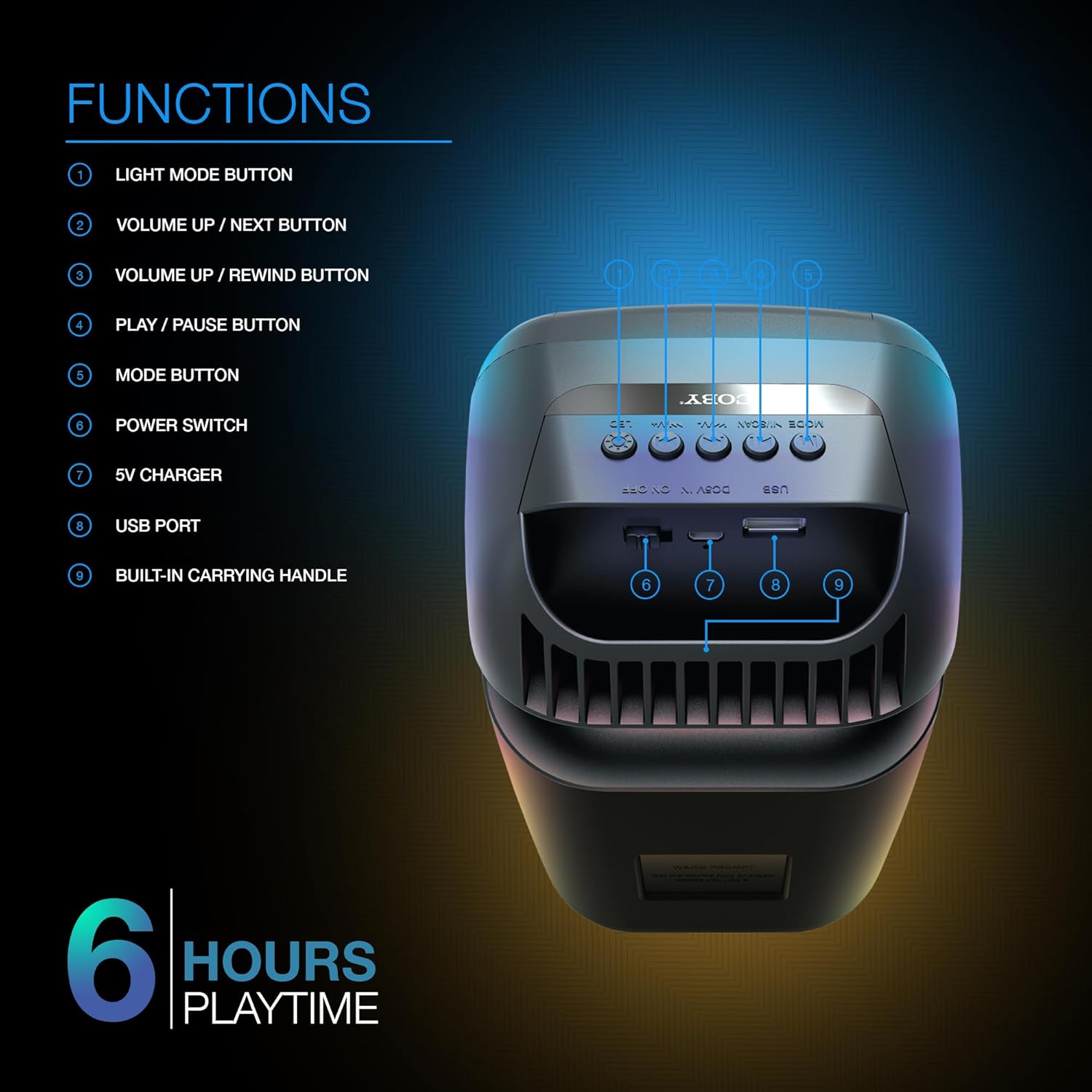
Image: A detailed diagram illustrating the top and rear controls of the Coby Ultimate Wireless Speaker. Numbered labels point to each function: Light Mode Button, Volume Up/Next, Volume Up/Rewind, Play/Pause, Mode Button, Power Switch, 5V Charger Port, USB Port, and Built-in Carrying Handle.
Funciones de control:
- Botón de modo de luz: Cycles through the 5 dazzling light-up modes.
- Volume Up / Next Button: Aumenta el volumen o salta a la siguiente pista.
- Volume Up / Rewind Button: Decreases volume or rewinds the current track.
- Botón de reproducción / pausa: Inicia o pausa la reproducción de audio.
- Botón de modo: Switches between different input modes (e.g., Bluetooth, FM Radio).
- Interruptor de alimentación: Enciende o apaga el altavoz.
- Cargador de 5 V: Port for connecting the charging cable.
- Puerto USB: For USB media playback or charging external devices (if supported).
- Built-in Carrying Handle: Para una fácil portabilidad.
Configuración
1. Carga del altavoz
Before first use, fully charge the speaker. Connect the provided 5V charging cable to the 5V Charger port on the speaker and plug the other end into a compatible USB power adapter (not included). The charging indicator light will show the charging status. A full charge provides up to 6 hours of playtime.
2. Encendido / apagado
Locate the Power Switch on the speaker. Slide the switch to the 'ON' position to power on the device. Slide it to the 'OFF' position to power off.
3. Emparejamiento Bluetooth
- Ensure the speaker is powered on and in Bluetooth mode (indicated by the Mode button).
- En su dispositivo móvil (teléfono inteligente, tableta, etc.), habilite Bluetooth y busque los dispositivos disponibles.
- Select "Coby CPA9000" or a similar name from the list of found devices.
- Once connected, the speaker will emit an audible confirmation, and you can begin streaming audio.
The speaker features Bluetooth version 5.3 for fast pairing and stable audio streaming.
Operación
1. Reproducción de audio
- Reproducir/Pausa: Press the Play/Pause button to start or pause the current track.
- Ajuste de volumen: Use the Volume Up / Next and Volume Up / Rewind buttons to adjust the playback volume.
- Navegación de pista: Briefly press the Volume Up / Next button to skip to the next track. Briefly press the Volume Up / Rewind button to go to the previous track.
2. Light-Up Modes
The speaker features 5 dazzling light-up modes that synchronize with your music. Press the Light Mode Button to cycle through the available light patterns and effects. Choose the mode that best suits your mood or environment.
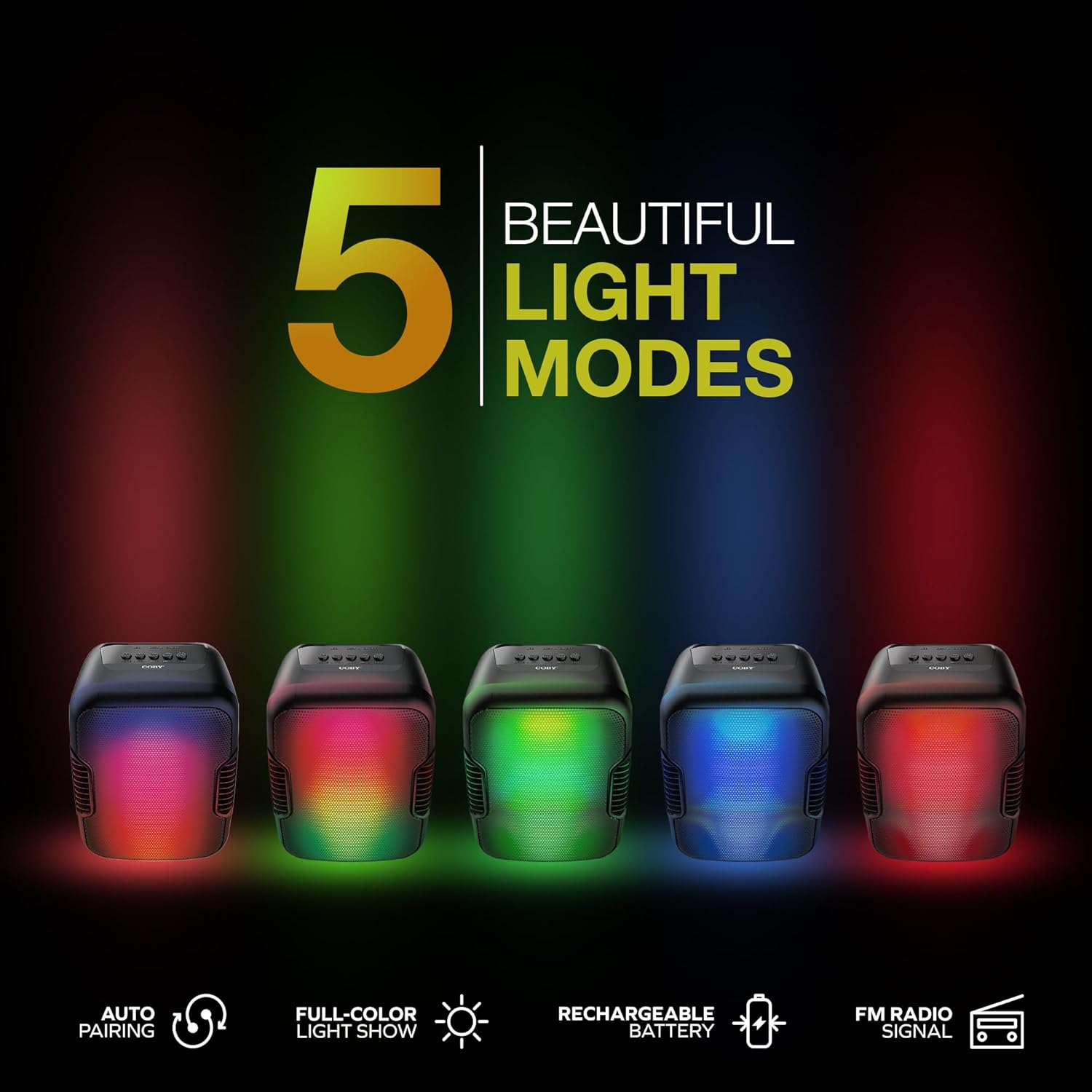
Image: Five Coby Ultimate Wireless Speakers arranged in a row, each displaying a different vibrant light mode, illustrating the variety of visual effects available.
3. Función de radio FM
To use the FM Radio, press the Mode button until you hear the FM radio signal. The speaker will automatically scan and tune into available stations. Use the Volume Up / Next and Volume Up / Rewind buttons to navigate between stations.
Mantenimiento
- Limpieza: Utilice un paño suave y seco para limpiar el exterior del altavoz. No utilice limpiadores abrasivos ni disolventes.
- Almacenamiento: Guarde el altavoz en un lugar fresco y seco, alejado de la luz solar directa y de temperaturas extremas cuando no lo utilice durante períodos prolongados.
- Cuidado de la batería: Para prolongar la vida útil de la batería, evite descargarla por completo con frecuencia. Cargue el altavoz regularmente, incluso si no lo usa constantemente.
Solución de problemas
| Problema | Posible causa | Solución |
|---|---|---|
| El altavoz no se enciende. | La batería está agotada. | Cargue el altavoz completamente utilizando el cable de carga proporcionado. |
| No hay sonido desde el altavoz. | Volume is too low or muted; Device not paired correctly; Incorrect mode selected. | Increase volume on both speaker and connected device. Re-pair Bluetooth. Press Mode button to select correct input. |
| La conexión Bluetooth es inestable. | Device is out of range; Interference from other devices. | Move the connected device closer to the speaker. Avoid placing speaker near other wireless devices. |
| Light modes are not working. | Light mode feature is off. | Press the Light Mode Button to activate and cycle through modes. |
Presupuesto

Image: The Coby Ultimate Wireless Speaker shown with its dimensions: 9.46 inches height, 4.92 inches width, and 4.33 inches depth.
| Característica | Detalle |
|---|---|
| Nombre del modelo | CPA9000 FLAME |
| Tipo de altavoz | Altavoz de subgraves |
| Tecnología de conectividad | Bluetooth |
| Tecnología de comunicación inalámbrica | Bluetooth 5.3 |
| Modo de salida de audio | Estéreo |
| Duración de la batería | Hasta 6 horas |
| Fuente de poder | Funciona con pilas (1 batería de iones de litio incluida) |
| Dimensiones del producto (Pr. x An. x Al.) | 4.33" x 4.92" x 9.46" |
| Peso del artículo | 14.1 onzas |
| Característica especial | USB Port, Light-Up Modes, Built-in Handle, FM Radio |
| Dispositivos compatibles | Teléfono inteligente, tableta |
| Método de control | Botones en el dispositivo |
| es resistente al agua | FALSO |
| Código Postal | 810071493751 |
Garantía y soporte
The Coby Ultimate Wireless Speaker comes with a limited warranty. For specific warranty terms and conditions, please refer to the documentation included with your purchase or visit the official Coby website. For technical support or further assistance, please contact Coby customer service.


