1. Introducción
The Lovskoo 300M WiFi Booster is designed to extend the range of your existing Wi-Fi network, eliminating dead zones and providing strong, reliable internet access throughout your home or office. This device acts as a signal amplifier, ensuring high-speed connectivity for all your devices, even in areas previously unreachable by your main router.
It supports IEEE 802.11n and IEEE 802.11g/b standards, offering speeds up to 300 Mbps. With its plug-in design and robust security mechanisms (WPA/WPA-PSK, WPA2/WPA2-PSK), it provides a secure and convenient solution for enhancing your wireless coverage.
2. Contenido del paquete
- 1 x Lovskoo WiFi Extender
- 1 x Manual de usuario
3. Características del producto
- Super Signal Coverage: Utilizes a new generation main control chip to search for 2.4G network signals, providing a maximum transmission rate of 300Mbps for high-speed internet surfing.
- WiFi Range Extender: Equipped with two external 2dBi omnidirectional antennas for improved performance, transmission rate, and stability. Automatically avoids channel conflicts and expands signal range up to 100 meters indoors and 300 meters outdoors (environment dependent).
- Puerto Ethernet: Includes a 10/100Mbps Ethernet port, allowing the extender to connect wired devices as an adapter.
- Fácil configuración: Designed for professional interaction with a minimalist and visual style, enabling expansion in just three simple steps. Features an advanced transparent BRIDGE mode for easy LAN access.
- Safe Internet Environment: Maximizes network security, preventing unauthorized access, protecting data, and avoiding Wi-Fi interference and privacy issues.
- Amplia compatibilidad: Works seamlessly with any standard router or gateway, extending WiFi signals for various devices including iOS, Android, and Windows.
- Indicador inteligente: A smart indicator light helps in finding the optimal placement for the internet signal booster.
4. Producto terminadoview y componentes

Figura 4.1: Delante y lateral view diagram of the Lovskoo WiFi Repeater, highlighting its 2 dBi antennas, LED indicators (WAN, WiFi, Repeater, Power, LAN), WPS/Reset button, WAN port, and LAN port.

Figura 4.2: Un claro view of the Lovskoo WiFi Repeater, showcasing its compact design and two adjustable external antennas.

Figura 4.3: Bottom perspective of the device, clearly displaying the WAN and LAN Ethernet ports for wired connections.
5. Guía de configuración
Follow these steps to set up your Lovskoo WiFi Booster:
- Encendido: Plug the WiFi Booster into a power outlet. The Power LED should light up.
- Connect to the Booster:
- Conexión inalámbrica: On your computer or mobile device, search for available Wi-Fi networks. Connect to the network named "wifi-xxxxxx" (where xxxxxx is the last 6 digits of the MAC address found on the back of the device).
- Conexión por cable: Alternatively, connect your computer to the Booster's LAN port using an Ethernet cable.
- Página de configuración de acceso: Abrir una web navegador e ingrese la dirección IP predeterminada: 192.168.188.1 en la barra de direcciones.
- Acceso: When prompted, enter the default username "admin" and password "admin".
- Seleccionar modo: Choose your desired working mode (Repeater, AP, or Router). For extending an existing network, select "Repeater" mode.
- Configurar el modo repetidor:
- Busque redes Wi-Fi disponibles.
- Seleccione su red Wi-Fi doméstica de la lista.
- Introduzca la contraseña de su red Wi-Fi doméstica.
- Puede optar por mantener el mismo SSID (nombre de red) o crear uno nuevo para la red extendida.
- Aplicar configuración: Save the settings. The device will restart.
- Verificar conexión: Once restarted, the Repeater LED should be solid, indicating a successful connection. You can now connect your devices to the extended network.
WPS Setup (Recommended for quick setup)
If your main router supports WPS (Wi-Fi Protected Setup), you can use this method for a quicker setup:
- Plug the WiFi Booster into a power outlet near your main router.
- Presione el botón WPS en su enrutador principal.
- Within 2 minutes, press the WPS/Reset button on the Lovskoo WiFi Booster for 2 seconds.
- The Repeater LED on the booster should start blinking and then turn solid, indicating a successful connection.
- You can now unplug the booster and move it to a suitable location within your router's Wi-Fi range, ensuring the Repeater LED remains solid.
Wired Connection ExampLos
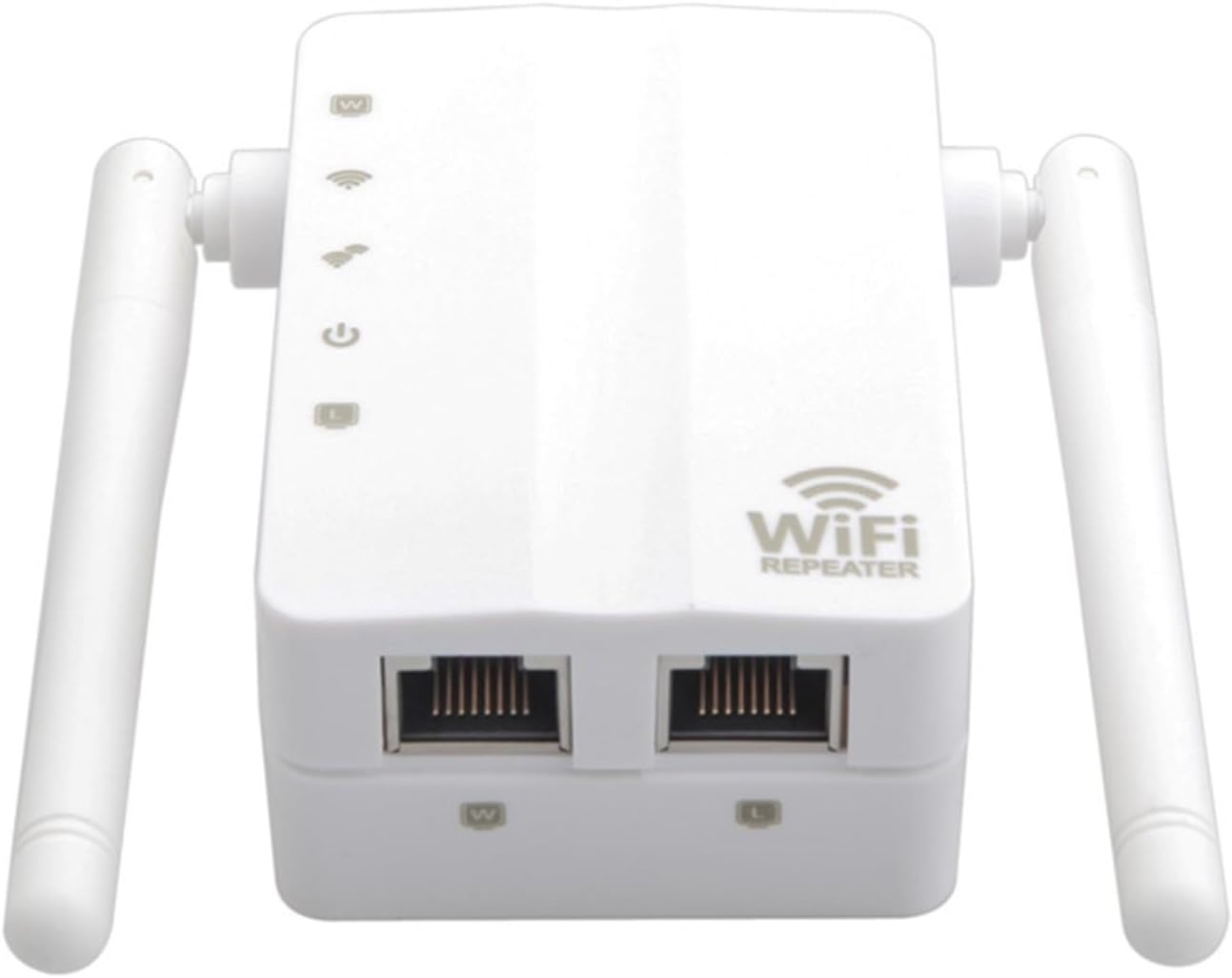
Figura 5.1: Connection diagram illustrating how to connect the Lovskoo WiFi Repeater to your internet source (modem/router) using the WAN port.

Figura 5.2: Connection diagram demonstrating how to connect a wired device, such as a computer, to the Lovskoo WiFi Repeater using the LAN port.
Guía de video de configuración
Vídeo 5.1: An official video demonstrating the setup and functionality of the Lovskoo WiFi Booster, highlighting its long-range capabilities.
6. Modos de funcionamiento
The Lovskoo WiFi Booster supports multiple operating modes to suit various networking needs:
- Modo repetidor: Extends the range of an existing wireless network. This is the most common mode for eliminating Wi-Fi dead zones.
- Modo AP (Punto de acceso): Converts a wired network connection into a wireless one. Ideal for creating a new Wi-Fi hotspot from an Ethernet port.
- Modo de enrutador: Functions as a basic router, providing internet access to multiple devices via a single internet connection (e.g., from a modem).
Puede cambiar entre estos modos a través del web-based management interface during or after the initial setup.
7. Especificaciones
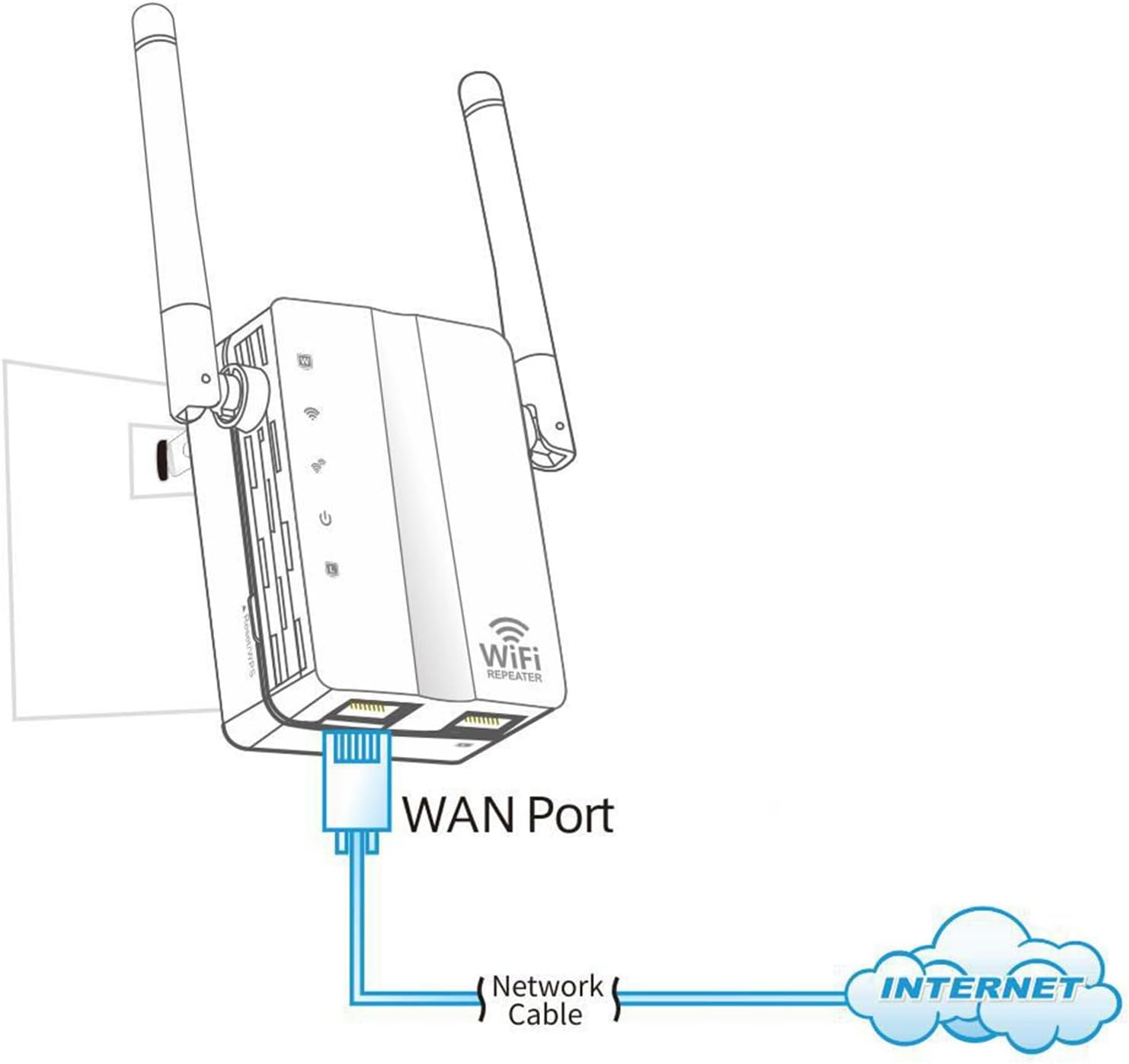
Figura 7.1: Dimensional drawing of the Lovskoo WiFi Repeater, showing its height, width, and depth.
| Característica | Detalle |
|---|---|
| Conjunto de chips | MTK7628kn |
| Interfaz | 1 x 10/100Mbps WAN Port, 1 x 10/100Mbps LAN Port |
| Velocidad inalámbrica | Hasta 300 Mbps (11n) |
| Rango de frecuencia | 2.4-2.4835 GHz |
| Potencia de transmisión | 20dBm (maximum EIRP) |
| Antena | 2 x 2dBi External Antennas (fixed) |
| Modos de trabajo | Repeater / AP / Router |
| Seguridad | 64/128-bit WEP, WPA/WPA2, WPA-PSK/WPA2-PSK (TKIP/AES) |
| Temperatura de funcionamiento | -20 ℃ a 70 ℃ (-4 °F a 158 °F) |
| Temperatura de almacenamiento | -40 ℃ a 90 ℃ (-40 °F a 194 °F) |
| Humedad de funcionamiento | 5% a 95% (sin condensación) |
| Humedad de almacenamiento | 90% máximo (sin condensación) |
| Sistema operativo compatible | Windows XP/Vista/Linnux/Win 7/Win 8/Win8.1/Win10/Mac OS |
| Tipo de adaptador | Enchufe de EE.UU. |
| Color | Negro, blanco |
| Dimensiones del producto | 142 x 90 x 50 mm (5.59 x 3.54 x 1.97 pulgadas) |
| Peso del artículo | 5.3 onzas |
8. Solución de problemas
- No se puede acceder a la web management page (192.168.188.1):
- Ensure your device is connected to the booster's Wi-Fi network or via Ethernet.
- Verifique que la configuración IP de su computadora esté establecida en "Obtener una dirección IP automáticamente".
- Intente borrar el caché de su navegador o utilizar un navegador diferente.
- Si el problema persiste, realice un restablecimiento de fábrica.
- Sin acceso a Internet después de la configuración:
- Check if the Repeater LED is solid, indicating a successful connection to your main router.
- Ensure you entered the correct Wi-Fi password for your main router during setup.
- Relocate the booster closer to your main router to ensure it's within range.
- Restart both your main router and the WiFi Booster.
- Velocidad lenta de Internet:
- Ensure the booster is placed in an optimal location, ideally halfway between your router and the desired coverage area, where it receives a strong signal from the main router. The smart indicator light can help.
- Avoid placing the booster near large metal objects, concrete walls, or other electronic devices that may cause interference.
- Check for channel interference from neighboring Wi-Fi networks. You might need to change the Wi-Fi channel on your main router.
- How to reset the device to factory settings:
With the device powered on, press and hold the WPS/Reset button for approximately 8 seconds until all LEDs flash. The device will then restart with default settings.
9. Información de mantenimiento y seguridad
Mantenimiento
- Mantenga el dispositivo limpio y sin polvo. Utilice un paño suave y seco para limpiarlo.
- Ensure proper ventilation; do not block the ventilation holes.
- Compruebe periódicamente si hay actualizaciones de firmware en el sitio web del fabricante. website (if available) to ensure optimal performance and security.
Información de seguridad
- Este dispositivo está diseñado solo para uso en interiores. No lo exponga al agua, la humedad ni a temperaturas extremas.
- No intente desmontar ni reparar el dispositivo usted mismo. Encargue cualquier servicio técnico a personal cualificado.
- Utilice únicamente el adaptador de corriente proporcionado o especificado por el fabricante.
- Mantenga el dispositivo alejado de fuentes de calor y de la luz solar directa.
- Ensure the power outlet is easily accessible for disconnecting the device if needed.
10. Garantía y soporte
This product comes with a standard manufacturer's warranty. For specific warranty terms, duration, and support inquiries, please refer to the warranty card included in your package or contact Lovskoo customer support directly.
For technical assistance or further questions, please visit the official Lovskoo websitio o comuníquese con su departamento de atención al cliente a través de la información de contacto proporcionada con su compra.


