1. Instrucciones de seguridad importantes
Al utilizar aparatos eléctricos, siga siempre las precauciones básicas de seguridad para reducir el riesgo de incendio, descarga eléctrica, quemaduras o lesiones personales. Lea atentamente todas las instrucciones antes de utilizar el aparato.
- No intente operar este horno con la puerta abierta ya que esto puede resultar en una exposición dañina a la energía de microondas.
- No coloque ningún objeto entre la cara frontal del horno y la puerta ni permita que se acumulen suciedad o residuos de limpiador en las superficies de sellado.
- No opere el horno si está dañado. Es particularmente importante que la puerta del horno se cierre correctamente y que no haya daños en: (1) puerta (doblada), (2) bisagras y pestillos (rotos o sueltos), (3) sellos de la puerta y superficies de sellado.
- El horno no debe ser ajustado ni reparado por nadie excepto personal de servicio debidamente calificado.
- Asegúrese de que haya suficiente ventilación alrededor del aparato. No obstruya ninguna abertura de ventilación.
- Utilice siempre guantes de horno al manipular platos o componentes calientes.
- This appliance is designed for countertop use only.
- Keep children away from the appliance during operation. The oven features a Bloqueo de seguridad para niños.
2. Producto terminadoview
The BLACK+DECKER MZAF2910-B5 is a versatile 4-in-1 appliance combining a microwave, air fryer, grill, and convection oven. It offers a 29-liter capacity and multiple cooking functions to meet various culinary needs.

Figura 2.1: Frente view of the BLACK+DECKER MZAF2910-B5 Digital 4-in-1 Microwave Oven. This image shows the sleek black exterior, digital display, and control panel on the right side, with the oven door on the left.

Figure 2.2: Interior components of the BLACK+DECKER MZAF2910-B5 Microwave Oven. This image highlights the stainless steel interior, 315mm glass turntable, grill rack, and air fry tray, along with labels for key features like the LED display and child safety lock.
Características principales:
- Funcionalidad 4 en 1: Microwave, Air Fryer, Grill, and Convection Oven.
- Capacidad: 29 Liters with LED cavity light.
- Menús preprogramados: 10 international cooking menus and 9 air fryer menu options.
- Niveles de potencia: 5 power levels for microwave, grill, and combination cooking.
- Función de descongelación: By weight and time.
- Minutero: 95-minute preset timer.
- Conveniencia: Quick start function, clock, and child safety lock.
- Interior: Stainless steel easy-clean interior.
3. Configuración
3.1 Desembalaje
- Retire con cuidado el horno y todos los materiales de embalaje de la caja.
- Check the oven for any damage, such as dents or a misaligned door. Do not operate the oven if it is damaged. Contact customer support.
- Remove all protective film from the surface of the cabinet and door.
- Remove the glass turntable, ring assembly, and air fry tray from the oven cavity. Wash them in mild soapy water, rinse, and dry thoroughly.
3.2 Colocación
- Coloque el horno sobre una superficie plana y estable que pueda soportar su peso y los alimentos más pesados que probablemente se cocinarán en él.
- Ensure there is at least 20 cm (8 inches) of space above the oven, 10 cm (4 inches) at the rear, and 5 cm (2 inches) on both sides for proper ventilation.
- No coloque el horno cerca de fuentes de calor o en lugares públicos.amp ambiente.
- Mantenga el horno alejado de aparatos de radio y televisión para evitar interferencias.
3.3 Conexión eléctrica
- Enchufe el cable de alimentación en una toma de corriente con toma de tierra adecuada.
- Asegúrese del volumentage y la frecuencia coinciden con las especificaciones de la etiqueta de clasificación del horno.
4. Instrucciones de funcionamiento
This section details how to use the various functions of your 4-in-1 microwave oven.
4.1 Panel de control terminadoview

Figure 4.1: Close-up of the BLACK+DECKER MZAF2910-B5 control panel. This image shows the digital display, function buttons (Microwave, Convection, Grill/Combi, Air Fryer Menu), and the central rotary dial with a '+30S' quick start button.
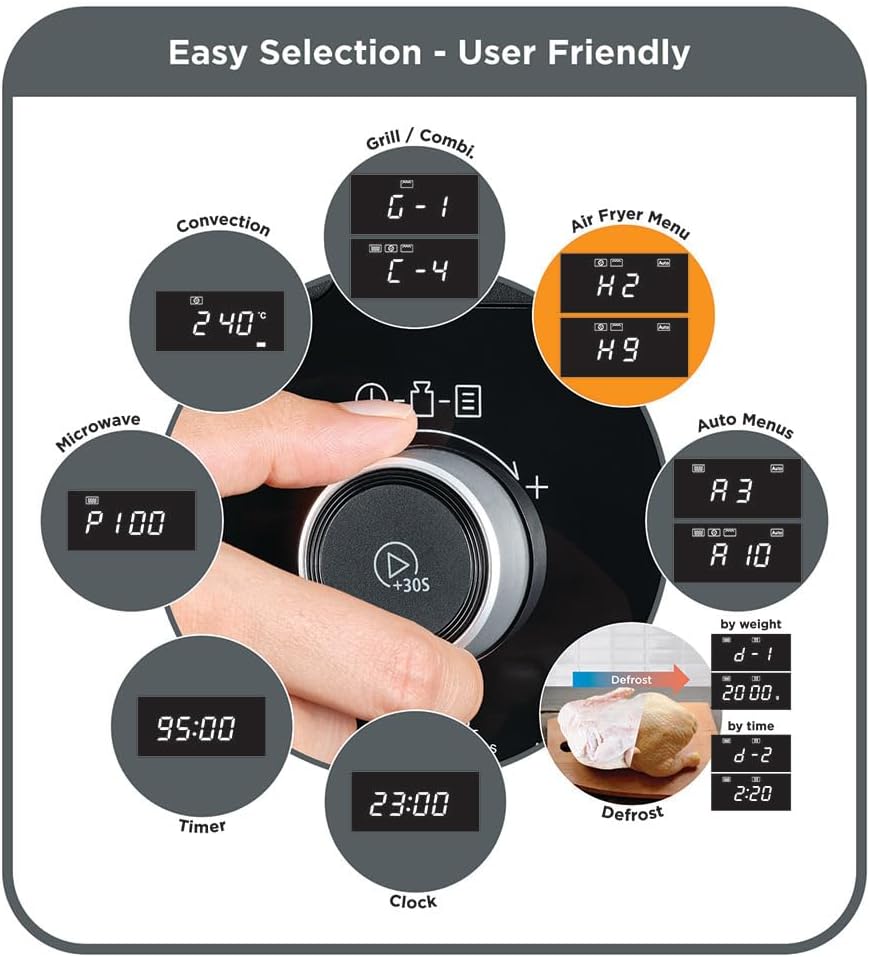
Figure 4.2: Hand operating the control panel of the BLACK+DECKER MZAF2910-B5. This image demonstrates the user-friendly rotary dial for easy selection of cooking modes, time, and power levels, including options for Grill/Combi, Convection, Air Fryer Menu, Microwave, Timer, Clock, and Defrost.
4.2 Puesta en hora del reloj
- En el modo de espera, presione el botón Reloj botón una vez.
- Turn the rotary dial to set the hour. Press Reloj de nuevo.
- Turn the rotary dial to set the minutes. Press Reloj Para confirmar.
4.3 Cocción en microondas
- Coloque los alimentos en un recipiente apto para microondas sobre el plato giratorio de vidrio.
- Presione el Microonda botón.
- Turn the rotary dial to select the desired power level (P100, P80, P50, P30, P10).
- Prensa Microonda again to confirm power.
- Gire el dial giratorio para ajustar el tiempo de cocción.
- Prensa Inicio/+30S para empezar a cocinar.
4.4 Función Grill
- Coloque los alimentos en la rejilla de la parrilla.
- Presione el Parrilla/Combinado button repeatedly until 'G' appears on the display.
- Gire el dial giratorio para configurar el tiempo de cocción.
- Prensa Inicio/+30S para comenzar a asar.
4.5 Función de convección
- Coloque la comida en un plato apto para horno.
- Presione el Convección botón.
- Turn the rotary dial to select the desired temperature.
- Prensa Convección again to confirm temperature.
- Gire el dial giratorio para ajustar el tiempo de cocción.
- Prensa Inicio/+30S para comenzar la cocción por convección.
4.6 Función de freír con aire
Use the dedicated air fry tray for best results.

Figure 4.3: Air fry tray with food inside the microwave oven. This image shows the specialized air fry tray positioned on the glass turntable, ready for air frying, demonstrating the appliance's multi-functionality.
- Place food on the air fry tray.
- Presione el Menú de freidora de aire botón.
- Turn the rotary dial to select one of the 9 preset air fryer options (e.g., H1 for fries, H2 for chicken wings).
- Prensa Inicio/+30S para comenzar a freír con aire.
4.7 menús automáticos
The oven features 10 pre-programmed international cooking menus for convenience.
- Presione el Menú automático botón.
- Turn the rotary dial to select the desired menu number (e.g., A-1 for Auto Reheat, A-10 for Chicken).
- Prensa Inicio/+30S Para empezar.
4.8 Función de descongelación
Descongelar alimentos por peso o tiempo.
- Descongelar por peso: Prensa Descongelar once, turn dial to select weight, press Inicio/+30S.
- Descongelar por tiempo: Prensa Descongelar twice, turn dial to select time, press Inicio/+30S.
4.9 Inicio rápido
Presione el Inicio/+30S Botón para iniciar la cocción inmediatamente al 100 % de potencia del microondas durante 30 segundos. Cada pulsación posterior añade 30 segundos al tiempo de cocción.
5. Mantenimiento y limpieza
La limpieza regular ayuda a mantener el rendimiento y la longevidad de su horno.
- Interior: Limpie la cavidad del horno con adamp Limpie el paño después de cada uso. Para manchas difíciles, use un detergente suave. No utilice limpiadores abrasivos ni estropajos.
- Exterior: Limpiar el exterior con un suave, damp paño. Evite que entre agua en las aberturas de ventilación.
- Puerta y sellos: Limpie cuidadosamente la puerta, los sellos de la puerta y las piezas adyacentes con un paño húmedo.amp paño para eliminar cualquier derrame o salpicadura.
- Glass Turntable and Ring Assembly: Se pueden lavar con agua tibia y jabón o en el lavavajillas. Asegúrese de que estén completamente secos antes de volver a colocarlos en el horno.
- Air Fry Tray and Grill Rack: Wash with warm soapy water. These are typically not dishwasher safe; refer to specific care instructions if provided with accessories.
- Cable de alimentación: Regularly inspect the power cord for any damage. If damaged, it must be replaced by qualified service personnel.
6. Solución de problemas
Si tiene problemas con su horno, consulte la siguiente tabla para conocer problemas y soluciones comunes.
| Problema | Posible causa | Solución |
|---|---|---|
| El horno no arranca | El cable de alimentación no está enchufado; la puerta no está cerrada correctamente; se ha fundido un fusible o se ha disparado el disyuntor. | Enchufe el cable de alimentación; cierre bien la puerta; revise el fusible del hogar o reinicie el disyuntor. |
| La comida no calienta | Incorrect cooking time/power level; Food not suitable for microwave/air fry. | Adjust time/power; Ensure food is suitable for selected function. |
| El plato giratorio no gira | Plato giratorio no colocado correctamente; Obstrucción debajo del plato giratorio. | Reposition turntable and ring assembly; Remove any obstructions. |
| Ruido inusual durante el funcionamiento. | Componentes sueltos; Recipiente de comida tocando las paredes del horno. | Check if turntable and accessories are correctly placed; Ensure containers do not touch oven walls. |
Si el problema persiste después de probar estas soluciones, comuníquese con el servicio de atención al cliente.
7. Especificaciones
| Característica | Especificación |
|---|---|
| Marca | NEGRO+DECKER |
| Modelo | MZAF2910-B5 |
| Tipo | Digital 4-in-1 Microwave Oven (Microwave, Air Fryer, Grill, Convection) |
| Capacidad | 29 litros |
| Potencia de microondas | 1000 vatios |
| Poder de la parrilla | 1000 vatios |
| Poder de convección | 2100 vatios |
| Dimensiones (D x W x H) | 40 cm x 40 cm x 45 cm |
| Color | Negro |
| Material | Metal (Stainless Steel Interior) |
| Tipo de instalación | Encimera |
| Características especiales | Automatic Cooking, LED Cavity Light, Child Safety Lock, 315mm Glass Turntable |
| Componentes incluidos | Grill Rack, Air Fry Tray, Glass Turntable |
8. Garantía y soporte
This BLACK+DECKER appliance comes with a standard manufacturer's warranty. Please refer to the warranty card included in your product packaging for specific terms and conditions, including warranty period and coverage details.
For technical support, service, or to inquire about replacement parts, please contact BLACK+DECKER customer service through their official website or the contact information provided in your product documentation. Always have your model number (MZAF2910-B5) and purchase date ready when contacting support.