1. Introducción
This manual provides essential information for the safe and efficient use of your Epson PowerLite 970 3LCD Projector. Please read it thoroughly before operating the projector and keep it for future reference.
1.1 producto másview
The Epson PowerLite 970 is a versatile 3LCD projector designed for clear and bright presentations. It features 4,000 ANSI lumens brightness, XGA (1024x768) native resolution with support for up to 1080p, and a 15,000:1 contrast ratio. Connectivity options include HDMI (one MHL-compatible), VGA, composite video, USB, LAN, and RS232, making it suitable for various source devices.
1.2 Información de seguridad
- Peligro eléctrico: Never open any covers on the projector except as specifically explained in this manual. Dangerous electrical voltages inside the projector can cause severe injury.
- Superficie caliente: La l del proyectoramp and surrounding areas can become extremely hot during operation and immediately after shutdown. Avoid touching these surfaces to prevent burns.
- Lamp Reemplazo: Always turn off the projector and allow the lamp to cool completely before attempting replacement. Use only genuine Epson replacement lamps.
- Ventilación: Ensure adequate ventilation around the projector. Do not block ventilation openings, as this can lead to overheating and damage.
- Fuente de energía: Connect the projector only to a power outlet that matches the voltage and current specifications indicated on the projector's label.
2. Configuración
2.1 Desembalaje y contenido
Carefully remove the projector and all accessories from the packaging. Verify that all items are present:
- Epson PowerLite 970 Projector
- Cable de alimentación
- Cable VGA
- Control remoto por infrarrojos
- Manual de usuario (este documento)
2.2 Ubicación del proyector
Place the projector on a stable, level surface or mount it securely. Ensure there is sufficient space around the projector for proper ventilation. Adjust the projector's distance from the screen to achieve the desired image size. The projector features adjustable feet for minor angle corrections.
2.3 Conexión de dispositivos
The PowerLite 970 offers a variety of input and output ports for connecting different devices. Refer to the image below for port identification.

Image: Rear panel of the Epson PowerLite 970 projector, displaying connectivity options including HDMI 1, HDMI 2/MHL, Computer 1 (VGA), Computer 2 (VGA), Video (RCA), Audio 1, Audio 2, Mic, Monitor Out, Audio Out, RS-232C, USB-B, USB-A, and LAN.
- HDMI (HDMI 1, HDMI 2/MHL): Connect digital video and audio sources such as Blu-ray players, laptops, or streaming devices. HDMI 2 is MHL-compatible for direct connection to compatible smart devices.
- VGA (Computer 1, Computer 2): Connect computers or laptops using the provided VGA cable.
- Composite Video (Video): Connect older video devices using RCA cables (yellow for video, red/white for audio).
- Audio In (Audio 1, Audio 2, Mic): Connect external audio sources or a microphone.
- Salida de audio: Connect to external speakers or an audio system.
- USB-A: For connecting USB storage devices or optional wireless adapters.
- USB-B: For projector control or USB display functions.
- Red local (RJ-45): Para conectividad y control de red.
- RS-232C: For serial control from a computer or control system.
2.4 Conexión de alimentación
Connect the power cable to the projector's AC inlet and then to a grounded electrical outlet. The projector is designed for 100-240V~, 50/60Hz power input.
3. Funcionamiento del proyector
3.1 Encendido / Apagado
Presione el Fuerza button on the projector's control panel or the remote control to turn the projector on. The status light will indicate the projector's state. To turn off, press the Fuerza button again and confirm shutdown if prompted.

Image: Top panel of the Epson PowerLite 970 projector, showing the control buttons including Power, Menu, Home, Source Search, A/V Mute, and navigation keys, along with focus and zoom rings.
3.2 Selección de la fuente de entrada
Presione el Búsqueda de fuente button on the control panel or remote control to cycle through available input sources (HDMI 1, HDMI 2, Computer 1, Video, etc.). Alternatively, use the dedicated input buttons on the remote control if available.
3.3 Ajuste de imagen
- Anillo de enfoque: Rotate the focus ring located near the lens to sharpen the image.
- Anillo de zoom: Gire el anillo de zoom para ajustar el tamaño de la imagen sin mover el proyector.
- Corrección trapezoidal: If the image appears trapezoidal, use the keystone correction feature (often found in the projector's menu or via dedicated buttons) to square the image.
- Pies ajustables: Use the adjustable feet on the bottom of the projector to fine-tune the projection angle and level the image.
3.4 Navegación por menús
Presione el Menú button on the projector or remote to access the on-screen display (OSD) menu. Use the arrow buttons to navigate and the Ingresar Botón para seleccionar opciones. Presione Esc para volver atrás o salir del menú.
4. Mantenimiento
El mantenimiento regular garantiza un rendimiento óptimo y prolonga la vida útil de su proyector.
4.1 litrosamp Reemplazo
El proyector lamp tiene una vida útil limitada. Cuando el lamp La vida se acerca a su fin, puede aparecer un mensaje de advertencia o la lamp indicator light may illuminate. Always replace the lamp with a genuine Epson replacement lamp unit (ELPLP96).

Imagen: Lateral view of the Epson PowerLite 970 projector, highlighting the lamp access cover, which can be removed for lamp reemplazo.
- Apague el proyector y desenchufe el cable de alimentación.
- Allow the projector to cool for at least one hour to prevent burns.
- Localiza el lamp cover (as shown in the image above) and remove the screw(s) securing it.
- Retire con cuidado el lamp cubrir.
- Afloje los tornillos que sujetan la lamp unit in place and gently pull out the old lamp.
- Insertar el nuevo lamp unit, ensuring it is seated correctly. Tighten the screws.
- Reemplace la lamp tapa y asegúrela con el(los) tornillo(s).
- Plug in the power cable and reset the lamp timer in the projector's menu.
4.2 Limpieza/reemplazo del filtro de aire
The air filter prevents dust from entering the projector. Clean the filter regularly (e.g., every 100 hours of use) or replace it if it becomes clogged.
- Apague el proyector y desenchufe el cable de alimentación.
- Locate the air filter cover (refer to the manual for exact location).
- Remove the cover and carefully take out the filter.
- Clean the filter using a small vacuum cleaner or compressed air. If heavily soiled or damaged, replace it with a new one.
- Reinsert the clean/new filter and replace the cover.
4.3 Limpieza general
- Limpie el proyector casing con un paño suave, seco y sin pelusa.
- Para suciedad rebelde, dampen the cloth slightly with water, but avoid harsh chemicals or abrasive cleaners.
- Gently clean the projector lens with a lens cleaning cloth or lens paper. Do not use abrasive materials.
5. Solución de problemas
Esta sección aborda problemas comunes que puede encontrar con su proyector.
| Problema | Posible causa | Solución |
|---|---|---|
| No hay imagen en la pantalla |
|
|
| La imagen es borrosa |
|
|
| La imagen es trapezoidal |
|
|
| El proyector no enciende |
|
|
| El control remoto no funciona |
|
|
6. Especificaciones
Detailed technical specifications for the Epson PowerLite 970 Projector.
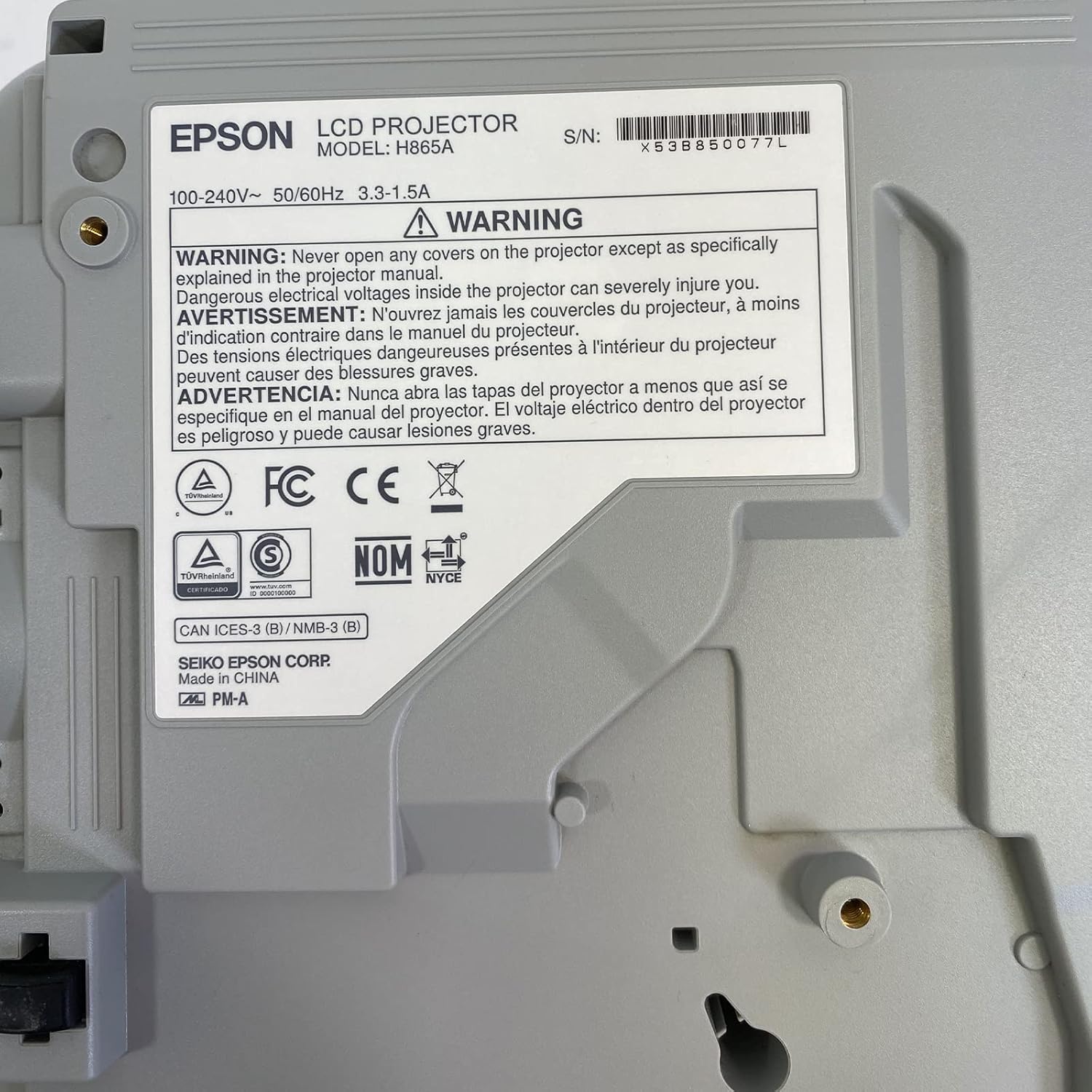
Image: Bottom label of the Epson PowerLite 970 projector, indicating model H865A and serial number X53B850077L, along with electrical ratings and safety certifications.
| Característica | Especificación |
|---|---|
| Número de modelo | PowerLite 970 (H865A) |
| Tecnología de visualización | Pantalla LCD de 3 pulgadas |
| Brillo | Lúmenes 4,000 ANSI |
| Resolución nativa | 1024 x 768 (XGA) |
| Resolución máxima | 1920 x 1080 (1080p) |
| Relación de aspecto | 4:3 |
| Relación de contraste | 15,000:1 |
| Conectividad | HDMI (x2, one MHL), VGA (x2), Composite Video (RCA), Network (RJ-45), RS232 (DB-9pin), USB A, USB B, Audio In (Mini Jack, RCA x2), Audio Out (Mini Jack), VGA Out |
| Video Modes Supported | 720p, 1080i, 1080p/60, 576i, 576p, 480p, 480i |
| Dimensiones del producto | 12 x 12.2 x 3.93 pulgadas |
| Características especiales | Portátil |
7. Garantía y soporte
7.1 Información de garantía
This Epson PowerLite 970 projector is offered with a 60-day replacement warranty provided by the seller, Good-DeAlZ-Online. This warranty covers functional defects and ensures a replacement if the product does not perform as expected within the specified period. Please retain your proof of purchase for warranty claims.
7.2 Atención al cliente
For technical assistance, troubleshooting, or warranty inquiries, please contact the seller, Good-DeAlZ-Online. Customer service typically responds within 24 hours.
For general product information or support related to Epson products, you may visit the official Epson support websitio.


