Introducción
Welcome to the user manual for your Infinity Smartwatch, Model NX 10. This device is designed to enhance your daily life with advanced fitness tracking, communication features, and smart notifications. Featuring a vibrant 1.43" AMOLED screen and robust IP68 water resistance, your smartwatch is built for both everyday use and active lifestyles. Please read this manual carefully to ensure proper operation and maintenance of your device.

Figure 1: Infinity Smartwatch NX 10. This image shows the smartwatch from an angled perspective, highlighting its round AMOLED display, black silicone strap, and two side buttons.
Configuración
1. Desempaquetado y carga inicial
Upon unboxing, ensure all components are present: the Infinity Smartwatch NX 10 and the charging cable.
- Conecte el cable de carga magnético a los puntos de carga en la parte posterior del reloj inteligente.
- Conecte el extremo USB del cable a un adaptador de corriente USB estándar (no incluido) o al puerto USB de una computadora.
- The watch display will show a charging indicator. Fully charge the device before first use, which typically takes approximately 2 hours.

Figure 2: Smartwatch charging. The image illustrates the smartwatch being charged magnetically, with a green lightning bolt icon on the screen indicating charging status and a "400mAh Battery Capacity" label.
2. Instalación y emparejamiento de la aplicación
To unlock the full potential of your Infinity Smartwatch, download and install the companion application, Nube de ajuste Pro, en tu teléfono inteligente.
- Scan the QR code provided in the quick start guide (if available) or search for "Fit Cloud Pro" in your smartphone's app store (Google Play Store for Android, Apple App Store for iOS).
- Instalar la aplicación.
- Open the Fit Cloud Pro app and follow the on-screen instructions to create an account or log in.
- Asegúrese de que Bluetooth esté habilitado en su teléfono inteligente.
- In the app, navigate to the device pairing section and search for your smartwatch (e.g., "NX 10" or similar Bluetooth name).
- Select your smartwatch from the list to initiate pairing. Confirm the pairing request on both your phone and the smartwatch if prompted.
- Once paired, the app will synchronize data with your smartwatch, and you can customize settings.
Instrucciones de funcionamiento
1. Navegación básica
- Pantalla táctil: Swipe left/right to navigate between main screens (e.g., activity, heart rate, weather). Swipe up/down to access quick settings or notifications. Tap to select an option.
- Botones laterales: The top button typically acts as a power button (long press) or a back/home button (short press). The bottom button may be customizable or provide quick access to sports modes.

Figure 3: 1.43" AMOLED Screen. This image highlights the vibrant display of the smartwatch, showing a detailed watch face with various data points like time, date, steps, and heart rate.
2. Realizar y responder llamadas
Your Infinity Smartwatch supports Bluetooth calling, allowing you to make and receive calls directly from your wrist when connected to your smartphone.
- Hacer una llamada: Access the dialer or contacts list on your smartwatch. You can dial a number directly or select a contact to call.
- Para contestar una llamada: When a call comes in, the smartwatch will display the caller ID. Tap the green answer icon to accept the call or the red icon to decline.

Figure 4: Stay Connected On The Go. This image shows a user interacting with the smartwatch to make a call, illustrating the microphone, dialing, call records, and contacts features.
3. Seguimiento de la actividad física y la salud
The smartwatch is equipped with multiple sensors to monitor your health and fitness activities.
- Podómetro: Automatically tracks your steps, distance, and calories burned throughout the day.
- Monitoreo del ritmo cardíaco: Provides real-time heart rate data. Access this feature from the main menu or set up continuous monitoring in the app.
- Monitoreo de la presión arterial: Offers blood pressure readings. For accurate results, ensure the watch is worn correctly and remain still during measurement. Nota: Esta función es sólo para referencia y no debe utilizarse para diagnóstico médico.
- Monitoreo del sueño: Realiza un seguimiento de tus patrones de sueño, incluido el sueño profundo, el sueño ligero y los tiempos de vigilia. View detailed analysis in the Fit Cloud Pro app.
- Modos deportivos: Supports over 100 sports modes, including running, cycling, swimming, and more. Select your desired activity to track specific metrics.

Figure 5: Track Every Move. This image displays the smartwatch tracking a swimming activity, with additional visuals of rock climbing and cycling, indicating its multi-sport tracking capabilities.

Figure 6: More than 110 sports modes. This image shows a variety of colorful icons representing different sports activities supported by the smartwatch, overlaid on a background of a person cycling.
4. Personalización
Personalize your smartwatch experience through the Fit Cloud Pro app.
- Caras de reloj: Choose from a wide range of pre-installed watch faces or download new ones via the app. You can also create custom watch faces using your own photos.
- Notificaciones: Configure which app notifications you wish to receive on your smartwatch (e.g., calls, SMS, social media alerts).
- Alarmas y recordatorios: Set alarms, sedentary reminders, and hydration reminders through the app.
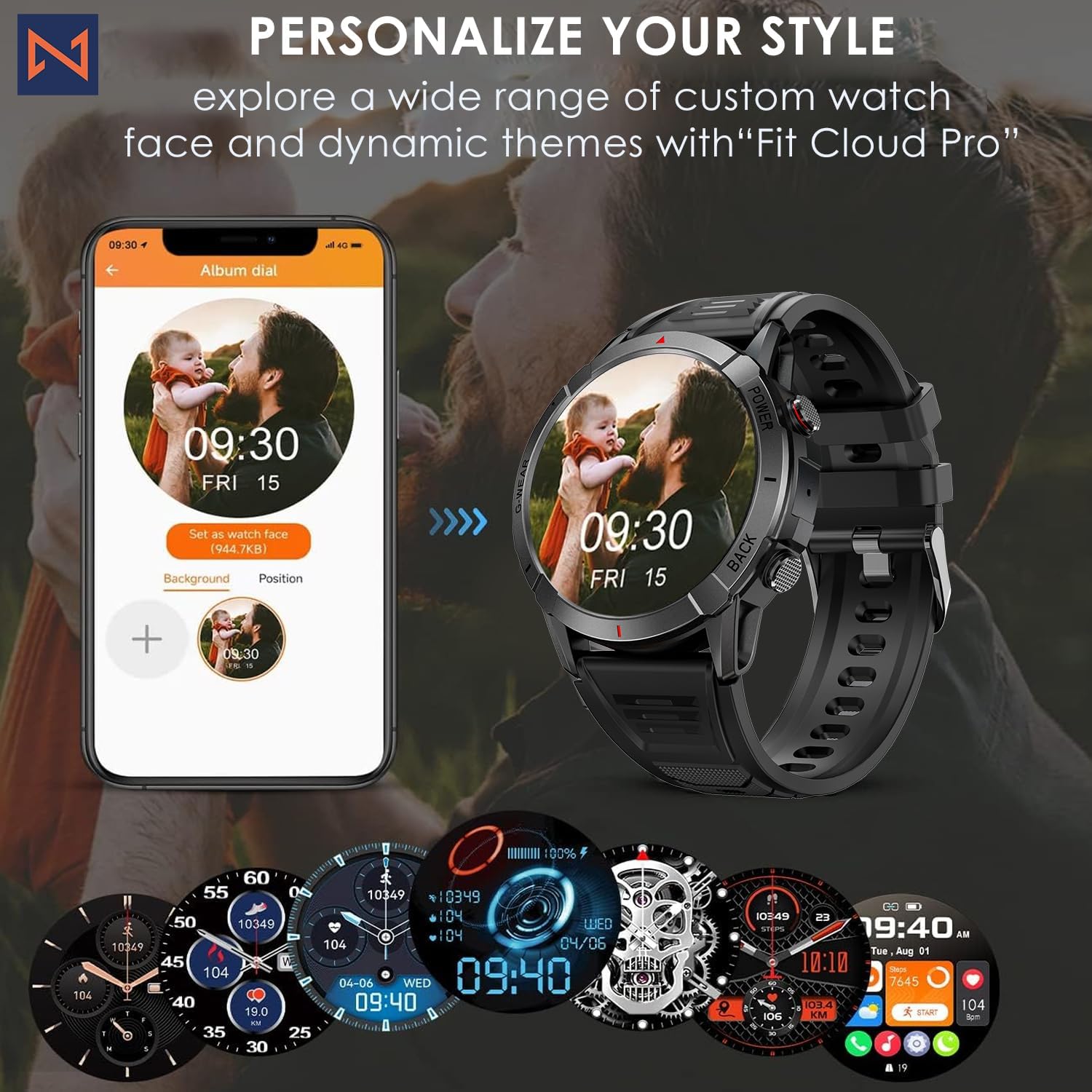
Figure 7: Personalize Your Style. This image demonstrates how to customize watch faces using the "Fit Cloud Pro" app, showing various digital and analog watch face options.
Mantenimiento
1. Limpieza del reloj inteligente
La limpieza regular ayuda a mantener la apariencia y la funcionalidad de su dispositivo.
- Limpie la pantalla y el cuerpo con un paño suave que no suelte pelusa.
- Para manchas difíciles, dampHumedezca ligeramente el paño con agua. Evite usar productos químicos agresivos o materiales abrasivos.
- Clean the charging contacts periodically to ensure proper connection.
2. Resistencia al agua (IP68)
Your Infinity Smartwatch is rated IP68, meaning it is resistant to dust and can withstand immersion in water up to 1.5 meters for up to 30 minutes.
- Es adecuado para uso diario, lavado a mano y lluvia ligera.
- Avoid prolonged immersion, hot water, steam, or high-pressure water jets (e.g., showering, sauna, diving).
- If the watch gets wet, dry it thoroughly before charging or operating buttons.

Figure 8: Engineered for Adventure. This image highlights the smartwatch's durability features, including waterproof, dustproof, anti-magnetic, and shockproof capabilities, with corresponding icons.
3. Cuidado de la batería
- Para prolongar la vida útil de la batería, evite temperaturas extremas.
- Cargue el reloj periódicamente; evite que la batería se descargue por completo durante períodos prolongados.
- Utilice únicamente el cable de carga proporcionado.
Solución de problemas
| Problema | Posible solución |
|---|---|
| El reloj no enciende | Asegúrese de que el reloj esté completamente cargado. Conéctelo al cargador y espere unos minutos antes de intentar encenderlo. |
| No se puede emparejar con el teléfono inteligente |
|
| Datos de salud inexactos |
|
| Notificaciones no recibidas |
|
| Duración corta de la batería |
|
Presupuesto
| Característica | Detalle |
|---|---|
| Número de modelo | NX10 |
| Mostrar | 1.43" AMOLED Screen |
| Resolución de pantalla | 466x466 alta definición |
| Capacidad de la batería | Polímero de litio de 400 mAh |
| Resistencia al agua | IP68 |
| Conectividad | Bluetooth |
| Sistema operativo | Android (compatible con iOS) |
| Material de la correa | 22mm Silicon Belt |
| Material de visualización | Aleación de zinc |
| Peso del artículo | 1.76 onzas |
| Capacidad de almacenamiento de memoria | 128 MB |
Garantía y soporte
For warranty information and technical support, please refer to the documentation included with your purchase or visit the official Infinity websitio.
Manufacturer: Infiniity
For further assistance, you may contact Infiniity customer service through the contact information provided on their official website or within the Fit Cloud Pro application.


