1. Introducción
This manual provides comprehensive instructions for the installation, operation, and maintenance of your CORN 1300Mbps USB Wifi Adapter. This device offers high-speed dual-band wireless connectivity for your computer, supporting both 2.4GHz and 5.8GHz frequencies.

Image: The CORN 1300Mbps USB Wifi Adapter featuring its rotatable 5dBi antenna, capable of 90 and 360-degree adjustments for optimal signal reception.
2. Contenido del paquete
Verifique que todos los artículos enumerados a continuación estén incluidos en su paquete:
- Adaptador WiFi USB de 1300 Mbps
- One Detachable 5dBi Antenna
- Manual de usuario
- CD Driver
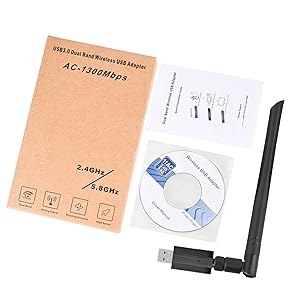
Image: Contents of the product package, showing the USB WiFi adapter, detachable antenna, user manual, and driver CD.
3. Características principales
- Dual Band 802.11ac: Supports up to 1300Mbps Wi-Fi speeds (867Mbps on 5GHz and 400Mbps on 2.4GHz) for reduced latency during streaming and gaming.
- Detachable 5dBi Antenna with Beamforming+ Technology: High-gain, long-range antenna designed to improve connectivity even in areas with weak signals.
- USB 3.0 de súper velocidad: Offers data transfer rates up to 5.8Gbps, which is 10 times faster than USB 2.0, ensuring maximum throughput and a stable internet connection. It is also backward compatible with USB 2.0 and 1.1 devices.
- Amplia compatibilidad: Compatible with Windows 11/10/8/8.1/7/Vista/XP/2000 and Mac OS 10.9-10.15. (Note: Not compatible with Mac OS 11.1 or newer versions, Linux, or TV operating systems).
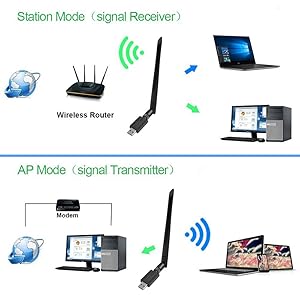
Image: Illustration of the 5dBi high gain antenna's enhanced signal penetration and coverage, demonstrating its ability to transmit through obstacles.

Image: Details on the secure technology, highlighting the 5dBi oxygen-free copper antenna for stable signal and WPS (Wi-Fi Protected Setup) for one-key encryption.

Image: A visual comparison demonstrating the superior speed of USB 3.0 (5120Mbps) compared to USB 2.0 (480Mbps).
4. Guía de configuración
4.1 Instalación del hardware
- Gently attach the 5dBi antenna to the USB Wifi Adapter by screwing it into the connector.
- Plug the USB Wifi Adapter into an available USB 3.0 port on your computer. For optimal performance, use a USB 3.0 port if available.

Image: The USB Wifi Adapter connected to a laptop, illustrating its compact design and antenna.
4.2 Instalación del controlador
El proceso de instalación varía según su sistema operativo:
- Para Windows 11 / 10: No drivers are required. The adapter is plug-and-play. Your system should automatically detect and install the necessary drivers.
- For Windows 8/8.1/7/Vista/XP/2000 and Mac OS 10.9-10.15:
- Inserte el CD con el controlador proporcionado en la unidad de CD-ROM de su computadora.
- Siga las instrucciones en pantalla para instalar los controladores.
- If your computer does not have a CD-ROM drive, please visit the CORN support website (if available) to download the latest drivers.
- Después de la instalación, reinicie su computadora si se le solicita.
5. Instrucciones de funcionamiento
5.1 Conexión a una red Wi-Fi
- Once the adapter is installed and drivers are recognized, open your computer's network settings.
- Locate the list of available wireless networks.
- Select your desired Wi-Fi network (SSID) and click 'Connect'.
- Introduzca la clave de seguridad de red (contraseña) si se le solicita.
- El adaptador se conectará a la red y usted debería tener acceso a Internet.
5.2 Operación de doble banda
The adapter supports both 2.4GHz and 5.8GHz (often displayed as 5GHz) frequency bands. You can choose the band that best suits your needs:
- Banda de 2.4 GHz: Ofrece una cobertura más amplia y una mejor penetración a través de las paredes, adecuado para navegación general y dispositivos más alejados del enrutador.
- Banda de 5.8 GHz: Provides faster speeds and less interference, ideal for high-bandwidth activities like online gaming and HD video streaming, especially when closer to the router.
5.3 Operating Modes (Station Mode & AP Mode)
The adapter can function in two primary modes:
- Modo estación (receptor de señal): The adapter acts as a client, connecting your computer to an existing wireless router to access the internet. This is the most common use case.
- Modo AP (transmisor de señal): The adapter can create a Wi-Fi hotspot, allowing other devices to connect to your computer's internet connection. This requires specific software configuration on your computer.
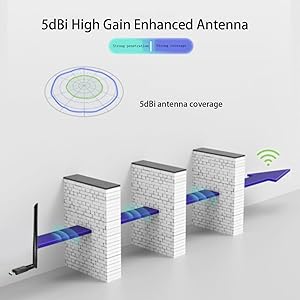
Image: A diagram illustrating the two operational modes: Station Mode, where the adapter receives Wi-Fi from a router, and AP Mode, where it transmits Wi-Fi from a modem-connected computer.
6. Mantenimiento
To ensure the longevity and optimal performance of your CORN USB Wifi Adapter, follow these maintenance guidelines:
- Mantenga el adaptador limpio y sin polvo. Utilice un paño suave y seco para limpiarlo.
- Evite exponer el adaptador a temperaturas extremas, humedad o luz solar directa.
- No deje caer ni someta el adaptador a golpes físicos.
- Asegúrese de que la antena esté bien fijada, pero no la apriete demasiado.
- When not in use for extended periods, consider unplugging the adapter.
7. Solución de problemas
If you encounter issues with your CORN USB Wifi Adapter, please refer to the following common solutions:
- Sin conexión Wi-Fi:
- Asegúrese de que el adaptador esté conectado de forma segura a un puerto USB.
- Verify that the drivers are correctly installed (refer to Section 4.2).
- Comprueba si el Wi-Fi de tu ordenador está habilitado.
- Reinicie su computadora y su enrutador inalámbrico.
- Velocidad lenta de Internet:
- Ensure you are connected to the appropriate Wi-Fi band (5GHz for faster speeds, if available).
- Acérquese a su enrutador inalámbrico para mejorar la intensidad de la señal.
- Compruebe si hay interferencias de otros dispositivos electrónicos.
- Actualice el firmware de su enrutador.
- Adapter Not Recognized / Driver Issues:
- Intente conectar el adaptador a un puerto USB diferente, preferiblemente un puerto USB 3.0.
- Reinstall the drivers from the provided CD or the manufacturer's websitio.
- Ensure your operating system is supported (Mac OS 11.1+ and Linux are not supported).
- Check Device Manager (Windows) or System Information (Mac) to see if the adapter is listed without errors.
- Conexión intermitente:
- Adjust the antenna's position for better signal reception.
- Asegúrese de que no haya obstrucciones físicas entre el adaptador y el enrutador.
- Check for conflicting network adapters or software.
8. Especificaciones
| Número de modelo | 5Bdi-1200Mbps USB wifi adapter |
| Interfaz de hardware | USB 3.0 |
| Velocidad de transferencia de datos | 1300 megabits por segundo (Mbps) |
| Protocolo de enlace de datos | IEEE802.11ac |
| Bandas de frecuencia | 2.4 GHz, 5.8 GHz |
| Ganancia de la antena | 5dBi |
| Dispositivos compatibles | Laptop, Desktop, PC |
| Sistema operativo compatible | Windows 11/10/8/8.1/7/Vista/XP/2000, Mac OS 10.9-10.15 |
| Dimensiones del producto | 0.75 x 0.49 x 0.06 pulgadas (cuerpo del adaptador) |
| Peso del artículo | 2.4 onzas |
| Color | Negro |
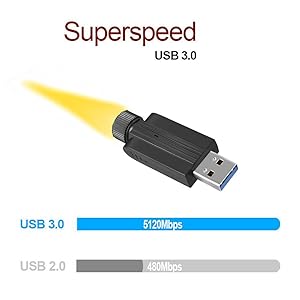
Image: Detailed dimensions of the USB Wifi Adapter, including the USB connector width, adapter body length, and total length with the antenna.
9. Información de garantía
Specific warranty details for this product may vary by region and retailer. Please refer to the warranty card included in your package or contact your point of purchase for detailed warranty terms and conditions.
10. Atención al cliente
For further assistance, technical support, or inquiries regarding your CORN 1300Mbps USB Wifi Adapter, please contact the retailer or manufacturer directly. Refer to the product packaging or the manufacturer's official websitio para información de contacto.


