Introducción
This manual provides essential information for the setup, operation, and maintenance of your Sharp Roku TV 55" Class (54.5" Diag.) OLED 4K Ultra HD with HDR10. Please read this manual thoroughly before using your television to ensure proper and safe operation.
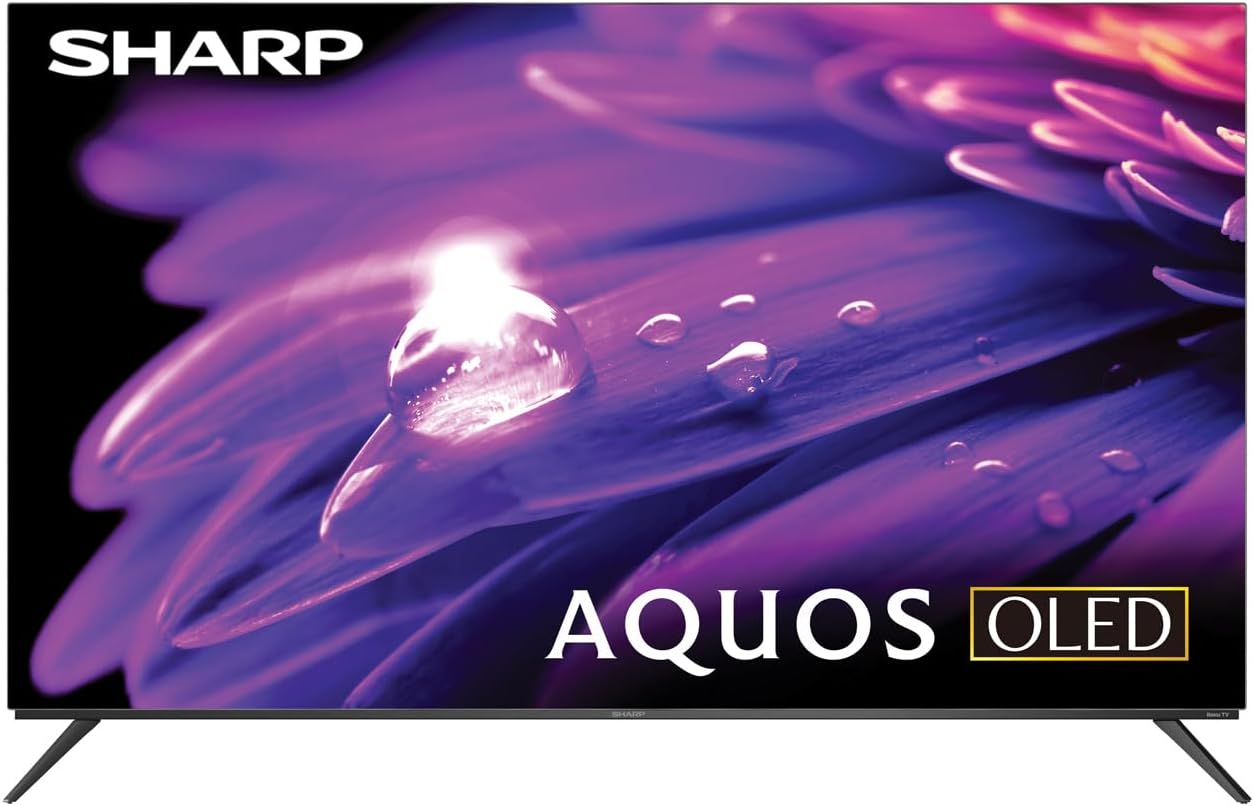
Figura 1: Frente view of the Sharp AQUOS OLED TV, showcasing su elegante diseño y pantalla vibrante.
Configuración
1. Desembalaje e inspección
Retire con cuidado el televisor y todos los accesorios del embalaje. Inspeccione si presenta daños. Conserve el embalaje para futuras necesidades de transporte o mantenimiento.
2. Instalación en soporte o montaje en pared
Instalación de soporte: Place the TV screen-down on a soft, flat surface. Attach the included stands to the designated slots on the bottom of the TV using the provided screws. Ensure they are securely fastened.
Montaje en pared: This television supports VESA 200x300 mounting. Use a compatible wall mount kit (sold separately) and follow the instructions provided with the wall mount. Ensure the wall can support the weight of the television (approximately 38.5 pounds / 17.5 kg) and the mount.

Figura 2: Perfil lateralfile of the television, demonstrating its slim design suitable for wall mounting.
3. Conexión de dispositivos
Connect your external devices to the appropriate ports on the back of the television. The Sharp Roku TV features multiple connectivity options:
- Puertos HDMI (4): For connecting Blu-ray players, game consoles, cable/satellite boxes, etc. One HDMI port supports eARC for enhanced audio return channel functionality.
- Puertos USB (2): Para conectar dispositivos de almacenamiento USB.
- Entrada de antena/cable: Para conectar una antena para transmisiones por aire o una conexión de TV por cable.
- Entrada AV: Para conectar dispositivos más antiguos mediante cables de audio estéreo y vídeo compuesto.
- Ethernet (LAN): Para una conexión a Internet por cable.
- Salida de audio digital: Para conectar a sistemas de audio externos.

Figure 3: Rear panel of the television, illustrating the arrangement of HDMI, USB, Antenna, AV, and Ethernet ports.
4. Encendido inicial y configuración de Roku
Plug the power cord into an electrical outlet. The TV will power on and guide you through the initial Roku setup process. This includes connecting to your Wi-Fi network (or using Ethernet), signing in to or creating a Roku account, and scanning for channels if an antenna is connected. Follow the on-screen prompts for a quick guided setup.
Instrucciones de funcionamiento
1. Navegación de la interfaz de Roku TV
The Sharp Roku TV features a simple home screen that centralizes your streaming favorites, inputs, and free live TV. Use the Roku remote to navigate through menus and select options. The directional pad and 'OK' button are used for selection, while the 'Home' button returns you to the main screen.

Figure 4: The Roku TV home screen, showing easy access to streaming channels and input selections.
2. Streaming and Content Access
Access a wide selection of streaming services and free live TV channels through The Roku Channel. You can add or remove channels from the Roku Channel Store. Organize and sort your home screen for a personalized experience.
3. Picture and Audio Enhancements
- Dolby Vision IQ & HDR10/HLG: The TV supports Dolby Vision IQ, HDR10, and HLG for enhanced picture performance with compatible content. Dolby Vision IQ intelligently adjusts picture settings based on ambient light conditions.
- Dolby Atmos: The integrated 30W (15W+15W) speaker system with Dolby Atmos delivers immersive sound with clarity and depth.
- Frecuencia de actualización variable (VRR): For optimized gaming, the TV features Variable Refresh Rate (VRR) with low latency, providing smoother gameplay.
4. Compatibilidad con el asistente de voz
The Sharp Roku TV works with popular voice assistants, allowing you to control your TV using voice commands through compatible devices (sold separately).
Mantenimiento
1. Limpieza del televisor
Para limpiar la pantalla, límpiela suavemente con un paño suave que no deje pelusa. Para manchas difíciles, frote ligeramenteampEnjuague el paño con agua o una solución de limpieza específica para pantallas. No rocíe el líquido directamente sobre la pantalla. Para el televisor casinUtilice un paño suave y seco. Evite limpiadores abrasivos o disolventes.
2. Actualizaciones de software
The Roku TV automatically receives software updates, ensuring you always have the newest channels and latest features. Ensure your TV is connected to the internet for these updates to download and install.
Solución de problemas
If you encounter issues with your Sharp Roku TV, refer to the following common troubleshooting steps:
- Sin energía: Asegúrese de que el cable de alimentación esté bien enchufado tanto al televisor como a una toma de corriente que funcione. Pruebe con otra toma de corriente.
- Sin imagen/sonido: Verify that the correct input source is selected. Check all cable connections to external devices. For no sound, check TV volume and external audio system volume.
- Problemas de conexión de red: Reinicia el router y el módem. En el televisor, ve a Configuración > Red > Comprobar conexión to diagnose. Try connecting via Ethernet if using Wi-Fi.
- El control remoto no responde: Cambie las pilas del control remoto. Asegúrese de que no haya obstrucciones entre el control remoto y el sensor infrarrojo del televisor.
- Problemas de calidad de la imagen: Adjust picture settings (brightness, contrast, color) in the TV's menu. Ensure you are viewVisualización de contenido 4K para una resolución óptima.
For more detailed troubleshooting or persistent issues, visit the official Sharp support websitio o la página de soporte de Roku.
Presupuesto
| Característica | Descripción |
|---|---|
| Número de modelo | 4TC55FS1UR |
| Tamaño de pantalla (diagonal) | 55" Class (54.5" Diag.) |
| Tecnología de visualización | Pantalla OLED |
| Resolución | 4K Ultra HD (3840 x 2160p) |
| Frecuencia de actualización | 120Hz (Native), 60Hz (Roku TV interface) |
| Compatibilidad con HDR | Dolby Vision IQ, HDR10, HLG |
| Salida de audio | 30W (15W+15W) Speaker System, Dolby Atmos, Dolby Digital Audio |
| Conectividad | 4 HDMI (1 eARC), 2 USB, Wi-Fi, Ethernet, AV In, Antenna In |
| Características especiales | Roku Streaming Built-In, Variable Refresh Rate (VRR), Low Latency, Voice Assistant Compatible |
| Dimensiones del producto (W x D x H) | 48.27" x 11.57" x 30.43" (con soporte) |
| Peso del artículo | 38.5 libras (17.5 kg) |
| Estándar de montaje VESA | 200x300 |

Figure 5: Dimensional diagram of the television, including width and height measurements.
Garantía y soporte
For warranty information and detailed support, please refer to the documentation included with your purchase or visit the official Sharp website. You can also find additional resources and FAQs on the Roku support websitio.


