Introducción
This manual provides comprehensive instructions for the setup, operation, maintenance, and troubleshooting of your Snom D150 IP Desk Phone. Please read this manual carefully before using the device to ensure proper functionality and to avoid damage.
The Snom D150 is a high-performance IP desk phone designed for professional use, featuring HD audio, Gigabit Ethernet, Power over Ethernet (PoE), and a clear 2.8-inch TFT LCD display. It supports 2 SIP identities and offers advanced features for efficient communication.
Contenido del paquete
Antes de comenzar, verifique que todos los artículos estén presentes en el paquete:
- Snom D150 IP Desk Phone Unit
- Auricular
- Cable del auricular
- Cable Ethernet
- Soporte de escritorio
- Guía de instalación rápida
- GNU General Public License Information
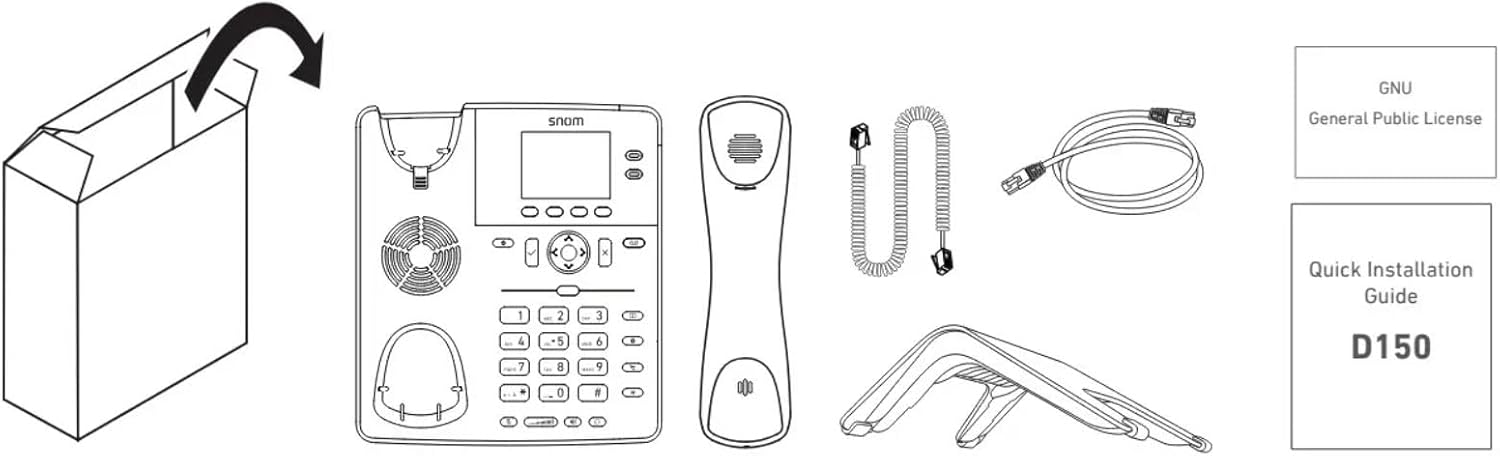
Image: Contents of the Snom D150 package, including the phone unit, handset, cords, stand, and documentation.
Configuración
1. Montaje del soporte de escritorio
Attach the desk stand to the back of the phone unit. Ensure it clicks securely into place for stable positioning on a desk.
2. Conexión del teléfono
Connect one end of the coiled handset cord to the handset and the other end to the handset port on the phone unit (marked with a handset icon).
3. Conexión de red (PoE o adaptador de corriente)
The Snom D150 supports Power over Ethernet (PoE) or an optional 5V DC power adapter (not included).
- Conexión PoE: Connect one end of the Ethernet cable to the "NET" port on the phone and the other end to a PoE-enabled network switch or injector.
- Conexión sin PoE: If PoE is not available, connect an Ethernet cable to the "NET" port and a 5V DC power adapter (not included) to the "5V DC" port.
4. Conexión a PC (opcional)
To connect a computer through the phone, use another Ethernet cable to connect the "PC" port on the phone to your computer's Ethernet port. This allows your computer to share the network connection through the phone.
5. Headset Connection (Optional)
Connect a compatible headset to the EHS (Electronic Hook Switch) port or the dedicated headset port if available, as indicated in the diagram.

Image: Diagram showing the rear ports of the Snom D150, including connections for power (5V DC), network (NET), PC, and EHS/headset.
Instrucciones de funcionamiento
Funciones básicas de llamada
- Haciendo una llamada: Lift the handset or press the speakerphone button, then dial the number and press the dial key (often a checkmark or green phone icon).
- Responder una llamada: Levante el auricular o presione el botón del altavoz cuando suene el teléfono.
- Terminar una llamada: Vuelva a colocar el auricular o presione nuevamente el botón del altavoz.
- Silenciar: Press the mute button (microphone icon) to mute your microphone during a call. Press again to unmute.
- Ajuste de volumen: Use the volume keys (up/down arrows) to adjust handset, headset, or speakerphone volume during a call.
Visualización y navegación
The 2.8-inch TFT LCD grayscale display shows call information, menu options, and status indicators. Use the navigation cluster (directional pad and OK button) to navigate through menus.

Imagen: Frente view of the Snom D150, highlighting the display and navigation buttons.
SmartLabel Function Keys
The Snom D150 features 4 context-sensitive function keys and 2 SmartLabel keys. These keys can be programmed for various functions such as speed dial, call transfer, call forwarding, or accessing specific features. The SmartLabel display dynamically shows the current function of these keys.

Image: Close-up of the Snom D150 display showing SmartLabel function keys and their dynamic labels.
Funciones avanzadas
- Historial de llamadas: Access your missed, received, and dialed calls through the Call History menu.
- Directorio: Manage your contacts and speed dial entries.
- Reenvío de llamadas: Configure calls to be forwarded to another number.
- SIP Identities: The phone supports 2 SIP identities, allowing you to manage calls from two different lines.
Mantenimiento
Limpieza del dispositivo
To clean your Snom D150, use a soft, dry, lint-free cloth. For stubborn marks, slightly dampen the cloth with water. Do not use abrasive cleaners, solvents, or strong chemicals, as these can damage the phone's surface and internal components.
Almacenamiento
Guarde el teléfono en un lugar fresco y seco, alejado de la luz solar directa y de temperaturas extremas cuando no lo utilice durante períodos prolongados.
Solución de problemas
| Problema | Posible causa | Solución |
|---|---|---|
| El teléfono no se enciende. | No hay alimentación desde el conmutador PoE ni desde el adaptador de corriente. | Ensure Ethernet cable is securely connected to a PoE-enabled port, or verify the 5V DC power adapter (if used) is properly connected and functional. |
| No hay tono de marcado. | Network connection issue; SIP registration failed. | Check Ethernet cable connection. Verify network settings and SIP account registration status on the phone's display. Contact your VoIP service provider if necessary. |
| Mala calidad de audio. | Congestión de la red; cable/teléfono defectuoso. | Check network bandwidth. Ensure handset cord is securely connected. Try a different handset or headset if available. |
| La pantalla está en blanco o congelada. | Software issue; power cycle needed. | Unplug the power/Ethernet cable, wait 10 seconds, then plug it back in to restart the phone. |
Presupuesto
- Modelo: Snom D150
- Número de pieza: 4652
- Color: Slate Grey (Black)
- Mostrar: 2.8-inch TFT LCD Grayscale Display
- SIP Identities: 2
- Ethernet: Gigabit Ethernet (2-port switch)
- PoE: Power over Ethernet (PoE Class 1)
- Audio: HD Audio, Headset compatible
- Teclas de función: 4 context-sensitive, 2 SmartLabel keys
- Seguridad: OpenVPN, TLS, SRTP, IPv4/IPv6 support
- Material: Acrilonitrilo butadieno estireno (ABS)
- Dimensiones (L x An x Al): 10.2 x 17.8 x 5.1 cm (aprox. 4.0 x 7.0 x 2.0 pulgadas)
- Peso: 901 gramos (aprox. 1.99 libras)
- Fuente de energía: PoE or 5V DC (power adapter not included)

Image: Icons representing key technical features of the Snom D150, including PoE, Gigabit Ethernet, IPv6 & IPv4, Headset connectivity, Security, SmartLabel, HD audio, and OpenVPN.
Información de garantía
The Snom D150 IP Desk Phone comes with a manufacturer's warranty of 3 años. Please retain your proof of purchase for warranty claims. This warranty covers defects in materials and workmanship under normal use.
Spare parts availability is guaranteed for 2 años a partir de la fecha de compra.
For detailed warranty terms and conditions, please refer to the documentation provided with your product or visit the official Snom websitio.
Apoyo
For further assistance, technical support, or to find compatible devices and PBX partners, please visit the Snom support websitio:
You can also consult the Quick Installation Guide (QIG) included in your package for initial setup steps.


