1. Producto terminadoview
The Pulido Fingerprint Door Knob offers a modern and secure keyless entry solution for your home or office. This smart door knob provides two primary methods of unlocking: fingerprint recognition and mobile application control. It is designed for ease of use and enhanced security, storing all user data locally on the device.

Image: The Pulido Fingerprint Door Knob highlighting its fingerprint sensor, app management capability, and power interface.
2. Contenido del paquete
Verifique que todos los componentes estén presentes antes de comenzar la instalación:
- Fingerprint Door Knob (Interior and Exterior Handles)
- Mecanismo de cierre
- Placa de impacto
- Tornillos de montaje
- Plantilla de instalación
- Manual de usuario
3. Identificación de componentes
Familiarize yourself with the different parts of your Pulido Fingerprint Door Knob:
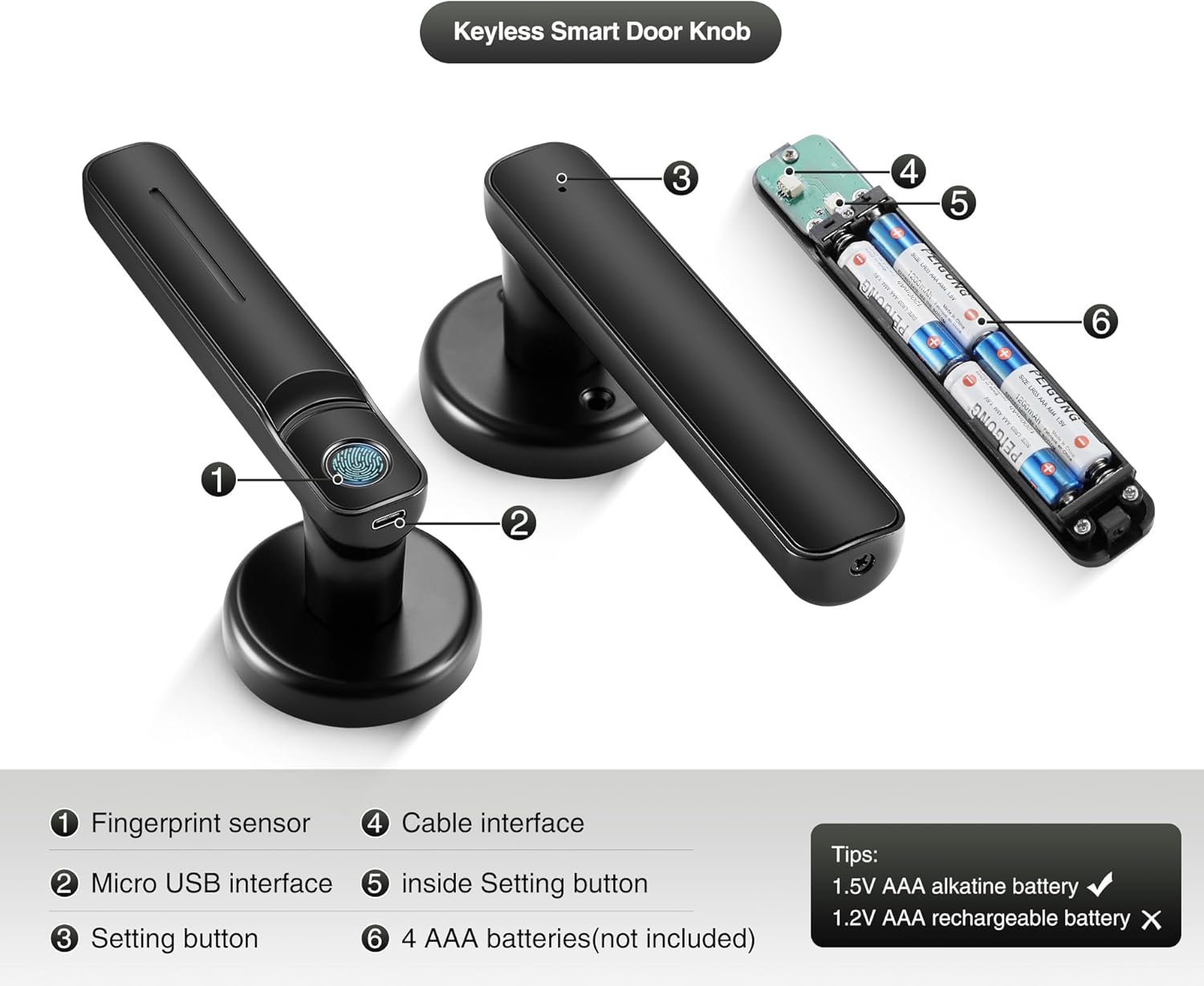
Imagen: Detallada view of the door knob's internal and external components.
- Sensor de huellas dactilares: Used for biometric unlocking.
- Interfaz micro USB: Para suministro de energía de emergencia.
- Setting Button (Exterior): Used for initial setup and pairing.
- Interfaz de cables: Connects the exterior and interior components.
- Inside Setting Button: Used for internal settings and resets.
- AAA Batteries Compartment: Admite 4 pilas AAA (no incluidas).
4. Guía de instalación
This section provides instructions for installing your new Pulido Fingerprint Door Knob. It is designed to replace standard mechanical door knobs.

Image: Visual representation of replacing a mechanical lock with the smart door knob.
4.1 Preparación
- Ensure your door thickness is compatible with the lock.
- Retire cualquier herraje de puerta existente.
- Verify the door bore hole and backset dimensions match the installation template.
4.2 pasos de instalación
- Instale el pestillo: Inserte el pestillo en el borde de la puerta y fíjelo con tornillos. Asegúrese de que el perno del pestillo esté orientado en la dirección correcta para la apertura de la puerta.
- Instalar la placa de impacto: Monte la placa de impacto en el marco de la puerta, alineándola con el pestillo.
- Instalar la manija exterior: Feed the cable and spindle through the door bore hole from the exterior side.
- Instalar la manija interior: Connect the cable from the exterior handle to the interior handle. Align the interior handle with the spindle and mounting posts.
- Asegure las manijas: Use the provided screws to firmly attach the interior handle to the exterior handle, ensuring the lock is flush with the door surface.
- Inserte las baterías: Open the battery compartment on the interior handle and insert 4 new AAA alkaline batteries.
- Operación de prueba: After installation, test the mechanical function of the knob to ensure smooth rotation and latch engagement.
5. Configuración inicial y configuración de la aplicación
To fully utilize your smart door knob, you will need to set it up with the mobile application and register fingerprints.
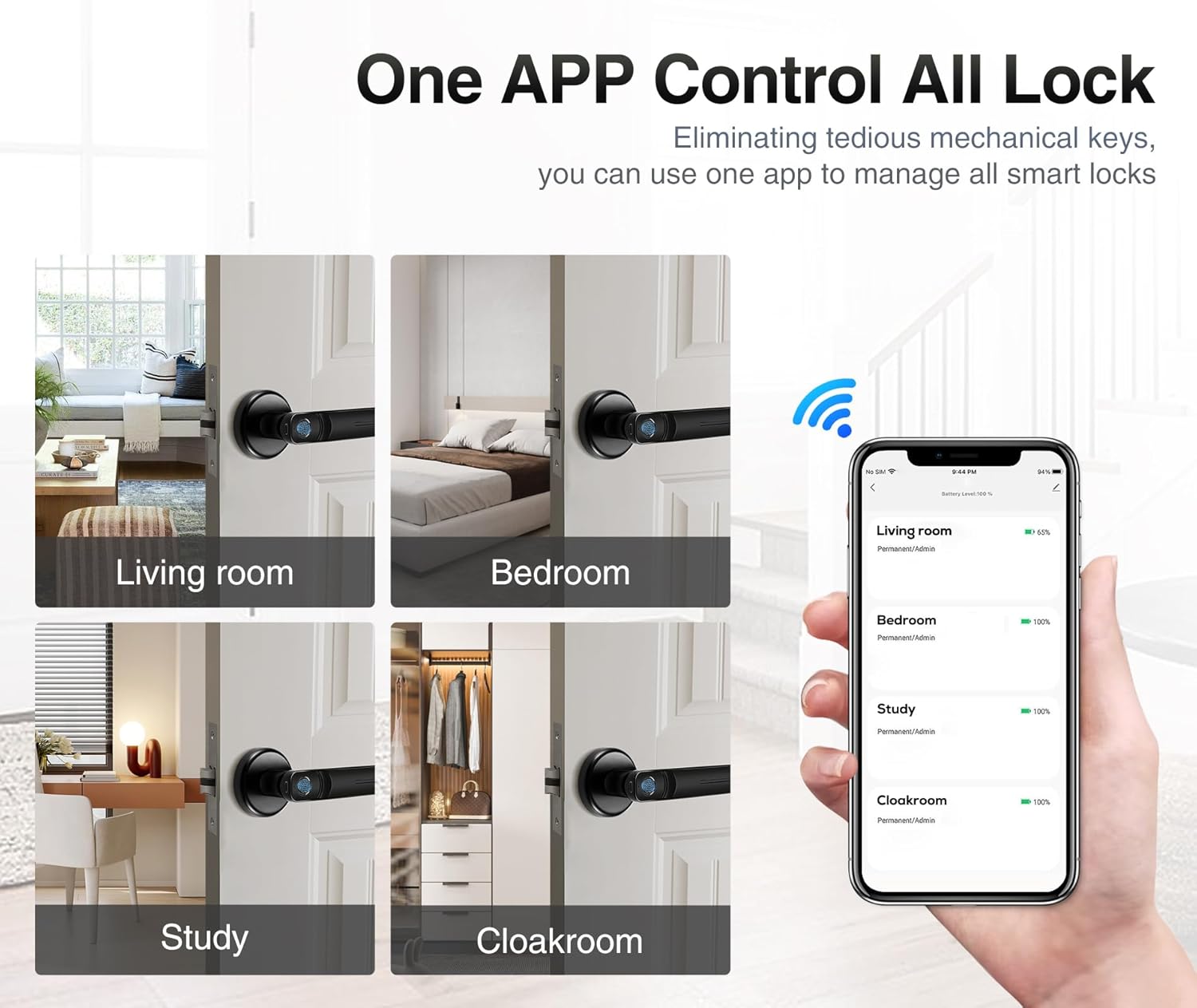
Image: The mobile application interface demonstrating control over multiple locks.
5.1 Descarga y emparejamiento de la aplicación
- Descargar la aplicación: Buscar the 'Tuya Smart' or 'Smart Life' app in your smartphone's app store (iOS or Android) and install it.
- Crear una cuenta: Abra la aplicación y regístrese para obtener una nueva cuenta o inicie sesión si ya tiene una.
- Agregar dispositivo: In the app, tap '+' to add a new device. Select 'Door Lock' or 'Smart Lock' from the device categories.
- Emparejar la cerradura: Follow the in-app instructions to put the door knob into pairing mode (usually by pressing and holding the setting button on the exterior handle until an indicator light flashes). The app will detect and connect to the lock via Bluetooth.
5.2 Registro de huellas dactilares
The lock supports up to 100 user fingerprints. Fingerprint information is stored locally on the lock for security.
- Access Fingerprint Management: In the app, navigate to the settings for your connected door lock and find the 'Fingerprint Management' section.
- Agregar huella digital: Seleccione “Agregar huella digital” y siga las instrucciones en pantalla.
- Escanear huella dactilar: Place your finger on the fingerprint sensor multiple times, adjusting the position slightly with each scan, until the app confirms successful registration.
- Repeat for Additional Users: Repeat the process for any other users who require fingerprint access.
6. Operación
Your Pulido Fingerprint Door Knob offers convenient and secure unlocking methods.
6.1 Desbloqueo con huella digital

Image: Demonstrating the quick fingerprint unlock feature.
- Coloque su dedo registrado firmemente sobre el sensor de huellas dactilares.
- The lock will unlock within 0.5 seconds if the fingerprint is recognized.
- Rotate the door knob to open the door.
6.2 Unlocking with the App
- Open the 'Tuya Smart' or 'Smart Life' app on your smartphone.
- Select the desired door lock from your device list.
- Toque el botón “Desbloquear” dentro de la interfaz de la aplicación.
- La aplicación también te permite: view unlocking records and manage user access.
6.3 Modo de paso

Image: The door knob in a hallway, illustrating the Passage Mode feature.
- Passage Mode allows the door to remain unlocked for continuous access without requiring fingerprint or app authentication.
- To activate Passage Mode, open the app, select your door lock, and find the 'Passage Mode' setting.
- Enable Passage Mode as needed. Remember to disable it when you require the door to be locked.
7. Gestión de la batería
The Pulido Fingerprint Door Knob is powered by 4 AAA batteries.
7.1 Instalación/reemplazo de la batería
- Locate the battery compartment on the interior handle (refer to Section 3, Component 6).
- Abra la tapa del compartimento.
- Insert 4 new 1.5V AAA alkaline batteries, ensuring correct polarity. Do not use 1.2V rechargeable batteries.
- Cierre bien la tapa del compartimento de la batería.
7.2 Advertencia de batería baja
- The lock will provide an audible or visual indicator when battery power is low.
- Replace batteries promptly to ensure continuous operation.
7.3 Energía de emergencia
- In case of complete battery depletion, the lock can be temporarily powered via the Micro USB interface (refer to Section 3, Component 2) using a standard power bank or USB charger.
- This allows you to unlock the door and replace the batteries.
8. Solución de problemas
This section addresses common issues you might encounter with your Pulido Fingerprint Door Knob.
8.1 Huella dactilar no reconocida
- Limpiar sensor: Asegúrese de que el sensor de huellas dactilares esté limpio y libre de suciedad o humedad.
- Colocación adecuada: Place your finger firmly and completely on the sensor. Try different angles if necessary.
- Volver a registrar huella dactilar: If issues persist, delete the existing fingerprint in the app and re-register it, ensuring a thorough scanning process.
- Multiple Attempts: The lock allows multiple attempts. If still unsuccessful, use the app to unlock.
8.2 Problemas de conectividad de la aplicación
- Bluetooth habilitado: Asegúrese de que Bluetooth esté habilitado en su teléfono inteligente.
- Proximidad: Be within Bluetooth range of the door knob.
- Reinicio de la aplicación: Cierre y vuelva a abrir la aplicación.
- Re-reparar dispositivo: If the app consistently fails to connect, try removing the device from the app and re-pairing it.
- Compruebe las baterías: Low batteries can affect Bluetooth connectivity.
8.3 Lock Does Not Engage/Disengage
- Compruebe las baterías: Asegúrese de que las baterías no estén agotadas. Reemplácelas si es necesario.
- Comprobación de la instalación: Verify that the lock was installed correctly and that the spindle and latch mechanism are properly aligned.
- Obstrucciones: Check for any physical obstructions preventing the latch from extending or retracting fully.
9. Especificaciones
| Característica | Especificación |
|---|---|
| Número de modelo | door konb 140 |
| Material | Aluminio, acero inoxidable |
| Dimensiones del producto | 5.7" de largo x 2.5" de ancho |
| Peso del artículo | 1.61 libras |
| Métodos de desbloqueo | Fingerprint, Mobile App |
| Tasa de reconocimiento de huellas dactilares | Hasta el 99% |
| Velocidad de desbloqueo | En 0.5 segundos |
| Capacidad del usuario | Hasta 100 huellas dactilares |
| Fuente de alimentación | 4 pilas alcalinas AAA de 1.5 V (no incluidas) |
| Energía de emergencia | Micro USB |
10. Garantía y soporte
Pulido is committed to providing reliable products and customer satisfaction.
10.1 Información de garantía
This product includes a free replacement service for 12 meses from the date of purchase for non-human caused damage. Please retain your proof of purchase for warranty claims.
10.2 Soporte técnico
Lifelong technical support is provided for the Pulido Fingerprint Door Knob. If you have any questions, require assistance with installation, setup, or troubleshooting, please contact our customer service team.
For support, please refer to the contact information provided on the product packaging or our official websitio.


