1. Introducción
This manual provides essential information for setting up, operating, and maintaining your SOUYIE Smart Watch T19Pro. Please read it thoroughly to ensure proper use and to maximize the device's capabilities.
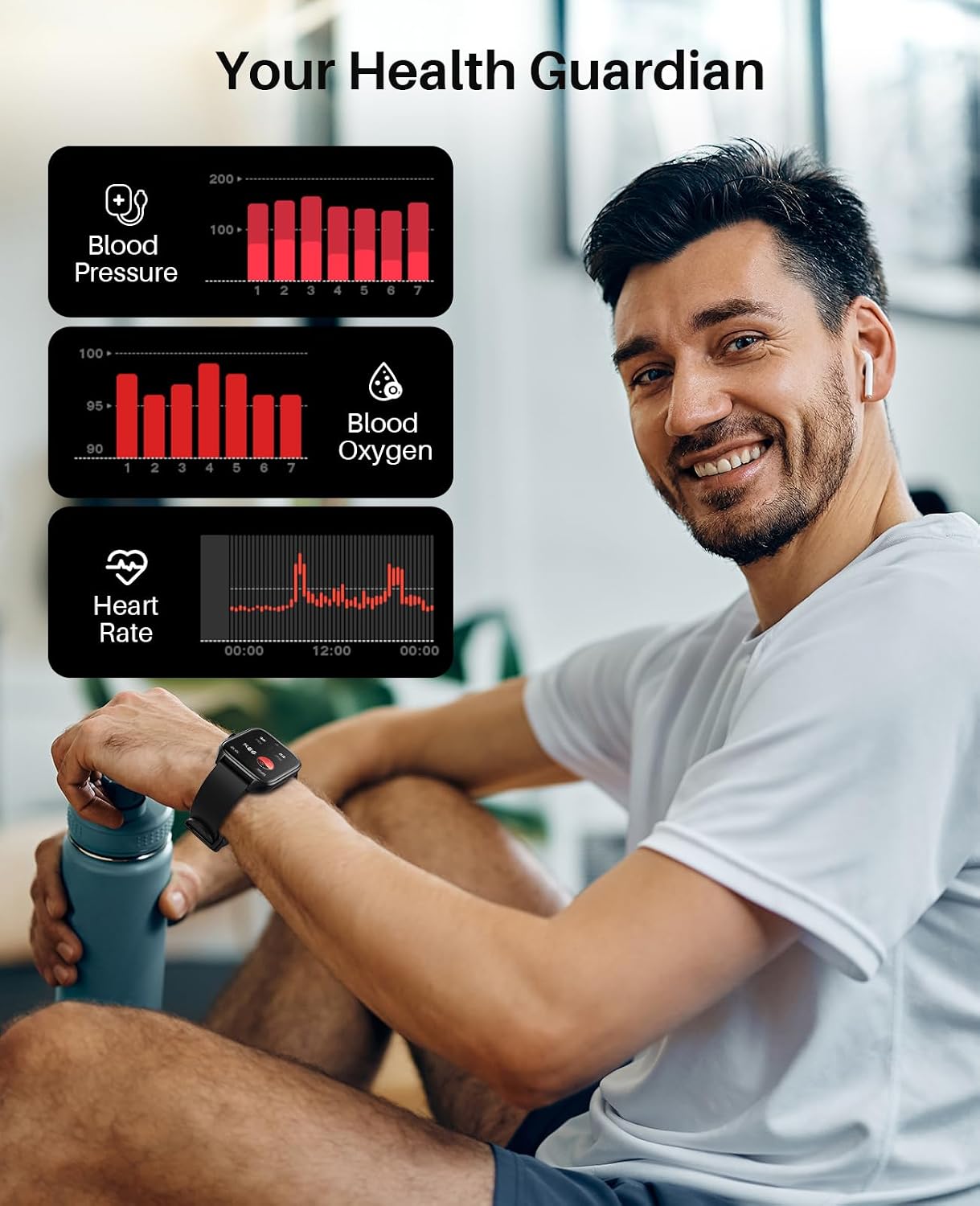
Imagen: Frente view of the SOUYIE Smart Watch T19Pro.

Image: SOUYIE Smart Watch T19Pro in multiple colors, highlighting its role as a personal health assistant.
2. Contenido del paquete
The SOUYIE Smart Watch T19Pro package includes the following items:
- 1 x SOUYIE Smart Watch T19Pro
- 1 x Manual de usuario
- 1 x Correa de silicona TPU
- 1 x cable de carga magnético USB
3. Primeros pasos
3.1. Carga del dispositivo
Before initial use, fully charge your SOUYIE Smart Watch T19Pro. The watch features a 280mAh battery. A full charge takes approximately 2 hours, providing about 7 days of daily use and up to 30 days of standby time.
- Connect the USB magnetic charging cable to a compatible USB power source.
- Attach the magnetic end of the cable to the charging points on the back of the smartwatch. Ensure proper alignment for a secure connection.
- La pantalla del reloj indicará el estado de carga.

Image: The SOUYIE Smart Watch T19Pro connected to its magnetic charging cable, illustrating charging duration and battery longevity.
3.2. Instalación de la aplicación y emparejamiento Bluetooth
To unlock the full potential of your SOUYIE Smart Watch T19Pro, download and install the companion application on your smartphone. The watch is compatible with Android (5.0 and above) and iOS (9.0 and above).
- Scan the QR code provided in the included user manual or search for the "Da Fit" app in your smartphone's app store (Google Play Store for Android, Apple App Store for iOS).
- Instalar la aplicación "Da Fit".
- Asegúrese de que Bluetooth esté habilitado en su teléfono inteligente.
- Open the "Da Fit" app and follow the on-screen instructions to add your device. Select "T19Pro" from the list of available devices to pair.
- Confirme la solicitud de emparejamiento tanto en su teléfono inteligente como en el reloj inteligente.
Video: Demonstrates the process of connecting the SOUYIE Smart Watch T19Pro to a smartphone via Bluetooth using the companion app.
3.3. Setting Up Notifications
Once paired, you can configure your smartwatch to receive notifications from your smartphone.
- Abra la aplicación "Da Fit" en su teléfono inteligente.
- Navigate to the "Notifications" section within the app.
- Enable notifications for desired applications (e.g., Phone, Messages, WhatsApp, Facebook, Twitter, Instagram, Skype, etc.).
- The smartwatch will vibrate and display incoming calls or messages on its screen.
Video: Illustrates how to enable and manage message notifications for the SOUYIE Smart Watch T19Pro through the companion app.
4. Características y funciones principales
4.1. Visualización y personalización
The SOUYIE Smart Watch T19Pro features a 1.96-inch high-definition large screen for clear visual display. It includes a rotary button on the side for navigation and switching watch faces.
- Navegación en pantalla: Swipe across the touchscreen to access different functions and menus.
- Botón giratorio: Use the rotary button to scroll through pages or switch watch faces.
- Caras de reloj: The "Da Fit" app offers over 100 different watch faces. You can also customize the watch face with your own photos.

Image: Close-up of the SOUYIE Smart Watch T19Pro's 1.96-inch HD screen and its functional rotary button.
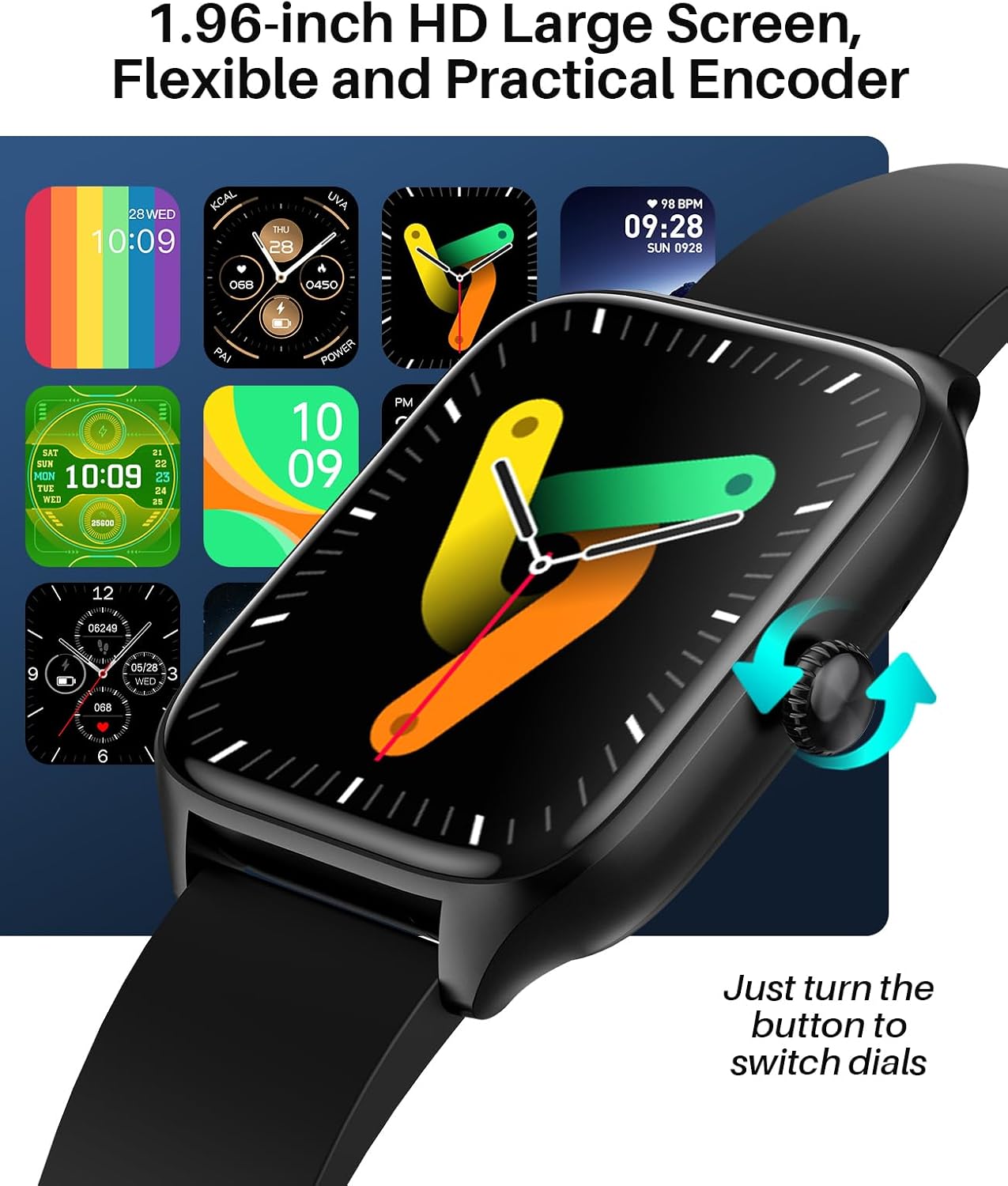
Image: A variety of digital and analog watch faces available for the SOUYIE Smart Watch T19Pro.
4.2. Monitoreo de la salud
The SOUYIE Smart Watch T19Pro utilizes optical sensors to monitor various health metrics.
- Monitor de frecuencia cardíaca: Realiza un seguimiento continuo de tu frecuencia cardíaca.
- Monitor de oxígeno en sangre (SpO2): Mide los niveles de oxígeno en sangre.
- Monitor de presión arterial: Proporciona lecturas de presión arterial.
- Rastreador de sueño: Monitors your sleep quality, including awake, light, REM, and restful sleep stages.

Image: A user wearing the SOUYIE Smart Watch T19Pro, with graphical representations of blood pressure, blood oxygen, and heart rate data.

Image: A woman sleeping while wearing the SOUYIE Smart Watch T19Pro, displaying sleep duration, heart rate, stress levels, and blood oxygen saturation.
4.3. Seguimiento de la actividad física
The smartwatch is equipped with features to track your physical activity.
- Rastreador de actividad: Records your daily activity.
- Podómetro: Cuenta tus pasos.
- Rastreador de calorías: Estima las calorías quemadas durante las actividades.
- Modos deportivos: Over 100 built-in exercise modes to record workout time and calories burned.

Image: A man playing tennis while wearing the SOUYIE Smart Watch T19Pro, with icons representing over 100 sports modes.
4.4. Funciones de comunicación
Stay connected with your SOUYIE Smart Watch T19Pro.
- Llamadas Bluetooth: Make and answer calls directly from your watch when connected via Bluetooth.
- Notificaciones de mensajes: Receive alerts for text messages and app notifications (e.g., WhatsApp, Facebook, Twitter).
- Asistente de voz con IA: Utilice comandos de voz para diversas funciones.

Image: The SOUYIE Smart Watch T19Pro showing a Bluetooth call interface, with various messaging and social media app icons indicating notification capabilities.
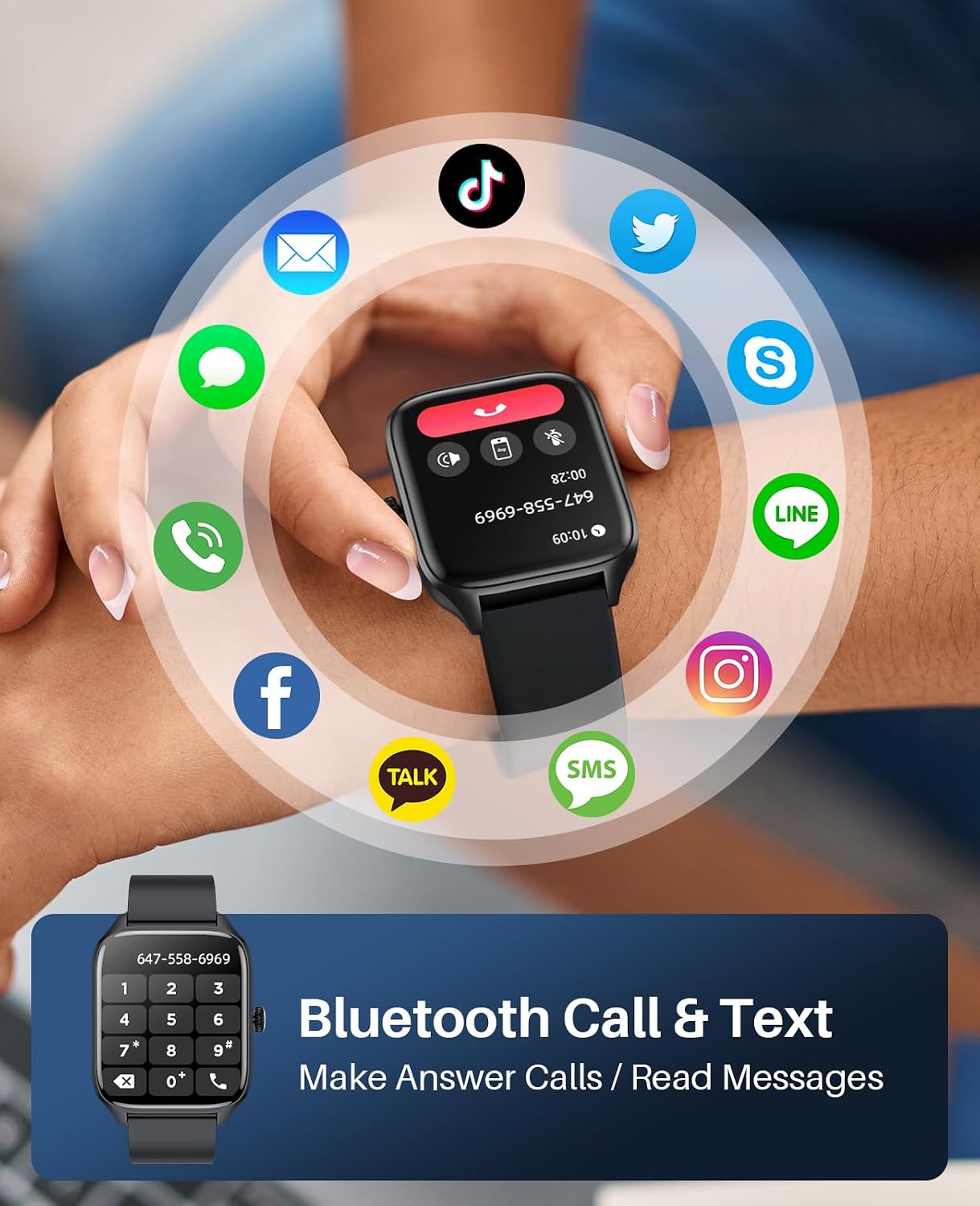
Image: The SOUYIE Smart Watch T19Pro displaying options for dialing, answering, rejecting calls, viewing contacts, and message reminders.

Image: The SOUYIE Smart Watch T19Pro showing the voice assistant interface with exampcomandos como "Por favor, apaga la alarma" y "¿Cómo está el clima hoy?".
4.5. Funciones inteligentes adicionales
The T19Pro offers a range of practical tools for daily convenience.
- Control de música
- Calculadora
- Recordatorio de sedentarismo
- Juegos casuales
- Despertador
- Cronógrafo
- Termómetro
- Control remoto de la cámara
- Live Weather Updates

Image: A man wearing the SOUYIE Smart Watch T19Pro, showcasing its multifunctional smart assistant features including alarm, calculator, music player, timer, and flashlight.
5. Resistencia al agua
The SOUYIE Smart Watch T19Pro has an IP67 waterproof rating. This means it is resistant to splashes, rain, and brief immersion in water. It can be used for daily activities such as cold showers or washing hands. It is not recommended for swimming, diving, or exposure to hot water or steam.

Image: A man by a pool wearing the SOUYIE Smart Watch T19Pro, illustrating its IP67 waterproof capability for daily use.
6. Especificaciones
| Característica | Especificación |
|---|---|
| Número de modelo | T19 profesional |
| Dimensiones del producto | 5.51 x 3.86 x 1.1 pulgadas |
| Peso del artículo | 1.87 onzas (53 gramos) |
| Tamaño de pantalla | 1.96 pulgadas |
| Sistema operativo | Android (5.0 and above) & iOS (9.0 and above) |
| Tecnología de conectividad | Bluetooth |
| Capacidad de la batería | 280 miliamp Horas (280 mAh) |
| Tiempo de carga | Aproximadamente 2 horas |
| Duración típica de la batería | Aproximadamente 7 días |
| Tiempo de espera | Aproximadamente 30 días |
| Resistencia al agua | IP67 |
| Características especiales | Activity tracker, alarm clock, blood pressure monitor, calorie tracker, camera, heart rate monitor, notifications, oximeter (SpO2), pedometer, phone, sleep monitor, text messaging, heart rate display, thermometer, AI voice assistant, music control, multi-dial switching, calculator, sedentary reminder, casual games, remote camera control, live weather, custom wallpapers. |
7. Cuidado y mantenimiento
- Limpieza: Limpie regularmente su reloj inteligente y la correa con un paño suave y seco. Si es necesario, utilice un paño ligeramente seco.amp paño y jabón suave, luego enjuague y seque completamente.
- Evite los productos químicos: Do not use harsh chemicals, cleaning solvents, or strong detergents, as they may damage the watch's finish or components.
- Temperatura: Evite exponer el reloj a temperaturas extremas (calor o frío) o a la luz solar directa durante períodos prolongados.
- Almacenamiento: Cuando no esté en uso, guarde el reloj en un lugar fresco y seco.
8. Solución de problemas
- El reloj no se enciende: Asegúrese de que el reloj esté completamente cargado. Conéctelo al cargador y espere unos minutos antes de intentar encenderlo.
- Problemas de conexión: Verify that Bluetooth is enabled on your smartphone and the "Da Fit" app is open. Try restarting both your phone and the smartwatch.
- Notificaciones no recibidas: Check the "Notifications" settings in the "Da Fit" app to ensure that notifications are enabled for the desired applications. Also, check your phone's system notification settings for the app.
- Lecturas inexactas: Asegúrese de que el reloj esté bien ajustado a su muñeca, ni demasiado apretado ni demasiado suelto. Limpie los sensores de la parte trasera del reloj.
- La pantalla no responde: Intenta reiniciar el reloj. Si el problema persiste, asegúrate de que la pantalla esté limpia y seca.
9. Garantía y soporte
SOUYIE smartwatches are supported by a commitment to service quality.
- Política de devoluciones: Se ofrece una política de devolución gratuita de 30 días.
- Garantía: El producto incluye una garantía de 1 años.
- Atención al cliente: 24/7 customer support is available. For assistance, please contact SOUYIE customer service through your purchase platform (e.g., "Find order --- Contact seller" on Amazon).