1. Introducción
The SHAHE Model 5347 Small Digital Level Inclinometer is a compact and versatile measuring instrument designed for precise angle and slope measurements. Its small size, rechargeable battery, and magnetic base make it ideal for various applications, including woodworking, construction, plumbing, and general DIY tasks. This manual provides detailed instructions for the proper setup, operation, and maintenance of your device.
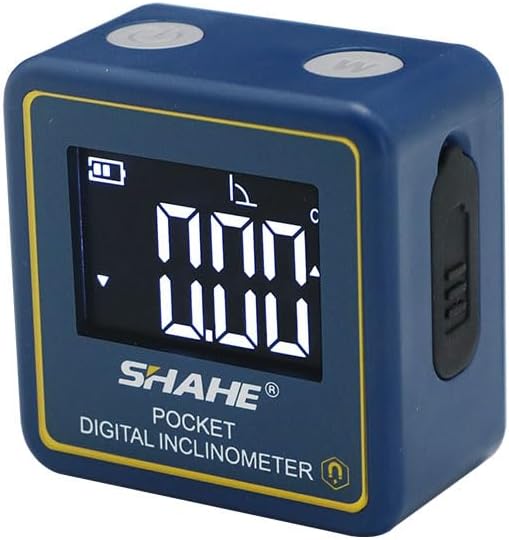
Frente view of the SHAHE Model 5347 Small Digital Level Inclinometer, showing its compact blue casing, digital display, and control buttons.
2. Contenido del paquete
Verifique que todos los artículos enumerados a continuación estén incluidos en su paquete:
- 1 x SHAHE Model 5347 Digital Level Inclinometer
- 1 x cable de carga tipo C
- 1 x Manual de instrucciones
- 1 x Caja del producto

Image showing the complete package contents: the SHAHE Model 5347 Digital Level, a Type-C charging cable, the instruction manual, and the product box.
3. Producto terminadoview y componentes
Familiarícese con los botones y los indicadores de pantalla del dispositivo:

Detailed diagram illustrating the components of the SHAHE Model 5347 Digital Level, including the ON/OFF button, functional key, data hold indicator, relative measurement indicator, battery capacity, measuring range, and slope sign on the display.
- Botón ON/OFF: Enciende o apaga el dispositivo.
- Functional Key (W): Used to switch between measurement modes or units.
- Mostrar: Muestra lecturas de medición, estado de la batería e indicadores de modo.
- Puerto de carga tipo C: Ubicado en el lateral para recargar la batería interna.
- Base magnética: Built-in magnets on the bottom for secure attachment to metal surfaces.
4. Características principales
- Alta precisión: Measures angles with a range of 4*90°, resolution of 0.05°, accuracy of ±0.2°, and repeatability of 0.1°.
- Compacto y portátil: Made from plastic, lightweight, and designed for easy one-hand operation.
- Batería recargable: Features a Type-C charging port for convenient recharging.
- Apagado automático: Conserva la vida útil de la batería apagándose automáticamente después de 3 minutos de inactividad.
- Función de retención de datos: Allows the user to freeze the current measurement on the display.
- Función cero: Enables setting any surface as a relative zero point for comparative measurements.
- Angle/Slope Conversion: Easily switch between displaying measurements in degrees or percentage slope.
- Relative-Absolute Measurement: Supports both absolute angle measurements and relative measurements from a set zero point.
- Imanes incorporados: Powerful magnets allow for secure attachment to metal surfaces, such as miter saw blades or table saw fences.
- Iluminar desde el fondo: White backlight for improved readability in low-light conditions.

Una muestra de collageasing key features: white backlight for visibility, Type-C charging port, built-in powerful magnets for attachment to metal surfaces, and the data hold function.
5. Configuración
5.1 Carga del dispositivo
Before first use, fully charge the inclinometer. Connect the provided Type-C charging cable to the device's charging port and plug the other end into a standard USB power source (e.g., computer, wall adapter). The battery indicator on the display will show charging status.
5.2 Encendido / Apagado
Presione el ENCENDIDO/APAGADO button once to power on the device. The display will illuminate and show the current angle. To power off, press and hold the ENCENDIDO/APAGADO button for a few seconds. The device will automatically power off after 3 minutes of inactivity to save battery life.
6. Operación
6.1 Zero Function (Relative Measurement)
To set a relative zero point, place the inclinometer on the desired reference surface. Once stable, press the CERO button. The display will show 0.00°, indicating that this surface is now the reference for subsequent relative measurements. This is useful for measuring the angle difference between two surfaces.
6.2 Absolute Measurement Mode
The device defaults to absolute measurement mode upon power-on, displaying the angle relative to a true horizontal plane. If you have set a relative zero, press the CERO button again to return to absolute measurement mode.
6.3 Función de retención de datos
Para mantener la medición actual en la pantalla, presione el botón SOSTENER button (often integrated with the functional key or a dedicated button). The 'H' icon will appear on the display. Press the SOSTENER button again to release the measurement and resume live readings.
6.4 Angle/Slope Conversion
El dispositivo puede mostrar medidas en grados (°) o porcentajes.tage slope (%). Press the W (Functional Key) button to toggle between these two units. The display will indicate the active unit.

Illustrations of the two measuring modes (Absolute and Relative) and two units of measurement (Angle in degrees and Slope in percentage) available on the SHAHE Model 5347 Digital Level.
6.5 Uso de la base magnética
The powerful magnets on the base of the inclinometer allow it to be securely attached to ferrous metal surfaces. This is particularly useful for hands-free operation on saw blades, metal frames, or other magnetic workpieces.
Control de retroiluminación 6.6
The white backlight automatically activates when the device is in use, ensuring clear readability of the display in various lighting conditions.
Official product video demonstrating the features and operation of the SHAHE Model 5347 Small Digital Level Inclinometer.
7. Mantenimiento
- Mantenga el dispositivo limpio y seco. Límpielo con un paño suave.amp Paño. No utilice limpiadores abrasivos ni disolventes.
- Evite exponer el dispositivo a temperaturas extremas, humedad o luz solar directa.
- Store the inclinometer in a protective case or its original packaging when not in use to prevent damage.
- Asegúrese de que el puerto de carga esté libre de polvo y residuos.
8. Solución de problemas
- El dispositivo no se enciende: Asegúrese de que la batería esté cargada. Conecte el cable tipo C y cárguela durante al menos 30 minutos.
- Lecturas inexactas: Ensure the device is placed on a stable, clean surface. Recalibrate by performing the zero function on a known level surface.
- La pantalla está oscura o parpadea: La batería puede estar baja. Recargue el dispositivo.
- Los botones no responden: Try powering the device off and on again. If the issue persists, ensure the device is fully charged.
9. Especificaciones
| Especificación | Valor |
|---|---|
| Número de modelo | 5347 |
| Rango de medición | 4 * 90 ° |
| Resolución | 0.05° |
| Exactitud | ±0.2° |
| Repetibilidad | 0.1° |
| Fuente de poder | Battery-powered (1 Lithium Polymer battery included) |
| Tipo de batería | Polímero de litio |
| Apagado automático | 3 minutos de inactividad |
| Peso del artículo | 2.08 onzas |
| Dimensiones del paquete | 6.02 x 4.25 x 2.52 pulgadas |
| Fabricante | Wenzhou Sanhe Measuring Instrument Co.,LTD |

Image demonstrating the compact size of the SHAHE Model 5347 Digital Level, easily held in one hand, with a size comparison to another device and dimensions.
10. Garantía y soporte
For warranty information and technical support, please refer to the contact details provided with your purchase documentation or visit the official SHAHE Measuring Tools webSitio. Conserve su recibo de compra como comprobante de compra.


