1. Introducción
The ANCEL BT521 is a versatile 4-in-1 automotive tool designed for comprehensive 12V lead-acid battery management. It functions as a battery tester, charger, repairer, and maintainer, providing essential diagnostics and charging capabilities for various vehicle types. This manual provides detailed instructions for safe and effective use of your BT521 device.
2. Características principales
- Funcionalidad 4 en 1: Integrates battery testing, charging, repair, and maintenance modes.
- Advanced Battery Testing: Performs health tests, cranking tests, and alternator tests for 12V lead-acid batteries (100-2000 CCA), providing State of Health (SOH), State of Charge (SOC), voltage, current, and rating.
- 8-Step Smart Charging: Features a comprehensive charging program including Desulfation, Soft Start, Bulk Charge, Absorption, Analysis, Repair, Float, and Pulse Maintenance to optimize battery power and extend lifespan.
- Función de reparación de batería: Helps revive older batteries and enhance lifespan by reversing sulfation.
- Automatic Unattended Mode: Monitors and maintains battery charge with up to 50% power consumption, ideal for long-term storage.
- Protecciones de seguridad: Incluye protección contra polaridad inversa, sobrecorriente y sobretensión.tage, short circuit, and overheat protection. Features smart control and temperature compensation for safe operation in various climates.
- Interfaz fácil de usar: Equipped with an easy-to-read LCD display and intuitive button controls.
- Diseño duradero: Features 2024 new copper clamps for ultra-stable contact and improved accuracy, and comes with a portable protective case.
3. ¿Qué hay en la caja?
- 1 x Comprobador de batería ANCEL BT521
- 1 x Manual de usuario
- 1 x Portable Protective Case

Image: The ANCEL BT521 device with its cables and clamps, user manual, and protective case, displayed alongside its retail packaging.
4. Configuración
- Conecte el Clamps: Adjuntar el cl rojoamp to the positive (+) terminal of the 12V lead-acid battery and the black clamp to the negative (-) terminal. Ensure a secure connection for accurate readings and safe operation.
- Encendido: The BT521 device will automatically power on once connected to a battery with sufficient charge. If the battery is completely dead, connect the power plug to an AC outlet.
- Pantalla inicial: The main menu will appear on the LCD display, allowing you to select the desired function.

Image: The ANCEL BT521 connected to a car battery, showing the clamps conectado a los terminales.
5. Instrucciones de funcionamiento
Navigate the menu using the Up/Down arrow buttons and confirm selections with the OK button. The Fn button can be used for a one-button quick charge.
5.1. Prueba de batería
- En el menú principal, seleccione "Prueba de batería".
- Choose the battery type (e.g., Regular Flooded, AGM Flat Plate, AGM Spiral, GEL, EFB).
- Select the standard (e.g., CCA, IEC, EN, DIN, CA, BCI).
- Ingrese el CCA nominal de la batería (arranque en frío) Amps).
- The tester will display results including SOH (State of Health), SOC (State of Charge), voltage, current, and a recommendation (e.g., Good Battery, Good-Recharge, Replace).

Image: The ANCEL BT521 display showing detailed results of a battery test, including health, charge, internal resistance, and CCA.
5.2. Prueba de arranque
- En el menú principal, seleccione "Prueba de arranque".
- Follow the on-screen prompts to turn off the engine and then start it when instructed.
- The device will analyze the cranking performance and display results such as cranking time, maximum/minimum voltage, and a status (e.g., Cranking Normal, Cranking Low).
5.3. Alternator Test (Charging Test)
- En el menú principal, seleccione "Prueba de carga".
- Follow the on-screen prompts to increase engine RPM to 2500 r/min and hold for 10 seconds, then press ENTER.
- The tester will perform a ripple test and loaded/unloaded voltage test, displaying the charging status (e.g., Charging Normal, Charging High, Voltage Low).
5.4. Quick Charging / Standard Charging
- En el menú principal, seleccione "Quick Charging" or "Standard Charging".
- The device will automatically initiate the 8-step smart charging process. The display will show the current step, SOC, voltage, y actual.
- The charging process includes Desulfation, Soft Start, Bulk Charge, Absorption, Analysis, Repair, Float, and Pulse Maintenance.

Image: The ANCEL BT521 connected to a power outlet and a battery, showing the 8-step smart charging process on its display.
5.5. Maintainer Mode
- En el menú principal, seleccione "Maintainer Mode".
- This mode automatically monitors the battery and provides trickle charging to keep the charge in the optimal range, extending battery life during long periods of inactivity.

Image: The ANCEL BT521 in maintainer mode, connected to a battery, illustrating automatic maintenance and repair.
5.6. Volverview Datos
En el menú principal, seleccione "Review Data" a view past test results and charging records.
5.7. Configuración
En el menú principal, seleccione "Setup" to configure device settings such as language or unit preferences.
Vídeo: Un overview of the ANCEL BT521's 4-in-1 Smart Battery Charger & Tester functions, demonstrating its capabilities.
Video: A detailed guide on how to use the ANCEL BT521 with a 12V lead-acid battery, covering various testing and charging modes.
6. Mantenimiento
- Limpieza: Limpie el dispositivo con un paño suave y seco. No utilice limpiadores abrasivos ni disolventes.
- Almacenamiento: Store the BT521 in its protective case in a cool, dry place when not in use.
- Cuidado de cables: Asegúrese de que los cables y clamps are free from damage before each use. Replace if any wear or tear is observed.
- Actualizaciones de firmware: Periodically check the ANCEL official websitio para obtener actualizaciones de firmware disponibles para garantizar un rendimiento y compatibilidad óptimos.
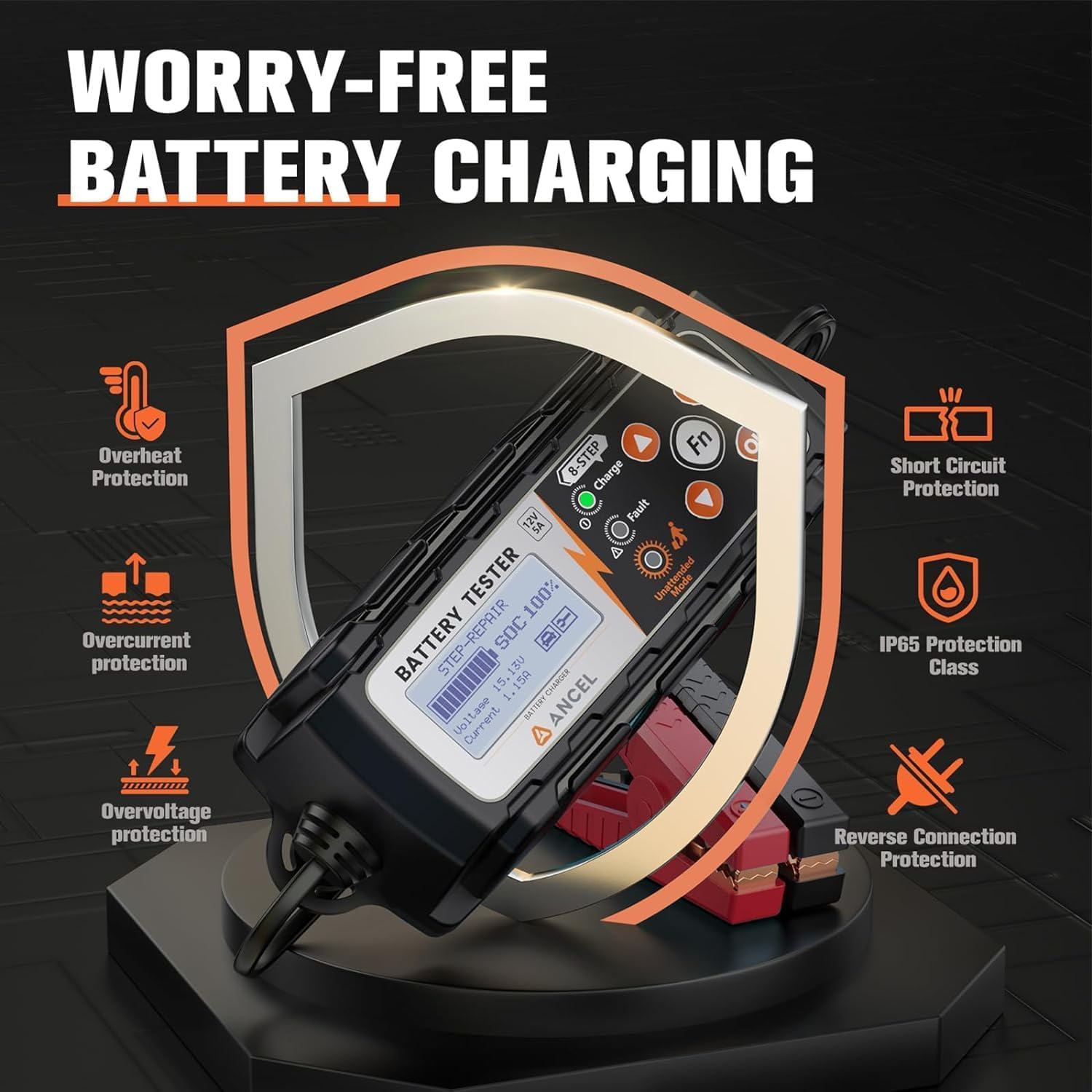
Image: The ANCEL BT521 highlighting its comprehensive safety features, including protection against various electrical faults and environmental conditions.
7. Solución de problemas
- El dispositivo no se enciende: Asegúrese de clamps are securely connected to the battery terminals. If the battery is completely discharged, connect the device to an AC power source.
- Indicador de "Fallo" encendido: Check for reverse polarity connection (red clamp to negative, black to positive). The device has reverse polarity protection. Also, check for short circuits or other battery issues.
- Resultados de pruebas inexactos: Ensure battery terminals are clean and connections are solid. Verify that the correct battery type and CCA rating are entered.
- La carga no progresa: Check the battery's health. If the battery is severely damaged or sulfated, the repair mode may need to be initiated first. Ensure the power plug is securely connected to an AC outlet.
- Problemas de temperatura: The device features automatic temperature compensation. If operating in extreme temperatures, allow the device to adjust.

Image: The ANCEL BT521 illustrating its temperature compensation feature, which adjusts charging based on ambient temperature to prevent over or under-charging.
8. Especificaciones
- Marca: ANCEL
- Modelo: BT521
- Fuente de energía: Alimentado por batería / Alimentación por CA
- Estilo: 4 IN 1 12V Battery Tester
- Color: Negro
- Dimensiones (L x An x Al): 11.22 x 7.09 x 3.74 pulgadas
- Peso: 2.4 libras
- Tipo de medida: Voltímetro
- Compatibilidad de la batería: 12V Lead-Acid Batteries (Regular Flooded, AGM Flat Plate/Spiral, EFB, GEL)
- Rango CCA: 100-2000 ACC
- Cargando Ampedad: 5A, 3A, 1A (seleccionable)
9. Garantía y soporte
For warranty information, technical support, or service inquiries, please refer to the documentation included with your product or visit the official ANCEL websitio. Guarde su recibo de compra para reclamos de garantía.


