Introducción
Thank you for choosing the R-MUSIC KARADUO Complete Karaoke Pack. This manual provides detailed instructions for the safe and efficient use of your new karaoke system, which includes a portable RGB speaker and two wireless microphones. Please read this manual thoroughly before operation and retain it for future reference.
Contenido del paquete
Asegúrese de que todos los artículos estén presentes y en buenas condiciones al desembalarlos:
- 1 x R-MUSIC KARADUO Portable RGB Speaker
- 2 x micrófonos inalámbricos
- Cable de carga 1 x USB-C
- 1 x Manual de usuario (este documento)

Image: The R-MUSIC KARADUO portable RGB speaker and two wireless microphones, as included in the package.
Producto terminadoview
Componentes y controles de los altavoces

Imagen: Arriba view of the R-MUSIC KARADUO speaker, showing the control buttons.
- LED Animation Button: Press to cycle through 5 different LED light animations.
- Botón Volumen + / Siguiente canción: Pulsación corta para subir el volumen. Pulsación larga para pasar a la siguiente canción.
- ON / OFF / Pause / Play Button: Long press to power the speaker on or off. Short press to play or pause music.
- Botón Volumen - / Canción anterior: Pulsación corta para bajar el volumen. Pulsación larga para ir a la canción anterior.
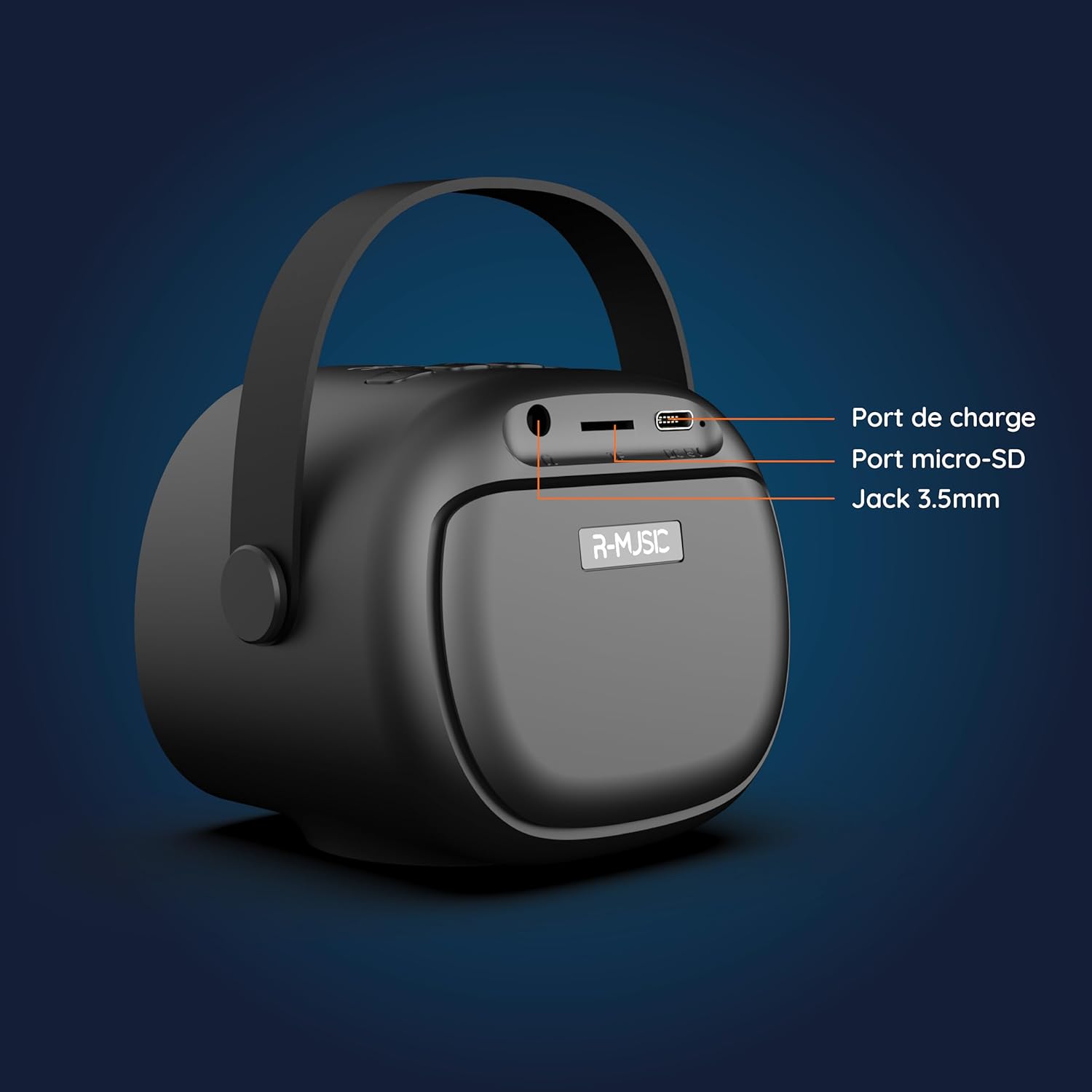
Imagen: Parte posterior view of the R-MUSIC KARADUO speaker, highlighting the charging port, Micro-SD card slot, and 3.5mm Jack port.
- Puerto de carga (USB-C): Connect the provided USB-C cable for charging.
- Ranura para tarjeta Micro-SD: Insert a Micro-SD card for direct music playback.
- Puerto auxiliar de 3.5 mm: Conecte dispositivos de audio externos mediante un cable de audio de 3.5 mm (no incluido).
Controles de micrófono

Image: Close-up of the R-MUSIC wireless microphones, illustrating the power, volume, and mode buttons.
- Botón de encendido: Long press to power the microphone on or off.
- Volumen + Botón: Aumente el volumen del micrófono.
- Volumen - Botón: Disminuya el volumen del micrófono.
- Botón de modo (M): Short press to cycle through 5 voice deformation effects and 3 karaoke modes.
Configuración
1. Carga del altavoz y los micrófonos
Antes del primer uso, cargue completamente el altavoz y ambos micrófonos.
- Vocero: Connect the provided USB-C charging cable to the speaker's charging port and a compatible USB power adapter (not included). The charging indicator will show the charging status.
- Micrófonos: Each microphone has its own charging port (usually Micro-USB, check the microphone itself). Connect them to a USB power source using appropriate cables (not included, or check if included with microphones).
A full charge provides approximately 14 hours of speaker playback without LED lights, or 7 hours with LED lights activated.
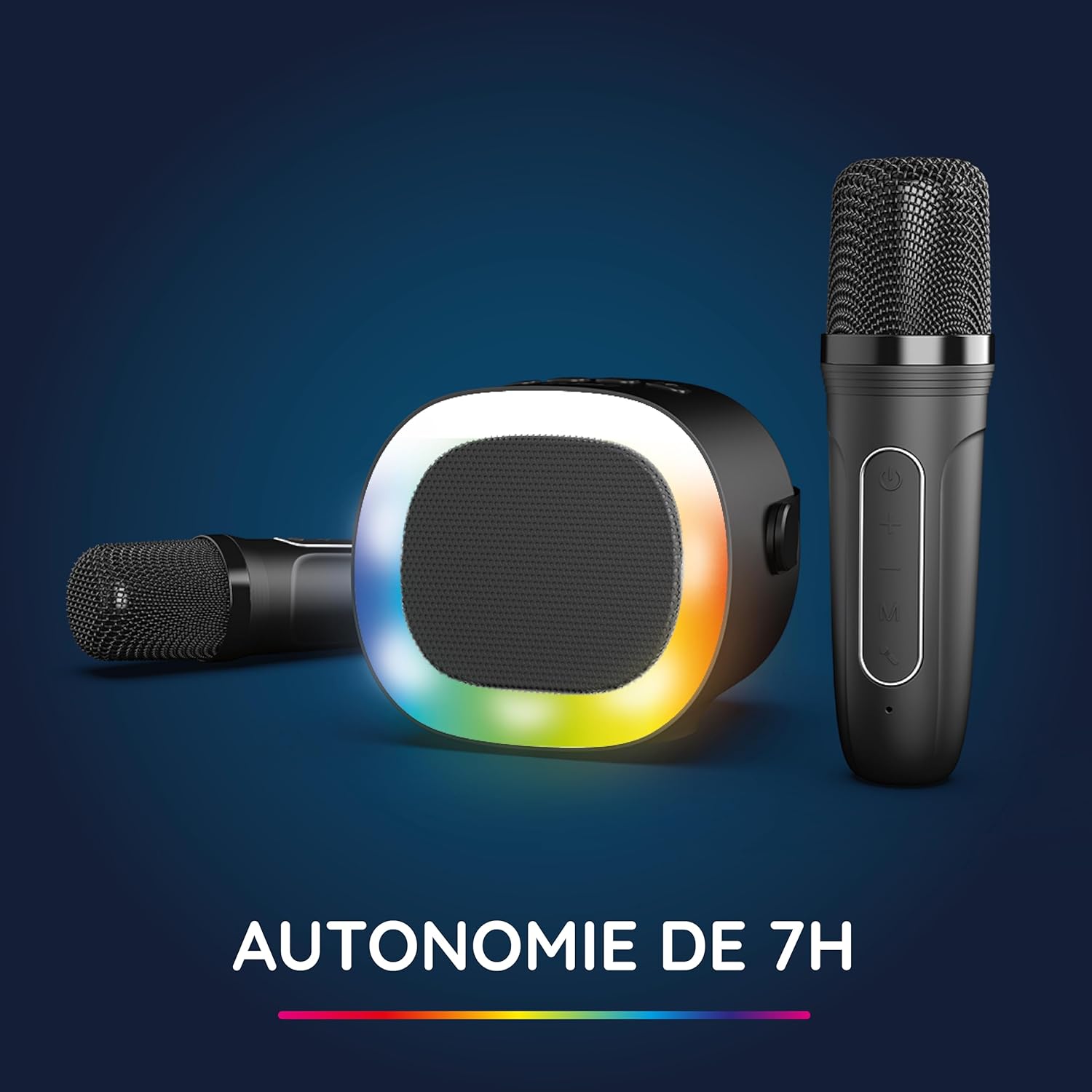
Image: The R-MUSIC speaker and microphones, illustrating the battery life with LED lights active.
2. Powering On and Pairing Microphones
- Encender el altavoz: Long press the ON/OFF button on the speaker until it powers on.
- Encender los micrófonos: Long press the Power button on each microphone until they power on.
- The microphones should automatically pair with the speaker. If not, ensure they are within close proximity and try powering them off and on again.
Instrucciones de funcionamiento
1. Conexión a fuentes de audio
The KARADUO speaker offers multiple connectivity options:
- Bluetooth 5.0:
- Asegúrese de que el altavoz esté encendido.
- Activate Bluetooth on your smartphone, tablet, PC, or other compatible device.
- Buscar "KARADUO" in your device's Bluetooth settings and select it to pair. A confirmation sound will indicate a successful connection.
- The Bluetooth 5.0 technology ensures optimal sound quality and a stable connection up to 10 meters.
- Entrada auxiliar:
- Connect a 3.5mm audio cable (not included) from your audio device's headphone jack to the speaker's 3.5mm AUX port.
- El altavoz cambiará automáticamente al modo AUX.
- Micro-SD Card Playback:
- Insert a Micro-SD card containing MP3 audio files into the Micro-SD card slot on the back of the speaker.
- El altavoz detectará automáticamente la tarjeta y comenzará a reproducir música.
2. Funcionamiento del altavoz
- Reproducir/Pausa: Short press the ON/OFF/Pause/Play button.
- Ajuste de volumen: Short press the Volume + or Volume - buttons.
- Pista siguiente / anterior: Long press the Volume + (next) or Volume - (previous) buttons.
- Modos de luz LED: Press the LED Animation button to cycle through 5 different LED light animations.

Image: The R-MUSIC speaker showcasing its dynamic LED light animations.
3. Funcionamiento del micrófono
- Volumen del micrófono: Use the Volume + and Volume - buttons on the microphone to adjust your vocal volume.
- Voice Deformation Effects: Short press the 'M' (Mode) button on the microphone to cycle through 5 different voice deformation effects.
- Modos de karaoke: Continue pressing the 'M' button to cycle through 3 distinct karaoke modes.
Mantenimiento
To ensure the longevity and optimal performance of your R-MUSIC KARADUO system, follow these maintenance guidelines:
- Limpieza: Utilice un paño suave y seco para limpiar el altavoz y los micrófonos. No utilice limpiadores abrasivos, disolventes ni productos químicos agresivos.
- Almacenamiento: Guarde el dispositivo en un lugar fresco y seco, alejado de la luz solar directa y de temperaturas extremas cuando no esté en uso.
- Exposición al agua: Este producto no es impermeable. Evite la exposición al agua o a la humedad excesiva.
- Cargando: Only use the provided charging cable and a compatible USB power adapter. Do not overcharge the device.
Solución de problemas
If you encounter issues with your KARADUO system, please refer to the following common problems and solutions:
| Problema | Posible causa | Solución |
|---|---|---|
| Sin poder | Batería baja o dispositivo apagado. | Charge the speaker/microphones. Long press the power button to turn on. |
| No hay sonido del altavoz | Volumen demasiado bajo, modo de entrada incorrecto o dispositivo no conectado. | Increase speaker volume. Ensure correct input (Bluetooth, AUX, Micro-SD). Reconnect Bluetooth or check AUX cable. |
| Los micrófonos no funcionan | Microphones off, low battery, or not paired. | Ensure microphones are charged and powered on. They should automatically pair with the speaker. If not, power cycle them. |
| Desconexión bluetooth | Device out of range, interference, or low battery. | Move the connected device closer to the speaker (within 10m). Ensure no major obstacles. Recharge the speaker. |
If the problem persists after trying these solutions, please contact R-MUSIC customer support.
Presupuesto
| Característica | Detalle |
|---|---|
| Marca | R-MÚSICA |
| Número de modelo | 484437 RM |
| Color | Negro |
| Tecnología de conectividad | Bluetooth 5.0 |
| Puertos de conexión | 3.5mm Jack, USB Type-C (charging), Micro-SD Card Slot |
| Características especiales | 2 Wireless Microphones, Universal Connectivity, 5 Voice Deformation Effects, LED Lights |
| Dispositivos compatibles | PC, Smartphone, Tablet, TV (via AUX) |
| Fuente de poder | Funciona con pilas |
| Duración de la batería del altavoz | Up to 14 hours (without LED), 7 hours (with LED) |
| Alcance de Bluetooth | Hasta 10 metros |

Image: Technical dimensions of the R-MUSIC KARADUO speaker, showing its height, width, and depth.
Garantía y soporte
Information regarding specific warranty terms and conditions for the R-MUSIC KARADUO Complete Karaoke Pack is not available in this document. Please refer to the product packaging or the retailer's websitio para detalles de la garantía.
For technical support or further assistance, please contact R-MUSIC customer service through their official websitio o la información de contacto proporcionada con su compra.


