Introducción
The Sonim XP5 Plus is a rugged, purpose-built communication device designed for demanding environments. It combines cellular and radio-like capabilities, making it ideal for critical communications. This manual provides essential information for setting up, operating, maintaining, and troubleshooting your Sonim XP5 Plus.
Contenido del paquete
Verifique que todos los artículos estén presentes en el paquete de su producto:
- Sonim XP5 Plus XP5900 Rugged Phone
- Adaptador de corriente
- Batería de iones de litio
- Cable USB-C
- Documentación (Guía de inicio rápido, Información de seguridad)
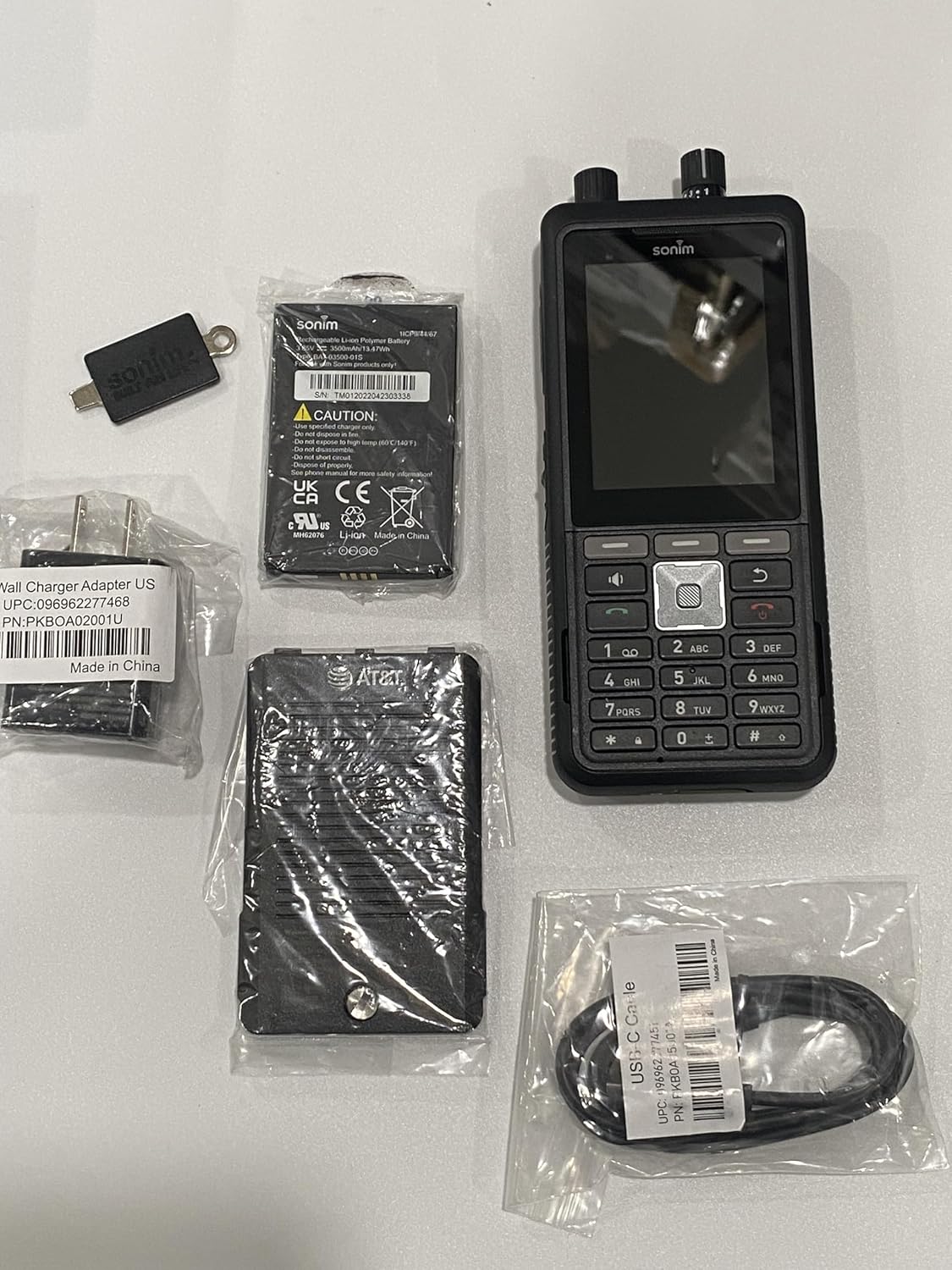
Image: The Sonim XP5 Plus phone, along with its included accessories: a battery, a wall charger adapter, and a USB-C cable. All components are individually packaged.
Producto terminadoview
Familiarize yourself with the physical features and components of your Sonim XP5 Plus.

Imagen: Múltiple views of the Sonim XP5 Plus phone. The front view shows the display and keypad, the back view shows the camera and speaker, and side views highlight the rugged design and side buttons.
Componentes clave:
- Mostrar: 2.8-inch screen for clear visibility.
- Teclado: Physical buttons for dialing and navigation.
- Botón Pulsar para hablar (PTT): Large, dedicated button for instant communication.
- Perillas de control de volumen: Top-mounted for easy adjustment.
- Cámara: Rear-facing camera for capturing images.
- Oradores: Dual 100db+ speakers with noise cancellation for clear audio.
- Sonim SecureAudio Connector: For secure accessory connections.
- Puerto USB-C: Para carga y transferencia de datos.
Configuración
1. Instalación de la batería
- Localice la tapa del compartimiento de la batería en la parte posterior del teléfono.
- Retire con cuidado la cubierta.
- Insert the Lithium Ion battery, aligning the gold contacts with the terminals in the phone.
- Replace the battery compartment cover, ensuring it is securely latched to maintain waterproofing.
2. Instalación de la tarjeta SIM y la tarjeta MicroSD
- With the battery removed, locate the SIM card slot(s) and microSD card slot. The phone supports Dual 4FF Nano SIM cards and up to 512GB microSD.
- Insert your Nano SIM card(s) into the designated slot(s) with the gold contacts facing down.
- If using, insert a microSD card into its slot until it clicks into place.
- Vuelva a instalar la batería y la tapa de la batería.
3. Carga inicial
- Conecte el cable USB-C al puerto de carga del teléfono.
- Connect the other end of the USB-C cable to the provided Power Adapter.
- Enchufe el adaptador de corriente a un tomacorriente de pared.
- Allow the phone to charge completely before first use. A full charge takes approximately 2 hours.
Instrucciones de funcionamiento
Encendido/apagado
- Para encender: Mantenga presionado el botón de encendido hasta que aparezca el logotipo de Sonim.
- Para apagar: Mantenga presionado el botón de Encendido, luego seleccione “Apagar” de las opciones en la pantalla.
Realizar llamadas
- From the home screen, use the keypad to dial the desired number.
- Presione el botón verde Llamar para iniciar la llamada.
- Para finalizar una llamada, presione el botón rojo Finalizar llamada.
Funcionalidad Pulsar para hablar (PTT)
The Sonim XP5 Plus features enhanced PTT capabilities for instant communication.
- Dedicated PTT Button: Press and hold the large PTT button on the side of the device to transmit your voice. Release to listen.
- Channel Select Knob: Use the top-mounted knob to quickly switch between communication channels without looking at the screen.
- Perilla de control de volumen: Adjust the speaker volume using the other top-mounted knob.

Imagen: Un primer plano frontal view of the Sonim XP5 Plus, highlighting the screen interface, the physical keypad, and the two rotary knobs located at the top of the device for channel and volume control.
Mensajería
Para enviar y recibir mensajes de texto:
- Navigate to the Messaging application from the main menu.
- Seleccione “Nuevo mensaje” e ingrese el número del destinatario o selecciónelo entre los contactos.
- Escriba su mensaje usando el teclado.
- Press the Send button.
Mantenimiento
Limpieza de su dispositivo
- Utilice un paño suave y seco.amp cloth to wipe down the exterior of the phone.
- Evite utilizar productos químicos agresivos o limpiadores abrasivos.
- Ensure all ports and covers are securely closed before cleaning with moisture.
Cuidado de la impermeabilización
The Sonim XP5 Plus is designed to be waterproof. To maintain its integrity:
- Always ensure the battery cover and all port covers (e.g., USB-C port) are firmly sealed before exposing the phone to water or dust.
- Do not submerge the phone in water deeper or for longer than specified in the product specifications.
- If the phone has been exposed to saltwater, rinse it thoroughly with fresh water and dry it completely before charging or opening any covers.
Cuidado de la batería
- Use only Sonim-approved chargers and batteries.
- Evite exponer la batería a temperaturas extremas.
- No perfore, desmonte ni cortocircuite la batería.
Solución de problemas
| Problema | Posible causa / solución |
|---|---|
| El teléfono no se enciende. | La batería podría estar agotada. Cargue el teléfono durante al menos 30 minutos. Asegúrese de que la batería esté correctamente instalada. |
| No puedo realizar ni recibir llamadas. | Check network signal strength. Ensure SIM card is properly inserted and activated. Contact your service provider. |
| Mala calidad de audio durante las llamadas. | Check volume settings. Ensure speakers/microphone are not obstructed. Move to an area with better network coverage. |
| El teléfono no responde. | Perform a soft reset by removing and reinserting the battery. If issue persists, contact support. |
| La batería se agota rápidamente. | Reduce el brillo de la pantalla. Cierra las aplicaciones que no uses. Limita el uso de datos en segundo plano. |
Presupuesto
| Característica | Detalle |
|---|---|
| Nombre del modelo | XP5plus (XP5900) |
| Marca | Sonim |
| Sistema operativo | Proprietary (optimized for rugged use) |
| Tamaño de la pantalla | 2.8 pulgadas |
| Resolución | 240 x 320 |
| Memoria RAM | 2 GB |
| Capacidad de almacenamiento de memoria | 512 GB (ampliable mediante microSD) |
| Capacidad de la batería | 3500 miliamp Horas |
| Tiempo de conversación | 30 horas |
| Tiempo de carga | 2 horas |
| Tecnologías inalámbricas | Cellular (5G), Wireless |
| Tipo de SIM | Dual 4FF Nano SIM |
| Características especiales | Push to Talk, Military Grade Ruggedness (MIL-STD-810H), Non-Incendive Class I, II and III Div 2 ratings, 100db+ speakers with Goodix Echo and Noise Cancellation Technology, Sonim SecureAudio Connector |
| Dimensiones (paquete) | 7.5 x 3.5 x 2 pulgadas |
| Peso del artículo | 10 onzas |
| Color | Negro |
Garantía y soporte
For detailed warranty information, please refer to the warranty card included with your product or visit the official Sonim website. For technical support, product registration, or service inquiries, please contact Sonim customer service through their official channels.
Soporte en línea: www.sonimtech.com/support


