Introducción
This user manual provides comprehensive instructions for the operation, maintenance, and troubleshooting of your Mycket Portable DAB/DAB+/FM Radio with Bluetooth. Please read this manual thoroughly before using the device to ensure proper functionality and to maximize your listening experience.

Figure 1: Mycket Portable DAB Radio. This image shows the radio's front panel, including the speaker grille on the left, the 2.4-inch color display on the right showing "BBC AsianNetwork" and DAB+ logo, and control buttons below the screen. An extendable antenna is visible at the top right.
¿Qué hay en la caja?
Upon unboxing your Mycket Portable DAB Radio, please ensure all the following items are present:
- 1 x Mycket Portable DAB Radio
- 1 x cable de carga micro USB
- 1 x Manual del usuario (este documento)
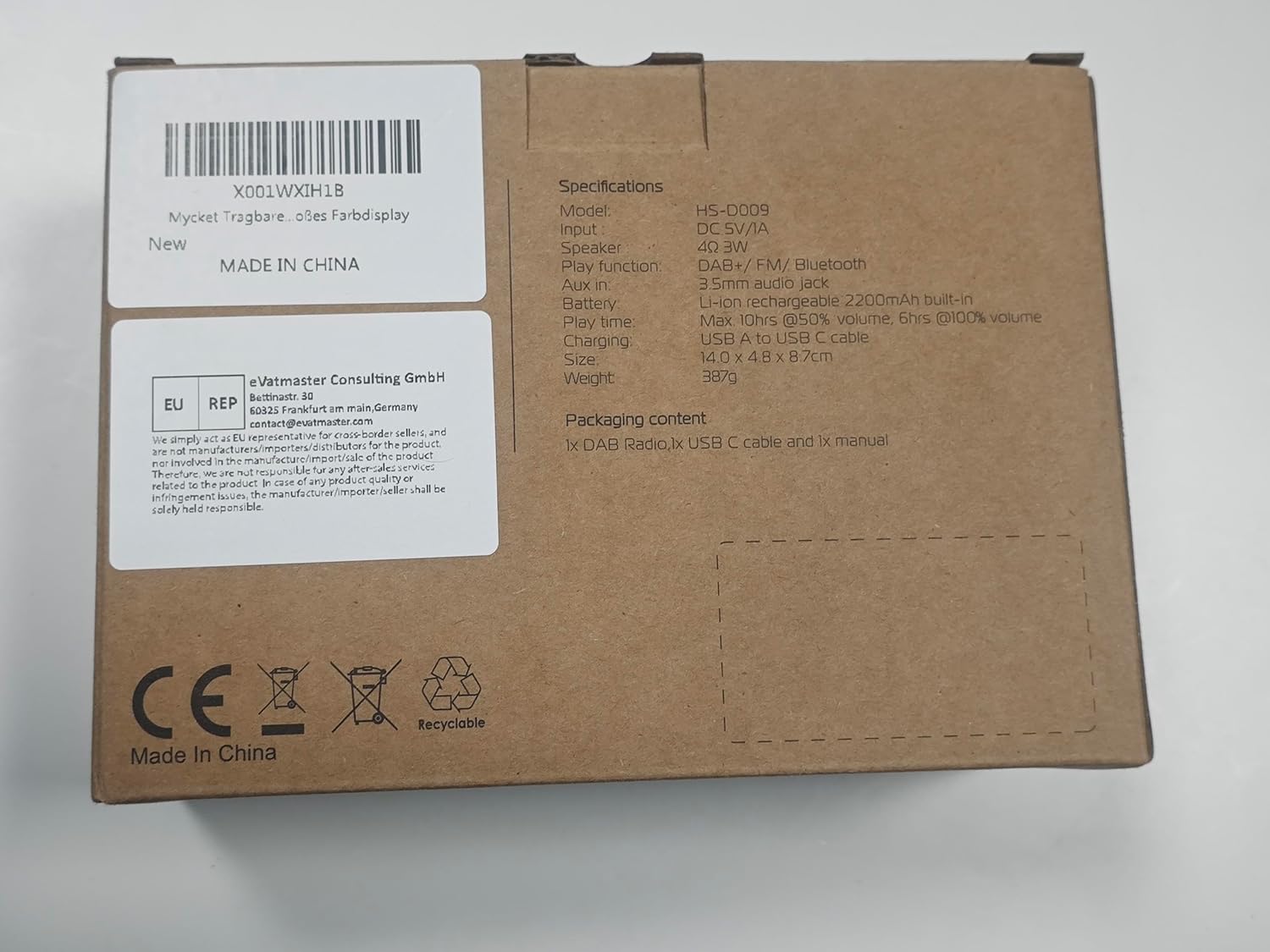
Figure 2: Packaging box for the Mycket Portable DAB Radio. The box lists specifications including model HS-D009, DC 5V/1A input, 3W speaker, DAB+/FM/Bluetooth functions, 3.5mm audio jack, 2200mAh lithium battery, 10+ hours play time at 50% volume, 6+ hours at 100% volume, USB-C charging, and dimensions of 14.0 x 4.0 x 8.7 cm. It also states "MADE IN CHINA" and includes CE and Recyclable symbols.
Producto terminadoview
The Mycket Portable DAB Radio is a versatile audio device offering multiple listening options. It features DAB/DAB+ and FM radio reception, Bluetooth 5.0 connectivity, and a built-in rechargeable battery for portability. The device includes a 2.4-inch color display for easy navigation and information display.
Características principales:
- DAB/DAB+ and FM Radio with RDS
- Bluetooth 5.0 para transmisión de audio inalámbrica
- 2.4-inch Large Colour Display
- Built-in 2200mAh Rechargeable Lithium Battery (up to 12 hours playback)
- 40 Preset Stations (20 DAB, 20 FM)
- Dual Alarms and Sleep Timer Function
- Conector para auriculares de 3.5 mm
- Carga USB-C

Figure 3: Mycket Portable DAB Radio with its dimensions. The radio measures approximately 5.5 inches (13.9 cm) in length, 1.6 inches (4 cm) in width, and 3.1 inches (8 cm) in height. This compact size highlights its portability.
Configuración
1. Carga inicial
Before first use, fully charge the radio. Connect the supplied Micro USB charging cable to the DC 5V port on the side of the radio and the other end to a USB power adapter (not included) or a computer USB port. The charging indicator on the display will show charging status. A full charge takes approximately 2.5 hours.
2. Encendido y apagado
Mantenga pulsado el Potencia/Modo Botón para encender o apagar la radio.
3. Ajuste de la antena
For optimal reception, fully extend and adjust the telescopic antenna. Position the antenna vertically for best results.
Instrucciones de funcionamiento
Selección de modo
Presione el Modo Botón para cambiar entre los modos DAB, FM y Bluetooth.
Funcionamiento de la radio DAB/DAB+
- Cambie al modo DAB usando el Modo botón.
- La radio realizará automáticamente un escaneo completo de las estaciones DAB/DAB+ disponibles la primera vez que la use o si no encuentra ninguna estación.
- Para iniciar manualmente un escaneo completo, mantenga presionado el botón OK button, then navigate to "Full Scan" and confirm.
- Utilice el Izquierda/Derecha arrow buttons to browse through the list of available stations.
- Prensa OK para seleccionar una estación.
- Para guardar una estación como preestablecida, mantenga presionada la tecla FAV button, then select a preset number (1-20) using the arrow buttons and press OK Para confirmar.
- Para recuperar un ajuste preestablecido, presione brevemente el botón FAV button, then select the desired preset number and press OK. Alternatively, use the numbered preset buttons (1-4) for quick access.

Figure 4: The radio's screen showing "AUTO SCAN & 40 PRESET". This feature allows the radio to automatically find and save up to 40 stations (20 DAB and 20 FM) for easy access via the FAV button.
Funcionamiento de la radio FM
- Cambie al modo FM usando el Modo botón.
- Para buscar automáticamente estaciones de FM, mantenga presionado el botón OK Botón. La radio escaneará y guardará las estaciones disponibles.
- Para sintonizar manualmente, presione brevemente el botón Izquierda/Derecha arrow buttons for fine-tuning, or press and hold for automatic scanning to the next strong station.
- Para guardar una estación FM como preestablecida, mantenga presionada la tecla FAV button, then select a preset number (1-20) and press OK Para confirmar.
- Para recuperar un ajuste preestablecido, presione brevemente el botón FAV button, then select the desired preset number and press OK.
Funcionamiento de Bluetooth
- Cambie al modo Bluetooth usando el Modo Botón. La pantalla mostrará "Emparejamiento Bluetooth" o algo similar.
- En su dispositivo móvil (teléfono inteligente, tableta, etc.), habilite Bluetooth y busque los dispositivos disponibles.
- Seleccione “Mycket D009” de la lista de dispositivos.
- Once paired, the radio will confirm the connection, and you can now stream audio from your device to the radio.

Figure 5: The radio's screen displaying "BLUETOOTH 5.0" and an iPhone screen showing "Mycket D009" as a connected Bluetooth device. This illustrates the process of connecting a mobile device to the radio for audio streaming.
Control de volumen
Rotate the large knob on the top of the radio clockwise to increase volume and counter-clockwise to decrease volume.
Uso de auriculares
Connect standard 3.5mm headphones to the headphone jack on the side of the radio for private listening. The radio's speaker will automatically mute when headphones are connected.

Figure 6: A close-up of the Mycket Portable DAB Radio's side, highlighting the 3.5mm headphone jack. This port allows for personal listening without disturbing others.
Función de despertador
The radio supports dual alarms. To set an alarm:
- Mantenga pulsado el OK Botón para entrar al menú.
- Navigate to "System Settings" then "Alarm".
- Seleccione Alarma 1 o Alarma 2.
- Configure the alarm time, source (Buzzer, DAB, or FM), frequency (Once, Daily, Weekdays, Weekends), and volume.
- Prensa OK para guardar la configuración.

Figure 7: The radio's display showing the "Alarm" menu, with options for Alarm 1 and Alarm 2. This feature allows users to set two independent alarms for waking up or reminders.
Función Sleep Timer
El temporizador de apagado permite que la radio se apague automáticamente después de un período establecido.
- Mantenga pulsado el OK Botón para entrar al menú.
- Navigate to "System Settings" then "Sleep".
- Select the desired sleep duration (e.g., 15, 30, 45, 60 minutes, or 1 hour 15 minutes).
- Prensa OK para activar el temporizador de apagado automático.

Figure 8: The radio's display showing the "Sleep" menu with various time options (OFF, 15 minutes, 30 minutes, etc.). This function allows the radio to automatically power off after a specified duration, useful for falling asleep to music or radio.
Ajustes del ecualizador
The radio offers 8 basic equalizer settings to customize the audio output.
- Mantenga pulsado el OK Botón para entrar al menú.
- Navigate to "System Settings" then "EQ".
- Select from options such as Classical, Jazz, Pop, etc.
- Prensa OK para aplicar la configuración.

Figure 9: A diagram illustrating the internal structure of the Mycket Portable DAB Radio's Hi-Fi speaker. This visual emphasizes the speaker's design for providing deeper, richer, and clearer audio quality.
Mantenimiento
Limpieza
Wipe the radio with a soft, dry cloth. Do not use abrasive cleaners, waxes, or solvents as they may damage the surface. Avoid spraying liquids directly onto the radio.
Cuidado de la batería
The radio contains a built-in rechargeable lithium battery. To prolong battery life:
- Evite descargar completamente la batería con frecuencia.
- Cargue la radio periódicamente, incluso si no está en uso, para mantener la salud de la batería.
- Guarde la radio en un lugar fresco y seco cuando no la utilice durante períodos prolongados.

Figure 10: The radio's screen displaying a full battery indicator and text indicating "PLAY MORE THAN 12 HOURS". This highlights the radio's long battery life of up to 12 hours on a single charge, powered by its 2200mAh rechargeable battery.
Solución de problemas
| Problema | Posible causa | Solución |
|---|---|---|
| No hay energía/La radio no enciende. | La batería está agotada. | Connect the radio to a power source using the USB cable and allow it to charge for at least 30 minutes before attempting to power on. |
| Mala recepción DAB/FM. | Antenna not fully extended or positioned incorrectly. Weak signal in the area. | Fully extend the telescopic antenna and adjust its position. Try moving the radio to a different location, preferably near a window. Perform a full scan for stations. |
| Problemas de emparejamiento de Bluetooth. | Radio not in Bluetooth mode. Device too far from radio. Bluetooth not enabled on source device. | Ensure the radio is in Bluetooth mode. Keep the source device within 10 meters (33 feet) of the radio. Ensure Bluetooth is enabled on your source device and "Mycket D009" is selected. |
| No hay sonido desde el altavoz. | Volumen demasiado bajo. Auriculares conectados. | Increase the volume using the top knob. Disconnect headphones if not intended for private listening. |
| La pantalla está en blanco o congelada. | Error del sistema. | Locate the small "Reset" pinhole on the side of the radio (near the USB port). Use a thin object (like a paperclip) to gently press the reset button. This will restart the device without losing presets. |
Presupuesto
| Número de modelo | Portable DAB Radio (HS-D009) |
| Dimensiones (L x An x Al) | 13.9 x 4 x 8 cm (5.5 x 1.6 x 3.1 pulgadas) |
| Peso | 380 gramos |
| Fuente de poder | Built-in 2200mAh Lithium Battery / DC 5V/1A via Micro USB |
| Duración de la batería | Hasta 12 horas (al 50% del volumen) |
| Tiempo de carga | Aproximadamente 2.5 horas |
| Mostrar | 2.4-inch TFT Colour Display |
| Tecnología de sintonizador | DAB/DAB+, FM |
| Frecuencia DAB/DAB+ | 174.928-239.20 MHz (Band III) |
| Frecuencia FM | 87.5-108 MHz (con RDS) |
| Versión de Bluetooth | 5.0 |
| Salida de audio | Altavoz incorporado, conector para auriculares de 3.5 mm |
| Ajustes preestablecidos | 40 (20 DAB, 20 FM) |
Garantía y soporte
Mycket provides a 12-month warranty for this product from the date of purchase. This warranty covers manufacturing defects and material faults under normal use. It does not cover damage caused by misuse, accidents, unauthorized modifications, or normal wear and tear.
For technical support, warranty claims, or any inquiries, please contact Mycket customer service. Contact information can typically be found on the product packaging or the official Mycket website. Mycket aims to provide 24/7 customer service.

Figure 11: Mycket's commitment to customer satisfaction, highlighting a 12-month warranty and 24-hour customer support.